
If you pay two creators to post about the same product, every follower they share sees your message twice and counts once. To find the overlap between two influencer audiences on Twitter, you count the followers both creators have in common, then read that count against the size and quality of each audience before you sign either deal.
Manual: open both creators' follower lists and compare names by hand, which stops being possible once each list passes a few thousand accounts. Circleboom: put both creators in one competitor report, read their shared followers in the Common Audience section, and compare their audiences side by side, all through X's official API at Enterprise level.
→ Find the overlap between two influencer audiences
Then compare the overlap with what each creator adds on their own.
Why audience overlap matters in an influencer campaign
Overlap is the part of a campaign budget that buys repetition instead of reach.
Two creators with 100,000 followers each do not give you 200,000 people. If 30,000 of their followers are shared, the combined audience is 170,000, and those 30,000 people see your product from both creators.
Repetition is not always bad. Hearing about a product twice from two trusted voices can help it stick. The point is to choose it on purpose, not discover it after the invoices.
Overlap is not a flaw to avoid. It is a cost you should know before you pay it.
How to calculate unique reach from an overlap
Unique reach is the size of both audiences together, minus the shared part.
Here is an illustrative calculation for two creator pairs you might consider:
| Pair | Followers (A + B) | Shared followers | Unique reach |
|---|---|---|---|
| Creator A + Creator B | 80,000 + 50,000 | 20,000 | 110,000 |
| Creator A + Creator C | 80,000 + 40,000 | 2,000 | 118,000 |
Creator C has a smaller audience than B, yet the A and C pair reaches more people, because C's followers are almost all new to A. If the goal is reach, the second pair wins. If the goal is to drive a message deeper into one community, the first pair may be the better choice.
Unique reach is a ceiling, not a forecast. It counts followers, and not every follower sees every post.
What overlap tells you about two creators
The share of the overlap, measured against the smaller audience, describes how the two creators relate.
- High overlap. The creators write for the same crowd. Good for reinforcement, poor for reach.
- Moderate overlap. A shared core with distinct edges. Often the most balanced pair for a campaign.
- Low overlap. Two separate audiences. Good for reach, but check that both audiences fit your market.
Low overlap can also be a warning sign. If one creator shares almost no followers with any peer in the niche, read where that audience lives and what it posts about before you assume it is relevant.
Why X will not show you the overlap
X shows each creator's follower list and nothing that compares two of them.
The data is public for public accounts: X's API documents a followers lookup that returns the accounts following any user. What is missing from the app is the matching of two lists.
Creators with protected accounts cannot be compared at all, as X's page on public and protected posts explains.
How Circleboom compares two influencer audiences
With Circleboom's X Competitor Analysis tool, you add the creators you are considering to one dated benchmark report. Your own account is optional, so a report can hold only candidate creators.
Circleboom pulls followers, following and recent tweets for every account through X's official Enterprise APIs, not scraping. For a paid decision that matters: an overlap built on incomplete lists understates repetition, and you pay for the gap.
The Common Audience section compares exactly two accounts at a time and prints their common followers and common followings, with view common followers and view common followings buttons that open the shared accounts.
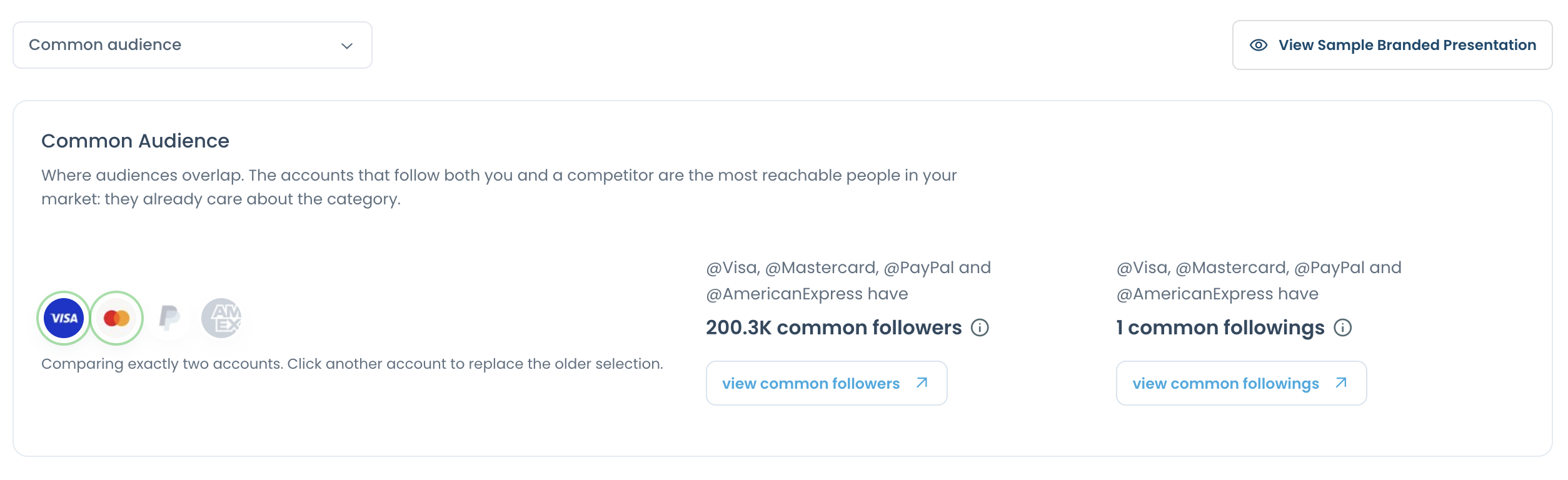
The rest of the report is what makes it a vetting tool and not only an overlap counter: audience quality, geography, language, engagement and top tweets for every creator, side by side.
How to find the overlap between two influencer audiences, step by step
Two phases: put the shortlist in one report, then read the overlap and the fit. Eight steps.
Hands-on look: every section of the X competitor benchmark report, including Common Audience and audience quality, in one podcast episode.
Put the shortlist in one report
- Log in to Circleboom Twitter and connect your X account.
- Open Monitoring and choose the X Competitor Benchmark Report.
- Enter every creator on your shortlist under Account Handles, using the + button for extra slots. Leave your own account out if you only want to compare creators.
- Click Start Competitor Analysis and choose Just this once.
Read the overlap and the fit
- Open the report and choose Common audience from the section menu.
- Click two creators and note their common followers. Click the next creator to replace the older selection, until every pair is covered.
- Switch to Audience Quality and compare the human, active and quality-tier shares of each creator.
- Read Audience Demographics & Geography to check that each audience sits in your market and language.
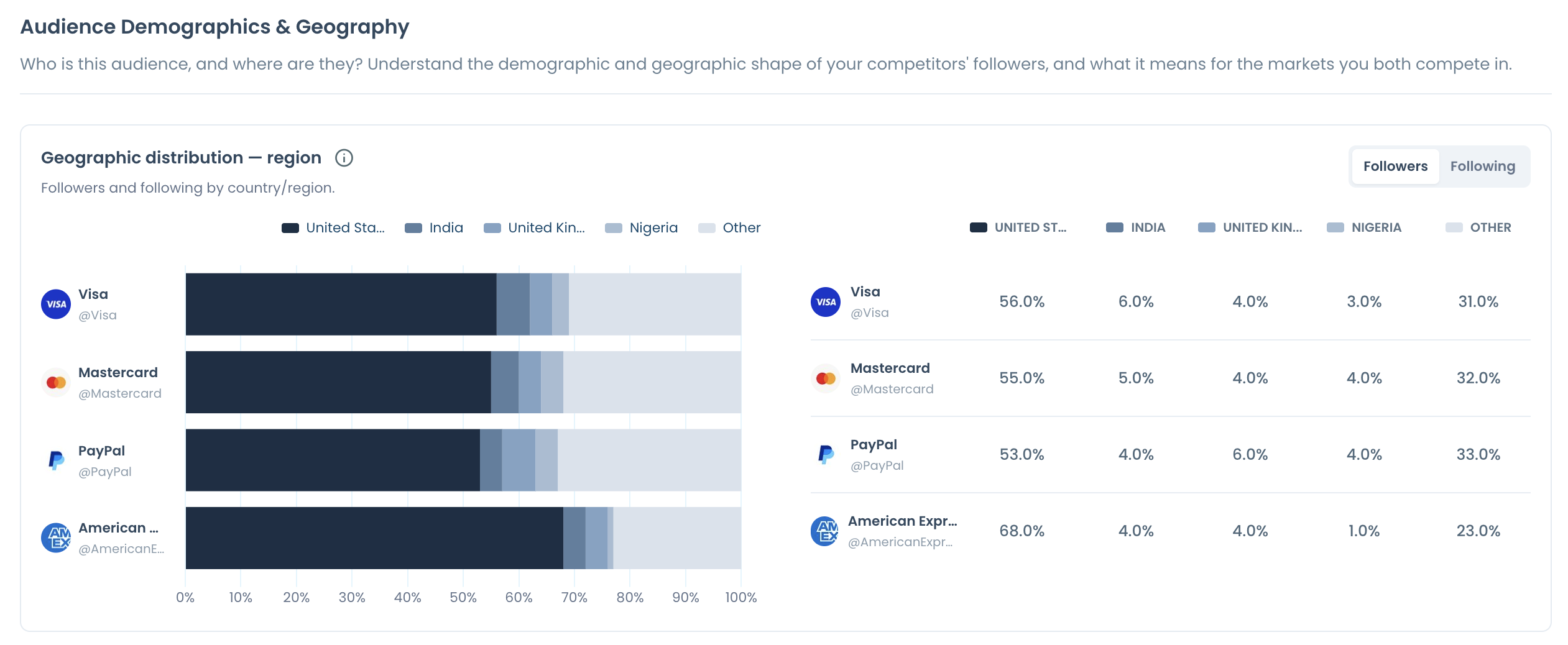
The order keeps the decision honest. Overlap tells you how much reach you buy; quality and geography tell you whether that reach is worth buying.
In short: count the overlap, then check who is in each audience.
Check audience quality before you trust the overlap
An overlap between two inflated audiences is an overlap of empty accounts.
The report's Audience Quality section shows, for each creator, the human versus fake/bot share, the active versus inactive share and the High, Medium and Low quality tiers. These are review signals calculated from official X API records, not verdicts on any single account.
If one creator's audience is heavy with suspected bots, part of its overlap with the other creator likely is too. X's rules on platform manipulation explain why bought followers exist in the first place.
A creator with fewer followers and a cleaner audience often reaches more real people.
Engagement tells you what the audience does
Followers show who could see a post. Engagement shows who responds.
The report's Engagement section shows each creator's average likes, reposts, replies, quotes and bookmarks per post, plus an engagement rate calculated as total engagement divided by total impressions. Content Leaderboards show each creator's top tweets by engagements, impressions, replies and bookmarks, so you can see what their audience rewards.
The guide on the Twitter engagement rate benchmark explains how to read those rates fairly across accounts of different sizes.
Check language and time zones before the brief
A creator's audience can be large, clean and separate from the other creator's, and still be in the wrong place for your campaign.
The report's Audience Demographics & Geography section shows each creator's followers by region, time zone and language. A creator whose audience is mostly in Brazil reaches few people with an English-language product launch timed for New York mornings. The guides on comparing an audience by country and on what a follower language split shows cover each panel.
Time zones also decide when the creators should post. If both audiences cluster in the same zone, stagger the two posts so the shared followers do not see both within the same hour, unless repetition is the point.
Read each creator's top tweets before you write the brief
A creator's best posts show what their audience already rewards. A brief that fights that pattern usually performs worse than one that uses it.
The report's Content Leaderboards list each creator's top tweets by engagements, impressions, replies and bookmarks. The guide on the four leaderboards explains what each one tells you. A creator whose top tweets are long threads with high bookmarks is a better fit for an explainer than for a quick promo.
For your own follow-up posts, our X Post Planner schedules them for when the campaign audience is active.
Brief the creator on what their audience already likes, not on what your product page says.
What creators follow tells you about their circle
Common followings, the accounts both creators follow, show whether two creators move in the same circle. Two creators who follow the same peers, brands and media accounts often get invited to the same collaborations, which can matter for exclusivity in your brief.
The Common Audience section shows common followings next to common followers, and the report's Followers / Following toggle switches the audience panels to each creator's following list. The guide on comparing a following list with a competitor's explains how to read that side.
If you want to know when a creator starts following new brands during a campaign, Track Someone's X Account's Following and Followers checks the account regularly and sends daily or weekly email reports when changes are detected.
Which creator pair fits your campaign
Match the pair to the goal.
- If you want the widest reach, pick the pair with the lowest overlap among creators whose audiences fit your market.
- If you want one community to hear the message twice, pick a pair with a high overlap and strong engagement.
- If two creators look equal, pick the one with the higher active share and the cleaner fake/bot share.
- If a creator's overlap with every peer is close to zero, check geography and language before you assume the audience is new and relevant.
- If you are still building the shortlist, use Find Influencers to find creators by keyword first.
Pay for the audience you need, not the overlap you did not notice.
→ Find the overlap between two influencer audiences on Twitter
Know what you buy twice
Every influencer campaign with more than one creator buys some people twice. The overlap decides how many, and X never shows it.
Put the shortlist in one dated report, read the shared followers pair by pair, and check quality and market fit before anyone posts. Every number is calculated from X's official API records. The guide to every metric in the benchmark report covers the rest of the comparison, and how to compare celebrity Twitter accounts covers larger talent deals.
→ Compare two influencer audiences before you pay
Influencer audience overlap: open questions
Can I compare creators I do not work with yet?
Yes. Any public account can go into the report, and nothing is sent to the creators you compare.
Is there a size limit on the creators I compare?
Accounts with more than 3,000,000 followers cannot be added to a comparison. Creators below that size can be compared freely.
Should I share the comparison with the creators or a client?
You can. Create Branded Presentation builds a logo-carrying export of the report, which suits a client review or a pitch. Keep the report date visible so everyone knows when the numbers were read.
How do I group the shared followers?
Open them with view common followers, then group the relevant accounts with the Twitter List Manager if you want to follow the campaign's reception among them.