

I was building a starter follow list for a B2B fintech account at 9 a.m. on a Tuesday, and by 9:23 a.m. I had a vetted list of 84 accounts: real fintech practitioners with declared roles in their bios, recent posting activity in the last 30 days, and follower counts in the 1,000 to 50,000 range that mark active professional accounts rather than dormant ones or media aggregators.
The three filter passes that produced the list (bio keyword for the role, activity floor for the recency, follower-range for the practitioner profile) are the same passes that work for any industry vertical. The platform's native search returns thousands of partially relevant results in any vertical, and the workflow that turns that noise into a usable list is the three-filter pass run through the bios-and-profiles surface.
Industry-specific X account discovery runs through a three-filter pass: bio keyword for role, activity floor for recency, follower-range for practitioner profile. The Circleboom workflow uses official X Enterprise APIs so the bio-search and activity-floor reads are accurate and the result list is reproducible.
The workflow produces a vetted account list ready for follow, list-add, or outreach in 20 to 30 minutes per vertical.
→ Start the bios-and-profiles search
Why Platform-Native Search Returns Noise
X's search returns posts and accounts matching the keyword across the entire platform, ranked by a combination of recency and the platform's relevance signal. For an industry-vertical query, this surfaces three categories of accounts that are not what the operator wants.
The first is aggregator and media accounts that mention the keyword in passing. The second is high-volume posters whose engagement profile suggests bot or commercial-spam behavior. The third is dormant accounts whose bio matches the keyword but whose last meaningful post was months or years ago.
The three categories typically account for 70 to 90% of the platform's native-search returns on any industry keyword. The signal accounts (real practitioners with recent activity) are buried under the noise unless an additional filter pass removes the three noise categories.
Circleboom's piece on the right way to perform a Twitter user search covers the practitioner framing of the noise problem. The piece walks through why the filter pass matters more than the keyword choice for any industry-vertical workflow.
The Three Filter Passes in Order
The order of the filter passes matters because each filter narrows the candidate set the next filter operates on. Three observations about the sequence.
The first pass is bio keyword targeting the role rather than the industry. "Fintech founder," "fintech engineer," "fintech analyst" produces different lists than the generic "fintech" alone. The role keyword pre-filters for actual practitioners.
The second pass is activity floor: accounts with a post in the last 30 days. This pass removes the dormant subset entirely, which is usually 30 to 50% of the bio-matched candidates.
The third pass is follower range: 1,000 to 50,000 for most B2B verticals, with the upper bound adjusted by industry maturity. This pass removes the high-follower aggregator accounts and the very-low-follower noise accounts in a single move.
How to Find Twitter Accounts by Industry Step by Step
The workflow runs in two phases: the bio-keyword search and the activity-and-range filtering. First run takes 20 to 30 minutes per vertical; subsequent verticals are faster once the filter settings are saved.
Phase 1: The Bio-Keyword Search
Log in to Circleboom Twitter
- Log in to Circleboom Twitter with the X account you want to use for the search. Login uses official OAuth, so platform credentials never pass through Circleboom directly.

Open the Advanced X Search menu
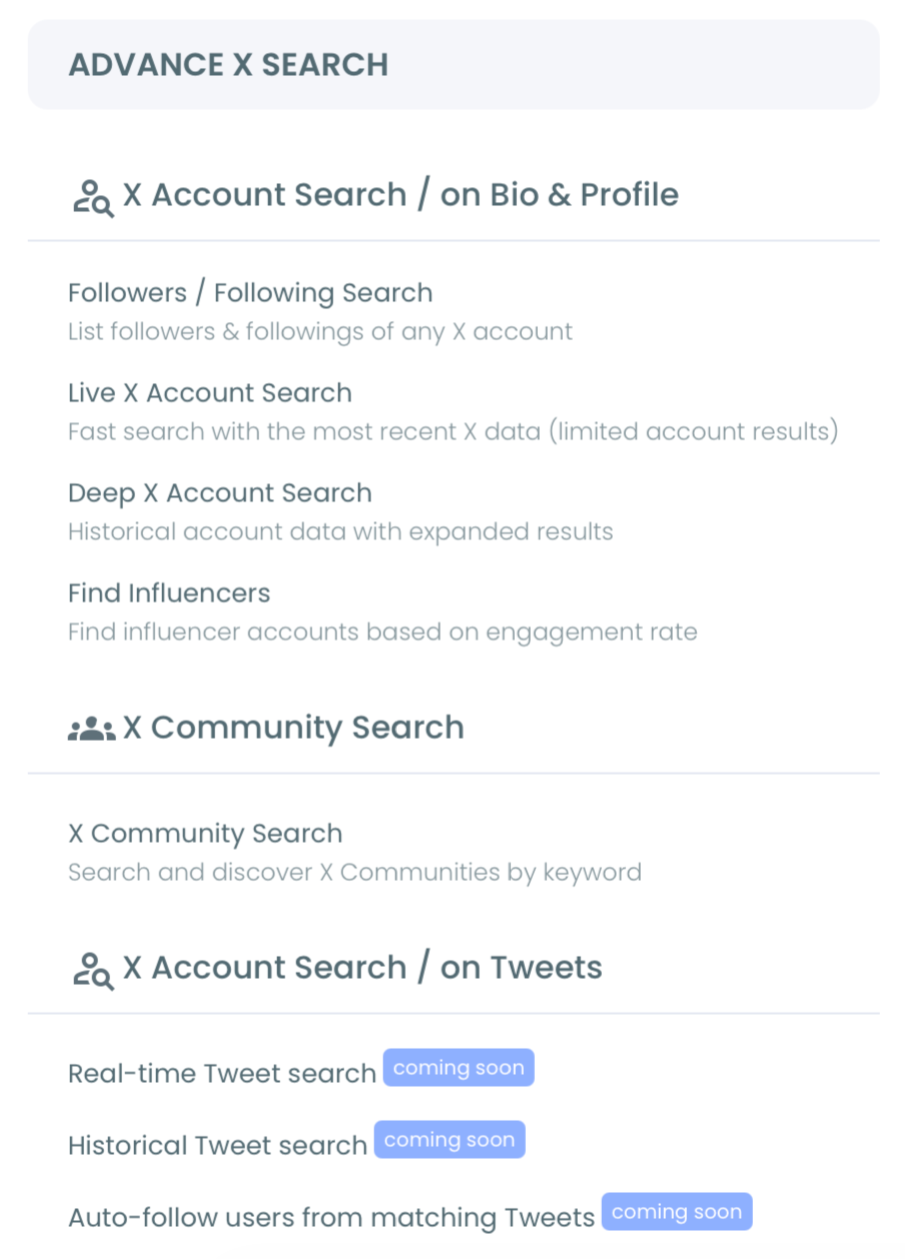
- Open the Advanced X Search menu in the left navigation. This surface holds the bios-and-profiles search and the related discovery tools.
Run the bio-keyword search for the role
- Open the Search Twitter Bios and Profiles tool and enter the role-targeted keyword. Use the specific role phrasing rather than the generic industry term. The search returns accounts whose bios contain the keyword.
Phase 2: The Activity-and-Range Filter
Apply the 30-day activity floor
- Apply the activity filter set to last-post-within-30-days. The filter rebuilds the result list with dormant accounts excluded, which usually halves the candidate count.
Apply the follower-range filter
- Apply the follower-range filter set to 1,000 to 50,000 (adjust the upper bound based on industry maturity). The filter excludes the high-follower aggregator accounts and the very-low-follower noise.
Review and export the vetted list
- Review the filtered list row by row for the top 50 to 100 entries and export to CSV for follow-list construction, list-add, or outreach. The review pass takes about 10 to 15 seconds per row.
The six-step sequence is the full workflow. The OAuth login earns sanctioned API access. The menu navigation loads the discovery surface. The bio search produces the initial candidate set; the two filter passes narrow to the practitioner subset; the review and export prepares the list for downstream use.
Video walkthrough: keyword-based X account search with the filter passes applied in sequence.
What the Workflow Produces
The output is a vetted, role-targeted account list per vertical, exportable for downstream workflows. The signal-to-noise ratio is typically 5x to 10x better than the platform's native search returns on the same keyword, because the three filter passes have removed the aggregator, bot, and dormant categories.
The Circleboom workflow uses official X Enterprise Developer access for the bio search and the activity-floor read. X Help's documentation on search behavior is useful background for understanding why platform-native search returns the noise it does, which is the structural reason the dedicated workflow exists.
Two adjacent surfaces extend the workflow. The Advanced X Search overview covers the broader discovery surface that the bios-and-profiles search sits inside. The advanced search filters landing covers the deeper filter set for operators who need more than the three-pass workflow.
Related Circleboom reading on the industry-and-role-targeted discovery theme.
- How to search Twitter accounts by join date on the tenure-dimension filter that pairs with the activity floor.
- Twitter advanced search on the platform-native search behavior that the workflow complements.
- More targeted Twitter/X account search on the broader practitioner-targeting framing.
Why the Three-Pass Workflow Holds
The reason the three-filter pass holds where platform-native search produces noise is that each filter targets a structurally distinct noise category. Bio keyword targets the role-mismatch noise. Activity floor targets the dormancy noise. Follower range targets the aggregator and bot noise.
Removing all three categories leaves the practitioner subset, which is the population the operator actually wanted to find. The compounding benefit is that the saved filter settings transfer across verticals with only the bio keyword changing.
The second and third vertical searches take 5 to 10 minutes each rather than 20 to 30. Start the bios-and-profiles search and the vetted-list construction becomes a repeatable operation rather than an open-ended search session.
Still Wondering?
How specific should the bio keyword be?
Specific enough that a fluent practitioner would describe themselves using the phrase, but broad enough that 100 to 500 candidates exist. "Fintech founder" is right; "fintech" alone is too broad and "Series A fintech founder building in stealth" is too narrow. Iterate the phrasing if the initial candidate count is too small or too large.
What if my industry has too few accounts to find a useful list?
For very narrow verticals, expand the activity floor to 60 or 90 days rather than 30, and widen the follower range. The workflow still produces a usable list; the practitioner subset is just smaller for less-populated verticals.
Can the workflow detect bot accounts that pass the three filters?
The three-filter pass catches most bot patterns through the activity and follower-range filters, but a small percentage of sophisticated bot accounts pass all three. For accounts where bot exclusion matters specifically, pair the workflow with the bot-detection surface for a final pass.
Does the workflow work for non-English bios?
Yes. The bio search supports any UTF-8 keyword. Multi-language verticals usually run the workflow separately per language and merge the results downstream rather than using a single multi-language keyword.
How often should I rerun the search for the same vertical?
Quarterly is the natural cadence. The practitioner subset of any vertical evolves slowly enough that monthly reruns surface mostly the same accounts. Quarterly reruns catch the new entrants and surface the accounts whose activity has dropped below the 30-day floor since the prior run.

