
Your tweet is out, the first hour is gone, and the likes and replies have not come. Most advice at this point is about your next tweet, which does nothing for the one sitting flat on your profile. This guide is about that one: what you can still do for it today, and how to tell whether it worked.
You can still lift a tweet after it is posted by reposting it at the next hour your followers are active. Circleboom schedules that repost of your published tweet on X for you, using official Enterprise APIs, and can remove the repost again afterwards.
→ Start with your tweet engagement rescue
The steps, the timing method and the success check are below.
Why engagement on a tweet stalls after posting on X
Tweet engagement arrives early: a post earns most of its likes and replies shortly after it is published. The window is brief, a large part of your audience is offline while it is open, and the post has moved down the feed by the time they return.
That makes the posting hour a bigger factor in tweet engagement than most people credit. Good writing published while your followers are away reaches only the few who happen to be scrolling.
The usual cause is ordinary. People publish when they finish writing, or when a generic chart told them to, and neither moment is tied to their own audience.
I see the same reaction every time: the writer blames the wording, deletes the post, or leaves it and moves on. All three skip the cheaper fix.
Circleboom reads when your followers are active on Twitter and reposts your existing tweet at one of those hours. That is the practical route to more engagement on a tweet after posting, and it leaves the original post untouched.
What a repost can and cannot do for a live Twitter post
A repost returns your tweet to the top of your followers' timelines without creating a new post. The original stays where it is, with every like and reply it has collected.
X treats this as normal use. Its Repost FAQs cover reposting your own posts and undoing a repost, and undoing one does not delete the original.
Two things stay fixed once a tweet is live:
- The time it was published.
- The audience that was online in that first window.
A repost changes neither. It adds a second, later window in front of followers who were offline for the first. That makes a scheduled repost the most direct way to raise tweet engagement on a post that is already out.
What the tool adds to a manual repost
You could repost by hand. The weakness is the hour: a manual repost goes out when you remember it, which is rarely when your audience peaks.
Circleboom's Auto Retweet takes a delay instead. You set how long to wait, it reposts at that point, and it can un-repost later so your profile does not fill up with copies of one tweet.
Circleboom is listed on X's Enterprise customer directory, so those repost actions travel through X's approved access and your account stays compliant while they run.
Which tweets deserve a second push
A tweet is worth reposting when it will still be accurate and useful at the later hour. Explanations, resources, opinions and announcements that are still current all qualify.
Posts tied to a moment do not. A live reaction, or wording such as "live now", reads as stale by the next peak.
Before you set anything, check the post the way an editor would: the dates, the offer, the facts and the link behind it. Circleboom does not check whether an announcement is still valid, so that review is yours.
What it does not promise
No tool can guarantee a lift. Circleboom's own documentation says follower activity is timing guidance, and that a repost is not certain to reach different people.
Treat the second push as a fair second chance for tweet engagement, then measure it. The measuring part comes after the steps.
I would rather tell you that now than have you expect a fixed number. A repost improves the odds that the right people see the tweet, and the tweet still has to earn the response.
When are your followers online on X?
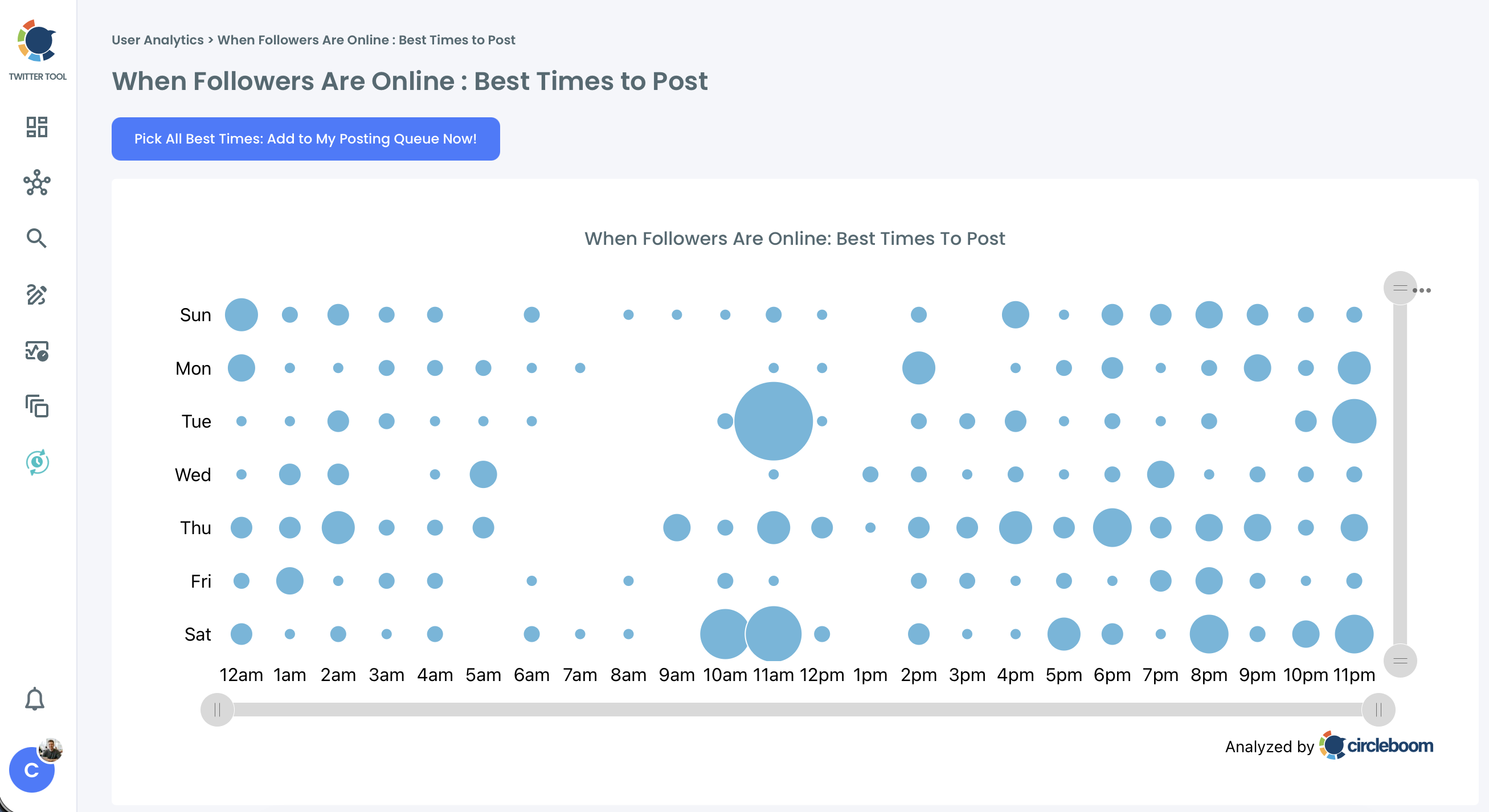
Your followers are online at the days and hours shown as the largest bubbles in Circleboom's When Followers Are Online chart. It is the one thing to know before you set anything.
The chart is the product's view of the best time to post on Twitter for your account. Days of the week run down the left side, and hours from 12am to 11pm run along the bottom. Each bubble is one day-and-hour slot.
Read it by size, since size is where future tweet engagement is most likely:
- A large bubble is a slot where many of your followers are active.
- A small dot is a slot with low but present activity.
- Large bubbles at the same hour on several days mark a daily peak.
Why this chart beats a generic best-time table
The chart is calculated from the activity of your own followers, so it describes your audience and no one else's. A generic table is an average of other accounts.
The gap can be wide. Circleboom's documentation gives the case of a generic chart recommending 09:00 while the account's own followers peak at 21:00.
For the reasoning behind posting hours in general, see the best time to tweet and why.
A short look at the chart: where to find your account's best posting times before you count the hours for a repost.
How to get more engagement on a tweet after posting, step by step
The method is a count. Find the current hour on the chart, find the next big bubble, and enter the gap between them as the repost delay.
In Circleboom's documented example, a tweet posted on Tuesday at 20:00 is reposted the next morning at 08:00, the account's second-strongest slot, which is a gap of 12 hours.
Record where the tweet stands
- Open Circleboom Twitter Management and connect the X account that published the tweet.
- Go to the X Post Planner menu and choose Post Analytics.

- Locate the tweet in the list of your posts and write down its impressions, engagements and engagement rate. You will compare against these later.
Count the hours to the next big bubble
- Open When Followers Are Online from the analytics for your account.
- Count the hours from the current hour to the next large bubble. Start at today's row, move right, and continue onto tomorrow's row if today has no big slot left.
Set the cycle on the tweet itself
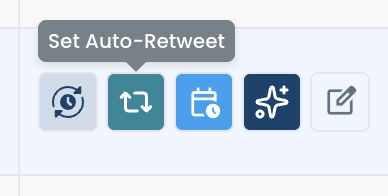
- Return to the post list and click Set Auto-Retweet in the action buttons on the tweet's row.
- Enter your count as the RePost after value, tick Un-RePost after and give it a delay, choose a number for Repeat this cycle, and confirm.
Counting from the chart is what makes the delay yours. A round number like "repost in six hours" is a guess, while a gap measured to the next big bubble puts the tweet in front of the followers the first window missed.
The whole method in four lines:
- Note the tweet's three numbers.
- Find the next big bubble.
- Count the hours to it.
- Enter the count as RePost after.
How to choose the three values
RePost after has separate steppers for hours and minutes, so a 12-hour gap is entered as 12 hours and 0 minutes.
Un-RePost after sets how long the repost stays before Circleboom removes it. Leave it unticked and the repost stays permanently.
Repeat this cycle sets how many times the repost and un-repost pair runs. For one flat tweet, a single cycle aimed at one strong slot is a sound start.
Keep two limits in view. The action must be set at least 15 minutes ahead, and the X account has to stay connected until the cycle finishes.
When one cycle is not enough
Add cycles only when the chart shows more than one strong slot ahead, and keep them apart. Circleboom's guidance is that 3 cycles spread across a day work better than 6 reposts within 3 hours, because close cycles show the same tweet to the same followers and lower engagement per impression.
With RePost after at 4 hours, Un-RePost after at 2 hours and Repeat this cycle at 3, one tweet gets its original window plus three repost windows.
When your followers live in two regions
Aim the count at the second region's active hours. In Circleboom's example, a tweet published at 09:00 in New York with RePost after at 12 hours returns at 21:00 New York time, which is around 09:00 in Singapore.
How to tell real engagement from repeat views on X
A second push worked when engagements rose along with impressions, not when impressions rose alone. That is the whole test of tweet engagement after a repost.
Impressions count every time a tweet appears on a screen. A repost can raise that number by showing the tweet to followers who already saw it, which adds views and no new response.
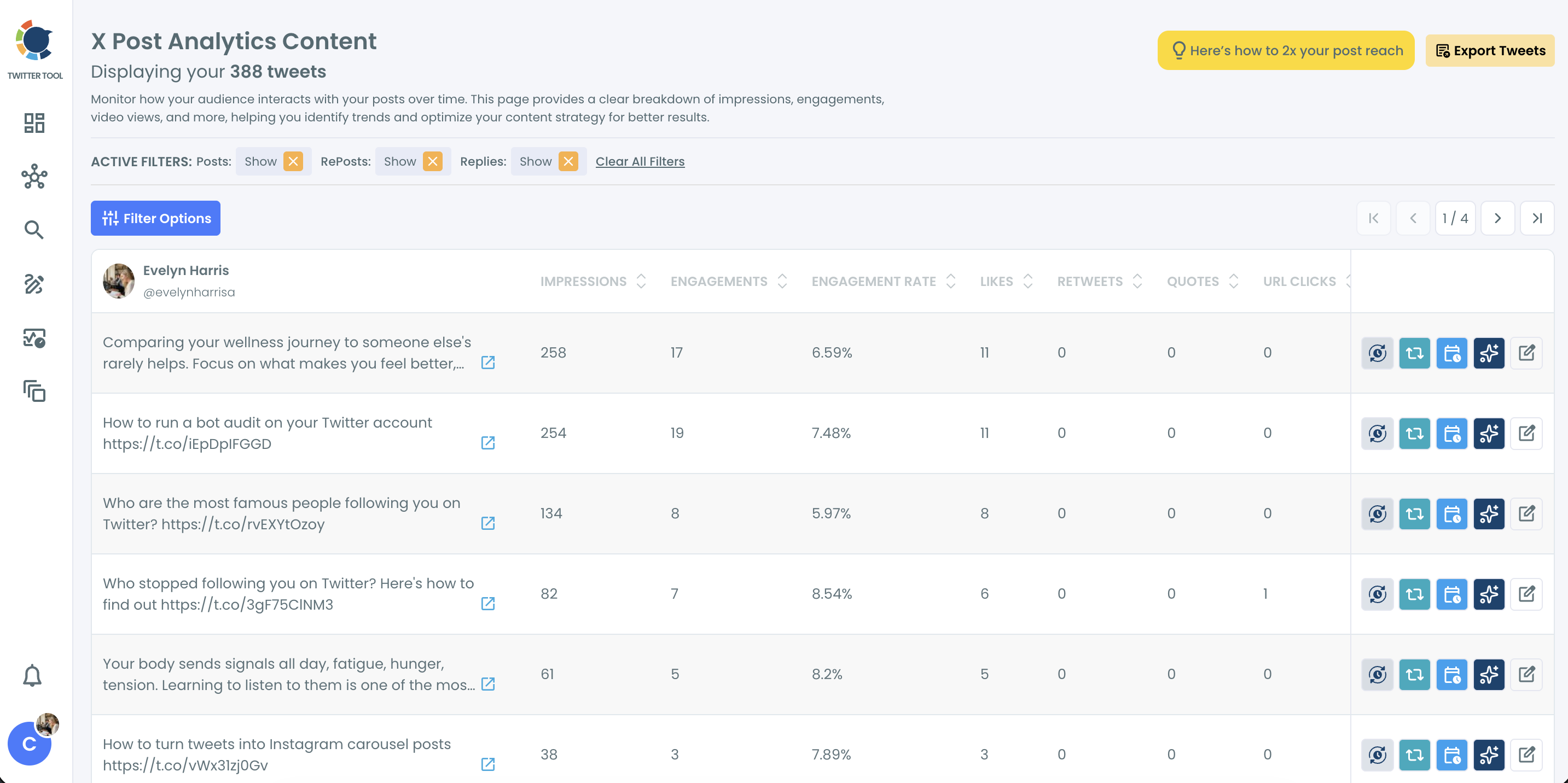
So go back to the three numbers from step 3 and read them again in Twitter Engagement Analytics. The table lists each of your posts with its impressions, engagements and engagement rate, so the before and after sit in one row.
The three outcomes you can see
- Impressions up, engagements up. The repost reached new people and they responded.
- Impressions up, engagements flat. The tweet was seen again and passed over. More cycles will not help it.
- Little movement in either. The slot was weaker than it looked, or the post has run its course.
Circleboom calculates engagement rate as total engagements divided by impressions. If you want X's wording for each metric, its export CSV definitions describe them one by one.
Read the rate next to the raw counts. A tweet with very few impressions can show a high rate that means little.
The same table helps beyond one rescue. Sorting it shows which posts your audience responds to most, and there is a full post on how to identify your most engaging tweet on X.
Where a benchmark fits
Your own average is the first yardstick for tweet engagement. For a wider reference point, see what counts as a good engagement rate on Twitter (X).
One mistake I see often is judging tweet engagement after a single hour. Give the repost window time to close, then compare.
If every tweet comes back flat at every hour, timing is not the issue. Check the audience next, since bots and inactive followers will not respond in any slot.
How to time your next Twitter posts so they need no rescue
Schedule new tweets into your peak slots from the start, and the first window will carry the tweet engagement a repost has to recover later. Circleboom gives you two ways to do it.
Fill the queue from the chart
The When Followers Are Online page has a button labelled Pick All Best Times: Add to My Posting Queue Now!. It adds the chart's peak slots to your posting queue.
Open the queue afterwards and confirm the slots do not clash with anything already scheduled. Every tweet you queue from then on leaves at one of those hours.
Pick a slot while scheduling
The X Post Planner has the same guidance inside its Schedule window. A Find your best posting time option shows 6 suggested slots based on audience activity, and choosing one fills the time field.
You can also set Auto Retweet on a new post before it goes out. Circleboom's example is a tweet scheduled for Tuesday 20:00 with RePost after at 12 hours, which returns for the Wednesday morning audience.
Recheck the chart after your audience changes, because follower activity shifts with growth and with cleanups. At that point the longer post on how to determine your best time to post on Twitter is worth a read.
Your checklist for the next flat tweet
I keep this list short on purpose, so it gets used. The next time tweet engagement stalls in the first hour:
- Leave the tweet up and note its impressions, engagements and engagement rate.
- Open the chart and count the hours to the next big bubble.
- Set Auto-Retweet with that count, plus an un-repost delay.
- Compare the three numbers once the repost window has passed.
- Queue your next tweets into peak slots.
Timing will not rescue every post, but it gives a good one the audience it missed the first time, and that audience is where tweet engagement comes from.
→ Schedule more engagement for the tweet you already posted
Frequently asked after the second push
Which time zone does the chart use, and is mine set correctly?
The chart shows hours in the time zone set for your Circleboom account. Confirm that setting before you count, so you do not convert a displayed hour twice. Circleboom's help center has a short page on what timezone is being used for best time to tweet.
Should I reply, add a follow-up or make a thread once the tweet picks up?
Reply first, because the people who answered are online now. If the idea has more in it, the X Post Planner's Add another post link attaches a follow-up tweet, and Circleboom's AI Writer can expand a single tweet into a thread.
What happens if I delete the tweet before the repost runs?
The cycle fails for that interval, because Auto Repost only works on a tweet that still exists at the scheduled time. A disconnected X account interrupts the cycle in the same way.