Most campaign plans fail in the gap between a signed-off brief and the first scheduled post. The brief says "three weeks, four platforms, launch on Monday," and nobody turns that into a number of posts, a set of limits and a calendar until launch week is already here.
What this campaign plan gives you.
• A brief with five fields that every later decision comes from.
• A post count per platform, worked out before anyone writes.
• A check for the platform limits that break one post on X or Bluesky.
• A schedule that sends the whole run from one composer, with tagged links.
Circleboom Publish schedules one campaign post to Facebook, Instagram, X, LinkedIn and six more platforms in a single send. Batch-create and schedule your social media campaign in one sitting once the brief is signed off.
Why a social media campaign stalls between the brief and the calendar
A social media campaign stalls when the plan stops at goals and dates and never reaches the level of single posts. The brief is approved, the creative team starts on images, and the question of how many posts each platform needs is answered one day at a time.
This is the most common way I see a launch go wrong, even when every other piece is right. The offer is strong and the visuals are ready, but the posting is done by hand, account by account, so the second week thins out and the last week barely happens.
The fix is to plan in posts, not in themes. A brief that ends with "36 posts across four platforms, written by Thursday, scheduled by Friday" is a plan someone can finish.
It is also the reason to batch your campaign posts before launch week.
Circleboom Publish sends one post to any mix of connected Facebook, Instagram, X, LinkedIn, Pinterest, Threads, Bluesky, TikTok, YouTube and Google Business Profile accounts in one action. That turns a social media campaign from a daily chore into one planning session and one scheduling session.
What goes into a social media campaign brief
A social media campaign brief needs five fields, and each one decides something about the posts later:
- Goal: one measurable outcome, such as sign-ups, sales or store visits, with a target number.
- Audience and platforms: who you want to reach and the three or four platforms where they already spend time.
- Message and offer: the one thing every post says, plus the reason to act now.
- Dates: start, launch moment, end, and the days that matter in between.
- Tracking: the campaign name and link tags you will use to measure results.
The goal field matters most, because it sets what the posts ask people to do. A campaign built for website conversions from social media campaigns needs a link in most posts and a landing page ready on day one.
An awareness campaign can lean on video and shares instead.
The dates field needs one more detail: the launch moment as a time, not a day. A launch post that goes live on every account at 9 a.m. on Monday reads as one event, while the same post trickling out over the morning reads as four unrelated updates.
If the brief includes creators or influencers, add a line on disclosure. The FTC's influencer disclosure guidance says any payment or free product has to be obvious in the post. The creator brief should say how they will show it.
Turn the campaign brief into a post count before you write
A post count is the bridge between the brief and the calendar: platforms times posts per week times weeks. Work it out before anyone opens a document, because it tells you how much writing, how many images and how many scheduling sessions the campaign needs.
As an illustration, take a three-week campaign on four platforms with three posts a week on each:
| Platform | Posts per week | Weeks | Total posts |
|---|---|---|---|
| 3 | 3 | 9 | |
| 3 | 3 | 9 | |
| 3 | 3 | 9 | |
| X | 3 | 3 | 9 |
That is 36 scheduled posts. It is also 12 distinct messages if the same post goes to all four platforms at once, which is where most of the time saving comes from.
The feature's own example puts a number on that saving. Four posts going to seven accounts on four platforms are 28 separate log-ins and publishes when done natively, close to an hour of signing in and out, and four sends of about ten minutes from one composer.
Check the post count against X and Bluesky limits
The catch is that one post rarely fits every platform as written. A 500-character draft fits Facebook (5,000), Instagram (2,200) and LinkedIn (1,300), but not X (280) or Bluesky (300). Media has the same problem: six images are fine for Instagram or Facebook, while X and Bluesky take four and a Pinterest pin takes one.
So the post count needs a second column in your head: which messages are short enough for X, and which need a shorter version. Circleboom's text and media limitations on Circleboom Publish page keeps the full list per platform.
When a draft is too long for X, there are three ways to handle it:
- Shorten it with the AI writer's Condense shortcut, or ask for "a version under 280 characters," and send one version everywhere.
- Leave X and Bluesky out of that send and post a shorter version from their own composers.
- Turn the long version into a thread on X.
Write the 12 campaign messages
Writing 12 messages is still real work. The principles in creating highly converting social media content help here: one idea per post, a clear first line and one action at the end.
Hashtags come last, once the text is final. The social media hashtag generator in the composer pulls 20 to 30 tags matched to each post's topic. It adds them in bulk, so you choose tags rather than invent them.
Prepare the campaign assets before the writing day
Assets are the slowest part of a social media campaign, so they get their own day before the writing. Each post in the count needs an image, a carousel or a clip, and Instagram will not take a post without one.
Video deserves the most lead time, because a short vertical clip can carry the launch post. If X is a channel, read how to drive traffic to your landing pages through an X campaign before you script it.
Watch before you film: nine practical tips for producing a campaign video and launching it on X, from planning the clip to the launch post.
Missing images are not a blocker. The composer's media bar has Canva, Unsplash, Giphy, Google Photos and the AI Carousel Generator, so a gap in the asset list can be filled while you schedule.
If an image is still in progress on scheduling day, Save as Draft keeps the post's accounts, text and media so far. You finish it when the asset arrives, without writing the post again.
What has to be connected before you schedule the campaign
Every account in the brief has to be connected to Circleboom Publish before the scheduling session, or the session stops halfway. The number of accounts you can connect depends on your plan, and new ones are added under Settings, in Manage Social Media Accounts.
Each platform asks you to sign in and grant permission in its own window. If that window does not open, Circleboom's guide to connecting your social accounts suggests turning off your ad blocker and checking your pop-up settings.
Once everything is connected, save the campaign's accounts as a Share Group under Settings, in Manage Share Groups. Every campaign post then starts with one click on the group instead of picking each account again.
Schedule the campaign from one composer
The scheduling session is where the plan pays off. Native schedulers post to one account on one platform at a time, so 36 posts become 36 separate publishes, while Circleboom Publish sends each of the 12 messages to every selected account at once.
Circleboom is an official X Enterprise Developer, so the X posts in your run go out through an approved connection alongside Facebook, Instagram and LinkedIn. Block out one afternoon to schedule every social media campaign post in one session, and three weeks of posting are done before launch day.
That is the trade a campaign plan buys: a couple of hours of batch scheduling up front for a presence on every platform, every day of the run. It is what keeps week three as busy as week one.
How to plan a social media campaign in Circleboom Publish, step by step
The steps below follow the order that keeps every post inside each platform's limits.
Open the composer with the campaign's accounts
- Log in to Circleboom Publish and check that every account from the brief shows as connected.

- Click the pencil icon in the left sidebar and choose Create New Post on All Platforms.
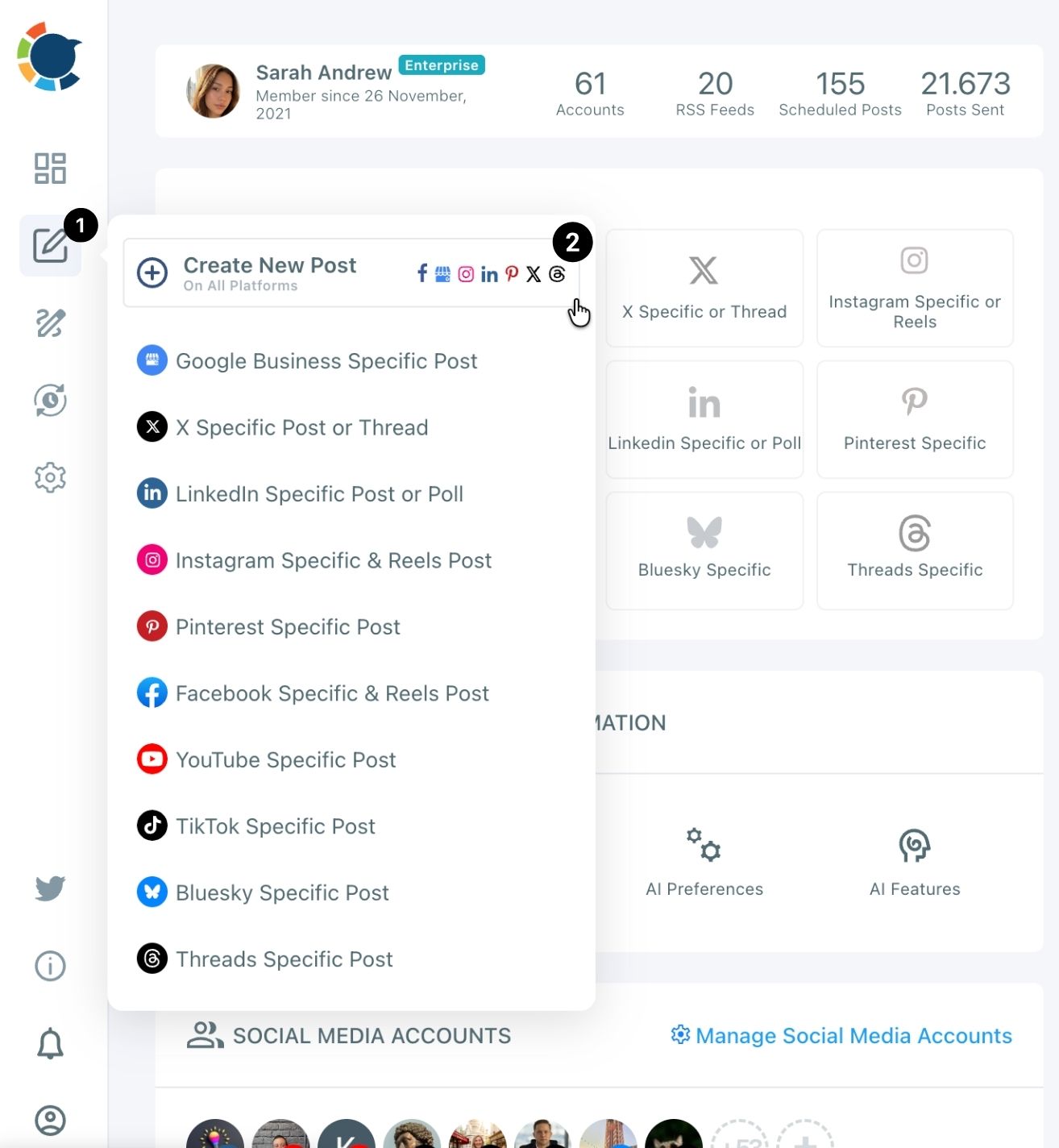
- Select the campaign's Share Group under Select by Share Group, or pick the accounts by platform icon, then click Done.
Write and check each campaign post
- Write the post or ask the AI with "Ask the AI anything...", and tell it the strictest limit, for example "make it max 280 characters" when X is selected.
- Add the media and hashtags from the media bar and the Hashtag button.
- Check Post Preview for every network tab before you send, looking for a cut caption or a missing image.
Schedule the whole campaign run
- Click Schedule for timed posts such as the launch, and pick the date with one of the suggested best times or Set Time.
- Use Post to Queue for the steady posts, so each one drops into the next open slot of every selected account.
- Open the Outbox Calendar View and filter by the Share Group to see the whole campaign laid out by week.
Planning the post count first is what makes this run in one sitting: you write 12 messages instead of 36, and the limit check in step 4 stops a long draft before it reaches X.
Quick recap: connect, open the composer, write each message once with the limit in mind, preview, then schedule or queue.
How to track which platform drove campaign results
Tag every campaign link with UTM parameters before it is scheduled, because a link posted without tags cannot be tagged afterward. Google's own guide to URL builders for campaign data says to always use utm_source, utm_medium and utm_campaign.
In the composer, click the link icon next to a pasted link and fill in source, medium and campaign; Circleboom swaps the tagged link into the post. Use one campaign name for the whole run and a different source per platform, so Google Analytics shows which platform sent the buyers.
On-platform numbers fill in the rest. Circleboom's post analytics shows how each post performed once it went live.
To judge the campaign as a whole, look at the reach-exposure ratio in your campaign. It compares how many people you reached with how often they saw you.
Which campaign plan fits your situation
The right plan depends on where you are starting from, so pick the branch that matches:
- If you have a launch date and nothing else, write the five-field brief first, then the post count, then book one day for assets.
- If you post to one platform only, skip the multi-platform limit check and use that platform's own composer for its native formats.
- If X or Bluesky is in the mix, write the short version of every message first and expand it for Facebook and LinkedIn.
- If you sell to businesses, set the goal around leads, and read about ROI from B2B lead generation campaigns before you pick a target.
- If several people write the posts, add an approval step before anything is scheduled.
I would start every plan on the same branch: the post count. Once that number is on the page, the rest of the social media campaign is a scheduling job.
→ Turn your social media campaign brief into scheduled posts
Campaign planning FAQ
Who approves campaign posts when a team writes them?
The account owner or an Admin does. With Circleboom's team management, each client or brand runs as its own workspace, and posts written by a User wait for approval before they go live.
What should I do with campaign posts after the campaign ends?
Reuse the ones that worked. Sent Items keeps every published post with a Share Again action.
The social media reposting workflow sends a proven post out again, ideally with a fresh line so it is not a duplicate.
How far ahead can I schedule a social media campaign?
As far as you like. The Schedule button works for ten minutes from now or months ahead, so a seasonal campaign can be fully scheduled as soon as the brief is signed off.