Which hour do you pick when your followers live on two or three continents?
The workable answer is a small set of windows chosen from your own audience data, because no single hour suits everyone.
The five steps below show how to schedule tweets in different time zones, from the map to a loaded queue.
Can I schedule tweets for followers in different time zones?
Yes, by choosing windows rather than converting clocks, since each tweet still goes live at one moment. Circleboom shows where your X followers are and when they are active through official X Enterprise APIs, so you can assign each region a slot.
→ Pick the windows that schedule tweets for different time zones
Why one posting hour fails a multi-region account
One posting hour fails because it serves whichever region happens to be awake and leaves the rest to the feed.
Most accounts settle on the hour that suits the person running them.
That habit is harmless with a local audience, and costly once a meaningful share of followers lives elsewhere.
The early minutes carry the weight here. Twitter distribution is time-sensitive, and a tweet that goes live while followers are online has a better chance of early likes and replies.
A tweet posted in the owner's evening can land after midnight for a European audience, whatever its quality.
The mistake I see most often is a schedule built around office hours. It feels disciplined, and Twitter timed posts do make it easy to keep.
But consistency at the wrong hour is still the wrong hour, so the first job is to find the hours that fit.
You can find the hours to schedule tweets across time zones from your own followers' activity instead of from habit.
Two limits shape everything below:
- Nothing delivers a tweet at each follower's local time.
- Activity is a timing signal, so a good slot raises the odds and guarantees nothing.
Now you have the goal: a few chosen windows, not one perfect hour.
What Circleboom gives a multi-region account
Circleboom gives you two separate views of your audience on X, and the schedule comes from reading them together.
Followers' Map / Time Zones answers where your followers are. When Followers Are Online answers when they are active, as a day-and-hour bubble chart built from your own followers.
That second point is what separates this from a published average. A general list of the best times to post on social media may say one hour while your own chart says another.
Your chart is the one measuring your audience.
Circleboom is a verified Enterprise partner of X, so you read this follower data through approved access rather than a scraping workaround.
When you are ready, open your best times to schedule tweets in each region and keep this guide beside you.
The two views stay separate on purpose. The activity chart has no geography filter, so it never shows "Europe's peak" as its own line.
You combine the views yourself, and the steps below show how.
Which time zone does the best-time chart show?
The chart shows hours in the time zone set for your connected account in Circleboom. If that setting is America/New_York, a bubble at 8pm means 8pm New York time, wherever the followers behind that bubble live.
Check the setting before you read a single bubble. It sits in Account Settings, on the Time and Queue Settings tab.
Circleboom's page on what timezone Best Time to Tweet uses gives the full path.
Never convert a displayed hour. This is the error that shifts a whole schedule. The bubble already reflects when followers are active, and the slot you pick already runs on your account's clock.
If you add an offset on top, every post moves away from the peak you meant to hit.
One case does call for care. If your account is set to a different time zone from your primary audience, confirm the offset once, so you understand what the hour means for those readers.
That is reading the chart, not converting it, and the slot you choose stays the displayed hour.
Why your follower map percentages leave people out
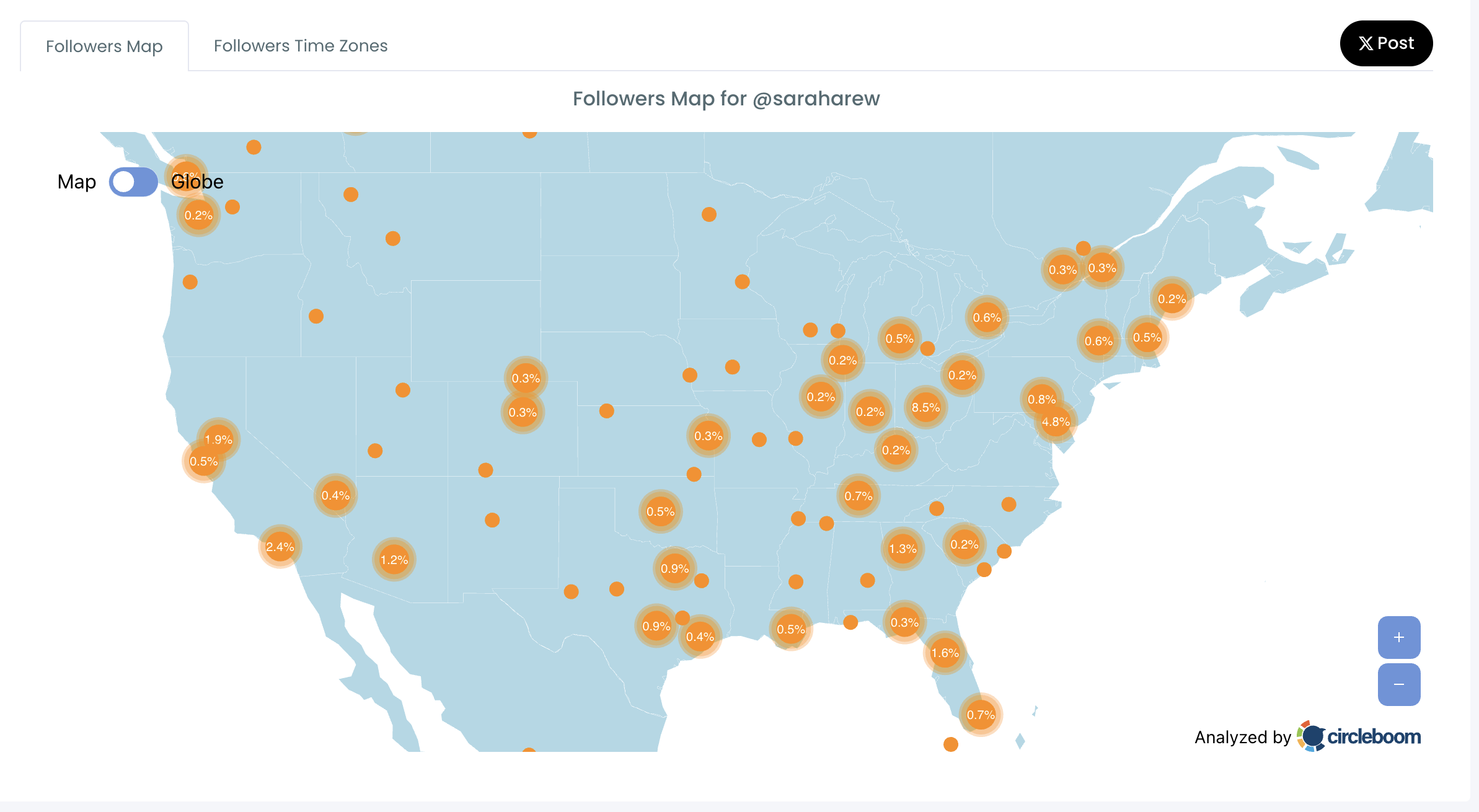
The percentages cover located followers only, so they describe part of your audience rather than all of it. Circleboom resolves the location field on each follower's public profile, and that field is optional free text.
A blank field, "Earth" or "Everywhere" cannot be placed, and those followers drop out with no "unknown" segment to show for them.
Here is the effect on the numbers. If 40% of your followers have no identifiable location, the map's percentages come from the remaining 60%. A region showing 30% is 30% of the located group, which is not 30% of everyone.
Use the map as a direction and a ranking, then. It is reliable for "the US is our largest region and the UK is second". It is weak for "exactly 31% of our audience is in Europe".
Treat sparse data as a reason to validate with language, engagement and customer data.
For wider uses of this view, see the benefits of using Twitter geolocation maps for your business.
Match the schedule to the shape of your audience
The map's pattern decides how many windows you need, so read it before you schedule tweets across time zones. Most accounts fall into one of these rows:
| What the map shows | What it means | Your plan |
|---|---|---|
| One region dominates | A clear primary market | Schedule around that region |
| Several regions are strong | Multi-window publishing | One window per primary region |
| Target market is small | Audience does not match the goal | Build that audience first |
| Location data is sparse | Conclusions are weak | Treat the map as directional |
A short illustration helps. Say your map ranks the US at 55%, the UK at 25% and India at 12%. Those are illustrative numbers, so swap in your own.
The US takes the primary window, the UK gets a secondary one, and India waits until its share justifies the effort.
Wording is a separate decision from timing. Before you write regional versions, check Twitter Language Stats to see whether the region needs another language at all.
How to schedule tweets in different time zones, step by step
Here is the flow, in order, across two phases.
Read your audience before you touch the calendar
- Log in to Circleboom Twitter and connect your X account.

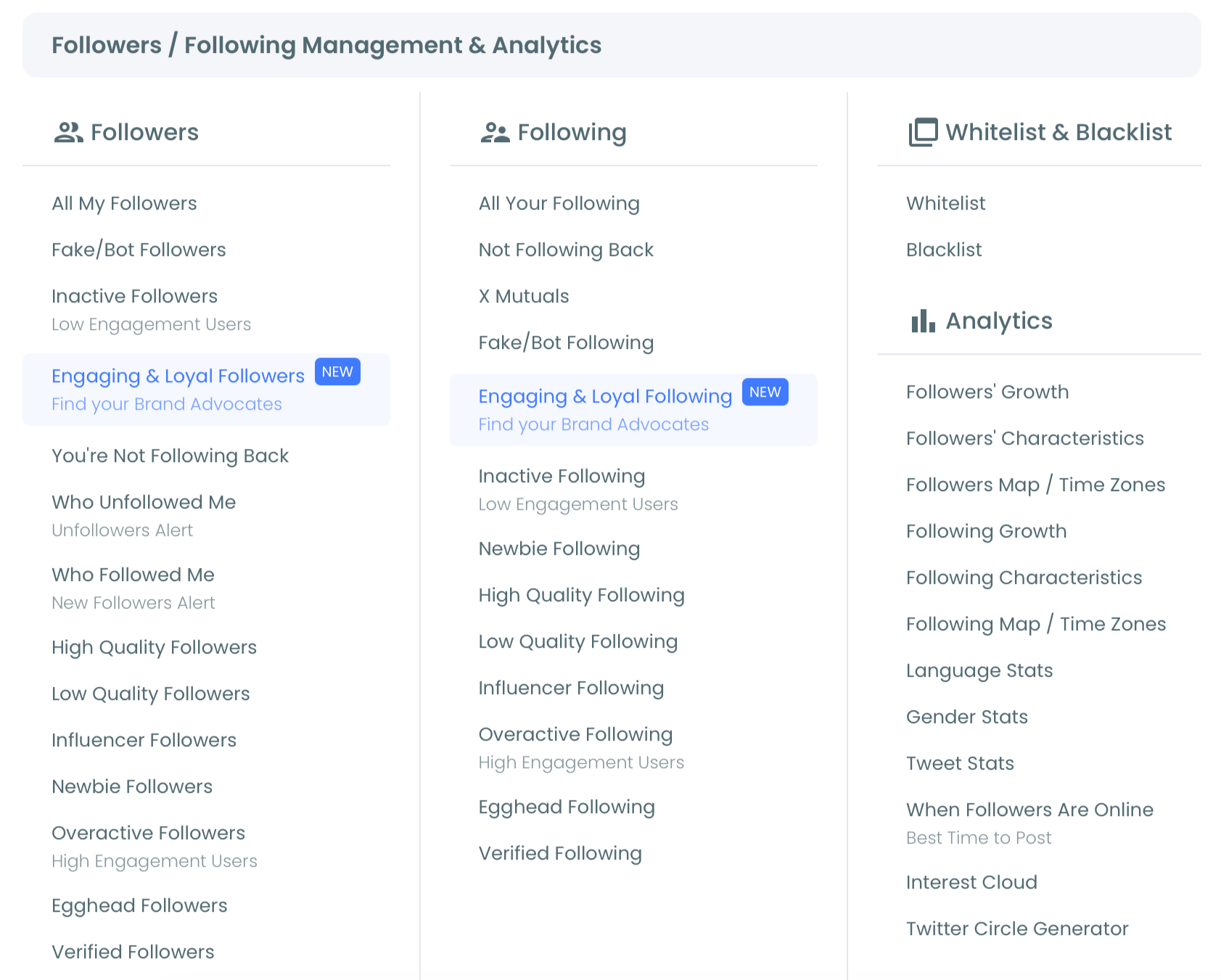
- Navigate to the Followers and Following menu and open its Analytics group.
- Open the Twitter followers and friends map and rank your top regions, then switch to the Followers Time Zones tab to see the named zones. Leave the black X Post button alone while you read: it publishes the current view to your account at once, with no confirmation step.
Turn the regions into scheduled windows
- Select When Followers Are Online and note the largest bubbles as primary windows and the next tier as secondary windows. Large bubbles at one hour across several days signal a daily peak, while large bubbles on a single day signal a weekly one.
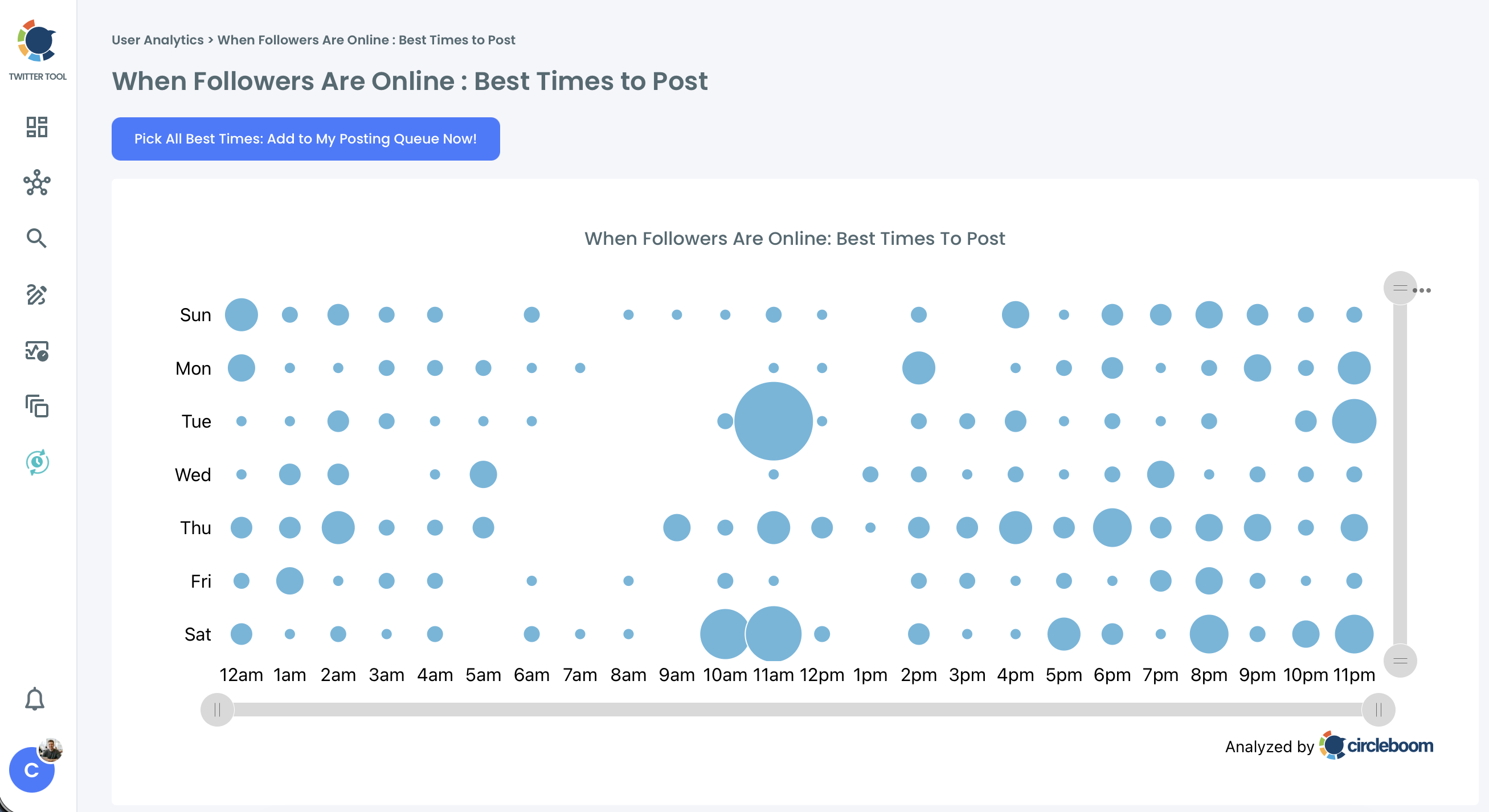
- Schedule in X Post Planner by choosing a Best Time to Post slot for each post, or press Pick All Best Times to add the identified slots to your posting queue. Review the queue straight away, because that button adds slots to the queue and leaves conflicts for you to catch.
This order works because each step narrows the one before it. The map tells you whether you need one window or three, the chart tells you which hours, and the planner applies them on your account's clock.
Start with the calendar instead and you end up defending an hour you picked before you had any evidence.
For a second angle on the chart, this walkthrough on how to find when your followers are online pairs well with step 4.
Four mistakes that break a multi-region schedule
Most attempts to schedule tweets for different time zones fail in one of four small ways, and all of them are easy to fix once you can name them:
- Crowding one peak. Every post lands on the biggest bubble, while the secondary windows that could serve another region stay empty.
- Treating a bubble as permanent. The largest bubble describes your audience today, and it can move as the follower base changes.
- Filling every slot. A full queue leaves no room for news. Scheduling 5 posts a week instead of 7 keeps 2 slots open for timely reactions.
- Ignoring the post itself. An immediate announcement may need a different hour from an evergreen explanation, so match the slot to the content.
Client work adds one more habit worth keeping. The chart's three-dot menu exports the view as PNG, JPG or PDF, which gives you a simple way to explain a schedule in a content-calendar discussion.
It supports your timing rationale, though it does not prove a future gain, so present it that way.
With the windows set and these traps avoided, the remaining question is how the second region sees your best posts.
How to reach a second region without writing a second tweet
Set an Auto Retweet cycle on the original tweet so that it returns during the second region's active hours. You publish once for the larger region, and the repost carries the same text to the next one.
Auto Retweet is configured in the post editor through the repost icon, while you schedule the tweet. The panel asks for three values:
- RePost after: the hours and minutes before the tweet returns.
- Un-RePost after: the hours and minutes before that repost is removed, which keeps the profile tidy.
- Repeat this cycle: how many times the whole loop runs.
A launch tweet shows the pattern well. Post it for the US morning, let it return in the European evening, and let it return again the next US morning.
Every market can see the announcement while it is still current, and nobody wrote a second post.
To set the delay, compare your windows on the chart. If your primary window is 09:00 and your secondary window is 21:00 on the same account clock, a RePost after value of 12 hours lands in the second one.
Limits on Twitter repost windows
Keep this to material that stays true. Check dates, offers and links first, since the tool will not notice when an announcement has expired.
Then keep the cycles spaced, because repeats packed into a few hours show the same tweet to the same people.
Compare results in Post Analytics, as a repost is another opportunity and not a promise of new readers.
Summary
To schedule tweets in different time zones, read your map, take your windows from your own activity chart, and load the slots on one account clock. The map ranks your regions, the chart supplies the hours, and Auto Retweet carries a tweet into the next window.
That sequence replaces guesswork with your audience's own pattern, and it spares you from converting anything by hand.
In my experience, the account that checks its time zone setting first avoids most of the errors that make a schedule look broken.
→ Start choosing windows to schedule tweets in different time zones
Multi-region scheduling questions
Can I load posts for several regional windows in one upload?
Yes, bulk schedule tweets in Circleboom takes a CSV of up to 1,000 rows for your X account, with each posting time at least 15 minutes ahead. The file carries the times you enter, so decide your windows first: the import does not choose Best Time to Post slots for each row.
When should I re-check my X followers' time zones?
Re-check after major follower growth, a large cleanup or a campaign that drew followers from a new region. Monthly suits most active accounts, since Circleboom's chart and map reflect your audience at the time of analysis.
Does posting in a best-time slot guarantee more engagement?
No, a Best Time to Post slot gives audience-specific timing guidance on Twitter, not a guaranteed result. The post's relevance, freshness and context still decide much of the outcome.