
A wrong list costs more than a slow one.
Follow or export the wrong accounts today and you have spent tokens and a limited daily pace on people who were never a match.
The way to search Twitter followers without that waste is to stack filters until only the right accounts remain.
What is the most reliable way to find specific people in a Twitter follower list?
Stack several conditions on the same list, because one filter alone returns too many wrong accounts. Circleboom filters any public X account's followers by bio, location and quality signals through official X Enterprise APIs, and every active filter must match.
→ Filter any public account's Twitter followers by bio, location and quality
Why one filter on a Twitter follower list returns the wrong people
A single filter answers a single question, and the person you need has to pass several.
Type "founder" into a bio search and you get founders, former founders, founders of nothing yet, and a few bots that picked the word because it sounds credible.
Circleboom's filters use AND logic, which means a result must match all active filters at once. That one rule changes how you should work.
Each extra condition removes a specific kind of wrong account, so the list shrinks for a reason you can explain later.
I treat this as the whole method. If a client asks why an account made the shortlist, "it matched the bio word, it is not flagged as inactive, and it sits above our follower floor" is an answer.
"It looked right" is not.
The native list on X cannot do any of this, since it has no filter at all. You may have been trying to find specific followers of another Twitter account by scrolling.
The faster fix is to search a Twitter follower list with stacked conditions instead.
Two mistakes cost people the most at this stage:
- Starting from a seed account that is too broad, which makes the list noisy no matter how good the filters are.
- Acting on the first filter's output, before the other conditions have removed anything.
How is searching my own followers different from searching someone else's on X?
Your own followers live in All My Followers, and any other public account's followers live in Followers / Following Search.
The two views look alike and share most filters, but the buttons and a few dropdowns differ, and those differences change what you can promise yourself before you start.
| What differs | All My Followers | Followers / |
|---|---|---|
| Whose list | Your connected account | Any public account |
| Removing accounts | Remove Follower button | Not offered |
| Unfollow button | Not on this screen | Available |
| Language filter | Yes | Yes |
| Engagement dropdown | Yes | Use the Active & Inactive column |
The practical result: language works on both lists. On someone else's list, combine it with bio words and location, and read the profile to confirm.
Because the filter works on both lists, the same language check carries over when you move from your own audience to a competitor's.
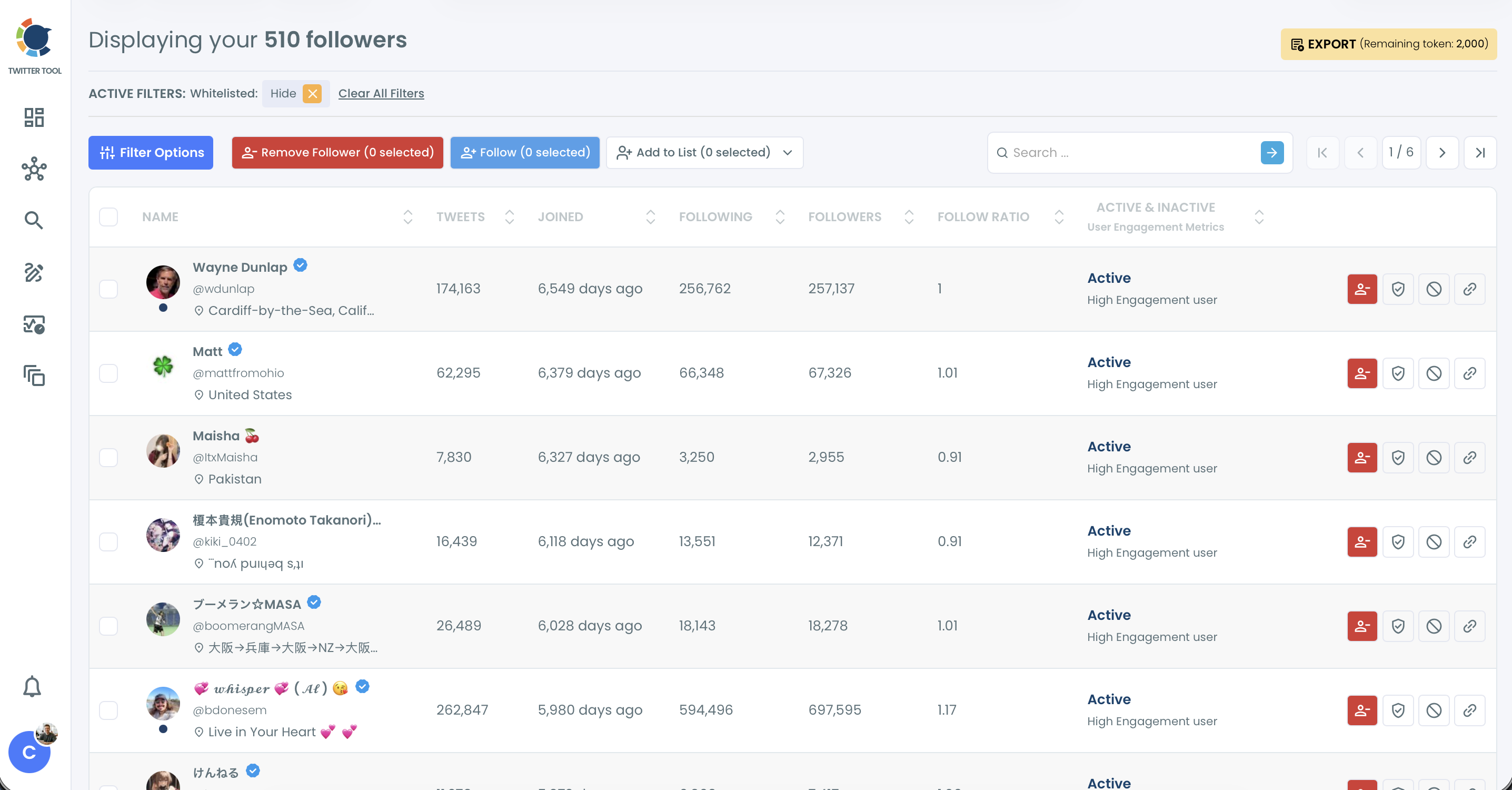
Look at the Active Filters bar in that screenshot, because it explains a problem that confuses people. Whitelisted and blacklisted accounts are set to Hide by default.
If someone you know follows the account and does not appear, check that bar before you doubt the data.
Circleboom is listed on X's Enterprise customer directory, so both routes read X's own records, which matters when the list ends up in a client report.
The filters worth stacking and what each one proves
Every filter proves one narrow thing, and it helps to know exactly what before you combine them. Group them by the question they answer.
Who the account says it is
Find in Bio & Name searches display names and bios for your keyword.
It sits inside the Filter Options drawer, and it differs from the search box on the listing screen, which only looks up names and usernames.
For a word like "founder" or "recruiter", the drawer is the one you want.
Bios are written by their owners, so try two or three wordings of the same role.
Verification Status adds a further check, and the same logic lets you list all my verified followers on Twitter when the list is your own.
When you have no seed account at all, this route is the wrong start. Search Twitter bios and profiles begins from a topic instead of from someone's audience.
Where the account says it is
Filter by Location is a free-text field matched against the profile's location. It reads a self-reported field that can be blank, outdated or wrong, and nobody verifies it.
So a location filter tells you what people wrote, nothing more. Someone who wrote "NYC" may not match "New York", and that makes spelling a real variable.
Run the common spellings as separate searches, and remember that a blank location removes a person who may live exactly where you need.
Whether the account is alive and real
Follower Quality holds five separate dropdowns, each of which can include or exclude a type of account:
- Eggheads, which have no profile photo.
- Protected, which keep their tweets private.
- Fake/Bot, which show spam-like behavior patterns.
- Inactive, which show little recent activity.
- Overactive, which post at an unusually high frequency.
Tweet Count and Join Date add activity and age. You can use them to search Twitter accounts by join date and drop very new profiles from a prospect list.
How much reach the account has
Follower Count, Following Count and Follow Ratio all take a minimum and a maximum.
The ratio is Followers divided by Following, so a very low figure like 0.1 points to a follower collector.
If reach is your main condition, there is a separate walkthrough on how to filter X followers by their follower count.
How to search Twitter followers by bio, location and activity
Here's the flow, in order. Use it to search Twitter followers on any public account.
On your own list in All My Followers, the filter order stays the same, because a clean sequence matters more than speed when the result feeds a follow or an export.
Load the list you want to search
- Log in to Circleboom and connect your X account.

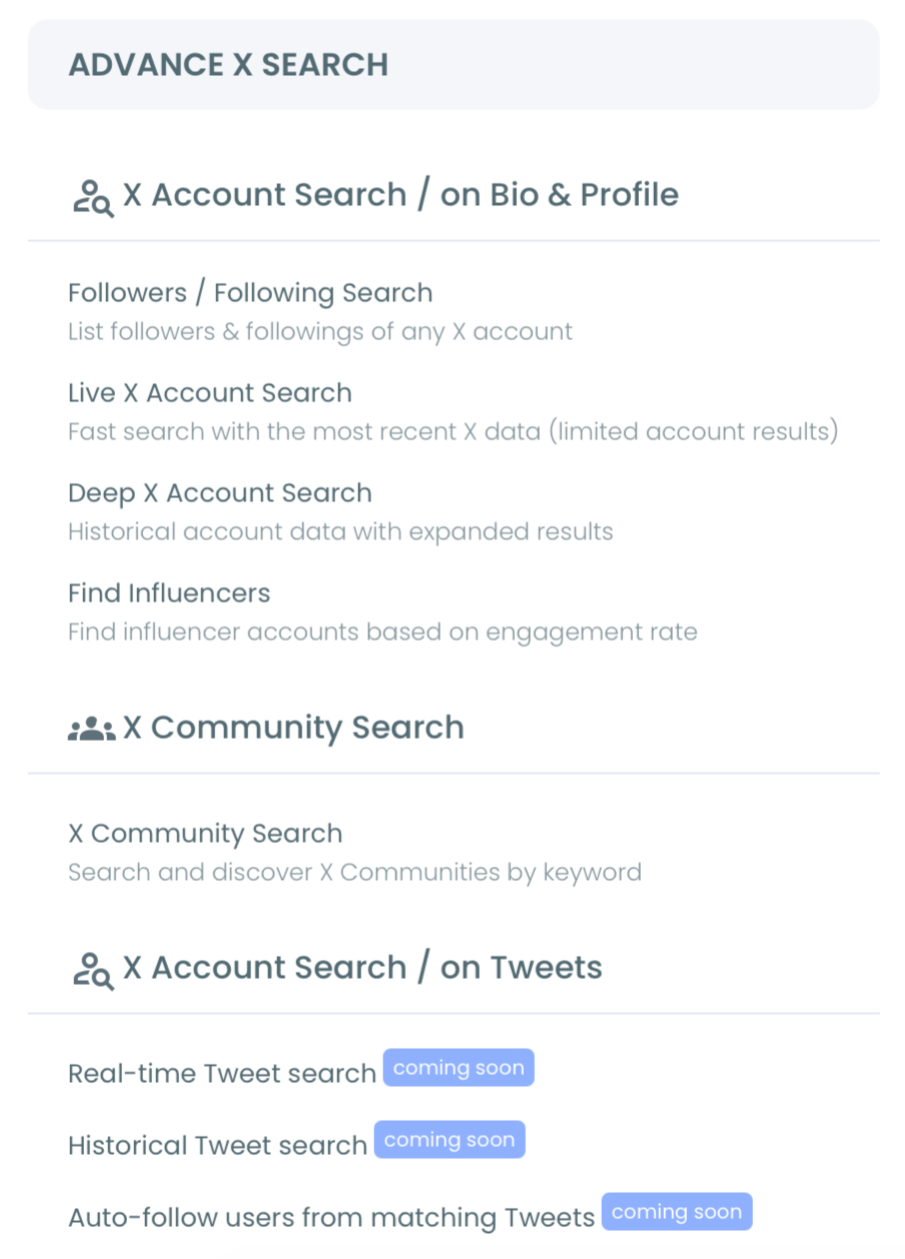
- Navigate to the Advanced X Search menu and open Followers / Following Search under Account Search.
- Choose Display Followers, or Display Following when you need the accounts someone follows, then enter the username and run the search.
Stack conditions from identity to quality
- Open Filter Options and type your role or topic word into Find in Bio & Name.
- Add one location in Filter by Location when geography is a real requirement.
- Exclude Fake/Bot and Inactive under Follower Quality, then click Apply Filters.
Review before you act
- Read the Active Filters bar to confirm which conditions are on, and remove any tag with its X.
- Sort by Follow Ratio or Followers, open a sample of profiles, and select only the accounts that hold up.
That sequence works because identity comes first: bio words decide who is relevant, and quality filters then clean the relevant group.
Run it the other way and you polish an audience you do not need.
The clip shows the Display Following direction. Display Followers runs the same way, with the button label changing to Show Followers.
Now you have a filtered list. The next decision is whether the table is showing you all of it, which is a question about size.
Why does the results table stop at 2,500 accounts?
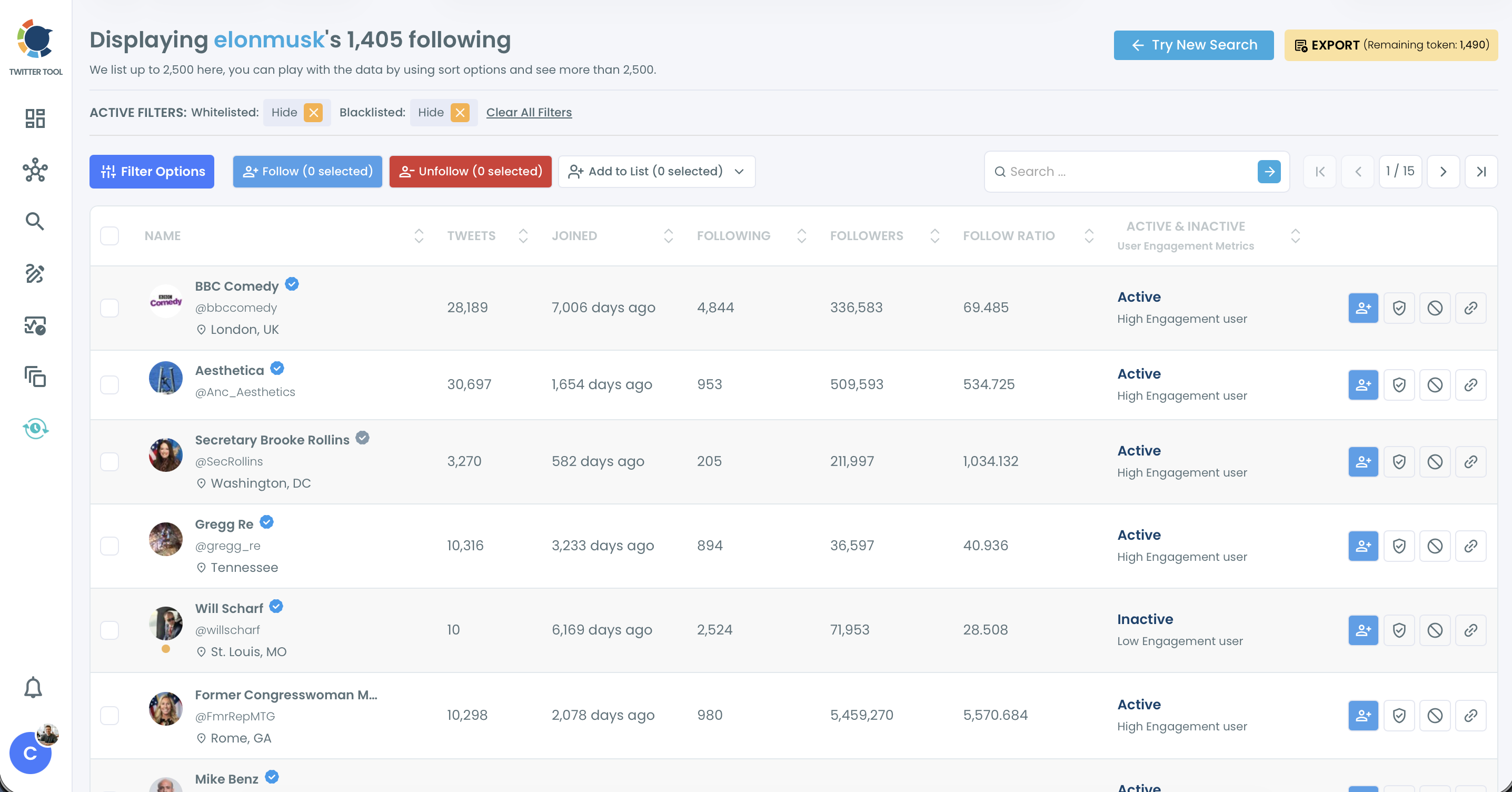
The results table displays up to 2,500 accounts, even when the list behind it is larger.
The page says so directly: "We list up to 2,500 here, you can play with the data by using sort options and see more than 2,500."
So the header can read 2,500 of 46,549 followers, and the visible rows are not the whole network. On a large seed account, the default view is one slice.
Sorting by a different column brings a different slice forward, and that is the sanctioned way past the default order.
Use it on purpose. Sorting by Followers descending and then ascending shows you two very different ends of the same audience.
A guide on how to sort Twitter followers by popularity covers what to read at each end.
Results are also paginated. A 2,500-account view shows 1 / 25 in the page counter, which works out to about 100 accounts a page.
On your own list, the master checkbox selects only the visible page, so apply your filters before selecting. Assume the same on any other list until your selected count says otherwise.
For an audit rather than a shortlist, read about how to analyze someone's Twitter followers as a whole.
Reporting on 2,500 rows as if they were the full audience is an easy error to make, and a client can catch it.
Three filter stacks to start from
Good starting stacks save you a round of trial and error. These three fit common jobs for a follower list, and each one is an illustration to adapt, not a formula.
Prospects from a competitor's audience. Use a bio word for the buyer's role, a minimum follower count that fits your market, and Fake/Bot and Inactive excluded. This suits B2B outreach, where the role word does most of the work.
Partners and creators in a niche. Set Verification Status if it matters to the deal, raise the Follow Ratio minimum, and sort by Followers. A high ratio means an account has many followers and follows few, which is a signal of influence.
A local audience for an event or launch. Use Filter by Location with a city name, a bio word for the topic, and a Tweet Count minimum so that silent accounts drop out. Run it again for each spelling of the city.
Save the output as you go. Adding the accounts to a Twitter List lets you keep watching them without changing who you follow, which is a lower-risk first step than a bulk follow.
Which route fits the list you need today
Pick by the job in front of you, then do one thing:
- If the list is your own followers, open All My Followers, where the Language and Engagement dropdowns are available.
- If the list belongs to another public account, use Followers / Following Search with the stacks above.
- If you care about who that account pays attention to, switch direction with the Twitter following list viewer.
- If you have no seed account, start from a topic search and come back with one.
A clean filter on the wrong seed account still gives you the wrong list, so spend a minute on that choice first.
→ Search a public account's Twitter followers with stacked filters
FAQ for filtering a Twitter follower list
Why can't I see all of someone's followers on X?
X's own list stops loading after a point, and it cannot be filtered, sorted or exported. Circleboom retrieves the follower list of a public account for its table, while private accounts stay inaccessible everywhere.
Can I export the filtered list?
Yes, Circleboom downloads results as a CSV through the Export button, and each export consumes tokens from the balance shown on that button. The export Twitter accounts page lists what the option covers.
Can I narrow a Twitter follower list to one country?
Only through the location each account typed into its profile, so a blank or inaccurate field drops out of the result or misleads it. Search the country and its major cities separately, and treat the output as a starting list.
Is a bulk follow from these results safe?
Circleboom paces follows at 50 every 15 minutes with a daily safety limit of 400, and the rest of the queue continues the next day. That pacing is designed to help protect your account, and mass following without pauses can still trigger X's spam filter, so review the selection first.