
A finished thread with no real ending is a common problem: the tweets are written, the idea is sound, and the last line just trails off.
Rewriting the whole thing to fix one tweet is a poor trade, and leaving it means the thread asks for nothing.
Typing it by hand: another round of edits, and a last line you have read too many times to judge. Circleboom: as an official X Enterprise developer, it adds the X thread's closing tweet through AI Writer from one feedback message.
→ Add a Twitter thread CTA and schedule the finished thread
The placement decision comes first, then the steps.
Why a finished X thread still needs a written ask
A thread without an ask leaves its readers with nothing to do at the moment they are most willing to do something. They have just spent their attention with you, and the ending decides whether that attention goes anywhere.
The mistake I see most often is treating a Twitter thread CTA as a signature, a "follow me for more" pasted on every thread. Readers learn to skip a line they have seen before.
The ask has to come from the thread it closes, which is why it is worth writing separately for each one.
This task also matters beyond one post, since threads earn more time and saves than single tweets. A newsletter turned into a thread can bring subscribers, but only when the last tweet tells readers where to subscribe.
To add a CTA to your Twitter thread you only need the existing text and a clear idea of what you want the reader to do.
Getting this right usually takes less time than the agonizing does. The thread already holds the argument, so the ending only has to state the natural next move for someone who agrees with it.
A closing tweet is not the only follow-up available, either. Replies and later posts can carry the conversation on, which this piece on how to auto-generate follow-up tweets looks at separately.
Where the Twitter thread CTA belongs: first tweet or last
The CTA and its link belong in the last tweet.
The first tweet has a different job: it is the only part most people see in the timeline, so it decides how many readers open the thread at all.
An example from Circleboom's own use cases shows the shape. A 1,500-word blog post becomes a 7-tweet thread with the link in the last tweet, and a 1,500-word newsletter becomes a 7-tweet thread that places the newsletter link at the end.
In both, the reader gets the value before the request.
Placement also changes how the ask reads. At the top of a thread, a link looks like the point of the post, and readers judge it before they have any reason to care.
At the bottom, the same link reads as the next step in something they have already chosen to finish.
One practical exception is worth keeping. If a reader must have a resource to follow the thread at all, name it in the first tweet and link it in the last.
You get the expectation early and the click at the point it makes sense.
Promise it early if you need to, and ask for it at the end.
Does the source page have to be public for an X thread?
Yes, if you build or rebuild the thread from a URL. AI Writer's Add article or tweet option reads the page at that address, so the page has to be publicly accessible.
A paywalled or login-gated page gives it limited or no content, and the thread comes out thin.
Three kinds of source cause most of the trouble:
- Pages behind a paywall or login.
- Pages that rely on heavy JavaScript, dynamic loading, or mostly images and video.
- Very short pages without enough material for a thread.
Tweets follow the same rule. A tweet from a protected account or a deleted tweet cannot be used as a source.
When the source is private, paste the text instead. This is also the safer route for a thread you have already finished, since your own words go in directly.
For a public source, this post on how to generate a Twitter thread from an article or news URL covers the idea. AI Writer now does that job through Add article or tweet.
Whichever route you take, read the source against the result. AI Writer summarizes and restructures, so emphasis or context can shift, and your closing line may be promising something the page no longer says.
How to add a Twitter thread CTA with AI Writer, step by step
Circleboom's AI Writer treats this as a conversation on X: you give it the thread, then ask for the ending in a follow-up, and the draft updates without you starting again.
If you want to write a Twitter thread CTA with AI Writer, have one sentence ready that says who the ask is for and what they get.
Short tutorial: a follow-up such as "Give a personal example" rewrites an AI Writer draft, the same move that adds your closing line.
The flow, in order.
Bring the finished thread into AI Writer
- Log in to Circleboom Twitter and connect your X account.
- Open the X Post Planner menu and click AI Writer in the sidebar.

- Set the writing style in the My Style dropdown before you generate, because changing it later needs a new generation.
- Paste the thread text into the input and ask for it back as a thread, keeping the wording.
Ask for the ending without redoing the rest
- Type the request into the Improve or give feedback box, for example "Add a last tweet that sends freelancers to the pricing worksheet."
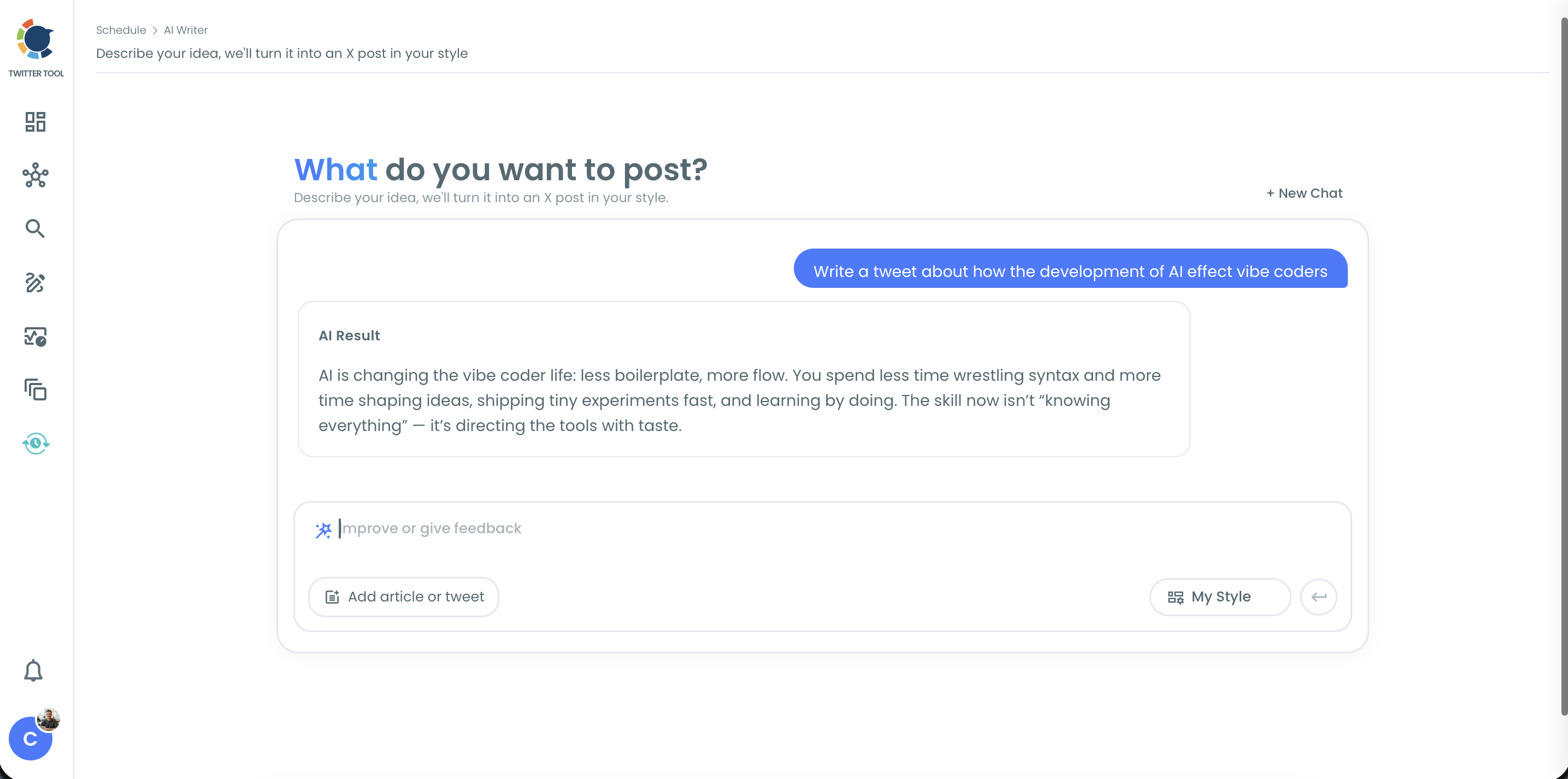
- Compare every other tweet with your original, and send one more instruction if any of them changed.
Check the last tweet and schedule the thread
- Click Use Post to load the thread into the full X Post Planner panel, then edit by hand or use Add another post if the ending still needs work.
- Apply Auto Numbering with Skip last tweet turned on if you want the ask free of a label.
- Choose Schedule and pick a date and time at least 15 minutes ahead.
That sequence protects what already works:
- The style is set before generation so the new line matches your voice.
- The comparison catches any drift before it reaches the planner.
- The 15-minute lead time is a planner rule you cannot skip for a scheduled post.
Quick recap:
- Paste the thread and set the style.
- Ask for the ending in the feedback box.
- Check the other tweets, number them, and schedule.
The planner side of this has its own page if you want to schedule a Twitter thread with cross-posting or best-time slots.
The other tools mentioned above live in X Post Planner.
Compared with deleting and retyping tweets by hand in a composer, this keeps your text in one conversation until it is ready.
For a look at another scheduler's approach, see this review of Hootsuite Twitter threads.
Circleboom's position as an official Enterprise partner of X is the safety answer here, since the tool that schedules your thread does so through approved access to your account.
How to word the feedback message so your X thread stays intact
The feedback box answers best to one narrow instruction, because it is built for small adjustments.
A message that asks for a new ending, a shorter middle and a friendlier tone gives you three changes to check at once, and you will not know which one damaged a line you liked.
Compare the two versions of the same request. These prompts are examples written for this article:
| Weak message | Stronger message | What improved |
|---|---|---|
| "Add a CTA" | "Add a last tweet that sends freelancers to the worksheet" | Reader and destination named |
| "Make the ending better" | "Shorten the last tweet and open with who it is for" | One measurable change |
| "Sound less salesy" | "Replace 'don't miss out' with what the page contains" | Exact phrase to change |
Each stronger message contains something the AI could not have guessed. That is the real work in this step, and it is why having your one sentence ready matters more than the tool you type it into.
Add a personal detail if you have one. A generated line becomes more believable when you supply the specific thing, such as "I built this after pricing 30 projects by hand," provided it is true.
AI Writer can place the detail. It cannot know it.
When the feedback box is the wrong control on X
Three controls cover the cases the feedback box does not:
- The regenerate icon gives you another version of the same prompt when the draft misses in a way you cannot name.
- + New Chat starts fresh when you want a different direction and not an adjustment.
- Collections keeps a draft you like but cannot post yet.
Now you have a closing line worth keeping. Next comes the read-through that catches what the conversation could not.
What to check in the last tweet before it goes out
Before the ending runs, read it on its own, the way someone arriving from a notification would, and check four things:
- The offer is true. The page contains what the tweet says, and any date in it is still correct.
- The link goes to the right place. Open it from the composer draft, not from memory.
- The tweet fits. Thread tweets each count separately toward the character limit, which depends on your account.
- There is one ask. A follow request beside a signup link splits the reader's decision.
The link deserves one more minute. Adding tags to the URL lets your analytics say which post sent each visitor, so you can tell this thread's traffic from everything else.
See how to use UTM parameters to track social media success for the format.
A reply can do extra work as well. A reply on your own post keeps the ask where people are already reading, and there is more on how to auto-reply to your tweets.
After it has run, X Post Analytics shows URL clicks by post.
Which Twitter thread CTA fits your thread?
The right ending depends on what you want after the reader finishes, so use the fork that matches your situation:
- If the thread teaches a process, offer the template or worksheet behind it and link it in the last tweet.
- If the thread argues a point, ask a narrow question people can answer in a few words, and leave the link out.
- If the thread came from an article, send readers to the part the thread could not include, such as the data or the examples.
- If your account is new, ask for the follow and say what you will post next.
Whichever branch you take, stay with one ask for the whole thread, and judge it by the matching number: URL clicks for a link, replies for a question, profile clicks for a follow request.
One thread proves little, so look across several endings before you decide a format does not work for your account.
I would rather see a plain ending that matches one of those than a clever one that matches none.
Circleboom keeps the draft, the ending and the schedule in one workflow, so the fix takes one session.
→ Write your Twitter thread CTA and queue the thread
Last-tweet questions from thread writers
Can the CTA tweet get a second chance if people miss it?
Yes. Circleboom's Auto Retweet reposts on X after the delay you set, removes the repost if you want, and repeats the cycle.
Check that dates and links are still valid first, because it does not check them for you.
Does thread numbering take characters from my CTA?
Yes. Auto Numbering labels count toward each tweet's character limit on X. Use a shorter format such as 1/, or turn on Skip last tweet so the closing tweet carries no label at all.