
My newsletter goes out once a week, which means 52 announcement posts a year. For most of last year, all 52 went to X and almost none reached Bluesky or Threads, where a growing share of my readers now spend their scrolling time.
The fix turned out to be a toggle in the scheduling panel. Today one click lets me cross post X to Bluesky and Threads at the same moment, every issue.
Can you cross post X to Bluesky and Threads in one click?
Yes. Circleboom's Cross Posting publishes a post written on X to your connected Bluesky and Threads accounts at the same scheduled moment, and Circleboom Publish's universal composer can do the same when more networks join the plan.
→ Cross post X to Bluesky and Threads in one click
Why my newsletter announcements never left X
The announcement post is the only marketing my newsletter gets. It goes out the morning an issue lands, with the headline, one sharp line from the issue and the subscribe link.
X was always first because that is where I started writing in public. Bluesky and Threads came later, and they got the leftovers.
Some weeks I pasted the post into Bluesky in the afternoon. Some weeks I forgot Threads entirely. Across a quarter, my Threads account announced maybe four of thirteen issues.
The cost was easy to calculate and hard to ignore. Three platforms times 52 issues is 156 posts a year. Done by hand, each one meant opening another app, switching to the right account, pasting, trimming and checking the link preview.
I had convinced myself the readers on Bluesky would find the issue anyway.
They didn't. The subscribe link only works where it is posted.
On Bluesky and Threads, my newsletter did not exist.
Plenty of writers split their time between the two text networks. The reasoning in why I use both Bluesky and Twitter will sound familiar: different readers, same writer, no time for three routines.
What I needed was a way to cross post X to Bluesky and Threads as part of writing the post, not as a chore after it.
The copy-paste workaround that failed on Bluesky and Threads
My first attempt was a reminder. Every issue morning, a calendar alert told me to copy the X post to the other two networks.
It lasted three weeks. The alert fired during a call, then during a deadline, then I snoozed it into the next day, and by then the issue was old news on X.
The second attempt was writing all three posts at once in a notes app and pasting them out one by one. That worked when I had time and collapsed the week I didn't.
A routine that depends on a free half hour is not a routine.
The Circleboom flow that carries one post from X to Bluesky and Threads
Circleboom's Cross Posting is the feature that does this. You write the post on X in Circleboom's X Post Planner, switch on Bluesky and Threads in the Schedule panel, and the post publishes to X and both networks at the same time. You connect each destination account once; after that, every post can carry it.
Before giving any tool my X account, I checked one thing. Circleboom is one of the companies on X's official Enterprise developers list, so the posting runs through X's approved access and not a scraping workaround. That settled the safety question for me.
The connection step happens in the account settings, where a Crosspost Accounts tab lists the networks you can attach:
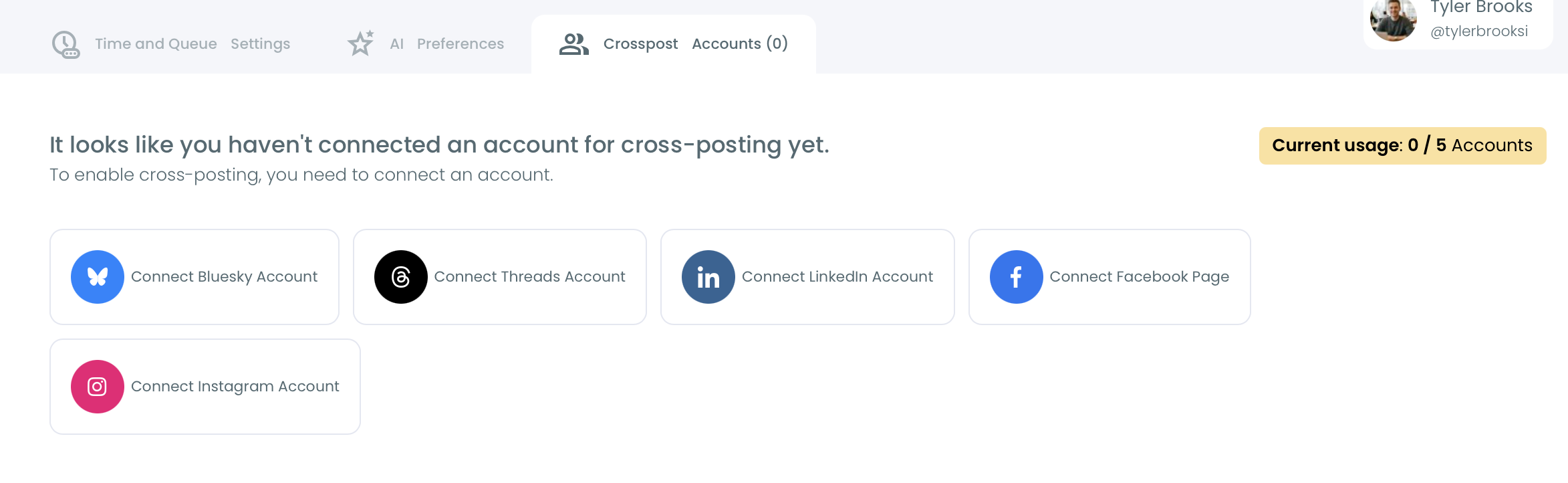
Bluesky and Threads are both on that list, along with LinkedIn, Facebook and Instagram. For my newsletter I only switch on the two text networks, which is the setting that lets me share every issue post on Bluesky and Threads automatically.
Circleboom's help center walks through the same setup on how to connect your Twitter/X and Bluesky accounts to cross-post.
Three rules that shaped how I cross post X to Bluesky
Three rules from the feature itself shaped my setup:
- One account per platform per post. Each send goes to one Bluesky account and one Threads account.
- One shared publish time. All destinations go out at the scheduled moment; per-platform offsets are not supported.
- Per-platform limits are checked before scheduling. Circleboom flags text that runs past a destination's limit.
That first rule is fine for me because when I cross post X to Bluesky, I only need one account on each network.
The third rule turned out to be the most useful, and the next section explains why.
For the whole X-first approach, the X Post Planner page covers the writing side. The older guide on how to mirror your Twitter posts to Bluesky explains the idea behind mirroring one timeline into another.
How I cross post X to Bluesky and Threads in one click
The setup has three phases: connect the two networks once, write the issue post on X, then toggle the destinations and schedule. After the first week it takes me about three minutes per issue.
Connect Bluesky and Threads once
- Log in to Circleboom with the account that holds your X profile.
- Open the Crosspost Accounts tab in your X account's settings and connect your Bluesky and Threads accounts.
Write the issue post on X
- Open X Post Planner from the X AI Writer for Creators + Post Analytics menu.
- Write the announcement with the headline, one line from the issue and the link, and keep it under 300 characters so Bluesky takes it as written.
- Attach the issue's header image, compressed under 2 MB, which is Bluesky's per-image ceiling.
Toggle Bluesky and Threads on and schedule
- Click Schedule and, under Cross post on, switch on Bluesky and Threads; use the pencil icon if you need to change which account receives it.
- Pick a best posting time and confirm, and the post goes to X, Bluesky and Threads together.
Writing to Bluesky's limits before the toggle is what keeps the click clean: the post passes the tightest destination first, so nothing gets flagged at the last step and nothing goes out half-trimmed.
Three minutes on Circleboom's Cross Posting: one tweet sent on to Instagram, Facebook, LinkedIn, Bluesky and Threads from one schedule.
Write for Bluesky's 300 characters, not for X
This was the lesson I did not expect.
I assumed X, the network famous for short posts, would set the limit. It does on a standard account: 280 characters.
But X lets a Premium account write much longer posts, and Circleboom uses whatever limit X allows for the connected account.
So the moment I started drafting longer issue posts on X, the binding limit moved, and every attempt to cross post X to Bluesky depended on Bluesky's number instead. Circleboom's limits for my three destinations:
| Platform | Text per post | Images |
|---|---|---|
| X (standard) | 280 characters | up to 4, 5 MB each |
| Bluesky | 300 characters | up to 4, 2 MB each |
| Threads | 500 characters | up to 10, 8 MB each |
A 600-character issue teaser fits my X account and fails twice: Threads needs it under 500 and Bluesky under 300. Circleboom flags that before scheduling, and the per-platform editor lets me shorten each version.
Now I skip the editing entirely. I write every announcement to 300 characters and one image under 2 MB, and it fits all three as it is.
That constraint improved the posts. A 300-character announcement has room for the headline, one line and a link, which is exactly what makes someone open the issue.
The Bluesky image size rule
Bluesky's 2 MB per-image limit is the tightest of the ten platforms Circleboom supports. My newsletter header exports at around 3 MB, so for months the image was the part that broke.
The fix is boring: export the header for social at a smaller size, once, and reuse that file for every issue.
When Circleboom Publish's universal composer is the better route
Cross Posting is built to cross post X to Bluesky and the other networks, so it starts on X. That suits me because X is where I write.
Two situations push the same job into Circleboom Publish's universal composer instead.
The first is a wider plan. When a newsletter also announces on LinkedIn, a Facebook Page or Google Business Profile, the universal composer, labeled "Create New Post on All Platforms," sends one post to any mix of connected accounts across all ten platforms in one action.

The second is timing. Cross Posting shares one publish time across every destination.
In Publish, each account keeps its own Queue of recurring slots, and Best Time to Post is computed for a Bluesky account separately from any X account, because the two audiences are online at different hours. Post to Queue drops the post into each account's next open slot.
Two caveats keep this honest. The universal composer sends the same text to every account and its AI writer does not enforce each network's limit on its own, so the 300-character habit still applies. Thread building and Auto Repost live in each network's own composer, not in the universal one.
For Threads specifically, the Threads post scheduler has the tools the universal composer leaves out, such as carousels of up to 10 images and Alt Text.
Is posting the same issue to X, Bluesky and Threads duplicate content?
No. Duplicate-content trouble comes from posting the same text to several accounts on the same platform, or repeating the same post again and again on one account. One announcement going once to one X account, one Bluesky account and one Threads account is ordinary cross-platform promotion.
The line I watch is repetition on X itself. Circleboom blocks the same tweet from going out again on X within one week, because X penalizes duplicate content. When I want an older issue to get a second chance, I either ask the AI writer for a fresh angle or use Auto Repost on the original post.
On Bluesky, the same resurfacing tool exists in Circleboom's Bluesky composer, and the guide on how to auto repost on Bluesky explains the settings. It is set before a post is sent, never added afterward.
Not on Threads yet? Start with post on Bluesky and Twitter at the same time for running the two networks side by side.
What changed once every issue reached X, Bluesky and Threads
The first change, once I could cross post X to Bluesky and Threads in one step, was arithmetic. 156 hand-made posts a year became 52 clicks, one per issue, with the other two networks carried along.
The second change showed up in replies. Each network answered differently: Bluesky readers replied to the issue's opening question, and Threads readers shared the subscribe link with a comment of their own. Same post, three different conversations.
The third change was about consistency. A Threads account that had announced four issues in a quarter now announces all thirteen.
On networks still growing, showing up every week is most of the work.
Moving an audience takes more than posting, though. Some of my X readers asked how to find me on Bluesky without searching. The guide on how to export your Twitter followers to Bluesky is what I sent them.
Between issues, let an RSS feed post to Bluesky and Threads
An issue a week leaves six quiet days. Circleboom can connect an RSS feed to Bluesky, Threads and X so new items post automatically; the RSS feed to social media setup is a one-time job.
My newsletter archive has a feed, so every issue page also posts on its own. The hand-written announcement is still the one with the best line in it, and that is the one I cross post.
One newsletter issue on X, Bluesky and Threads
My readers had already moved to two more timelines, and now every issue post meets them there.
→ Cross post your next issue from X to Bluesky and Threads
Questions about cross posting from X to Bluesky and Threads
Does a thread on X arrive on Bluesky as a thread?
No. When you cross post X to Bluesky, each tweet of an X thread is published on Bluesky as an individual post. For a real Bluesky thread, build it in the Bluesky composer with "Add another post."
Can I cross post an X poll to Bluesky or Threads?
No. Platform-specific interactive features such as X polls are not carried through Cross Posting; the text and any attached image or video are. Post the poll on X and share a plain-text version elsewhere.
What happens if my Threads connection expires?
The cross-post to Threads fails at its scheduled time while X and Bluesky still go out. Reconnect the account in the Crosspost Accounts tab to keep future posts flowing.