Short answer: yes, but not every tool that says "Story scheduling" publishes the Story for you.
Instagram's own app cannot schedule Stories. Meta Business Suite can, if your account is managed there. Third party tools differ a lot: in our test, Circleboom Publish published the Story at the scheduled minute with music, while Planable could only save it as a draft until its phone app was installed, and even then it works as a reminder for you to post by hand.
We are Circleboom, and Circleboom Publish is our product. That is why we put every step on screen, so you can check the results yourself.
How we tested
One image. One Instagram account. Three routes. All on November 6, 2026.
The image: a candle flame on a black background, exported at 1080 x 1350. That is the 4:5 shape Instagram uses for feed posts, not the 9:16 shape of a Story. We kept it that way on purpose, because many brands reuse feed images as Stories, and we wanted to see how each tool handles the wrong shape.
The account: a test Instagram profile, pitt.aus, connected to both scheduling tools.
The plans: Circleboom Publish on Enterprise, Planable on its Free plan. The Story limit we hit in Planable came from how the account was connected, not from the plan.
Step 1: Instagram itself
Before any third party tool, here is what Instagram and Meta offer for free.
The Instagram website: the Create menu has three options: Post, Live video and Ad. There is no Story option, so you cannot even post a Story from a computer, let alone schedule one.

The Instagram app: you can schedule, but only some formats. Instagram's Help Center says public accounts can schedule Reels, photos and carousel posts, up to 25 a day and up to 30 days ahead. Stories are not on that list.
Meta Business Suite: Meta's free dashboard for Facebook Pages and Instagram business accounts can schedule Stories, on mobile and on desktop, according to Meta's help pages. The catch is the setup: your Instagram account has to be managed inside Business Suite, with the right access. We could not open Business Suite for our test account, so this part comes from Meta's documentation, not from our own test. If your account already lives in Business Suite, it is a free option worth trying.
So scheduling a Story natively is possible, but not in the Instagram app most people use every day.
Step 2: Circleboom Publish
Circleboom Publish is our social media scheduler for Instagram, Facebook, X, LinkedIn, Google Business Profile, Pinterest, TikTok, YouTube, Threads and Bluesky.
Creating the Story
We opened the Instagram composer, selected pitt.aus and clicked the Story Post tab. The "Create Instagram Story" window opened, and we uploaded the same 4:5 image.
The preview looks like a real Story: profile name at the top, reply bar at the bottom, the image centered on black. It showed no crop warning.

Three buttons sit right under the preview: Post to Queue, Schedule and Post Now. No phone app and no reminder step.
Adding music
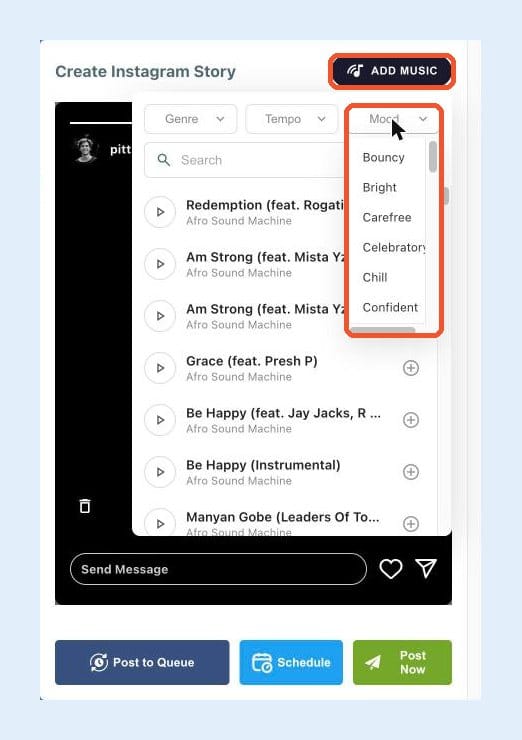
Click Add Music and a track library opens, with filters for Genre, Tempo and Mood plus a search box. We picked the Chill mood and a calm track called "Slowly" by Zeefellaz.
A small editor then lets you choose which 15 seconds of the song to use.

After Done, the preview shows the track name under the account name.

Scheduling it
We clicked Schedule and set it for 12:30 PM, about 15 minutes ahead. It appeared in the Circleboom Outbox as an Instagram Story, waiting for its slot.
One limit applies to every third party tool, ours included: a scheduled Story cannot carry a link sticker, poll or mention. Instagram does not open these to third party tools (Planable's help center lists the same limits), so Circleboom does not offer them either. If a Story needs a link sticker, add it in the Instagram app.
Step 3: Planable
Planable is a content collaboration and scheduling tool, popular with agencies for its approval workflows.
Creating the Story
We clicked Compose, picked pitt.aus and switched to the Story tab. Uploading was easy. Like Circleboom, Planable placed the 4:5 image inside a 9:16 frame with no warning and no cropping.

Trying to schedule it
We picked a date and time (13:00, Istanbul time) and opened the menu next to Save draft. It had two options: Set reminder and Publish now. Both were greyed out. There was no Schedule option like the one in Circleboom.
Hovering the small orange warning explained why: "Mobile app required to publish this post."

In this setup, a Planable Story is a reminder, not an automatic post. Planable's help center describes the flow: at publishing time you get a notification on your phone, open Instagram, post the Story yourself, then come back and mark it as published.
The only thing we could actually do was save it as a draft.
Stickers and music
Planable has an Add stickers button with Text, Location, Link, Music, mention, hashtags, Questions and Notes. The note at the top of the panel explains what they are: planning notes. When it is time to publish, you get a phone notification so you can copy and paste them into Instagram yourself.

Music works the same way. Clicking it opens a text box that says "Add music info to include later."

That helps a team plan Stories together. It does not attach music to a scheduled Story.
Why no direct publishing?
Planable can publish some Stories directly. Its help center says direct Story publishing needs an Instagram business account, is switched off when a page is first added, and is turned on in the page settings.
We opened the page settings for pitt.aus. There were switches to publish Posts directly and Reels directly. There was no switch for Stories.

Our account was connected through Instagram login, not through a Facebook Page. Based on what we saw, that connection type kept Stories on the mobile app route. If your account is connected through a Facebook Page, your results may differ, so check that switch before you count on scheduled Stories.
What Planable users report
Planable scores 4.4 out of 5 from 71 reviews on Trustpilot, so most users are satisfied. A few reviews match what we saw. A two star review from January 2026 says the reviewer's Stories never published through Planable, and that music, tagging and collab options were missing. A one star review from September 2025 describes scheduled posts failing with no explanation. Another says features that used to be included are now sold as add ons. Planable's billing page lists Analytics ($14), Social inbox ($9) and Social listening ($99) per workspace per month as add ons for paid plans.
These are a small share of the reviews. We mention them because they line up with what we saw on screen.
Step 4: The results on Instagram
Circleboom Publish: the Story went live on its own. Instagram's timestamp shows 12:30:36, half a minute after the slot we picked. Nobody touched a phone.

Circleboom moved it from the Outbox to Sent Items at the same minute, and nothing appeared in Failed Items.

Two details worth knowing:
- The music came along, without a label. Circleboom turned the photo and the track into a 15 second vertical video (720 x 1280), so the music plays as the Story's sound. Because the track is part of the video, Instagram does not show a music sticker with the song name, the way it does when you add music in the app. The Circleboom preview shows the track name; the live Story does not.
- The 4:5 image was not cropped. The whole candle stayed in the frame, centered with black above and below. On a black photo that is invisible. On a bright photo you would see the bands, so export Story images at 1080 x 1920 for the cleanest result.
Planable: 13:00 came and went, and the Story is still a draft in the calendar. Nothing new appeared on the account.
| Meta Business Suite* | Circleboom Publish | Planable | ||
|---|---|---|---|---|
| Schedule a Story | No | Yes | Yes | Reminder only |
| Publishes on its own | No | Yes | Yes | No |
| Music | No | Not tested | Built in library | Text note |
| 4:5 image | n/a | Not tested | Fitted, no warning | Fitted, no warning |
| Link stickers, polls | In app only | Not tested | No | Copy by hand |
*Meta Business Suite results come from Meta's help pages; we did not test it. Circleboom Publish published the Story at 12:30 with music as the Story's sound (no music sticker). Planable was connected through Instagram login.
Do the math
Take a brand that posts one Story a day: 30 Stories a month.
With a reminder based flow, every Story means stopping work at the set time, opening the notification, opening Instagram, posting, then marking it as done. At something like 3 minutes each, that is 90 minutes a month, plus being available at the exact minute 30 times a month.
With real scheduling, you prepare a week of Stories in one sitting, add a track to each and schedule them. That is about 4 sittings a month instead of 30 interruptions.
The minutes matter less than the interruptions.
Why it matters for traffic and sales
Stories are where followers check in with a brand every day. Posting daily keeps you near the front of the Story tray, and every tap on your profile is a chance to send someone to the link in your bio.
Make that link measurable. Tag it with UTM parameters using Circleboom's UTM Link Builder, so Google Analytics shows how many visits and sales your Instagram profile drives. Then use Circleboom's Best Time to Post for Instagram to publish when your followers are most active.
A Story that never goes out because nobody was free at 13:00 drives no traffic at all.
Which should you use?
- Meta Business Suite if your account already lives there and you do not need music. It is free.
- Circleboom Publish if you want to schedule Stories from your desktop, add music from a built in library, and have them publish on their own. That is exactly what it did in this test.
- Planable if your team mainly needs approvals and comments on drafts. Check the Stories switch in your page settings first; without it, Stories become phone reminders.
Try it with your own account: schedule Instagram Stories with Circleboom.