

Which of your tweets did the most people see? On X, your most viewed tweet is the one with the highest impressions count, and ranking a whole history by that number takes a sort that X itself does not provide.
Manual on X: open posts one by one, copy each view count, compare by hand, and accept that the summary only covers the last 28 days. Circleboom: Circleboom ranks every retrievable tweet on your X account by impressions in a single click, with data pulled through official Enterprise API access from X.
→ Find your most viewed tweet on X
Definition first, then the rank, the 3,200-tweet window and what every sort column means.
What "most viewed tweet" means on X
A most viewed tweet is the post with the highest impression count on your account. Impressions are what X shows as views, and they measure exposure, not approval.
The Metrics page of X's API documentation defines an impression as each time a post appeared on a user's screen. The count is not unique, so one person who sees the same post twice adds two impressions.
That definition separates views from reactions:
- Impressions count appearances, including a scroll-past in a timeline.
- Likes, retweets and replies count deliberate actions by people who stopped.
- Engagement rate divides those actions by impressions to show how many viewers acted.
Why impressions always run ahead of engaged readers
Circleboom's definition goes further: a tweet earns an impression whenever it shows up in a timeline, a search result or a notification, and that includes autoplay and posts scrolled past without a pause. Add the fact that repeat sightings count again, and an impression total is a count of screen appearances, not a head count of people.
That is why a large number on its own proves little. A tweet can be shown thousands of times to people who never slowed down, and it will still outrank a smaller post that most of its viewers read in full.
A tweet ranked first by likes and a tweet ranked first by impressions are often different posts. Most lists that promise your "top tweets" rank by likes, which answers a different question.
When the question widens from views to overall popularity, the broader overview of how to find your most popular tweet puts views and likes together with the other signals.
Circleboom treats impressions as their own sortable column, so the definition and the ranking line up. If you want a ranking built on exposure, the place to sort tweets by impression count is that column.
Account-wide reach over time sits in a separate view, Circleboom's Twitter impression analytics.
Why X does not rank your tweets by impressions
X gives you numbers post by post and a recent summary, but no list of your full history ordered by views. The per-post view needs a click on each tweet. The summary covers the most recent 28 days, so older posts never enter the comparison.
For an account with a few dozen tweets, opening each one is slow but possible. For an account with a few thousand, it is not a realistic job, and the answer most people settle for is a guess.
The number already exists for every post
Every tweet you publish already carries its own figure, because X's API returns an impression count as a per-post metric. What nobody hands you is those figures lined up in order, with your most viewed tweet at the top.
Circleboom retrieves each tweet with its metadata and engagement metrics through X's official API access, then calculates engagement rate itself as total engagements divided by impressions. Each tweet becomes one row and each metric one column.
I find this framing ends most arguments in a content meeting quickly. Once everyone agrees the figure exists per post, the only argument left is which column to sort.
Circleboom fills that gap with a table instead of a chart, and any column in it sorts from highest to lowest.
How to rank your tweets by impressions on X
To rank your tweets by impressions, connect your X account to a tool that loads your tweet history with per-post metrics, then sort that list by the impressions column. In Circleboom, the list lives on the Content page of Post Analytics, and one click on the Impressions header puts your most viewed tweet in row one.
The four steps below cover the whole route.
The data comes through official access: X includes Circleboom in its Enterprise customer directory, so the ranking uses X's own numbers rather than a scraped estimate.
Compared with clicking through posts on X one at a time, the sorted table answers the question for every retrievable tweet at once. You can find the most viewed tweet on your X account without downloading or merging anything.
Four steps from login to a ranked list on X
- Log in to Circleboom and authorize the X account you want to analyse, so Circleboom can load its tweets and their metrics.

- Navigate to the X Post Planner menu on the Circleboom dashboard.

- Open Post Analytics, go to the Content page and sort by Impressions, highest first.
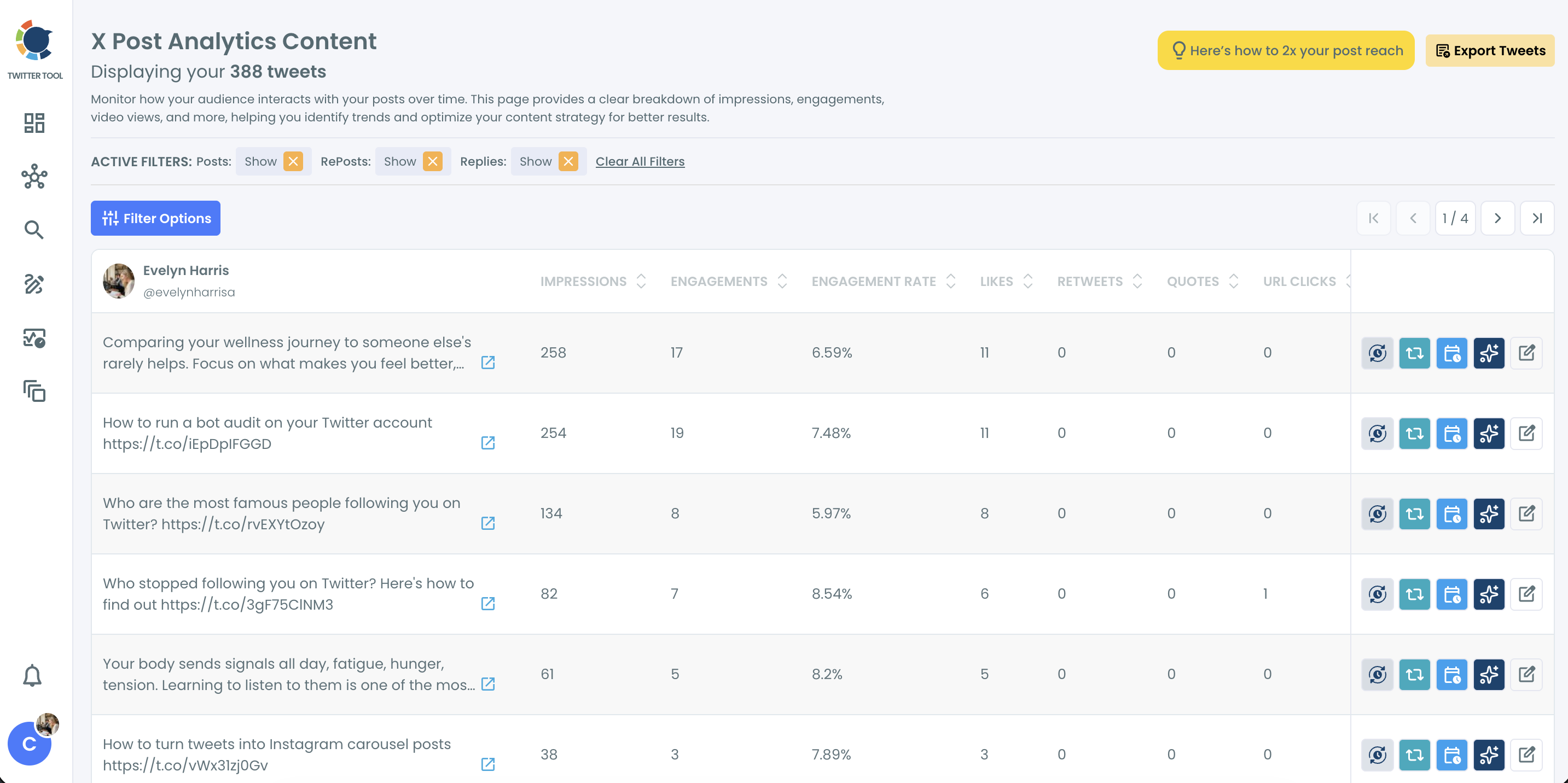
- Compare the top rows by engagement rate before you treat the leader as your strongest post.
The order matters because the login decides which account's data loads, the sort decides what "top" means, and the rate check stops reach from being mistaken for quality.
For the account-level picture, the Overview page of Post Analytics charts Impressions, Likes, Bookmarks and other metrics as a line or bar chart, with summary cards that show the change.
In one line: connect the account, open the Content page, sort Impressions, read the rate.
Narrowing the ranking before you compare
For a fairer contest, sort within a like-for-like set. Filter Options can hold the list to one media type, one date range or original posts only, and its Impression Count field sets a minimum so low-reach posts drop out before you compare rates.
What each sort column tells you about a tweet on X
Every column in the table answers a different question, so the column you sort by decides what "best" means. This map shows what a high value in each column signals, based on how Circleboom interprets each metric.
| Sort column | What a high value means | What it suggests doing |
|---|---|---|
| Impressions | The post was shown to the most people | Check its rate before reusing it |
| Likes | Viewers approved of it | Study its tone and topic |
| Retweets | Viewers chose to pass it on | Give it another distribution window |
| Bookmarks | Viewers saved it to return to | Expand it into a thread or resource |
| Engagement rate | A large share of viewers acted | Give it more reach at a better time |
Impressions and engagement rate in a sample ranking
Circleboom's anonymised sample report shows how far apart the two columns can sit. Sorted by impressions, its top post has 258 impressions and a 6.59% engagement rate. A post further down the same page has 82 impressions and an 8.54% rate.
The first post is the sample account's most viewed tweet on that page. The second one did better with the people who saw it, and a ranking by rate would put it higher.
Two columns in that table are easy to confuse. Impressions describe what X distributed; engagement rate describes how viewers responded.
A post can top one and sit near the bottom of the other.
Circleboom adds one caution about rate: a tweet with very few impressions can show a very high rate that is accurate but not meaningful at scale, so read the rate next to the raw counts.
A post that leads on rate with modest reach still deserves a closer look, since the few people who saw it responded.
The quieter columns: bookmarks, replies and clicks
Bookmarks deserve a second look because they are the quietest signal. People save what they plan to use later, and the guide to see your most bookmarked tweets covers that ranking on its own.
Replies and URL clicks add two more readings. Replies point to topics that start conversations, and URL clicks show which posts sent people to a page, which matters most to brands measuring traffic.
Sort by the column that matches the job. A ranking by views answers a reach question and nothing else.
If you want the raw arithmetic for a single post, the Twitter X metrics calculator is a quick way to run it.
Reuse, not rewrite from scratch: how to give top-ranked tweets a second round of engagement.
Can you find a most viewed tweet older than your last 3,200 tweets?
No, not in the impressions ranking. The X API returns up to the 3,200 most recent tweets for standard access, and Circleboom's table ranks only within that set, so older posts are not in the list at all.
The limit is counted in tweets, not years, which makes posting volume the deciding factor:
- At 10 tweets a day, 3,200 tweets is about 320 days, under a year of history.
- At 2 tweets a day, the same window covers 1,600 days, nearly four and a half years.
Heavy posters feel this most. A high-volume account may have its most viewed tweet of all time sitting just outside the window, while the ranking crowns the best post of the past year instead.
Filters do not widen the window either. Filtering narrows the tweets already loaded; it never fetches extra ones beyond the set the API returned.
When the post you want is older than that, searching for it directly is the better route, and the guide on how to find old tweets covers ways to locate them.
I treat the top row on a busy account as "most viewed in the retrievable window" and say so in any report. That small label prevents a confident claim about a ranking that never saw the account's early years.
Which impressions ranking to run on X, by goal
The right sort depends on what you plan to do next:
- If you need proof of reach for a report or a pitch, sort by impressions and quote the top row with its date range.
- If you want a post to reuse, sort by impressions, then keep only the top rows whose engagement rate beats your account's average.
- If the leader is old but still accurate, refresh its wording with Circleboom's AI rewrite for old tweets instead of posting the same text again.
- If one campaign is the question, set the date range to that campaign before you sort, so older posts cannot crowd the top.
- If your account posts heavily, label the result as the most viewed tweet of the last 3,200, not of all time.
Once the top post is clear, putting it back in front of people is a separate step, and the walkthrough on how to repost a tweet handles it.
Whichever branch fits, the ranking comes from X's own data, delivered through Circleboom's place among X's official Enterprise developers.
→ Put your most viewed tweet in row one
What people ask about tweet view counts
Does a high view count mean a tweet performed well?
Not always. Impressions show how widely a tweet was shown, while engagement rate shows how many viewers acted, so a post with huge reach and a weak rate can trail a smaller post that its viewers responded to strongly. In my experience, the posts worth reusing are the ones high on both.
Why is the impressions cell blank for some older tweets?
Impression data may be unavailable for some older tweets and for tweets posted before your account connected to Circleboom. Those tweets show no engagement rate either, because the rate needs an impression count to divide by.
Can you see how many views a single tweet has?
Yes. X shows a view count on each post, and Circleboom shows the same figure as the Impressions column for every retrievable tweet at once.
Does sorting tweets in Circleboom change anything on my X account?
No. Sorting and filtering only reorder the data already loaded, and actions such as reschedule or AI rewrite need your deliberate confirmation; an AI rewrite never posts on its own.
How current are the impression numbers in the ranking?
They reflect the values X reported when the data loaded. A tweet that is still gathering views can show a lower figure until the next refresh, so give a brand-new post time before comparing it with older ones.





%20without%20Premium)

