Most advice about a falling follower count tells you to watch the number more closely. The number is the least informative thing on the page, because it cannot say who left, when or why.
How can you tell when someone loses followers on Twitter, and who left?
X shows only the current total, so the answer needs a record kept over time. Circleboom snapshots a public account's follower list on X and dates every follower it loses, drawing on official X (Twitter) Enterprise APIs.
→ See when someone loses followers on Twitter
What X shows when someone loses followers
When someone loses followers on Twitter, X shows a lower follower total on their profile and nothing else. There is no history of departures, no date beside each one and no list of the accounts that left. The platform has no notification for it either.
That silence matters most to people whose work depends on someone else's audience:
- An agency briefing a client on a rival creator.
- A brand watching a competitor after a launch or a misstep.
- A researcher following how a public figure's audience shifts.
Each of them needs names and dates, and the profile offers neither.
That gap shapes every method people try. Any answer to "who left?" has to come from a comparison between an earlier list and a later one, and X does not keep the earlier list for you. Circleboom does, with a dated log of the followers an X account loses for any public account you choose.

Circleboom tracks a public X account's follower changes from periodic snapshots and lists each lost follower with profile data, so a drop becomes a set of names instead of a number.
Three ways to see that someone lost followers on Twitter
There are three practical routes, and they answer different questions. Only one of them names the accounts that left.
| Route | What it shows | What it misses |
|---|---|---|
| Live follower counter | The total, updating as it changes | Who left, and whether arrivals hid the losses |
| Manual list check | Today's followers, which you can save | Anyone who left before your first save |
| Snapshot tracking | Each lost follower, dated, with profile data | Changes before tracking started |
A Twitter live follower counter is the fastest way to confirm a drop is real. It is the wrong tool for explaining it, because it blends new and lost followers into one moving figure.
A manual list check works once you have two saved lists. The catch is the first one: if nobody saved the list before the drop, the departures are already invisible.
Comparing two saved lists of a large account by hand is also slow, and the result is a single net difference with no date on any departure inside it.
Snapshot tracking fixes both problems by saving the list on a schedule and comparing each save with the last. That is the method behind Circleboom's Track Someone's X Account's Following and Followers feature.
How the three routes fit together
In my own work the three routes run in sequence. The counter tells me something is moving, a quick look at the current list shows who still follows, and the tracking record answers the question that matters: who left, on which day, and what kind of account they were.
How Circleboom's follower-loss tracking works
The feature reads a public account's follower list at regular intervals, compares it with the previous snapshot and stores the accounts that are newly present or newly absent. Each change carries a timestamp, so the dashboard becomes a dated history rather than a picture of today.
Circleboom is a verified Enterprise partner of X, and that matters most for this exact task.
A follower-loss record is only as good as the list behind it.
Scraping-based collection can miss accounts or return partial lists, which produces phantom "losses" that never happened. Pulling the list from X's own source records keeps the comparison honest.
The choices that decide what gets recorded
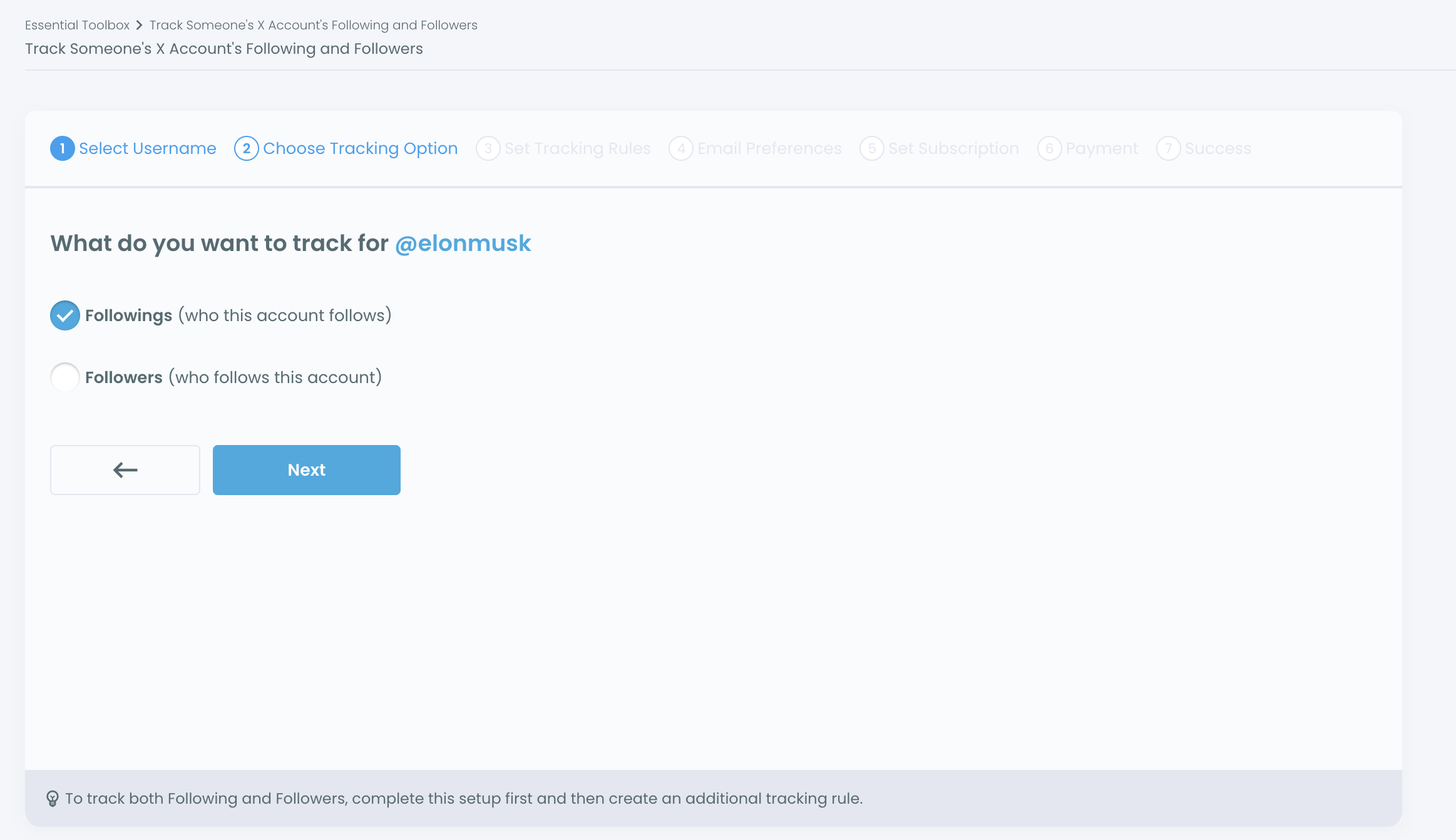
Setup runs through a seven-step wizard, and the choices that decide the result are these:
- Direction: Followers, for the people who follow the account.
- Change type: Track Recent Unfollowing for losses, or Track Both for losses and new followers.
- Reporting: a daily or weekly email that is sent only when a scheduled update finds a change, or a dashboard-only view.
What reaches you, and what reaches them
The tracked account receives no notification: Circleboom reads public follower data and nothing reaches the person you watch.
Tracking is a paid subscription, each active rule uses Tracking Tokens, and only public accounts can be added.
When you open Circleboom Twitter, the feature sits under the Monitoring menu.
The dashboard then shows a daily bar chart, with red bars below zero for lost followers, and a grid of the accounts behind each day.
Pick daily email when the account is in the middle of something fast, such as a launch or a public dispute, and weekly for steady background monitoring or a recurring client report. No email, in other words, means the scheduled update found no change.
You can track when someone loses followers on Twitter for as long as the rule stays active.
Why does a public account lose followers on X?
A public account loses followers for one of four reasons, and each leaves a different shape in a tracking record. Reading the shape is how you tell a platform cleanup from an audience walking away.
| Cause | What happens | What the tracking record tends to show |
|---|---|---|
| Locked or spam accounts removed | X removes locked accounts from follower counts | One deep red bar; rows of recent, sparse or low-activity profiles |
| Churn after an event | Real followers react to a post, campaign or controversy | Red bars clustered around one date; active, established accounts |
| Ordinary drift | People tidy their follow lists over time | Shallow red bars spread across weeks; a mixed set of profiles |
| Count looks wrong | The displayed total misbehaves for platform reasons | A drop on the profile with no matching red bars |
The cause is in the shape of the record, not in the size of the drop.
Platform cleanup of locked or spam accounts
X explains in its Following FAQ that locked accounts are removed from follower counts. So a sharp drop can happen without a single person deciding to leave.
In the record, this tends to show as one heavy day. Sort that day's rows by join date and follower count, and the cleanup pattern is usually plain: new profiles, few followers, little activity.
Churn after an event
Real departures cluster around something the account did. Use the date picker above the results grid to open the days around an announcement or a public argument, then look at who is in them. Established, active accounts leaving in a short window are a reaction worth reporting. The method in how to analyze someone's Twitter followers helps judge whether those accounts matter to you.
The grid's inline search reads names, usernames and bios, so you can check a day's departures for specific people, such as a rival's team or a journalist who covers the niche, without scrolling the whole list.
Ordinary drift
Every account loses some followers every week. Shallow, evenly spread red bars are normal background, and a report that treats each one as news will mislead. Compare periods rather than reacting to single rows.
The best defense against misreading drift is a baseline.
Let a rule run through a few quiet weeks before the moment you care about, and you learn what normal loss looks like for that account. A later cluster then stands out against a measured background instead of against a guess. Without that baseline, the first deep red bar after setup tends to look alarming whether or not it is.
A count that looks wrong
Sometimes the profile total moves while the record stays quiet. X's page on common following issues covers why follower and following counts can look wrong for platform reasons. When the number and the record disagree, trust the record of names and recheck the count later.
When causes overlap in the same week
Real weeks are rarely clean. A controversy can trigger genuine departures on the same days X removes a batch of locked accounts, and the two stack into one tall red bar. Split them inside the grid rather than on the chart.
Filter that day by Follower Quality and join date: the sparse, recent profiles are the cleanup, and what remains is the reaction. I report the two numbers separately, because a client hearing one combined figure will assume the worst.
The rows in the results grid carry name, tweet count, join date, following and follower counts, follow ratio and engagement status, and Filter Options adds Follower Quality labels such as Fake/Bot, Inactive and Eggheads. Those labels are Circleboom's reading of public data, not a verdict from X.
Can you track who they follow and unfollow as well?
Yes, with a second tracking rule. One rule watches one direction, so tracking an account's followers and its following means two separate setups, each its own subscription. The wizard says so on the Choose Tracking Option screen, and the account then appears twice in your management list.
The Following direction answers a different question: not who left this account, but whom this account left. An executive who quietly unfollows a partner company is a relationship signal, while an influencer losing followers is an audience signal. The post on the who follows whom on X Twitter follower tracker explains the relationship side in more depth.
Tracking an account's friends over time: what the Following direction records when an account starts or stops following others.
For a one-off check of a single relationship, Circleboom's who follows who on X view gives the current answer without a subscription.
The same tracker can also log the other half of follower movement: the accounts that start following someone. There is a guide on how to track someone else's number of new followers on Twitter.
How does their audience compare with mine on X?
Account Comparison answers this, and it pairs well with loss tracking. Comparison takes a snapshot of overlap between accounts, showing shared followers and gaps. Tracking shows how one account's network changes after that snapshot.
Together they tell you whether the followers someone lost were people you also reach.
In practice, compare first, then track.
If a competitor shares a large slice of your audience, their follower losses after a misstep may be your opening. If the overlap is small, their churn says little about your market. Circleboom's Twitter X account comparison page covers the snapshot side.
For the method behind shared audiences, the guide to find the intersection of followers between two Twitter accounts walks through reading overlap. I treat the overlap number as the filter that decides which competitors deserve a tracking rule at all.
The pairing also changes how you read a loss. When a lost follower appears in your own shared-audience list, that account is choosing between voices in your space, and its next follow may tell you where it went. When it does not, the loss belongs to the other account's story.
Checklist for reading someone's follower losses on Twitter
Seeing that someone loses followers on Twitter is easy. Reading it well takes a few habits:
- Confirm the drop on a live counter, then stop watching the number.
- Set a Followers rule with Track Recent Unfollowing, or Track Both, before the week you expect movement.
- Read the chart for shape: one deep bar, a cluster or a spread.
- Open the deepest days in the grid and check join dates, activity and Follower Quality labels.
- Export the dated rows as a CSV when the finding goes into a report.
The record is built from X's own source records, through Circleboom's official X Enterprise developer access, so a client or a manager can trust where the names came from.
→ Find out who someone loses on Twitter, day by day
Questions before reading someone's follower drop on X
Is a live follower counter enough to see who someone lost on Twitter?
No. A live counter shows the total and how it moves, but it never names the accounts that left or separates them from new arrivals. Use it to confirm a drop, then use tracking to see who.
Can I export the list of followers someone lost on X?
Yes. The Export button on the tracking dashboard saves the detected changes as a CSV. Exports use Export Tokens, a separate balance from the Tracking Tokens that keep the rule running.
Does tracking work on accounts with millions of followers?
Yes, with one caveat. For very large accounts, X may return partial list data, so small changes can occasionally be missed. Patterns stay reliable; single rows deserve a second look.
Do I lose the follower-loss history if I pause tracking?
No. Pausing stops new snapshots but keeps the existing dashboard history. Cancelling a subscription may affect data retention depending on the plan, so export anything important first.
Can I use this to see who unfollowed my own Twitter account?
You can, but a different Circleboom feature fits better. Who Unfollowed Me is built for your own lost followers, while this tracker is meant for watching other public accounts over time.