

The best Twitter poll ideas ask about something your followers already have an opinion on, give two to four short options that don't overlap, and lead to a follow-up post once the votes are in. Below are 40 poll ideas grouped by goal, each with options that fit X's 25 character limit. To turn them into posts, use Circleboom's Poll Generator inside X Post Planner, which lets you write and schedule polls in advance, something X itself does not allow.
A poll looks like the easiest post on X. One question, a few options, done.
Then it goes out and collects eleven votes. Not because the audience is dead, but because the question was too vague to care about, or the options all meant roughly the same thing, or it went live at 11 pm on a Friday because that was the moment you remembered to post it.
The good news is that polls really are a low-effort format for the people voting. One tap, no typing. Followers who have never written a single reply will vote on a clear A or B question. The hard part sits on your side: coming up with questions worth answering, again and again, and getting them out at the right time.
With Circleboom Twitter, you can find question angles in the Inspiration feed, draft the poll text with AI Writer, add up to four options with the Poll Generator, and schedule the whole thing for when your followers are online.
Where Circleboom fits into a polling routine
Circleboom is an Official X Enterprise Developer, so polls created in Circleboom are published through X's official API as native X polls. Followers vote on X exactly as they would on any other poll. There is no external link and no third-party voting page.
Three tools do most of the work here:
- Inspiration shows trending posts from accounts in your topics, with their replies, retweets, likes, and bookmarks. Posts with heavy reply counts are usually sitting on a question people want to argue about.
- AI Writer turns a few words like "poll about remote work" into a full post, and you can refine it with follow-ups such as "make it shorter" or "sound more casual."
- Poll Generator adds up to four choices of 25 characters each and a poll length from 5 minutes to 7 days, then lets you schedule the poll like any other post.
The ideas below give you the questions. Circleboom handles getting them written and published on a schedule.
40 Twitter poll ideas by goal
Every option below fits within X's 25 character limit, so you can paste them straight into the poll fields.
Polls that get quiet followers talking
These work because there is no wrong answer, and most people have a strong preference.
1. Coffee or tea while you work? Coffee / Tea / Neither / Both, no shame
2. When do you do your best work? Early morning / Afternoon / Late night
3. How many tabs are open right now? Under 10 / 10 to 30 / 30+ / I lost count
4. Your inbox right now? Inbox zero / Under 50 / Hundreds / Don't ask
5. Notifications on or off? All on / Only important / All off
6. How do you read long articles? Read it now / Save for later / Skim it / Never read it
7. Best day of the week to get real work done? Monday / Midweek / Friday / Weekend
8. Desk setup? Laptop only / One monitor / Two monitors / Three or more
Polls that decide your next post
These are the most useful polls you can run, because the winning answer becomes content your audience already asked for.
9. Which topic should my next thread cover? List your four strongest topics, each under 25 characters.
10. What format do you want more of? Threads / Short tips / Case studies / Tools lists
11. How long should my posts be? One liner / A short paragraph / Full threads
12. What should I break down next? Name two or three recent industry events as options.
13. What do you want to learn from me? Basics / Advanced tactics / Tools I use / Mistakes I made
14. Should I share my full process? Yes, step by step / Just the results / Both
Polls for your niche
Swap in the terms from your field. The structure works the same for marketing, tech, design, finance, or fitness.
15. Biggest challenge in [your field] right now? Four honest pain points, short and specific.
16. Which tool do you use most? Your four most common tools in the niche.
17. How did you learn [skill]? Self taught / Courses / On the job / Still learning
18. What will matter most next year? Four trends people in your niche are debating.
19. How much time do you spend on [task] weekly? Under 1 hour / 1 to 5 hours / 5+ hours / Too much
20. Hot take: [common belief] is overrated. Agree / Disagree / Depends
21. What do beginners get wrong most? Four common mistakes from your field.
22. Where do you get your [industry] news? X / Newsletters / Podcasts / YouTube
Polls for brands and products
Polls give brands quick directional input before a decision. Treat the results as a signal, not as research.
23. Which name do you like better? Name A / Name B / Neither
24. Which feature should we build next? Two to four features on your roadmap.
25. How did you first hear about us? X / A friend / Search / Somewhere else
26. What would make you use [product] more? Four improvements you are considering.
27. Which color for the new design? Two or three options, with the visuals attached in the post.
28. What do you use [product] for most? Your four main use cases.
29. Pricing question: monthly or yearly? Monthly / Yearly / Depends on the deal
30. Which launch should we do first? The two or three items in your pipeline.
Polls for creators and personal brands
31. Would you watch a live session on [topic]? Yes / Maybe / Prefer a thread
32. Which of my posts this month helped most? Four short titles of recent posts.
33. How long have you followed me? Just now / A few months / Over a year / Since day one
34. What brought you here? Threads / Tips / Opinions / Honestly no idea
35. Should I start a newsletter? Yes / No / Already enough of those
Polls for live moments and events
Short durations work best here. A 5 minute or 1 hour poll fits a match, a keynote, or a live announcement.
36. Who wins tonight? Team A / Team B / Draw
37. Best announcement so far? The top three announcements, shortened.
38. Rate today's keynote. Great / Fine / Skip it next time
39. Predict the result. Three or four realistic outcomes.
40. Will you try [new thing] announced today? Already did / This week / Later / No
📌 Keep options clearly different from each other. "Morning" and "Night" get answered faster than "I prefer working early in the morning before meetings," and overlapping options make the result hard to read.
How to turn Twitter poll ideas into scheduled polls with Circleboom
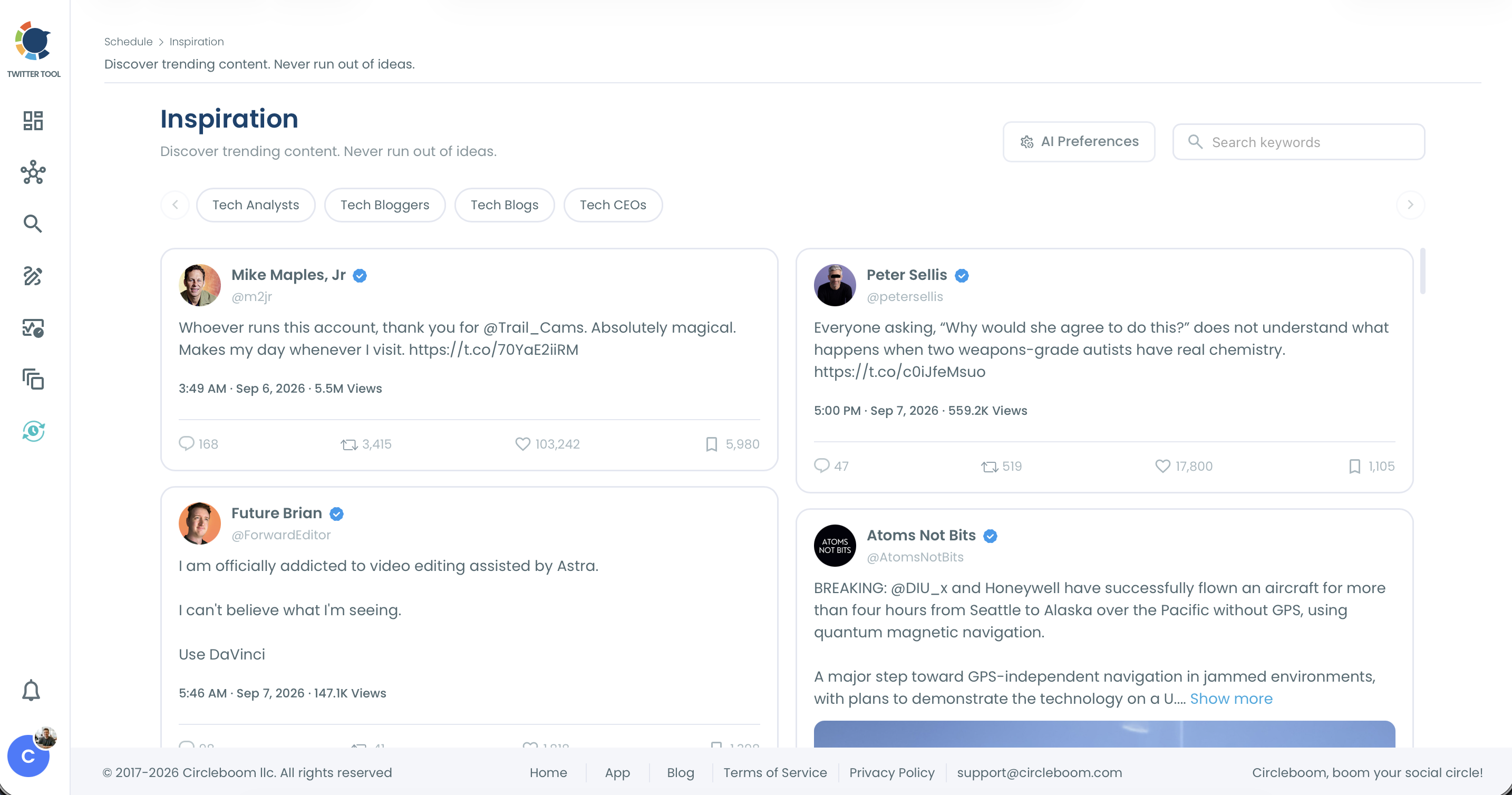
Step 1: Find a question angle in Inspiration. Open Inspiration from the sidebar. The feed shows trending posts from accounts in your topic areas with their engagement. A post with far more replies than likes usually means people disagree, and that disagreement is a ready made poll question.
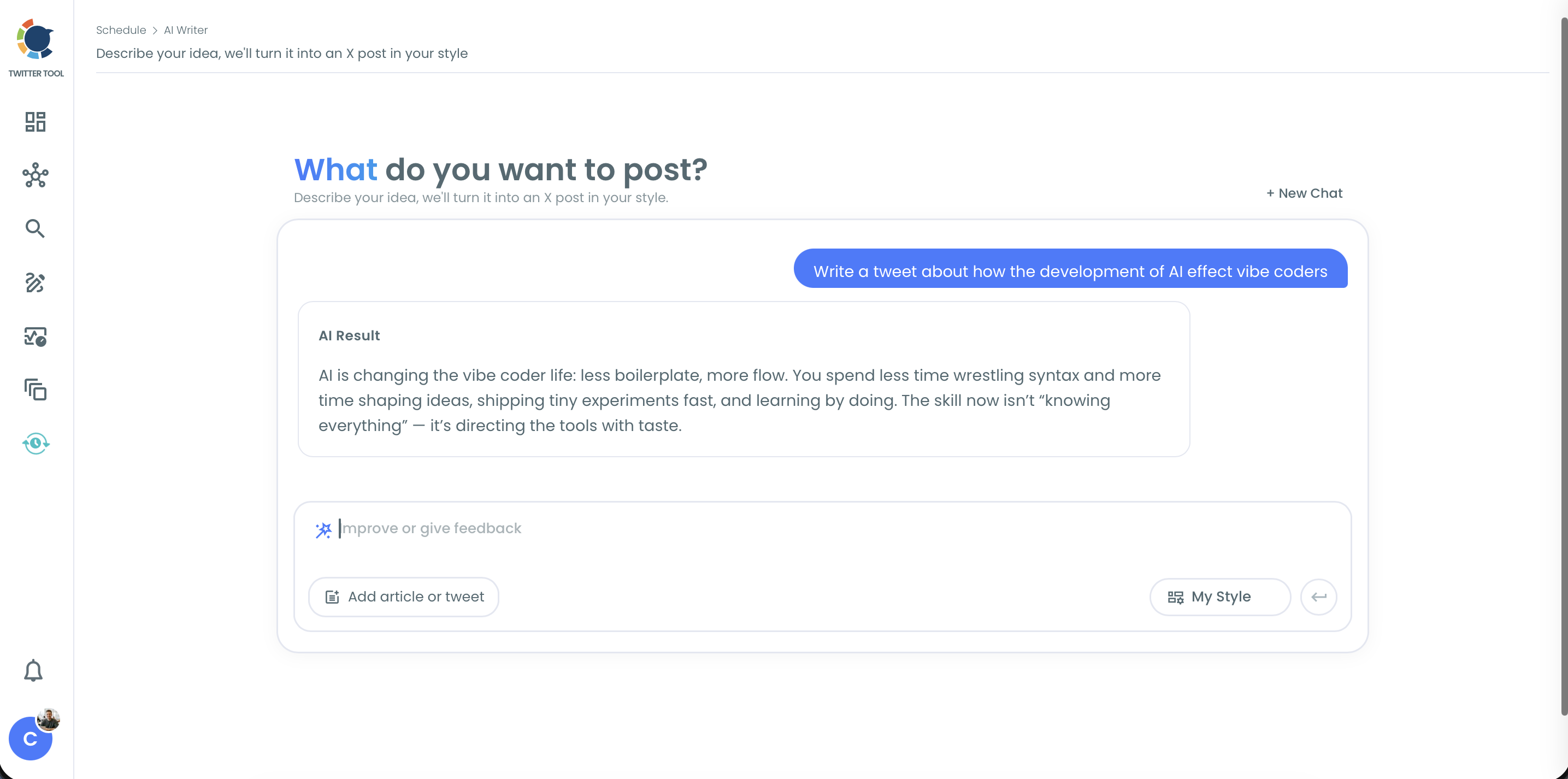
Step 2: Draft the poll post with AI Writer. Open AI Writer in X Post Planner and describe what you want, for example "a short poll question asking marketers which channel brings them the most leads." Refine the draft with the "Improve or give feedback" box, or turn on My Style so it sounds like your own posts. Click Use Post to load it into the planner.
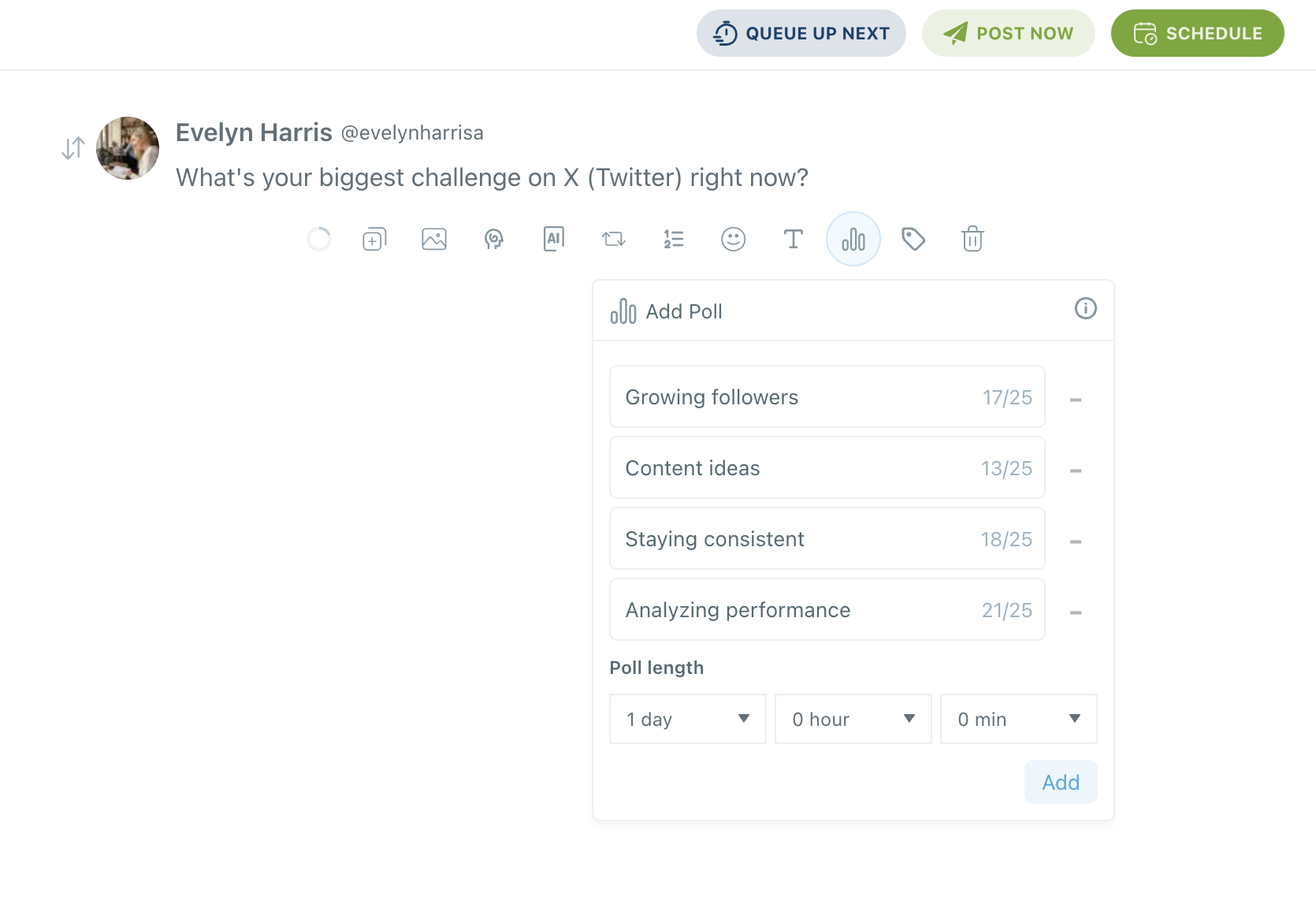
Step 3: Add the poll options. Click the poll icon (the bar chart icon) in the editor toolbar. The Add Poll panel opens. Type two to four choices, up to 25 characters each, and set the poll length with the Days, Hours, and Minutes dropdowns. Click Add.
Step 4: Schedule it. Click Schedule and pick a date and time, or use Queue Up Next or Post Now. Your poll publishes on X at that time as a native poll.
Why good Twitter poll ideas still flop
Most polls fail for reasons that have nothing to do with the question itself.
They go out at random times. X does not let you schedule a poll in its own composer. You create it at the moment you post, which means polls go live whenever you happen to think of them. A poll that goes live on Tuesday morning when your followers are active gets a very different response from the same poll posted late on a Friday. Circleboom's When Followers Are Online feature shows when your audience is active, so you can schedule polls into those windows. There is more on this in how the timing of your Twitter poll affects participation.
The duration doesn't match the question. A 24 hour poll covers every time zone. A 5 minute poll suits a live event. A 7 day poll gives a bigger question time to travel. One default length for everything leaves votes on the table.
The topic isn't something your audience cares about. A poll on a subject outside your followers' interests will be scrolled past. Circleboom's Interest Cloud shows what your followers are interested in, which is a reliable shortlist of poll topics.
⚠️ A published poll cannot be edited. Check the question, every option, and the duration before you schedule it.
What to do after the votes come in
Post the result. A results post like "62% of you picked B, here's why that matters" brings voters back and starts a new round of replies. It is a second post with built in interest.
Turn the winner into content. If you asked which topic to cover next, write that thread. The audience that voted for it is already waiting. Circleboom's Generate My Next Post can help draft the follow-up in your style, and you can schedule Twitter threads the same way you schedule polls.
Read the replies. Four options can't hold every opinion. The replies under a poll often have better material than the vote count.
Check what the poll did beyond votes. Post Engagement Analytics shows whether a poll pulled in replies and broader engagement compared with your other posts. For more ways to lift those numbers, see how to improve your Twitter engagement rates.
Make it a series. A weekly poll on the same day becomes something followers expect. Since Poll Generator lets you schedule polls in advance, you can plan a month of them in one sitting.
FAQ
What makes a good Twitter poll?
A good poll asks one clear question your followers have an opinion on, with two to four short options that don't overlap. It should also lead somewhere: a results post, a thread, or a decision you will actually make.
How many options can a Twitter poll have?
An X poll can have two to four options. Each option is limited to 25 characters, so short and clearly different choices work best.
How long should a Twitter poll run?
It depends on the question. A 24 hour poll reaches followers in every time zone, a 5 minute poll fits a live event, and up to 7 days suits a bigger question. In Circleboom, you set the length with Days, Hours, and Minutes dropdowns.
Can I schedule a poll on Twitter?
Not in X's own composer. With Circleboom's Poll Generator in X Post Planner, you can create a poll and schedule it for any future date and time. You can read more in can I schedule a Twitter poll.
Can AI help me come up with Twitter poll ideas?
Yes. Circleboom's AI Writer drafts poll posts from a short description and refines them with follow-up instructions. The Inspiration feed shows which topics are getting heavy replies in your niche, which is a good place to find questions people want to vote on.
Are Twitter polls anonymous?
Other users can't see who voted for which option. For the details, read are Twitter polls anonymous.
Can I edit a poll after it's published?
No. Once a poll is published, it can't be edited, so review the question and options before scheduling.
Final thoughts
Polls are easy for followers and surprisingly hard to keep doing well. The questions run out, the timing slips, and the poll you meant to post on Tuesday turns into one you forget entirely. These Twitter poll ideas cover the first problem. Circleboom covers the rest: Inspiration for fresh angles, AI Writer for the wording, and Poll Generator for scheduling polls on X when your audience is actually there.
Plan your next poll with Circleboom:
https://circleboom.com/social-media-scheduler/twitter-scheduler/schedule-twitter-polls

