
The tweets that get bookmarked the most are the ones people expect to need again: reference-grade threads, step-by-step guides, checklists, data tables, and tool lists. A bookmark is a save-for-later action, so it rewards usefulness over entertainment.
Which tweets get bookmarked the most on X?
Useful, reference-style posts get the most bookmarks: how-to threads, checklists, resource lists, and data breakdowns people plan to reread. Circleboom's Engagement Analytics ranks your own tweet history by bookmark count on X through official, authorized data access, so you can see exactly which of your posts people saved and copy the pattern.
→ see which tweets get bookmarked most
A like says a post was fun to scroll past. A bookmark says it was worth keeping. That gap is why bookmarks are one of the clearest signals a creator can read, and why the answer to this question matters more than a generic "post better content" tip.
The Short Answer: Bookmarks Reward Utility, Not Applause
People bookmark tweets they cannot afford to lose in the scroll. The content that consistently earns saves shares one trait: future usefulness.
Across the accounts that pull steady bookmark numbers, five formats show up again and again:
- How-to threads that teach a repeatable process.
- Checklists and frameworks the reader wants to apply later.
- Curated resource or tool lists worth returning to.
- Data breakdowns, benchmarks, and reference numbers.
- Templates, prompts, and swipe-ready examples.
Notice what is missing from that list: hot takes, memes, and reaction posts. Those earn likes and replies, which is a different job. If your goal is saves, you are writing a reference, not a punchline. A quick look at your most bookmarked tweets shows the same split playing out on real accounts.
Circleboom's Engagement Analytics makes that split visible by letting you rank every post you have published against the exact metric you care about.
There is also a topic pattern. Evergreen subjects (skills, tools, how-tos, "the complete list of X") get bookmarked far more than time-bound news, because the reader expects the post to stay useful next week. If you want a primer on the feature itself before you optimize for it, what bookmarks are on Twitter covers the basics cleanly.
Why X Won't Tell You Which of Your Tweets Get Bookmarked
Here is the part most guides skip. General advice about "make guides and checklists" is fine, but it cannot tell you what YOUR specific audience saves.
X shows you a bookmark count on a single post, and a rolling 28-day summary. What it does not offer is a way to sort your entire history by bookmark count and see your all-time save magnets in one ranked view. X even publishes a help page on bookmark counts that confirms the per-post number, but per-post is not the same as ranked-across-your-account.
Without a ranking function, finding your most-bookmarked posts means opening hundreds of tweets one by one and comparing numbers by hand. That is not realistic across thousands of posts, which is precisely the gap a dedicated analytics layer fills. You can see the same limitation discussed in this walkthrough on how to see tweet analytics.
Circleboom closes that gap. It pulls your per-tweet metrics through official X data access and presents them as one sortable table, so bookmark count becomes a column you can rank on instantly. Because Circleboom is an official X Enterprise Developer company, that data arrives through compliant, authorized channels rather than scraping, and your account stays safe while you analyze it.
How to Find What Kind of Tweets Get Bookmarked the Most
To find your own save magnets, connect your account, open your ranked post table, sort by the bookmarks column, and read the top rows for the pattern they share. The whole loop takes a few minutes and turns a vague "post more value" goal into a concrete list of what your audience actually keeps.
Short demo: how a full tweet history turns into one ranked, per-post engagement table you can sort by any signal.
Here is the flow, in order.
- Log in to Circleboom Twitter and connect your X account with official OAuth.

- Open the X Post Planner menu, then Post Analytics.

- Open Engagement Analytics and sort the table by the bookmarks column to rank every accessible post from most-saved to least.
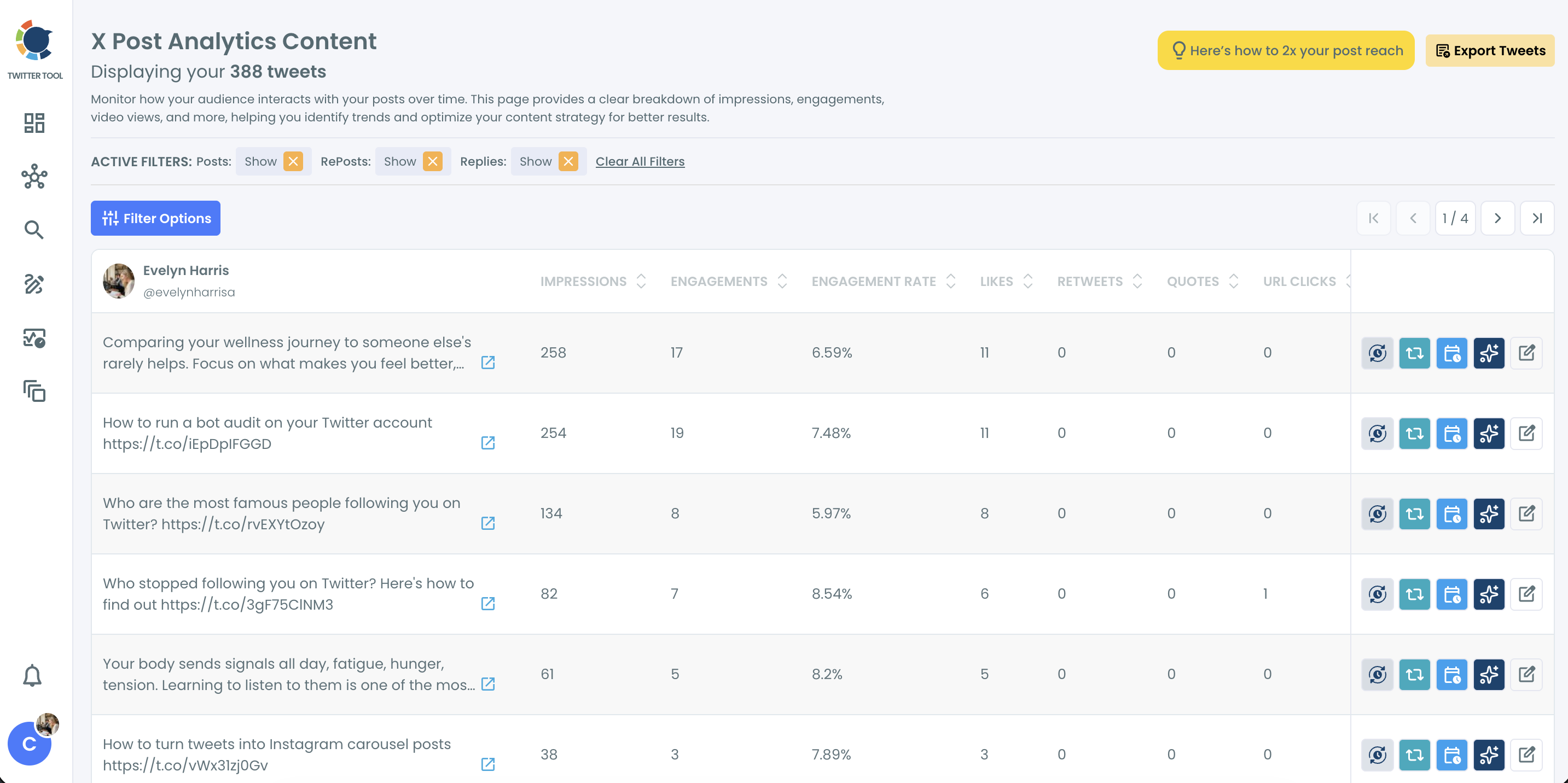
- Read the top rows and note the shared traits (topic, format, hook style, media type), then queue those posts to run again through the reshare or auto-retweet options.
That order works because ranking comes before interpretation. You cannot spot a pattern until the data is sorted, and you cannot act on a pattern until you have named it. Once your top-saved posts sit at the top of the table, the "what kind of tweets" question stops being abstract and becomes a short, specific list drawn from your own account. Start your own audit here: find your most-bookmarked tweets.
One practical limit to know: Circleboom works on the accessible history window (up to the most recent 3,200 tweets on standard access), so very old posts outside that window will not appear in the ranking. For most accounts that still covers years of content.
The Bookmark-to-Like Ratio: Your Real Value Signal
There is a second, sharper read hiding in the same table. Do not judge a post by bookmarks alone. Judge it by bookmarks relative to likes.
A high bookmark-to-like ratio means people found the post useful enough to save, not just fun enough to tap. A post with 40 likes and 30 bookmarks is doing something very different from a post with 400 likes and 5 bookmarks. The first is a reference; the second is entertainment.
Sorting the ranked table by bookmarks and then eyeballing the like column next to it gives you this ratio at a glance. It separates your genuinely useful posts from your merely popular ones. That instinct sits behind broader work on how to improve your Twitter engagement rates too. If saves are your goal, chase the ratio, not the raw applause.
You can go one level deeper by cross-checking bookmarks against impressions with the Impression Analytics view. It shows how far a post reached before people decided to save it. Pairing reach with saves tells you whether a low bookmark count is a content problem or just a visibility problem.
Use the Filters to Confirm the Pattern
Sorting by bookmarks gives you the ranking. The filters tell you why the ranking looks the way it does.
Inside Engagement Analytics you can narrow the ranked table by three kinds of filter before you read it:
- Content filters (post type, media type, language, or keyword).
- Performance filters (a minimum bookmark, like, or engagement-rate threshold).
- A date-range filter to isolate a single campaign or content series.
Filter your top savers by media type and you learn whether image posts, plain text, or video collect the most saves in your niche. Filter by keyword and you see which themes people keep. This is how a vague "make useful content" goal becomes a precise brief. Not just "post guides," but "post text-only how-to threads about the two topics my audience actually saves." The filters turn one ranked list into a repeatable content formula.
The Bottom Line
The tweets that get bookmarked the most are references, not reactions: guides, checklists, resource lists, data, and templates people plan to reuse. That is the general answer. The useful answer is personal, and it lives in your own ranked history. Sort your posts by bookmark count, read the top rows, watch the bookmark-to-like ratio, and reproduce whatever keeps showing up.
You can manage the saved posts themselves inside the Twitter Bookmarks Manager, but the growth work happens in the analytics view, where your save patterns become repeatable.
The full post-level analytics dashboard is where those patterns turn into your next content plan.
→ Pull your most-bookmarked tweets on X
Common Questions About Bookmarked Tweets
Can I see who bookmarked my tweet on X?
No. Twitter bookmarks are private, so X does not reveal the identity of the people who saved a post. You can see the total bookmark count per post, and with Circleboom you can rank all your posts by that count to find your top savers.
Do bookmarks help my tweets reach more people?
They help. A save is a strong signal that content is worth keeping, and X's ranking treats meaningful engagement like saves as a positive input to reach. Bookmarks are not the only signal that matters, but a high save rate usually travels with strong distribution.
How many past tweets can I analyze for bookmark counts?
Circleboom analyzes the accessible history window, which is up to the most recent 3,200 tweets on standard account access, pulled through official X Enterprise data. Posts older than that window fall outside the API's return range and will not appear in the ranked table.
What is a good bookmark-to-like ratio?
There is no universal number, because it depends on your niche. The useful move is to compare your own posts against each other: the ones with an unusually high bookmark share relative to likes are your true reference content, and those are the formats worth repeating.