
Choosing what to tweet can stop you cold especially when you're staring at an empty composer at 9am with a queue to fill.
The good news: you rarely need to start from scratch. Between trending conversations already happening in your niche, curated content from sources your audience cares about, and AI tools that help you rewrite and respond in your own voice, there's no shortage of raw material. You just need a system for finding it.
This guide covers 18 proven tweet ideas from evergreen content formats to the fastest ways to find and publish what's already working in your space.
What to Post on X (in general)
If you want to build an X following, the question isn't just "what do I say?" it's "what does my audience actually want to read?"
Not every idea below will fit every brand or creator, but there's enough here to fill weeks of content without repeating yourself.
1. Sectoral News and Updates as Blog Content
You don't need to write original commentary on every story. Sharing relevant industry news or blog content — with a brief take from you — positions you as a reliable source for your niche.
In practice, tracking down that content manually (scanning news sites, checking blogs, filtering what's worth sharing) takes more time than the posting itself.
Circleboom's Article Curator solves this: it monitors hundreds of sites and blogs across thousands of topic categories and surfaces articles relevant to your interests. Select what's worth sharing, add your commentary, and publish. The content is always current, always on-topic, and your queue stays full without you spending an hour digging through search results.
2. RSS feeds
If you already follow specific sites or blogs that consistently publish content your audience would value, connect those RSS feeds directly to your Circleboom dashboard.
Once you've added the feed URLs and set your posting interval, Circleboom handles the rest, pulling new articles automatically and publishing them at the times you've configured. It's the most hands-off way to keep a steady flow of relevant content going out without manual curation.
3. Polls & Questions
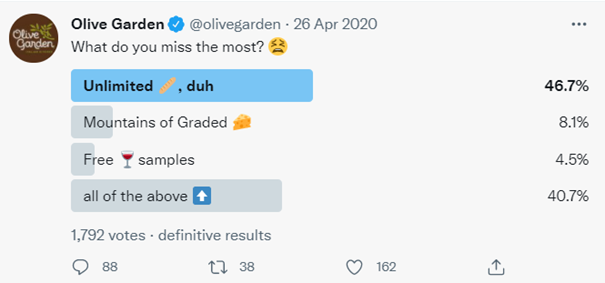
Polls are one of the highest-engagement formats on X because they ask the audience to do something even if it's just a single tap.
Use them to learn what your audience thinks about your industry, your content, your product, or anything they have a clear opinion on. The data you get back is genuinely useful for shaping future content, and the participation itself signals to the algorithm that your account generates engagement.
4. Pro-Tips
Practical, specific advice consistently outperforms vague inspiration on X. If you know something that took you time to learn — a shortcut, a workflow, a counterintuitive approach — tweet it directly.
One clear tip in 280 characters is more shareable than a full explainer. Keep it concrete, keep it accurate, and your followers will share it with people who need the same advice.

5. Inspirational Quotes
A well-chosen quote — especially one tied to your niche — performs well because it's inherently shareable. People repost quotes that articulate something they believe but haven't found the words for.
The #quoteoftheday and #qotd hashtags extend reach. Brands like Nike pair quotes from athletes with their brand voice to make the format their own rather than generic.
6. Special Day Celebration
Jumping on relevant social media holidays — industry awareness days, cultural moments, actual holidays your audience observes — is an easy way to stay timely without chasing breaking news.
The key word is relevant. A generic "Happy Monday" post doesn't do much. A post tied to a specific day that genuinely connects to your niche and audience gives people a reason to engage.
What to tweet to get followers
Growing on X requires more than posting good content in isolation. You need to show up in the right conversations, use the right signals, and stay consistent. These ideas are specifically geared toward expanding your reach and pulling in new followers.
7. Trending Tweet Inspiration: Find What's Working and Make It Yours
The fastest path from "I don't know what to tweet" to a published post is finding what's already resonating in your niche — and responding to it in your own voice.
Circleboom's Inspiration feature does exactly this. It surfaces high-engagement tweets from X, filtered to the interest topics you've set in your AI Preferences, with real engagement data on every card — views, replies, retweets, likes, and bookmarks — so you can see what's actually working before you engage.
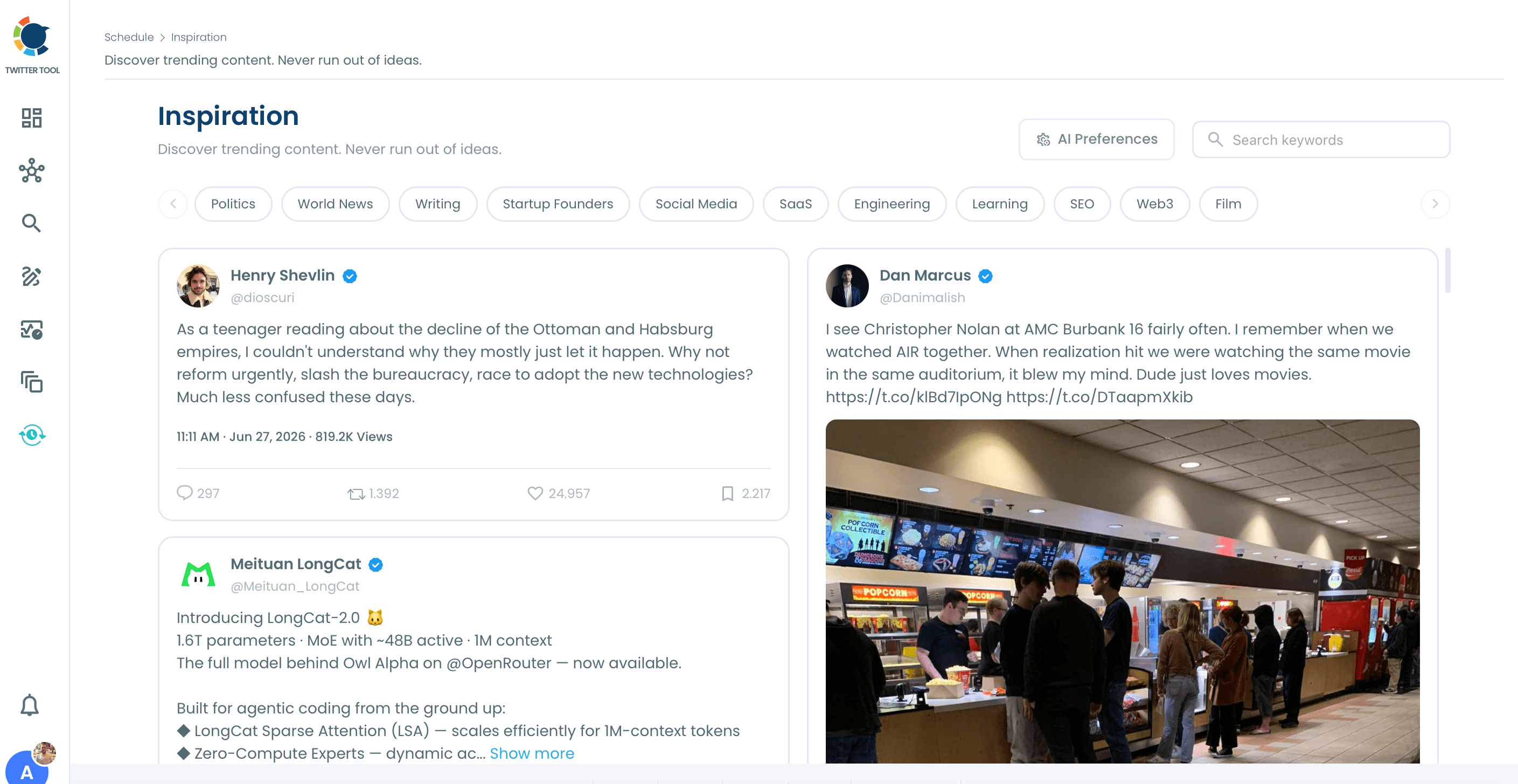
From any card in the feed, you have three options:
Rewrite. Circleboom generates a completely new post on the same topic or angle, written in your personal style — not a paraphrase of the original, and not generic AI copy. You can adjust the direction with notes or try different tones before sending it to the full AI Tweet Generator for further refinement.
AI Quote. Generates a new post featuring your commentary with the original tweet embedded below for context. Quote tweets appear in your followers' timelines, unlike replies which stay confined to a thread — so this format extends your reach while joining an existing conversation.
AI Reply. Generates a reply in your voice and inserts you directly into the active conversation thread.
To find ideas fast: open Inspiration, select a topic chip, scan the feed. The process typically takes under a minute to reach a publishable draft.
You can also schedule or cross-post directly from the Inspiration feed, the Schedule modal includes Post Now, Queue Up Next, and cross-posting toggles for LinkedIn, Threads, Bluesky, Facebook, and Instagram.
Find the Inspiration feed in the X Post Planner as a standalone page, or as a carousel below the Post Editor.
8. Popular Hashtags: Use What Your Audience Is Already Searching
Hashtags expand your reach beyond your existing followers but using the most popular hashtags in your niche often backfires, because your post gets buried in a feed dominated by large accounts.
Circleboom's hashtag and keyword tool helps you find result-driven hashtags that popular enough to have an active audience, specific enough that your post has a real chance of being seen. Add the most relevant ones to each tweet rather than stacking a dozen generic tags.

9. Discounts and Promo Codes
Exclusive offers for your X followers — discount codes, early access, flash sales — drive immediate engagement and give people a concrete reason to follow your account.
The exclusivity is the point: followers who know your X account sometimes drops private deals will stick around and pay attention.
10. Rich Visuals
Tweets with images, custom graphics, or infographics stop people mid-scroll in a way text-only posts don't.
You can design social media graphics directly inside Circleboom's dashboard through the Canva integration, templates, video formats, and stock images from Unsplash are all accessible without leaving the platform. When you're done, publish immediately or add it to your scheduler.
The free GIPHY integration is available for the same workflow when you want a GIF rather than a static image.
11. Personal Questions and Polls for Followers
Polls don't have to be brand or industry focused. Asking followers to weigh in on personal decisions — what to cover next, which approach to try, what product to review — builds a participatory relationship between you and your audience.
Creators and influencers use this format constantly. It works equally well for brands that want to surface real audience preferences rather than guessing.
12. Sharing Breaking News
Breaking news is one of X's native strengths, it's often where stories surface before mainstream media covers them. If you can respond to breaking developments in your niche quickly, you position your account as a go-to source.
Use RSS feeds to pull in the latest content from trusted sources automatically, or share your direct take on news that's relevant to your audience. Speed matters here more than length.
13. Responding, Retweeting, and AI Replies
Engagement with other accounts, responding to mentions, retweeting relevant content, replying to conversations in your niche builds presence and visibility beyond your own timeline.
For managing mentions and tracking who's talking about you, use Circleboom's Twitter User Analytics to make sure nothing gets missed.
When you want to join a conversation but aren't sure how to phrase your reply, the AI Reply tool in Circleboom's Inspiration feed generates a response in your voice from the trending tweet directly. You're not crafting a response from scratch you're reviewing and approving one that already sounds like you, then posting it into an active thread.
14. Tweet About What's Trending in Your Audience: Interest Cloud
You don't need to guess what your followers care about. Circleboom's Twitter Interest Cloud compiles data from your followers' profiles and recent tweets and organizes it into a visual map of what your audience is actively thinking and talking about.
Use it to validate your content direction or discover topic areas you hadn't considered. If something appears prominently in the Interest Cloud and you haven't posted about it recently, that's a gap worth filling.
Pair this with the Inspiration feed (idea #7 above) for a two-step approach: Interest Cloud shows what your audience is interested in; Inspiration shows what's already resonating in those topic areas on X right now.
15. Post at the Right Time
The best tweet idea published at 3am when your audience is asleep performs worse than a decent tweet posted when they're active and scrolling.
Circleboom's Twitter Analytics analyzes your followers' activity patterns and identifies the optimal times to post based on when they're actually on the platform.
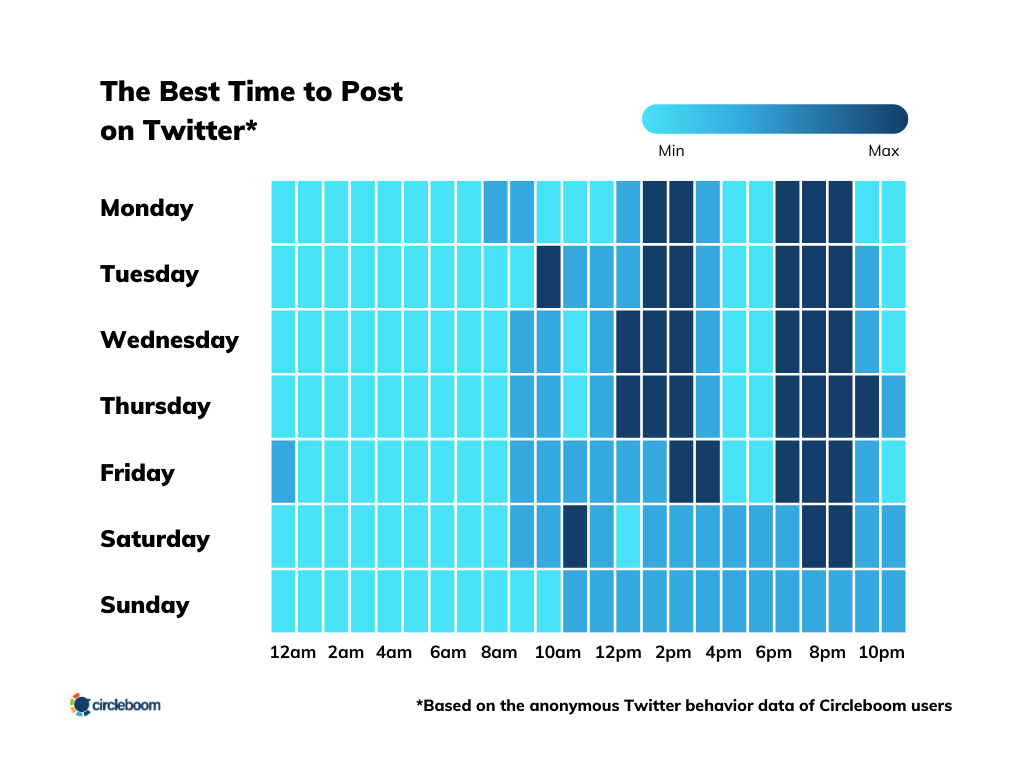
Use this to inform your Queue Scheduling so your content lands at peak hours without requiring you to post in real time.
Funny Things to Tweet
Some of the most followed accounts on X built their audience entirely on humor. Brands that can pull off a consistent comedic voice generate the kind of organic sharing that no paid campaign can match. These formats are the most reliable vehicles for it.
16. GIFs and Memes
GIFs and memes are the native language of X's short-form format. They communicate tone and reaction faster than text, they're inherently shareable, and when a meme is timed well it gets pulled into conversations far beyond your own follower base.
Search and embed GIFs directly from the free GIPHY integration inside Circleboom Publish, without switching tabs or tools.
17. Challenge Trends
Participating in trending internet challenges, when they're relevant to your brand and audience, inserts your account into a larger ongoing conversation. The reach is built in.
The best versions adapt the challenge to your specific context rather than copying it wholesale. The content lands harder when it's recognizably yours, not just participation for the sake of it.
18. Photoshop Fails and Viral Humor
Retweeting or commenting on well-known viral moments, photoshop fails, caught-in-the-act brand mistakes, absurd-but-real news is a consistent performer for accounts that want to be part of the cultural conversation without creating original humor from scratch.
This works best when the content you're engaging with is already circulating widely. You're adding your voice to something people are already talking about, not hoping they find a joke in isolation.
Wrapping Up
Now you have 18 formats, ideas, and tools, no more staring at a blank composer.
If you want the fastest path to a publishable tweet right now, start with Circleboom's Inspiration feed: open it, pick a topic, and within a minute you have a trending tweet you can rewrite in your voice, quote with your commentary, or reply to directly. It's purpose-built for exactly the moment when you know you need to post but don't know what to say.
For sustained, consistent posting over time, scheduled content, RSS automation, best-time publishing, Circleboom Twitter and Circleboom Publish give you the full workflow: from finding ideas to scheduling, publishing, and tracking what worked.
[→ Get started with Circleboom and never run out of things to tweet]
Updated July 2026. Originally published August 2021.