
Most first-time advertisers on X choose the largest audience the campaign form offers, on the theory that more people means more chances. On a small budget the opposite holds: the best first audience is the smallest one, the followers who already retweet you.
Broad targeting: a small budget spread across strangers who mostly scroll past. Circleboom: builds a list of your followers on X ordered by how often they retweeted you, using X's official Enterprise APIs, ready to export for X Ads.
→ Twitter ads targeting
Every other audience takes its place after them, in the order below.
Twitter ad audiences ranked for a small budget
Target your engaged followers first, interest and keyword audiences second, and broad reach last. Location and demographic filters are not a separate audience: they narrow whichever audience they are added to.
The table puts the four options in order, with the situation each one suits and what it costs you.
| Rank | Audience | Pick it when | What it costs you |
|---|---|---|---|
| 1 | Engaged followers, uploaded as a list of the people who retweet you | The budget is small and the account has some retweet history | Little money, plus a wait of 1 to 3 hours while the list is built |
| 2 | Interest and keyword audiences | The engaged list has shown which post works and you want new people | More budget for each lesson, because their reaction is unproven |
| 3 | Location, language, age and gender filters | The offer only applies to some places or groups | Reach, since every filter shrinks the audience it sits on |
| 4 | Broad reach or X's automated targeting | A proven post and a budget large enough to scale it | The most spend before you learn who responded |
The cost column is about more than money. Row one costs time, because the list has to be built before it can be uploaded.
Rows two and four cost certainty: you pay first and find out afterward whether the audience cared.
Why the options are not equal for a first campaign
Most write-ups of Twitter ads targeting present the options as equals. For a first campaign they are not equal, because only the first row is made of people who have already acted on your content.
Rank audiences by proof of interest, then spend in that order.
The ranking is a sequence, and no row is forbidden. A business with a proven post and a larger budget will use all four, while a business with $50 should not start at row four.
If the account has retweet history, row one is available now. Circleboom turns that history into a Twitter ads audience of engaged followers that you can export.
Who to leave out of a first X campaign
Leave out anyone who cannot respond. Three groups waste impressions on any budget:
- Accounts flagged as fake.
- Accounts X has suspended.
- Accounts that are locked.
Circleboom excludes all three while it builds the engaged list, so the exported file does not carry them into the ad account.
A second group needs a human eye. A loyal retweeter can still sit outside your market. Circleboom's documentation notes that regular interaction signals a relationship and does not make an account a fit for your offer.
Scan the highest-ranked accounts and deselect the ones that would never buy.
How do you find out who your X audience is before you pick?
Look at two things before any Twitter ads targeting decision: who follows you, and which of those followers act on what you post. The first is demographics, and the second is behavior.
For the first, Circleboom breaks the whole follower base into quality and activity groups such as active, inactive and fake. The post on how to find correct follower demographics on Twitter covers that reading.
Full run-through: the follower demographics view that tells you who is in the audience before you spend on it.
For the second, the engaged list answers a question the follower count hides: what share of the audience is loyal, and what share only subscribed.
Compare two numbers. One is the size of the engaged list, and the other is your follower total.
The gap between them is the part of the audience that has never passed a post along. That gap is usually wide, and it is the reason a campaign aimed at all followers behaves like a broad campaign.
What the retweet-count spread tells you
The spread inside the list matters as well. Each row carries a Times Retweeted count, so you can see whether support comes from a few heavy retweeters or from many people who shared once.
A few heavy retweeters point to a small advocate group worth reaching every time you post. Many single retweets point to a wider audience that reacts to some topics and not others, which tells you the creative matters more than the list.
Why engaged followers are the first target for Twitter ads
Engaged followers come first because they have already done what an ad asks strangers to do. That is why Twitter ads targeting on a small budget starts with them.
Circleboom's Engaging & Loyal Followers list finds them on X by working backward from your tweets, where other follower views start from the follower list.
The build runs in four stages:
- Circleboom fetches up to your last 3,200 tweets.
- It retrieves the retweeters of each tweet.
- It removes duplicates, plus fake, suspended and locked accounts.
- It cross-checks the result against your current followers and counts how many of your tweets each one retweeted.
The result is a table sorted by proof. Sort by Times Retweeted from the top and the first rows are the followers who spread your posts most often.
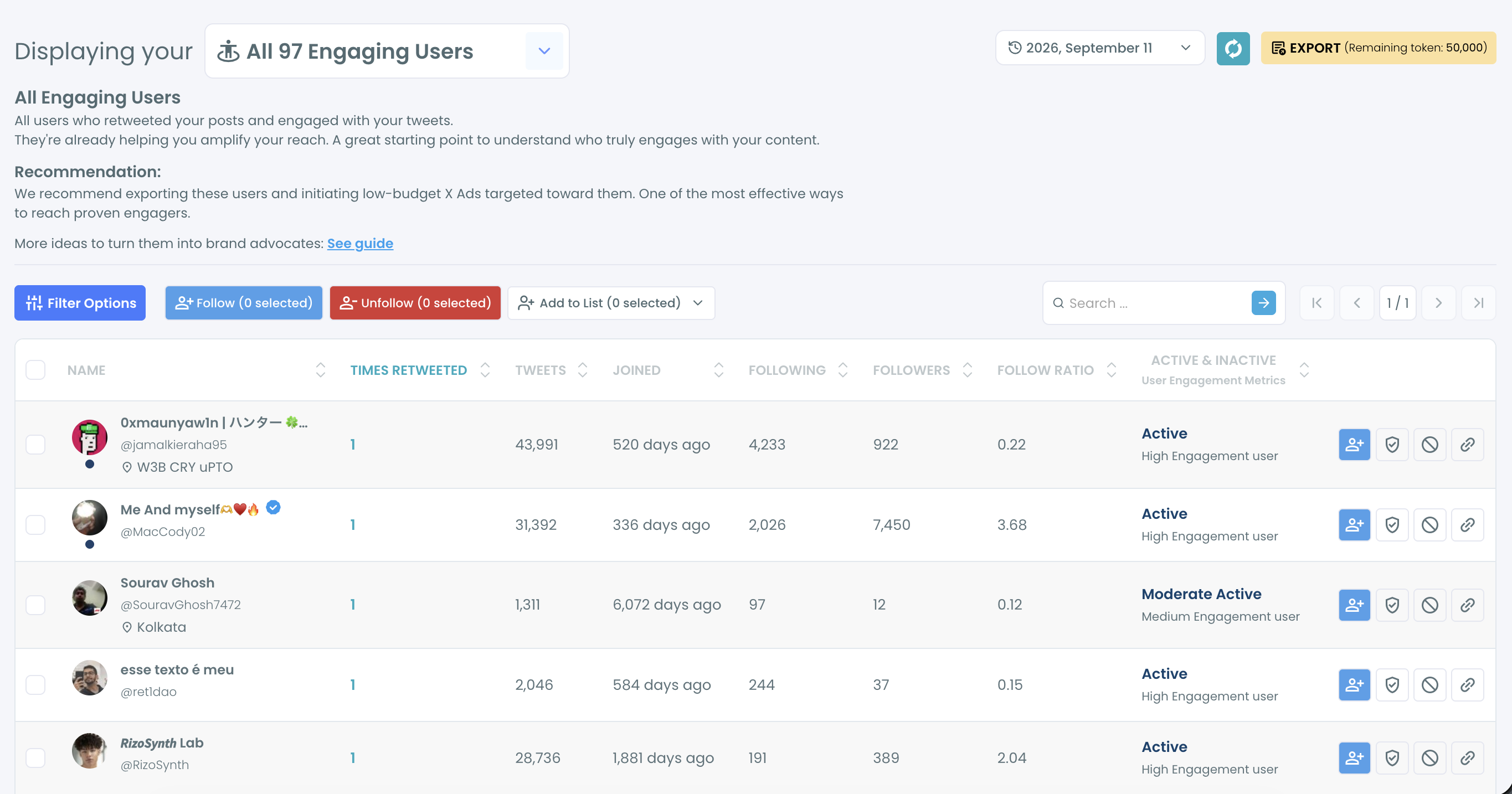
The table also shows each account's follower count, follow ratio and an activity label. Those columns let you separate a loyal small account from a loyal large one before either goes into an audience.
The preparation is not instant. Circleboom puts it at 1 to 3 hours, because the retweeters of every tweet are requested one tweet at a time. A preparation screen shows the stage in progress, and you are notified when the list is ready.
Finished lists are saved. A date selector on the results page reopens an earlier run, so you can compare this month's engaged audience with last month's.
What the data source means for your ad account
The list is built from platform records. As an official X Enterprise Developer company, Circleboom reads tweets and retweeters through X's own API. The audience you upload is made of real account IDs, and your account stays inside X's rules.
That matters more for ads than for analysis. A scraped list can miss accounts or carry wrong ones, and those gaps follow the file into the audience X builds from it.
Why a small engaged audience travels further than its size
Each engaged follower is also a distribution point. Circleboom's documentation gives the arithmetic as an example: if 50 loyal followers each have about 2,000 followers, one retweet from each puts a tweet into up to 100,000 timelines.
An ad shown to those 50 people is also an attempt to reach their audiences too, at no extra charge.
Scale changes the size of the list and not the logic.
In another Circleboom example, an account with 1,000,000 followers and about 50 engagements for each tweet collects around 160,000 interactions across 3,200 tweets. After duplicates are removed, that leaves roughly 50,000 to 60,000 unique engaged accounts.
What Circleboom's tests found about reach
Circleboom's co-founder tested this audience with enterprise customers and with the company's own X account. In those tests, impressions and engagement rose roughly in line with the share of the engaged audience reached, so reaching half of it brought about a 50% lift.
The same list has uses beyond one promoted post. Circleboom's guidance gives a launch example: 1,000 exported loyal followers, used as the audience for a product launch, reach people who already spread the brand's posts.
The most active of them can become ambassadors, which no interest audience can offer on day one.
Treat the test result as Circleboom's observation and not as a figure from X. I rank this audience first for a plainer reason: when a campaign to proven retweeters underperforms, the audience can be ruled out as the cause.
Open the list here and check its size before planning anything else: X Ads targeting with your engaged followers.
Two practical notes close this section.
The export is a CSV that carries each account's profile ID, which is the form X Ads accepts for a list audience. X also checks the advertiser before any campaign runs: the account has to pass its ads eligibility rules, and being verified is one of them.
Can you aim X ads at one country or city?
Yes. X Ads targeting includes location, and the place to choose is the one where your engaged followers already are.
X documents location with three other options on its page for geo, gender, language and age targeting. These options are subtractive: each one you add removes people from the audience and never adds any.
So the useful question is which place, and that is an audience question before it is an ads question. Circleboom's Twitter Followers Map shows where your followers are.
Inside the engaged list, two filters do the narrowing before you export:
- Filter by Location takes free text, such as a city name.
- Filter by Language takes a detected profile language from a dropdown.
Filtering before the export has one advantage over filtering inside X Ads. The Active Filters bar names every filter in force and the list shows the engaged accounts that remain, so you see the audience you are about to pay for.
Set the same filter in the campaign form and the audience shrinks where you cannot see who was dropped.
For the wider practice, including when a place filter is worth its cost in reach, see the post on geo-targeting.
Age and gender targeting on Twitter ads
X Ads targeting offers both age and gender options, and both follow the same subtractive rule as location. X's documentation explains how it infers a user's age.
Circleboom covers one of the two. Its Gender Stats view estimates the gender split of your followers from profile signals. You can check gender on Twitter for your own account before adding a gender filter.
Circleboom does not report follower ages. For age, the decision depends on what you know about your customers. The post on how to target age groups on Twitter ads is the place to continue.
One rule keeps demographic filters from hurting a small budget: add them to wide audiences and not to narrow ones.
An engaged list is already a few hundred or a few thousand people. An age range on top of it can leave too few accounts to learn from.
An interest audience is the opposite case. It is large and unproven, so an age or gender filter there removes people you had little reason to pay for.
When broad reach and X's automated targeting make sense
In X ads targeting, broad reach makes sense once a post has proven itself on a smaller audience and the budget can carry a larger one. Before that point it is the most expensive way to find out whether a post works.
X offers an automated version of this route called Optimized Targeting. It is X's own broad option, where the platform finds the audience and you do not hand-pick one.
Automation and a hand-picked list answer different needs. The uploaded list answers whether the post works. The automated audience answers how far a working post can go.
Between those two sits the second row of the table. Interests chosen from data beat interests chosen by instinct, and Circleboom's view for interest targeting on Twitter shows the topics your followers discuss most.
An engaged list can also seed a look-alike audience later, which is a separate task from choosing the first target.
Which Twitter ads audience to pick, by situation
Your situation decides the row, and the four cases below cover most small advertisers.
- If the budget is small and followers already retweet you, upload the engaged list and run to it first.
- If the account has few retweets so far, start with a small interest audience built from the topics your followers discuss, and build the retweet history for the next round.
- If the offer is local, apply the location filter to whichever of those two audiences fits, and check the remaining size before launch.
- If a post has already won on a small audience and budget is available, widen to broad or automated targeting.
Whichever row you start on, write down the audience size and the result before moving to the next. Twitter ads targeting only improves when each round is compared with the one before it.
Good X ads targeting is a matter of order more than of options. Circleboom supplies the first audience in that order, the X followers with a record of spreading your posts, and every later audience is judged against how that one performed.
→ Build your Twitter ads target list from engaged followers
Ad targeting FAQ: age, place and budget
Why do broad Twitter ads get expensive on a small budget?
Broad ads get expensive because the budget is spent before it reaches enough of the right people to produce a result, so the cost of each real response climbs. A small, proven audience can be covered almost completely for the same money. The post on why Twitter ads are so expensive goes further into cutting that cost.
How do you make the engaged group uploadable to X ads?
Export it from Circleboom as a CSV and upload that file in X Ads as a list audience. Circleboom's documentation describes the path as Tools, then Audiences, then Create Audience with the list upload option, and notes that X accepts tab, comma, semicolon or bar as the delimiter.
What if many followers leave their profile location blank?
Those followers will not match a place filter in Circleboom, because Filter by Location reads the text in a profile's location field. In that case I filter by language in the list, export without a place filter, and set the location inside the X Ads campaign instead.