

Yes. And it's more useful than most people realize.
Twitter lets you click on any public account's follower count and scroll through whoever shows up. But what you're looking at is a partial list with no search, no filters, and nothing you can do with it except keep scrolling.
For accounts with a few thousand followers, that's already impractical. For larger accounts it's completely useless.
Circleboom Twitter retrieves the complete follower list of any public account and puts it in a structured, searchable, filterable table.
You can search by keyword, filter by activity level, follower count, account age, fake and bot signals, and more. Every result comes with full profile data. And you can act on what you find directly from the results.
Can you search someone else's followers on Twitter?
Not through Twitter's native interface. Twitter shows a partial, unfiltered follower list with no search or sorting capability.
With Circleboom Twitter's Followers Search, you can enter any public username, retrieve their complete follower list, and search and filter through it using any combination of criteria including keywords, follower count, account age, activity level, and quality signals.
 infocircleboom.com
What Is Circleboom Twitter?
Circleboom is an Official X Enterprise Developer. All follower data it retrieves is publicly available and accessed through X's official APIs. Private accounts cannot be searched. No scraping, no workarounds, fully compliant with platform rules.

Here's what Circleboom Twitter gives you for follower search and analysis:
- Retrieve the complete follower list of any public Twitter account
- Search within the list by keyword, bio content, or username
- Filter by follower count, following count, tweet count, account age, and activity level
- Apply quality filters including fake and bot signals and egghead accounts
- Follow, add to lists, or export results directly from the search view

How to Search Someone Else's Followers on Twitter with Circleboom Twitter
Step #1: Log in to Circleboom.
Create a new account if you don't have one yet!

Step #2: Upon signing in, authorize Circleboom with your Twitter account.
This entire process can be completed within seconds.
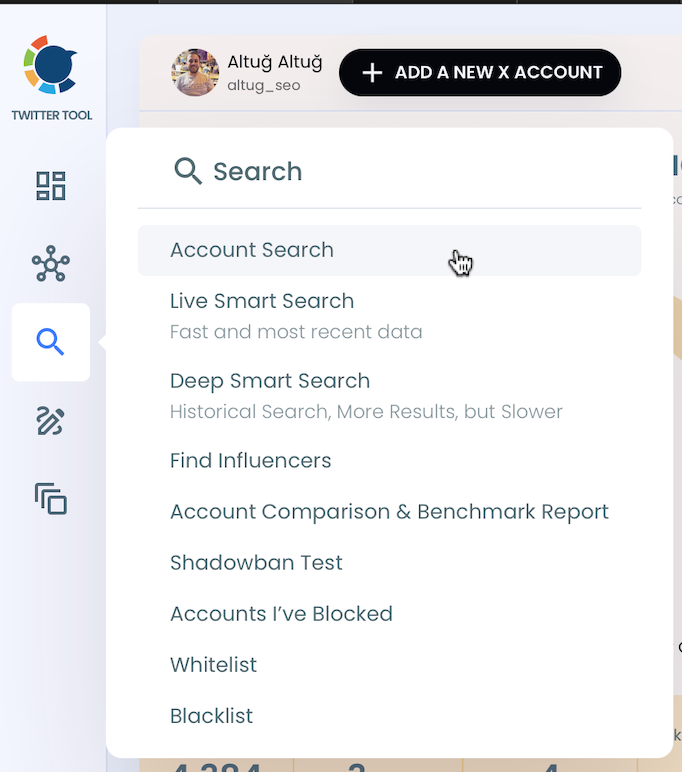
Step #3: Locate the "Search" function in the sidebar.
From there, select "Account Search" to proceed.
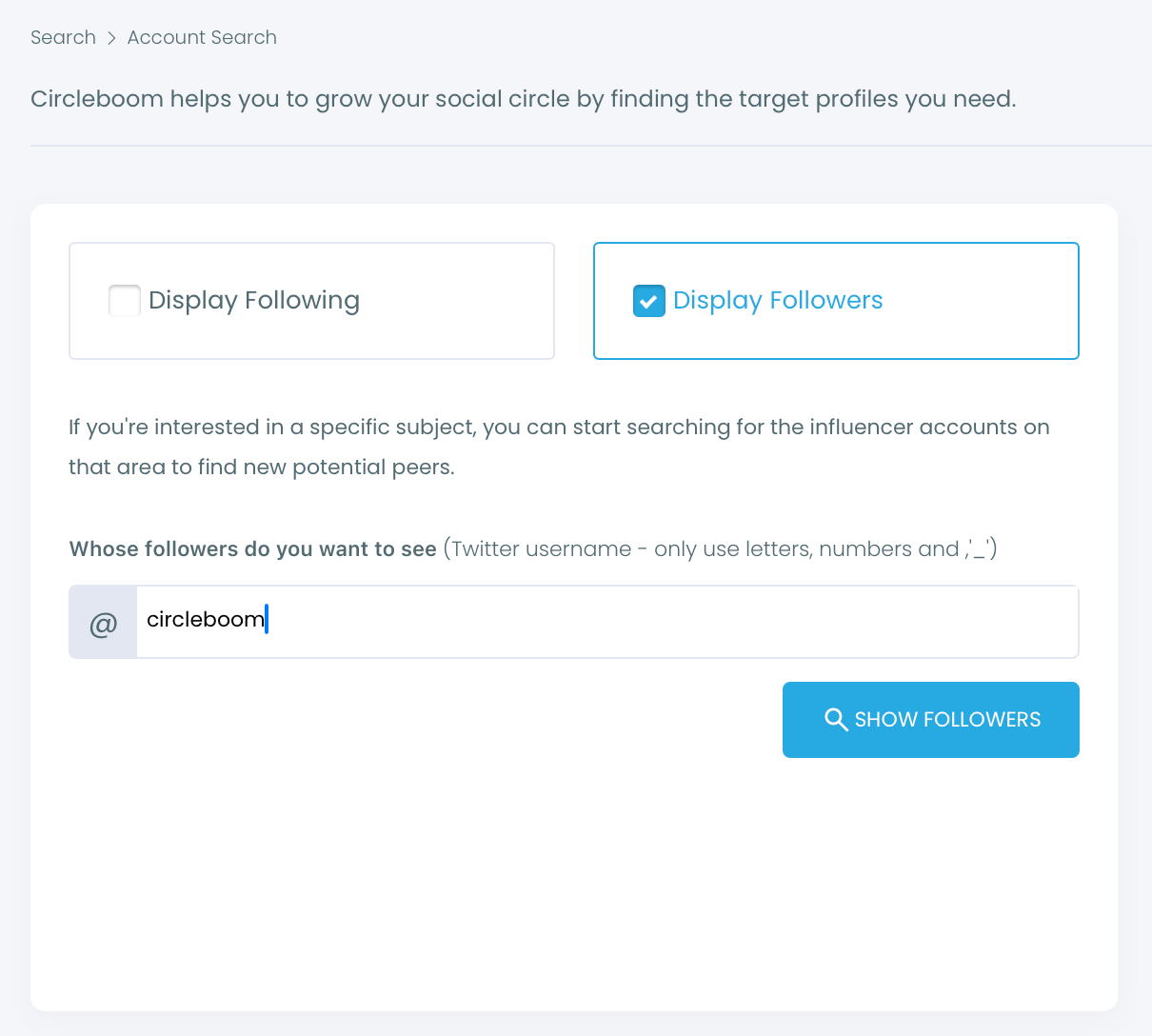
Step #4: You'll encounter two options within the Account Search feature: "Display Friends" and "Display Followers."
If you'd like to see who follows a particular user, input the username and select "Display Followers."
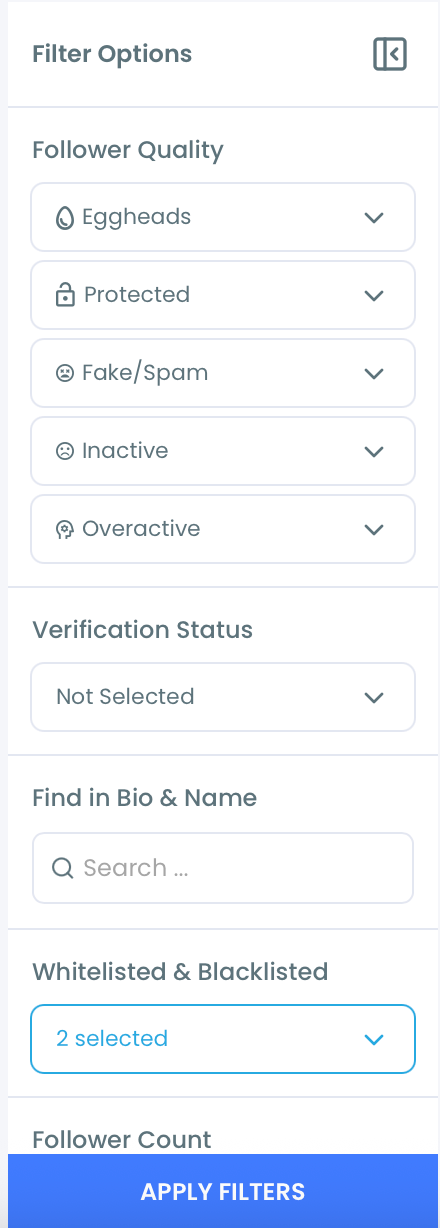
Step #5: To swiftly refine your search results, utilize the filter options above the search box.
This allows you to view verified accounts, filter out inactives, apply minimum follower count or join date limits, and so on.
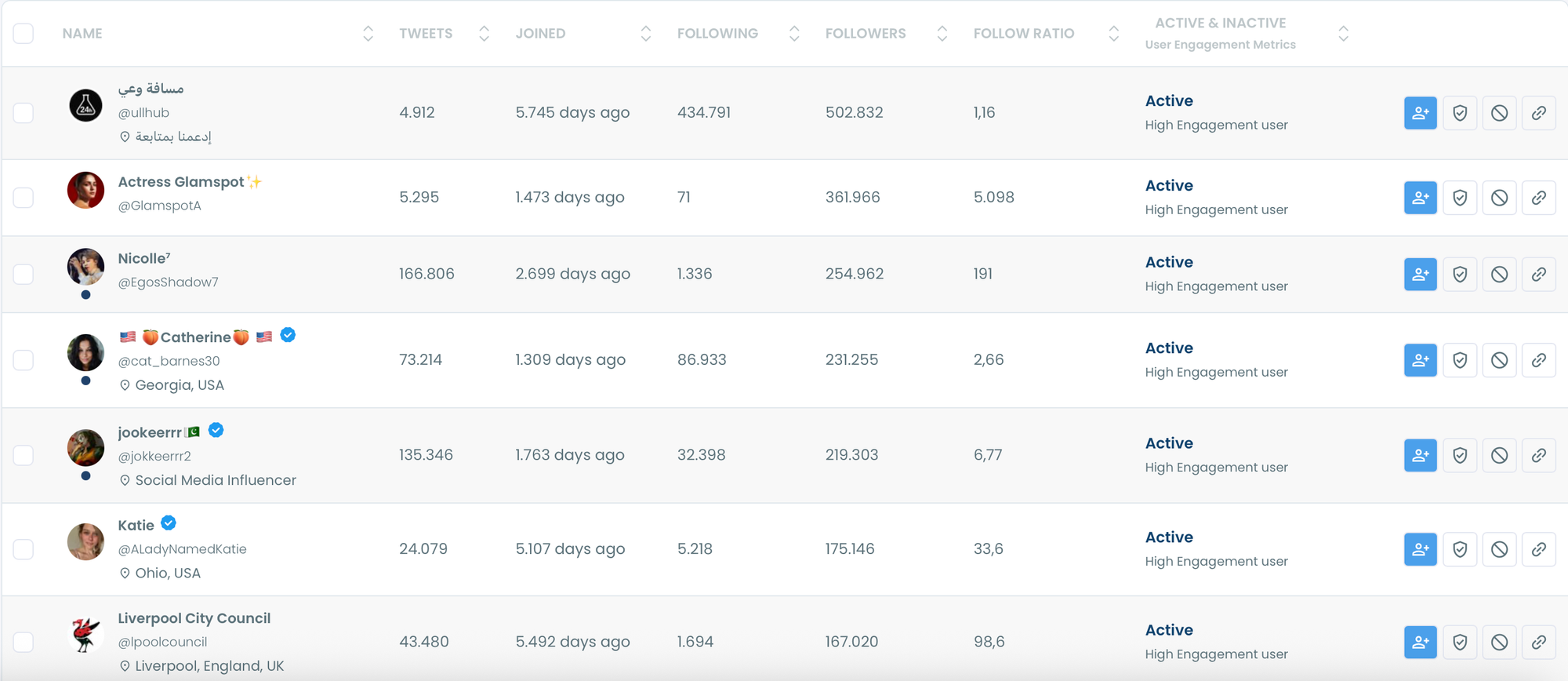
Step #6: Circleboom will present a comprehensive list of the followers of the targeted Twitter profile.
You can sort or filter them for better inspection. Or you can visit these profiles on Twitter to examine in more detail.
Step #7: If you'd like to see more than 2,500 followers on an account, you need to export them into CSV.
You will receive the list in the email once you click "Export all" from the top right.
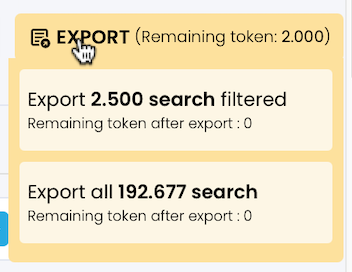
You can store this follower list on your computer and use it on any other projects.

The capabilities of Circleboom Twitter are not limited to searching and exporting Twitter accounts. You can also
- delete your tweets and likes,
- spot fake followers or Twitter bots,
- see who unfollowed you,
- and get an in-depth analysis of your profile with many details.
For a more detailed guide, here's our hands-on video:
What Twitter Shows You vs. What Circleboom Shows You
When you visit a public profile on Twitter and tap the follower count, you get a scrollable list. No search bar. No way to filter by location, activity, or account type. No way to sort by follower count or any other metric. Just a list that loads in batches, cuts off early, and gives you nothing to work with beyond the names you can see at that moment.
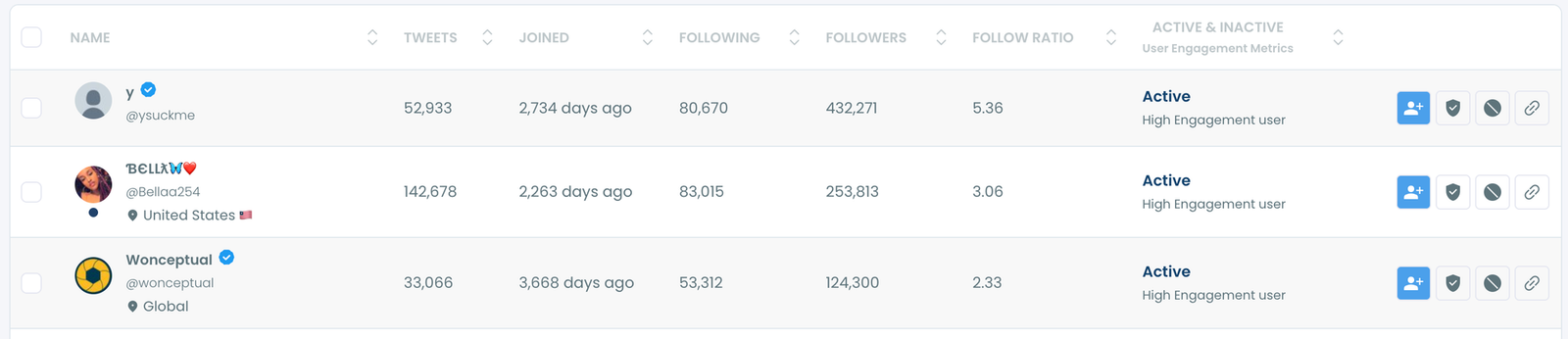
For any account with more than a few hundred followers, this is essentially useless for research or discovery purposes.
📌 Circleboom Twitter retrieves the complete follower dataset through X's official API, not from the scrollable interface. That means you get every follower, not just the ones Twitter chose to load, in a structured table you can actually work with.
The difference between the two isn't just convenience. It's the difference between glancing at a crowd and having a searchable database of everyone in it.
What You Can Search and Filter
Once you retrieve a follower list in Circleboom Twitter, the search and filter options are what make it genuinely useful.
Keyword search. Search within the list by keyword. This matches against bios, usernames, and display names. If you're looking for accounts in a specific niche within someone's followers, searching a relevant term narrows the list immediately to the accounts most likely to be relevant to you.
Follower count filter. Set a minimum or maximum follower count to isolate accounts with a specific size of audience. Useful for finding micro-accounts, established accounts, or filtering out accounts with almost no presence.
Account age filter. Filter by when accounts were created. Newer accounts may be less established. Older accounts have a longer track record. For research purposes, being able to separate these quickly matters.
Activity level filter. Surface accounts that are actively posting versus those that have gone dormant. An active account in someone's follower list is a more valuable discovery than one that hasn't posted in two years.
Fake and bot filter. This applies quality signals across the follower list to surface accounts matching bot-like behavior: extreme follower ratio imbalances, default avatars, low tweet counts, and cluster creation dates. Useful when evaluating the quality of another account's audience, not just finding people to engage with.
Egghead filter. Isolates accounts without a custom profile image. Combined with other signals, this surfaces a large portion of the lowest-quality accounts in any follower list quickly.
⚠️ All filters can be combined. A keyword search filtered to active accounts with over 500 followers created before 2020 gives you a very specific result set from what started as a raw follower list. The more filters you stack, the more targeted the output.
Why You'd Want to Search Someone Else's Followers
Finding relevant accounts in a niche. If a well-known account in your space has built a strong following over several years, their follower list is a pre-qualified audience for your topic. Searching within that list by keyword or filtering by activity surfaces the most engaged and relevant accounts without starting from scratch.
Audience research before a collaboration. Before agreeing to work with an account, understanding who actually follows them gives you a clearer picture than their follower count alone. Filtering for quality signals shows you what proportion of their audience is real and active.
Competitor analysis. Your competitor's followers are people who are interested in what they do. Some of those accounts might be interested in what you do too. Searching their follower list by relevant keywords surfaces the segment most likely to be worth reaching.
Building targeted Twitter Lists. Rather than following every account you find, you can add selected accounts from the search results to a Twitter List for monitoring. This lets you track what a curated group is posting without committing to a follow. Combine this with Circleboom Twitter's Find Influencers feature to layer influence signals on top of follower data.
Frequently Asked Questions
Can you search someone else's followers on Twitter?
Not through Twitter's native tools. Twitter shows a partial follower list with no search or filter capabilities. Circleboom Twitter's Followers Search retrieves the complete follower list of any public account and makes it fully searchable and filterable.
Does Twitter show the full follower list of any account?
No. Twitter loads follower lists in batches and typically shows an incomplete view, especially for larger accounts. Circleboom Twitter retrieves the full dataset through X's official API, giving you every follower in a structured table.
Can I search by keyword within someone's follower list?
Yes. Circleboom Twitter's Followers Search includes a keyword search that matches against bios, usernames, and display names within the retrieved follower list. This lets you find niche-relevant accounts within a larger follower base quickly.
Can I combine multiple filters at once?
Yes. All filters in Circleboom Twitter's Followers Search can be stacked simultaneously. You can search by keyword while filtering by account age, follower count, and activity level at the same time to produce a very specific result set.
Can I follow accounts directly from the search results?
Yes. You can follow selected accounts, add them to a Twitter List, or export the full result set as a CSV directly from the Followers Search view without switching tools.
Does this work on private accounts?
No. Private accounts have protected follower lists that are not accessible through X's public API. Circleboom Twitter can only retrieve and search follower lists from public accounts.
Can I export the search results?
Yes. Any filtered result set from the Followers Search can be exported as a CSV file. This is useful for outreach lists, research documentation, or any workflow that needs the data in a structured format outside the Circleboom dashboard.
Final Thoughts
Twitter gives you a scroll and nothing else when it comes to someone else's followers. Circleboom Twitter gives you the full list, a search bar, and every filter you need to find exactly who you're looking for within it.
Search someone else's followers on Twitter with Circleboom Twitter.
infocircleboom.com





