

Technically, yes. But what Twitter actually shows you without an account is frustrating.
Visit any public profile without being logged in and you'll see some tweets. But not all of them. Not even close to all of them. And the ones you do see aren't in chronological order. Twitter's algorithm decides what to surface, and the result is a random mix.
If you want to actually see someone's tweets, all of them, in order, with the full picture of what they've posted and how each tweet performed, you need a different approach.
With Circleboom Twitter's Export Tweets feature, you can get a clean CSV file with the full tweet text, dates, likes, retweets, replies, and more. Everything in one place, ready to open in any spreadsheet tool without a Twitter account.
Can you see someone's tweets without a Twitter account?
Partially. Twitter shows a limited and algorithmically selected set of tweets on any public profile to logged-out visitors, but the order is not chronological and the coverage is far from complete.
With Circleboom Twitter, you can retrieve up to 3,200 tweets from any public account in a structured CSV file including full text and engagement data, without needing a Twitter account of your own.
 infocircleboom.com
What Is Circleboom Twitter?
Circleboom is an Official X Enterprise Developer that retrieves data directly through X's official APIs. All tweet data exported is publicly available information accessed through compliant, verified API access. No scraping, no workarounds.

- Export tweets from any public Twitter account
- Get the full tweet text, date, likes, retweets, replies, and available engagement stats
- Download everything as a clean CSV file ready for Excel or Google Sheets
- Filter tweets by keyword, engagement level, or media type before exporting
- No Twitter account required to export tweets from public profiles
How to See Someone's Tweets Without a Twitter Account Using Circleboom Twitter
Step #1: Enter the Username
On the Circleboom export page, type in the Twitter/X username of the account you want to export tweets from (without the “@” symbol) and click on the blue “Search” button.

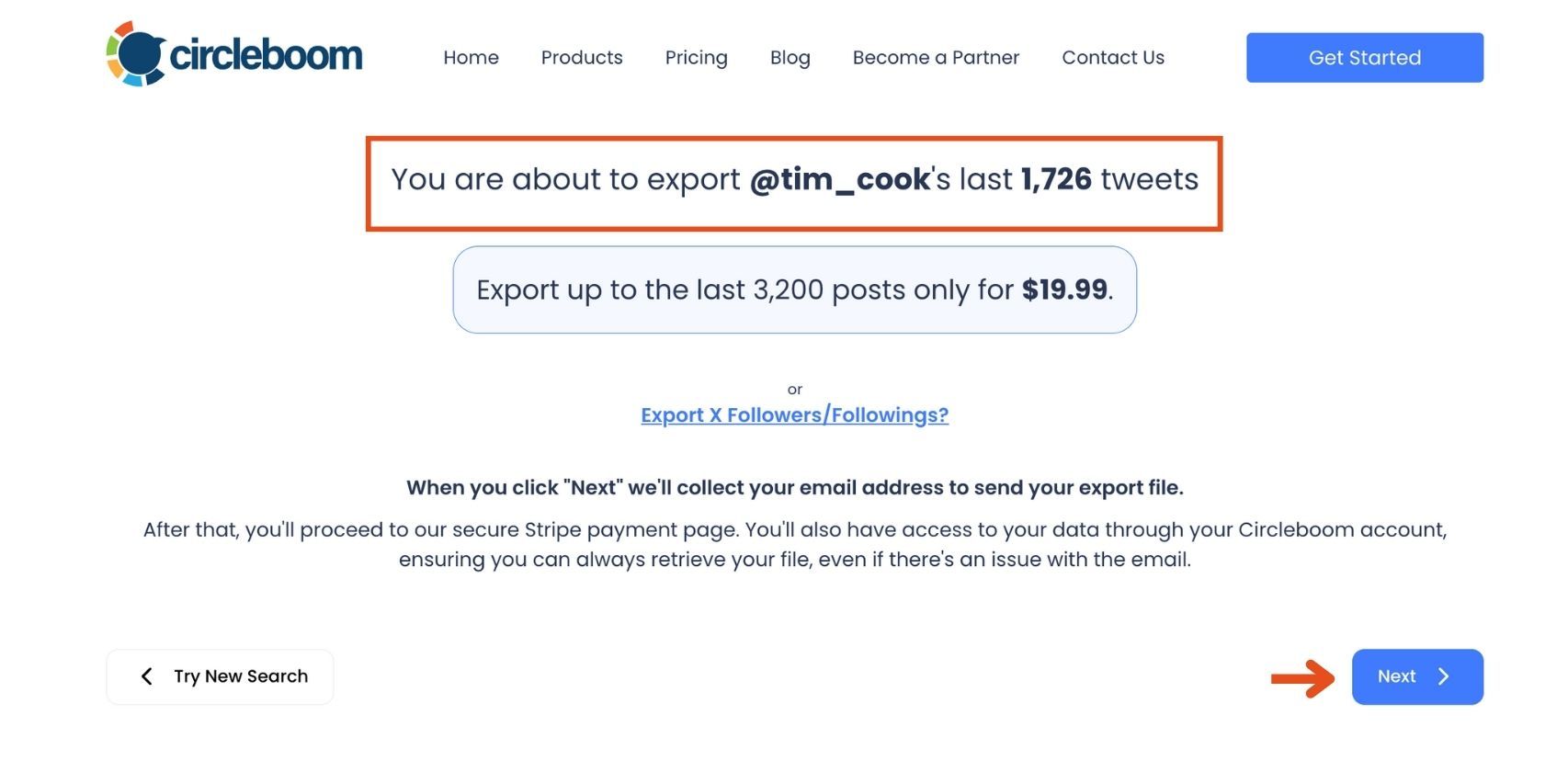
Step #2: Confirm the Tweet Count
Circleboom will display the total number of tweets available for export from the selected account. Review this information, then click the “Next” button to proceed with the export process.
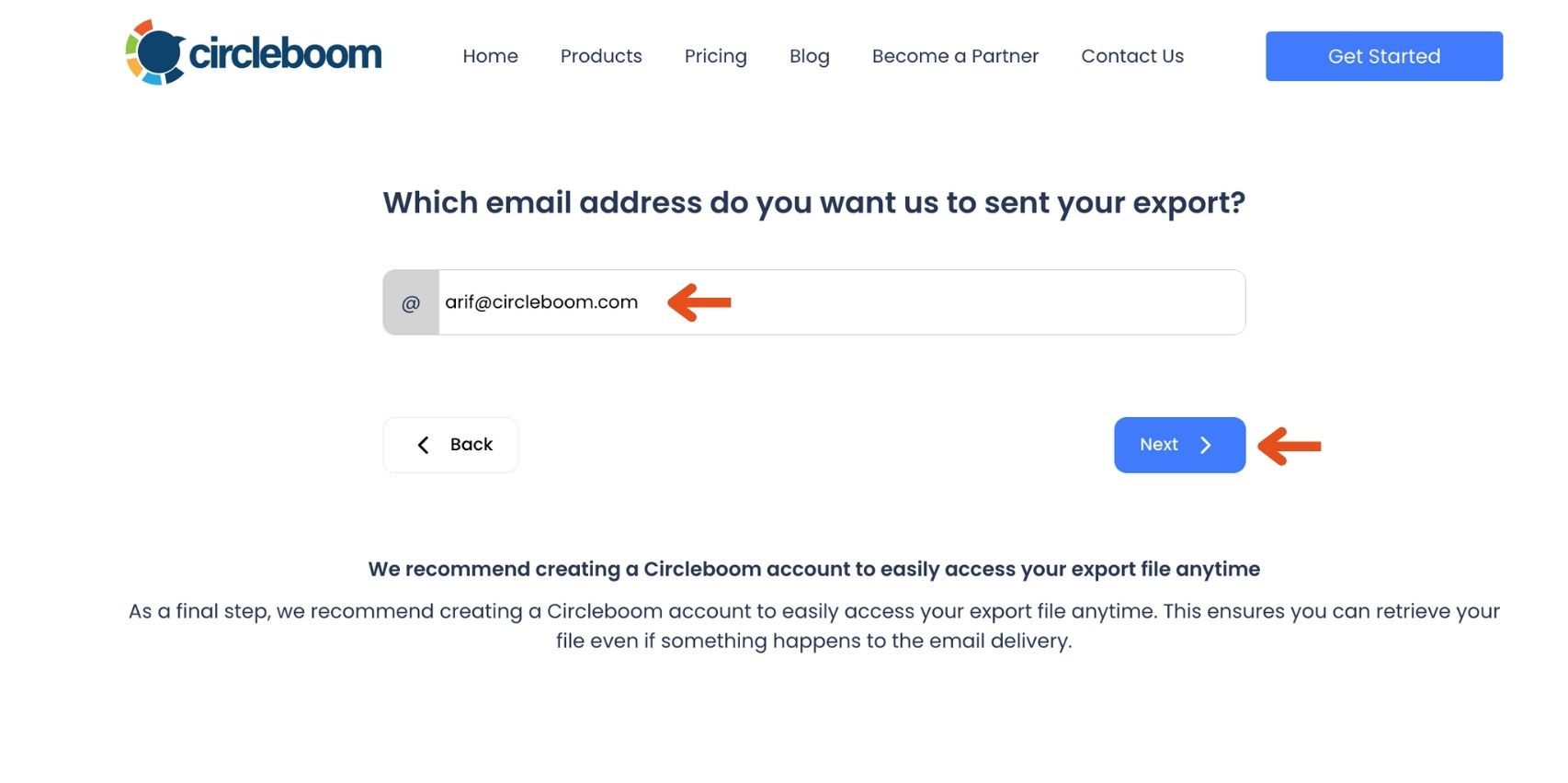
Step #3: Enter Your Email Address
Enter the email address where you’d like to receive the exported tweet file. Circleboom also recommends creating an account for easy access to your export file at any time. After entering your email, click the “Next” button to continue.
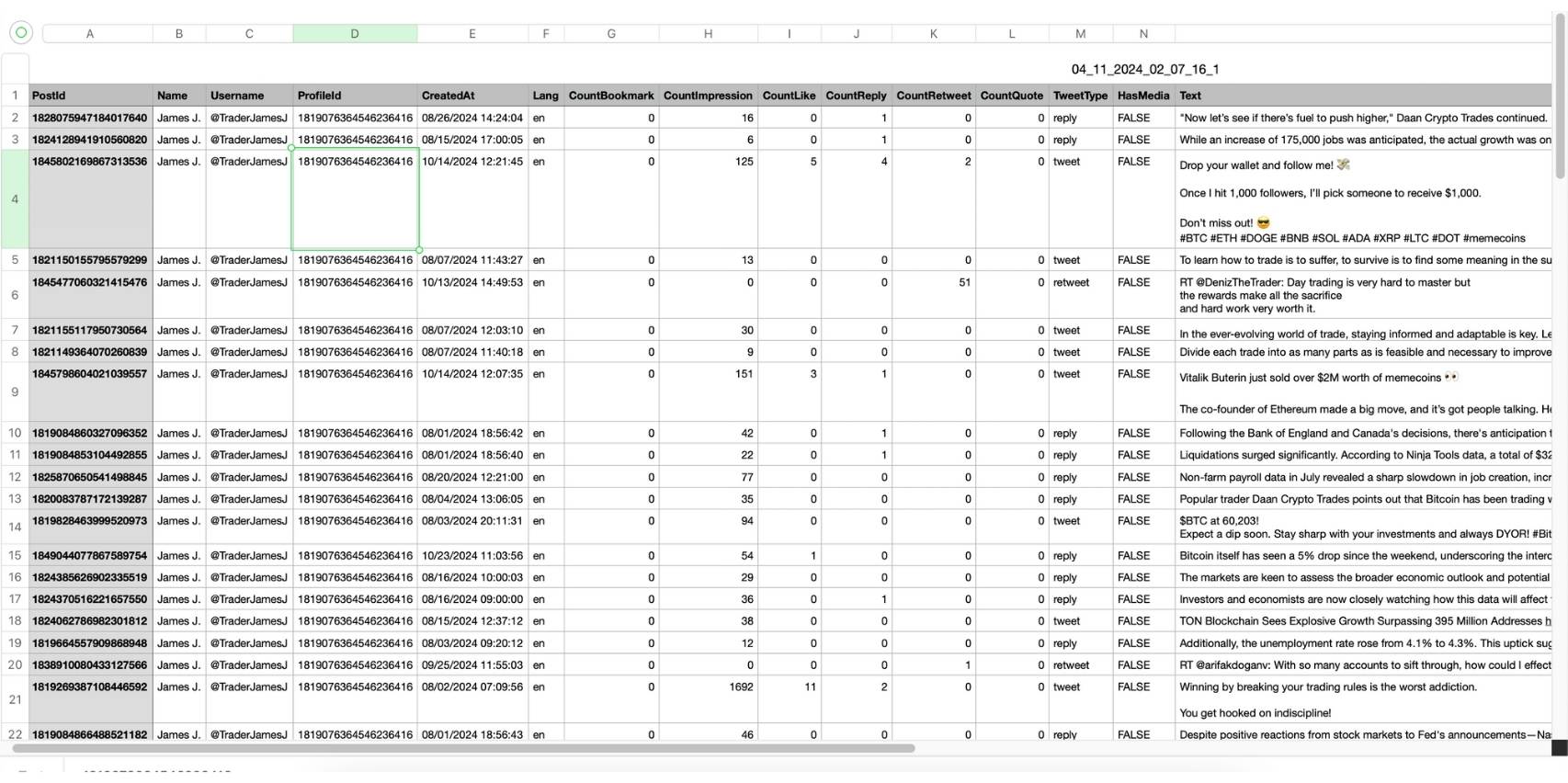
Step #4: After entering your email address, Circleboom sends the exported tweets in a CSV format directly to your inbox.
This CSV file includes essential details like Post ID, username, tweet text, engagement metrics (likes, retweets, replies), language, and timestamps, making it easy to review, analyze, or archive the tweets.
Here's how you can export all tweets of someone. Watch the video: 📥 ⬇️
What Twitter Actually Shows You Without an Account
When you land on a public Twitter profile without being logged in, you can see some content. The profile picture is there, the bio, the follower count. And below that, some tweets.

But the selection is strange. Twitter's algorithm picks which tweets to show logged-out visitors, and it doesn't sort them by date. You might see a tweet from last week, then one from three years ago, then something from 2019. There's no thread, no context, no continuity. Just a handful of posts pulled from different points in time with no clear pattern.
Scroll down and you hit a wall. Twitter prompts you to log in or create an account to see more. The content doesn't stop loading gradually. It just stops.
📌 What Twitter shows logged-out visitors is not a representative sample of what an account posts. It's a small, algorithmically selected slice designed to give you a taste, not a full picture.
If you want to actually understand what someone tweets about, how often, what performs, and what their content looks like over time, that limited view doesn't help.
What the CSV Export Actually Gives You
When Circleboom Twitter exports tweets from a public account, the output is a structured CSV file with up to 3,200 tweets. Each row is one tweet. Each column is a data point.

Full tweet text. The complete content of every tweet, not truncated. If the tweet was a long-form post or a thread opener, the full text is there.
Date and time. Every tweet is timestamped, so you can see the posting pattern, how frequently they post, when they're most active, and how their content has evolved over time. In chronological order, which is the thing Twitter's logged-out view never gives you.
Engagement data. Likes, retweets, replies, and where available, impressions. For each individual tweet. This tells you not just what someone posted but which posts actually landed with their audience.
Tweet ID and URL. Each row includes the direct link to the original tweet so you can reference the source easily.
Once it's in a CSV, you can open it in Excel or Google Sheets, sort by any column, filter by keyword, chart the engagement over time, or use it as the foundation for any analysis or research workflow you need.
Why This Is More Useful Than Scrolling Twitter
You get the full picture, not a sample. Up to 3,200 tweets is a significant body of content. For most accounts, that covers years of posting history. Twitter's logged-out view gives you maybe a dozen posts selected by an algorithm. The difference in what you can actually learn from the two is enormous.
Chronological order actually means something. Seeing someone's tweets in date order shows you how their content has changed, how their topics have evolved, and when their engagement started improving or declining. The random non-chronological display Twitter shows without an account tells you none of that.
You can search and filter. Inside a spreadsheet, you can search for any keyword across 3,200 tweets in seconds. Want to see every tweet they've ever posted about a specific topic? Filter the column. On Twitter, even logged-in users can't search within a specific account's tweet history easily.
You can analyze performance patterns. Sorting by likes or retweets shows you immediately which content resonated most. That's the kind of insight that takes hours to approximate manually by scrolling and trying to remember what you saw.
It works for research on any public account. Whether you're studying a competitor, researching a journalist's coverage, analyzing an influencer's content strategy, or just curious about what an account posts, the CSV export works the same way for any public account without needing credentials of your own.
Frequently Asked Questions
Can you see tweets without a Twitter account?
Yes, partially. Twitter shows a limited, algorithmically selected set of tweets to logged-out visitors on any public profile, but the order is not chronological and the coverage is incomplete. For a complete, structured view of an account's tweets, Circleboom Twitter's Export Tweets feature retrieves up to 3,200 tweets in a CSV file without requiring a Twitter account.
Why does Twitter show tweets in random order without an account?
Twitter's algorithm selects what to surface to logged-out visitors rather than displaying tweets chronologically. This is a deliberate product decision designed to show what it considers most relevant or engaging rather than giving a full account history.
How many tweets can Circleboom export?
Circleboom Twitter can export up to the most recent 3,200 tweets from any public account. This limit comes from X's API constraints and applies to all third-party tools that access the platform through official API channels.
What information is included in the exported CSV?
Each exported tweet includes the full tweet text, date and time, like count, retweet count, reply count, tweet ID, and direct URL. Impression data is included where available through the API.
Can I filter tweets before exporting?
Yes. You can filter the tweet dataset by keyword, engagement level, media type, and other criteria before downloading, so the exported file contains only the tweets most relevant to your purpose.
Does this work for any public Twitter account?
Yes. Circleboom Twitter can export tweets from any public account. Private accounts have protected tweet histories that are not accessible through X's public API.
Do I need a Twitter account to use Circleboom Twitter?
You need a Circleboom account to use the Export Tweets feature. You do not need a Twitter account of your own to export tweets from other public accounts.
Final Thoughts
Twitter's logged-out view was never designed to give you a real look at what an account posts. It shows you enough to make you want to log in, not enough to actually understand the account's content.
Circleboom Twitter's Export Tweets feature gives you the full picture: up to 3,200 tweets, in order, with engagement data, in a CSV you can work with anywhere.
See someone's full tweet history without a Twitter account using Circleboom Twitter.
infocircleboom.com




)

