Running out of content ideas usually happens on the day a post is due, not the week before. Below are 50 post ideas sorted by the material you already have, plus the fastest way to turn each one into a finished post.
The quickest content ideas start from material you already have, and Circleboom Publish turns a note, a link or an old post into a ready post for X, LinkedIn, Facebook, Instagram, Bluesky or Pinterest with its AI Social Media Post Generator.
→ Generate social posts from your content ideas with AI
The 50 ideas below are grouped by that raw material, so you can start from whatever is in front of you.
Why you run out of content ideas
Most dry days are not a shortage of content ideas. They are a shortage of words: you know what you want to say, and the sentence will not come.
We do not think a list of 100 prompts fixes that, because each prompt still has to be written from nothing.
The fix is to start from material that already exists. A note from a meeting, an article you read this morning, a post that did well last month: each one is a half-finished post.
Circleboom Publish is built around that idea, so you can turn half-formed content ideas into ready posts without a blank page.
The best content ideas are already in your notes, your browser history and your sent posts.
Consistency is the reason this matters. Platforms reward accounts that show up steadily, and one empty week costs more than one average post.
Pew Research Center's figures on social media use in 2026 put YouTube at 84% of U.S. adults, Facebook at 70% and Instagram at 51%, so the audience is there on every platform you post to.
If you want the broad view first, the general list of social media post ideas covers formats across every network. This article goes narrower: ideas you can post today from what you have.
Sort the 50 ideas by what you already have on hand
Every idea below starts from one of five kinds of raw material, and each one has a matching tool in Circleboom Publish that turns it into a post:
| What you have | Example | Tool that turns it into a post |
|---|---|---|
| A note or a thought | Meeting notes, a lesson | Generate Post from Text |
| A link you read | A report, a news story | Generate Post from URL |
| An old post that worked | Last month's top post | Repost From Sent Items |
| A customer question | A DM, a comment | Composer AI prompt |
| A photo or a visual | A product shot, a chart | Media bar and a caption |
Pick the row that matches what is in front of you today, then pick an idea from that group. You skip the blank page because the material is already written down somewhere.
Content ideas from a note or a thought
A note is the most common raw material and the most wasted. Generate Post from Text takes any pasted text, an idea, meeting notes or an internal memo, and turns it into a post with the goal, tone, language and platform you choose.
Ideas from your own work:
- A lesson you learned this week, in one sentence and one example.
- A mistake you made and what you changed after it.
- The insight from today's meeting notes that a customer would care about.
- A decision you changed your mind on, and why.
- A quick how-to from a task you do every day.
Ideas from your opinions and plans:
- An unpopular opinion in your field, with your reason.
- A myth you keep hearing from customers, and the fact that replaces it.
- The one tool you rely on and what you use it for.
- A prediction for the next quarter in your industry.
- What you would tell yourself in your first year in this job.
These work for business accounts as well as creators. For company-specific angles, the list of B2B social media post ideas adds ideas built for buyers and decision-makers.
Content ideas from a link you read
A link is a post someone else already researched. Generate Post from URL, called "Generate a Post from an Article or News Link" in the AI Features menu, rewrites any article or news link into an original post with your own angle, instead of sharing it as-is.
Ideas from news and reports:
- An industry report, with the one number your audience should know.
- A news story told with a humorous tone.
- A study's finding and what it means for your customers.
- A long article turned into a thread on X or Bluesky.
- An article you disagree with, and your counterpoint.
Ideas from what you read and watch:
- Three things you read this week, one line each.
- A tutorial you would add one missing step to.
- A recap of an event, from the organizer's own write-up.
- A platform's product update and how it changes your work.
- A quote from an interview, with your comment under it.
On LinkedIn, a shared link reads better with your own take on top of it. The guide on what to post on LinkedIn shows which formats suit a professional feed.
Content ideas from an old post that worked
A post that already earned engagement is a proven idea. Many of your followers likely never saw it the first time, and everyone who followed you since never had the chance. Repost From Sent Items resends a published post as-is or edited.
Ideas that reuse a winner:
- Your best post from last month, with a new opening line.
- A top text post turned into a carousel.
- An old prediction, revisited: were you right?
- The best comment on an old post, answered in a new post.
- A single strong post expanded into a thread.
Ideas that extend a winner:
- A "one year later" follow-up on a post that did well.
- A list post turned into a poll that asks which item readers use.
- A tip from one platform rewritten for another platform's format.
- Three small tips from three old posts, combined into one.
- The strongest line of your best post, set as a quote image.
For idea 22, the AI Carousel Generator builds the slides inside the composer, so a text post becomes a swipeable version without a design tool.
Content ideas from a customer question
Every question a customer asks is a post other customers need. The composer's AI button opens "Ask the AI anything...", where a one-line instruction returns a full draft you can edit.
Ideas from questions and comments:
- The question you answer most often, answered once in public.
- A question from your DMs, with the private details left out.
- The objection you hear before a sale, and your honest answer.
- A short quiz on something customers often get wrong.
- A poll asking what your audience wants you to cover next.
Ideas from customer stories:
- A before-and-after from a customer request.
- A "you asked, we built it" post about a change you made.
- A comparison customers ask about, with a fair answer.
- A myth-buster that started as a customer's question.
- A public reply to a review, shared with the customer's permission.
Quizzes and polls turn a question into a conversation. The guide to create social media quizzes covers the formats and the mistakes to skip.
Content ideas from a photo or a visual
A photo is a post waiting for a caption. The composer's media bar includes Unsplash, Giphy, Google Photos, Canva and the AI Carousel Generator, so the visual and the words come together in one place.
Ideas from your own photos:
- Behind the scenes of a normal workday.
- Your product in use, shot by you or a customer.
- Your workspace, with the one thing in it you would never give up.
- A milestone, with the number and a thank-you.
- A photo from an event you attended, with one takeaway.
Ideas from visuals you make or find:
- A process in five steps, as a carousel.
- A GIF reaction to a piece of industry news.
- A simple chart you made from your own data.
- A screenshot of a tool with one tip about it.
- A seasonal post built on an Unsplash image.
The caption is still where the post earns its reach, so treat each photo as the opening of a short story, not the whole post.
How to turn a content idea into a finished post fast
Pick the idea, paste the raw material into the matching generator, choose the settings and edit the draft. The whole loop takes a few minutes per post.
Generate Post from Text and Generate Post from URL share the same form:
- Main Goal: Engagement, Awareness, Promotion, Website Traffic or Informative.
- AI Tone and Style: Informative, Motivational, Encouraging, Conversational, Technical or Humorous.
- Language: English by default, with other major languages available.
- Target Platform: X, Bluesky, LinkedIn, Facebook, Instagram or Pinterest.
- Generate as a thread post: a toggle for long material on thread-capable platforms.
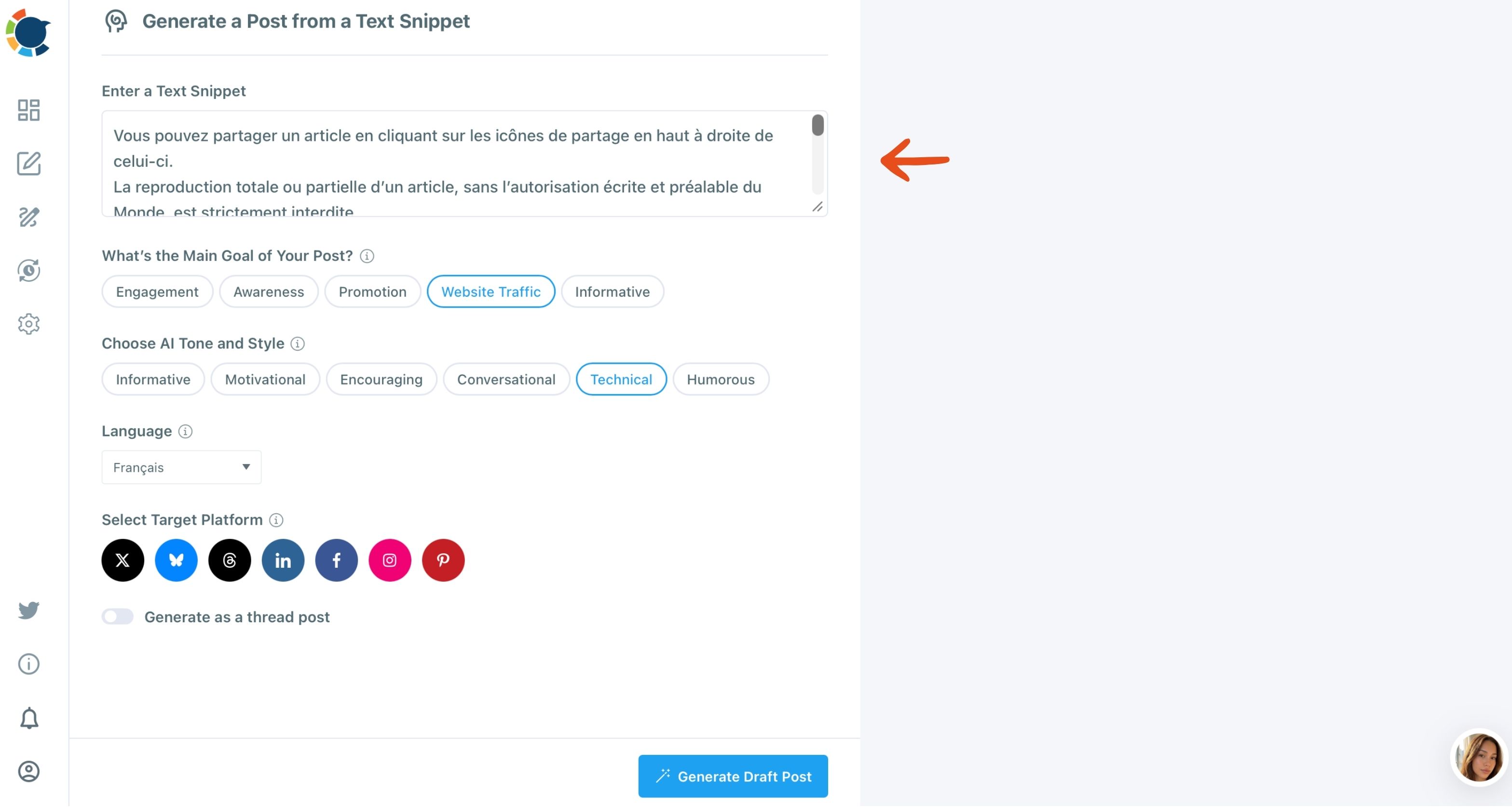
The draft opens in the composer, where you edit it and add your own touches before you schedule it. Nothing posts on its own.
When you want to write posts from any content idea with the Social Media Post Generator, every platform's AI generator sits behind that one page.

The language setting is worth a second look. If part of your audience reads Spanish or Japanese, you can write the post in that language even if you do not speak it, then review it before it goes out.
Can you write a week of posts in one sitting?
Yes, and that is the habit that keeps dry days from happening. Pick five ideas from the list on Monday, generate a draft for each, edit them, and send them to the Queue or schedule them for the rest of the week.
Batch writing works because the hard part, deciding what to say, happens once. Each generator request is quick, so one sitting buys a full week of daily presence.
Finish each post with the Hashtag Generator, which pulls 20 to 30 hashtags matched to the post's topic and adds them in bulk. Then the only daily job left is answering comments.
What if you have no idea at all today?
Curate instead of creating. Discover Articles surfaces fresh articles on the interests you choose and adds the best ones to the Queue in one click, which works best on X, Facebook, Bluesky, LinkedIn and Threads.
The article curation page shows how it fills the days between your own posts. When an article deserves your take, paste its link into Generate Post from URL and it becomes idea 11 on this list.
Content ideas from other people's tweets
On X, a strong post from someone else is a prompt in itself. You borrow the idea, not the words, and write your own version.
Watch: borrowing the idea behind a strong tweet and rewriting it in your own words with Tweet Inspiration.
That flow lives in Circleboom Twitter's post inspiration tool. Circleboom is an official X Enterprise Developer, so the flow runs on approved X access. It suits accounts where X is the main channel.
The idea is already there
You never run out of content ideas; you run out of starting points, and you already have five of them.
→ Turn today's content idea into a scheduled post
Content ideas FAQ
Can I reuse a post that already did well?
Yes. Circleboom Publish lets you pick a proven post from Content Performance Analytics and resend it with Repost From Sent Items, as-is or edited.
The guide on what to tweet based on past post analytics shows how to read which posts earned a second run.
Is it risky to repost exactly the same text?
Yes, duplicate content can limit a post's reach. Paste the old post into Generate Post from Text, pick a different tone or goal, and edit the new version so the message stays the same and the post is new.
Do I need a separate design tool for visual post ideas?
No. The Circleboom Publish composer includes Unsplash, Giphy, Google Photos, Canva and the AI Carousel Generator in its media bar, so the image and the caption come together in one place.