
Over the past few months, several friends have asked me the same question in different ways.
They were frustrated because their Twitter (X) accounts had started to attract bot followers, fake-looking profiles, or accounts that clearly weren’t real people. Engagement felt off, timelines felt noisy, and trust in the follower count started to drop.
Their idea sounded simple on the surface:
“If I create a new account, won’t all the bots disappear?”
It feels like a clean reset.
No bots, no fake followers, no mess. But the reality is a bit more complicated—and in most cases, creating a new account actually creates new problems instead of solving the original one.
The short answer: a new account doesn’t really solve the Bot X Follower Problem
 Arif Akdogan
What Happens When You Create a New X Account
When you create a brand-new Twitter (X) account, there are no bot followers at the beginning.
But there’s an important detail that gets overlooked:
there are no followers at all.
No audience, no engagement history, no social proof, no momentum. Everything you’ve built—whether that’s followers, conversations, or content history—gets wiped out instantly. You’re not fixing the problem; you’re resetting your entire presence.
And once you start growing again, something familiar usually happens.
The Real Dilemma: New Accounts Attract Bots Even Faster
One of the biggest misconceptions is thinking bots only exist on “old” or “damaged” accounts. In reality, new accounts are often targeted more aggressively by bots.
Bot networks actively look for fresh profiles because:
⛔ New accounts have fewer trust signals
⛔ They’re more likely to follow back
⛔ They help bots inflate their own follower counts
⛔ They’re easier to blend into early growth stages
So after you start growing your new account, the first wave of followers is often a mix of real users and bots. That puts you right back where you started—except now you’ve lost all your previous progress.

The Hidden Hazards of Creating a New Account
Starting over sounds refreshing, but it comes with real downsides that aren’t always obvious at first.
You lose:
- Existing real followers and long-term connections
- Past engagement history that helps your posts perform
- Social proof that builds credibility
- Username recognition or brand consistency
You also take on extra work:
- Growing from zero again
- Re-establishing trust with your audience
- Reposting or recreating content
- Explaining to people which account is the “real” one
In short, you trade a solvable problem for a long rebuilding process—while still remaining exposed to bots.
The Better Solution: Detect and Remove Bot Followers
If the issue is bot followers, the solution doesn’t require starting over.
It simply requires cleaning your existing account.
Removing bots:
➡️ Improves follower and network quality
➡️ Makes engagement rates more accurate
➡️ Helps your content reach real people
➡️ Keeps your account history and momentum intact
Instead of abandoning your account, you keep what works and remove what doesn’t.
How I Detect and Remove Bots with Circleboom Twitter
To handle this properly, I use Circleboom Twitter.

Circleboom Twitter is an official X Enterprise Developer, which means it works directly within X’s API rules and doesn’t rely on risky automation methods. That’s important when you’re dealing with follower actions like analysis and removal.
What Circleboom Twitter does is straightforward but powerful:
🟢 It analyzes all your followers and followings
🟢 Detects suspicious, fake, or bot-like accounts
🟢 Lets you remove them in bulk or with one click
🟢 Runs the process automatically instead of forcing manual cleanup
You don’t need to inspect profiles one by one or guess which accounts are real.
Step-by-Step: How to Detect and Remove Bot Followers Using Circleboom Twitter
Here’s how the process works in practice:
Step #1: Go to the Circleboom Twitter website and log in with your credentials.
If you’re a new user, sign up—it’s quick and easy!

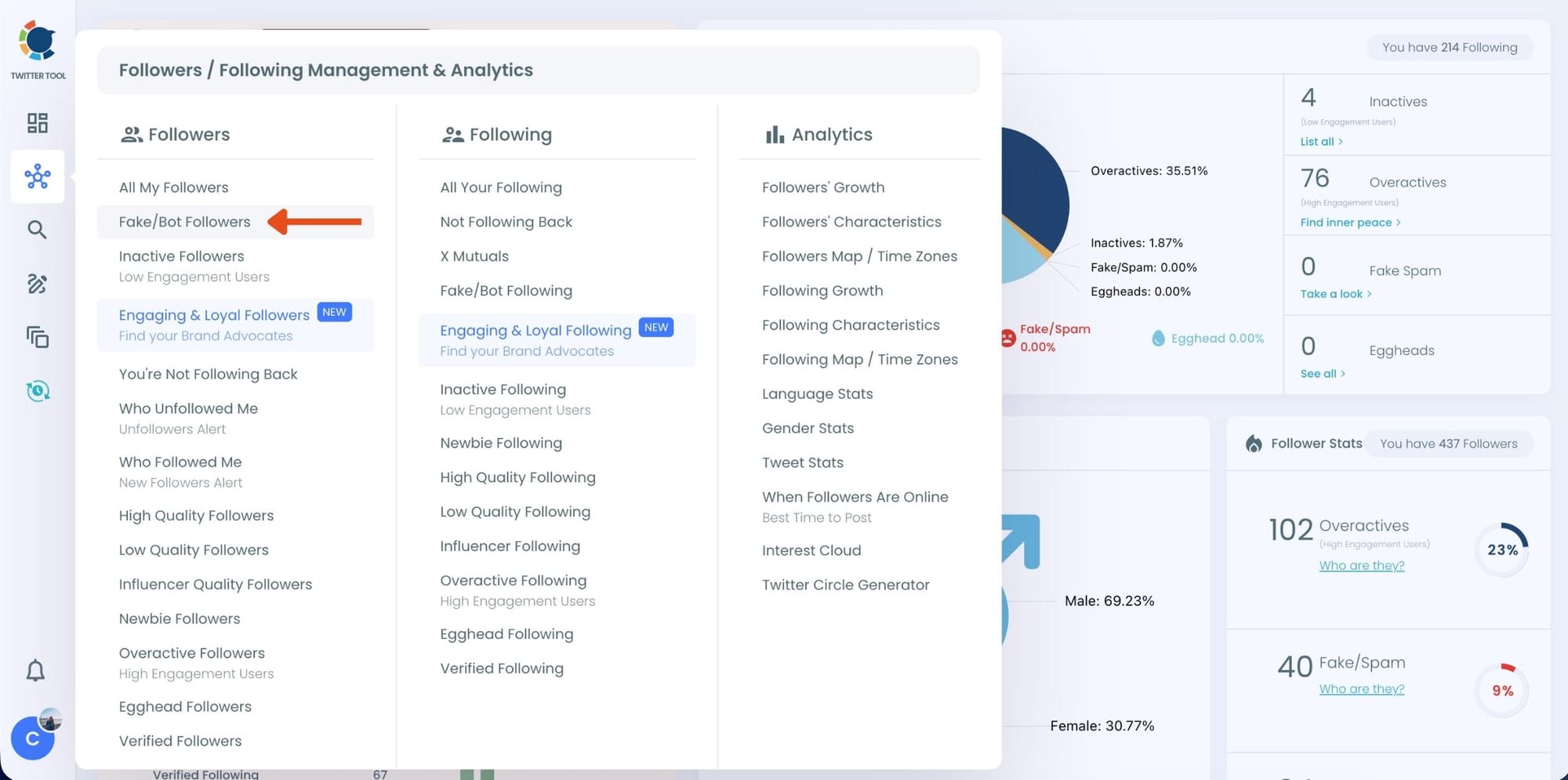
Step #2: On the left-side menu, click on the Followers / Following Management section. A dropdown menu will appear. Select Fake/Bot Followers to see the full list of your followers.
If you want to remove specific accounts, such as inactive users, you can directly select these categories from the dropdown menu instead of viewing all followers.
Step #3: You will see a complete list of your fake/bot followers.
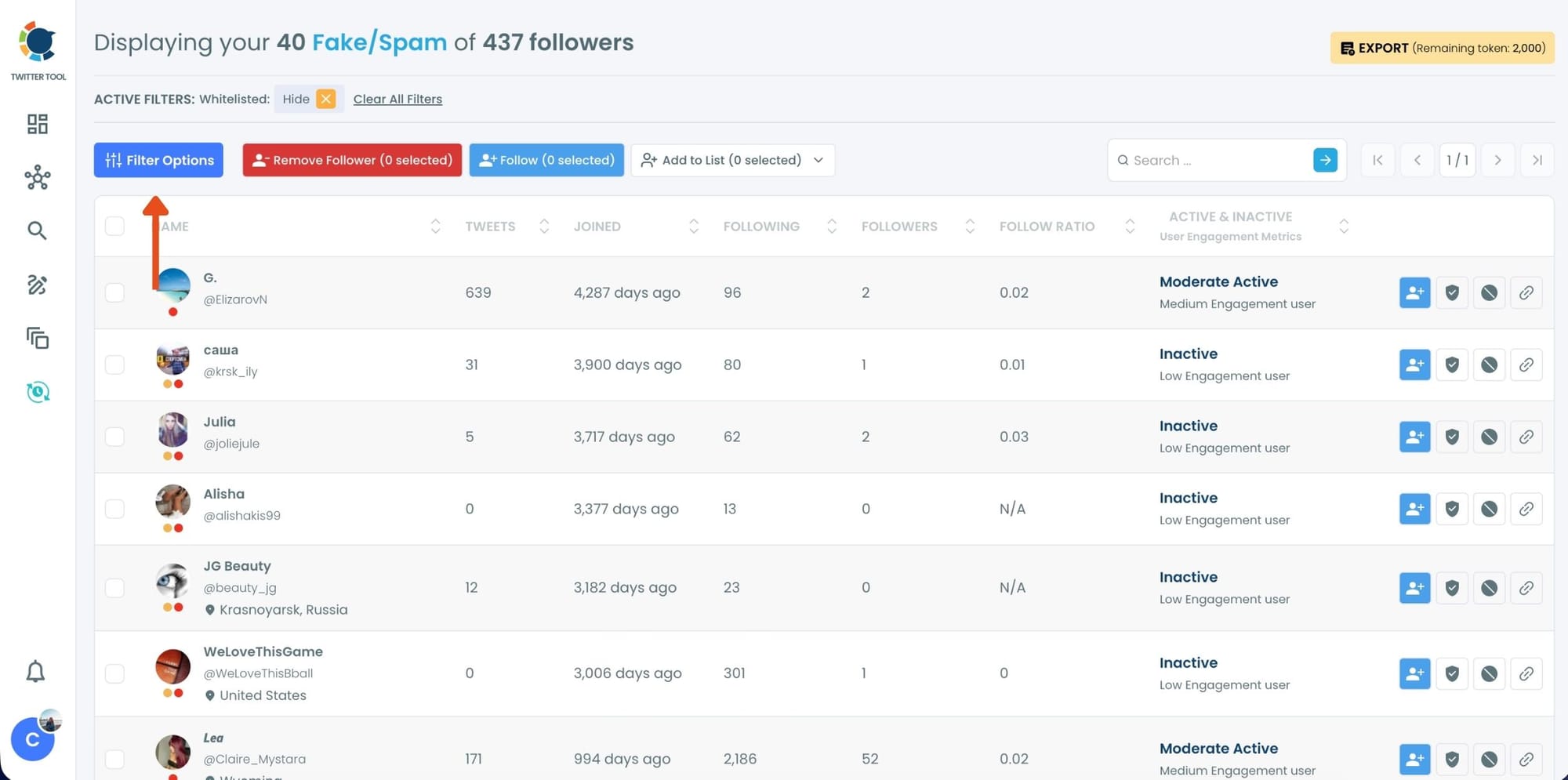
Use the Filter Options on the left side to refine your list. You can filter followers based on engagement levels, inactivity, verification status, follower/following count, and more.

Step #4: Browse through your followers and check the boxes next to the users you want to remove.
You can also select multiple users at once. Once you have selected the users, click on the Remove Followers button at the top.
Alternatively, you can remove individual followers by clicking the red remove icon next to their name on the right side of the list.
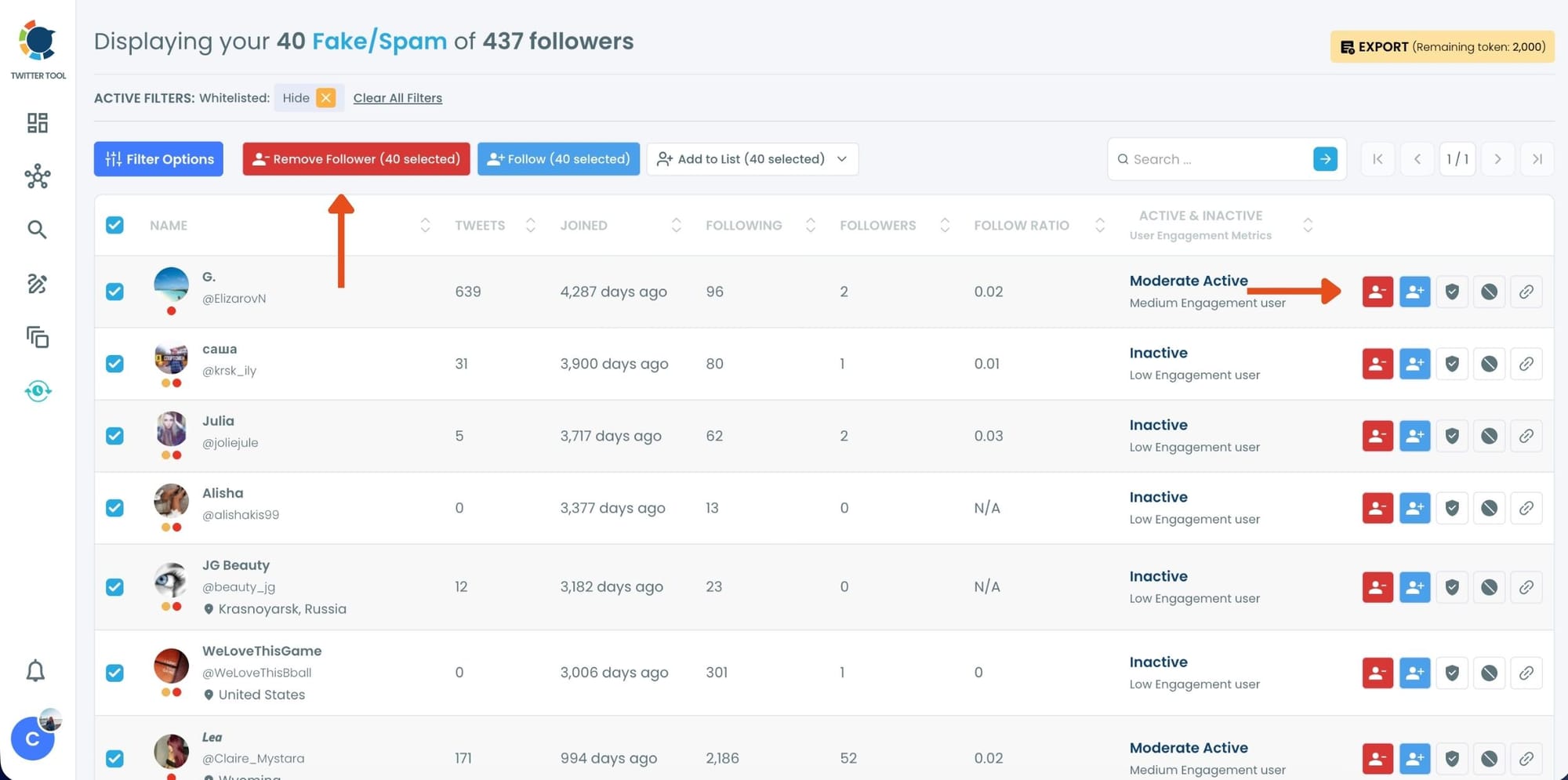
A confirmation message will appear asking if you are sure you want to remove the selected followers. Click ''Remove Followers''.
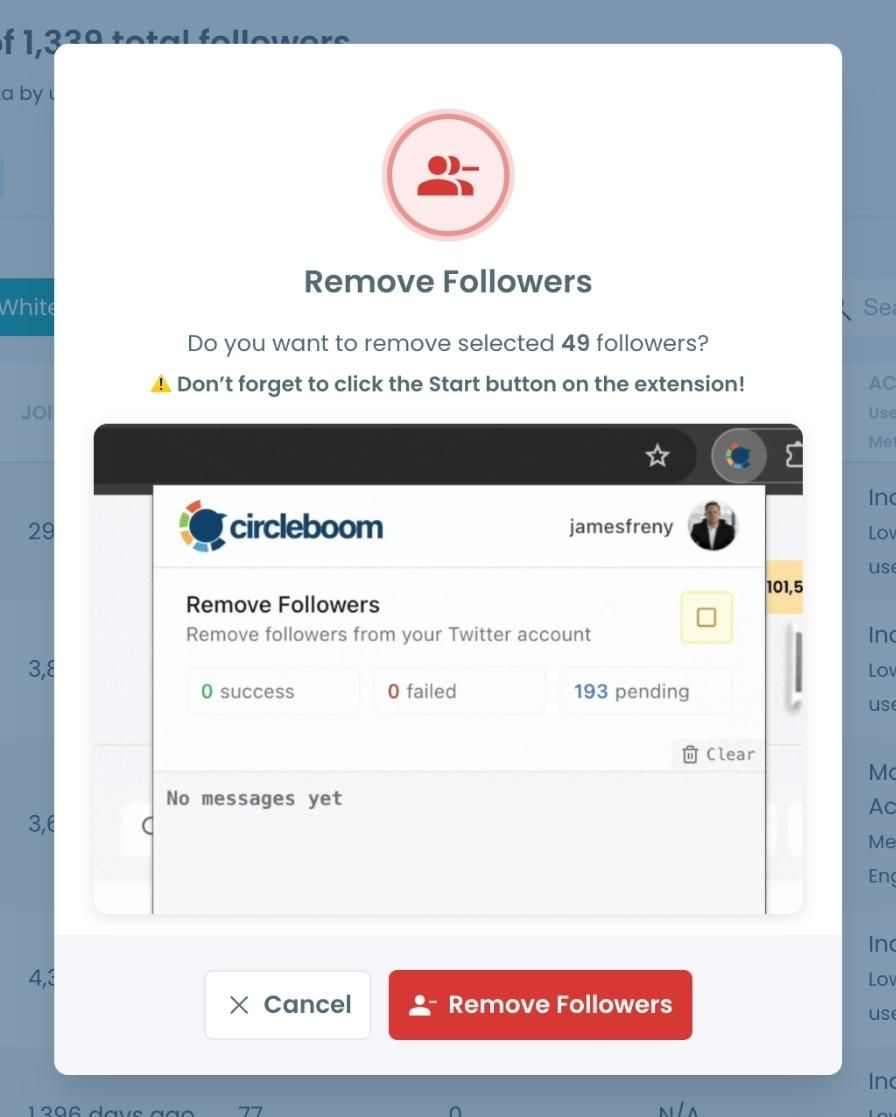
Step #5: Since the removal action is processed via the Circleboom Remove Twitter/X Followers extension, you need to install it to complete the process.
Click on Download the Extension and install it from the Chrome Web Store.
Once installed, you can easily remove followers.

Step #6: After installing the extension, Circleboom will automatically add all your removal requests to the extension queue.
Click on the Start button to begin the removal process.
The extension will process your requests and remove the selected followers.
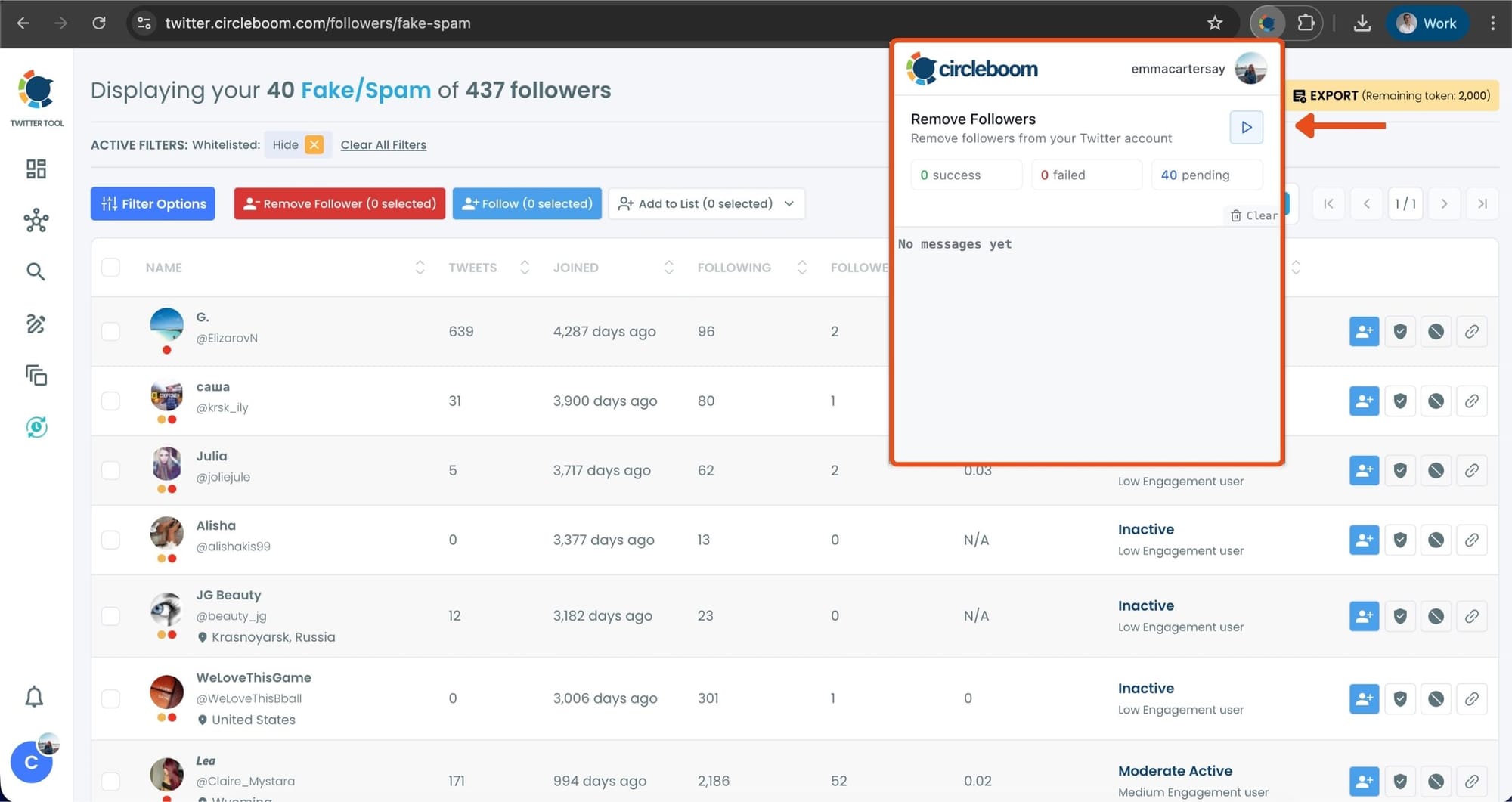
That's it! Your selected followers are now removed automatically.
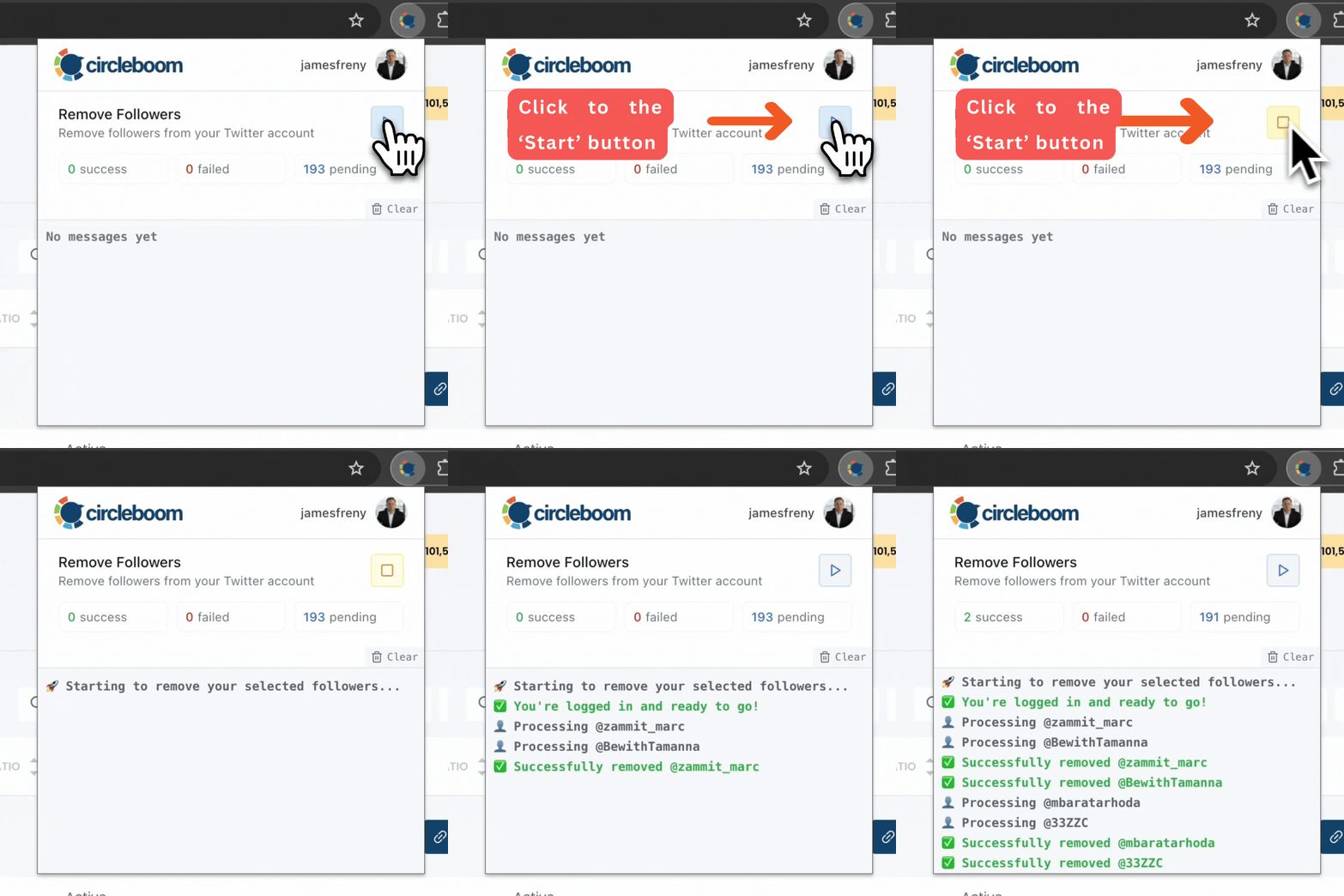
⚠️ Important Warning: Once the removal process begins, do not close your Chrome browser or the Circleboom tab. The tool will automatically remove followers in the background, but if you close the tab or exit Chrome, the process will stop.
If you need a more detailed guide check this video ⬇️
Once you have these accounts before you, you can also choose to add them to your Twitter lists or export them into CSV, both without having to leave the platform.
To prevent unwanted removal, Circleboom also includes a whitelist feature. You can read more about “How to Whitelist My Twitter Followers.”
What to Do After Removing Bots
Bot cleanup isn’t a one-time task—it’s part of maintaining a healthy account.
A simple routine works best:
- Run a bot check periodically
- Clean up spikes after viral tweets
- Focus on organic growth instead of follow-for-follow tactics
This keeps your account clean without forcing resets or drastic actions.
Final Thoughts: Don’t Restart—Clean What You’ve Built
Creating a new Twitter (X) account may feel like a quick fix, but it doesn’t eliminate bots in the long run. New accounts attract bots too, often even faster, and restarting means giving up real progress you’ve already made.
If bot followers are the issue, the solution is simple and direct:
detect them, remove them, and keep growing.
With Circleboom Twitter, you can clean your account efficiently, protect your engagement quality, and move forward—without starting from zero again.
%20Account%20Eliminate%20Bots%3F)
