Attorneys use X for two jobs: being findable when someone checks their name, and finding the people who matter to their practice. Twitter for lawyers works when each job has its own routine and its own tool.
By hand: posts stop when court fills the week, and useful accounts stay hidden in the timeline. With Circleboom: one sitting schedules the week, and keyword search lists relevant X accounts, all through official X Enterprise APIs.
→ Plan your Twitter for lawyers routine in X Post Planner
The two jobs, their limits and the steps follow below.
The two jobs of an attorney on X
An attorney's X account has one job facing outward and one facing inward.
Being findable means a recent, useful profile is there when a client, reporter or referring lawyer looks you up.
Finding people means building a working network of peers, press and referral sources by name.
Most advice for lawyers on X treats these as one activity called "being active."
Separating them matters because they fail in different ways and need different time.
| Job | What it needs | Circleboom tool | Limit to plan around |
|---|---|---|---|
| Being findable | Three posts a week | X Post Planner | Schedule 15 minutes ahead |
| Finding people | A reviewed list | Deep Account Search | Public accounts only |
| Following up | Named X Lists | Add to List | 400 follows a day |
An attorney who only posts writes to nobody in particular. An attorney who only searches has a list and no reason for anyone on it to reply.
Circleboom handles both jobs in one account, and it is a verified Enterprise partner of X, which matters when the account in question carries your professional name.
This guide covers how to use X, not what you may say on it. It states no bar or advertising rules, so check those with your licensing body before you publish.
Why being findable comes first for most attorneys
A findable account gives every other activity somewhere to land. When a reporter or a referring lawyer clicks your name after a reply, the profile either shows recent, useful posts or it shows a date from months ago.
The common failure is calendar-driven silence: a good run of posts, a trial, then nothing.
The practical fix is to separate writing from publishing.
You can plan a week of Twitter for lawyers posts on a quiet day and let them go out on a busy one.
Good topics for this job are explanations, since attorneys explain hard things all day. Educational tweets that teach and build authority tend to suit a legal account better than promotion does. A plain answer to a question clients keep asking is usually enough.
That steady output also supports personal branding for professionals, which for a lawyer tends to outlast any one firm or job title.
How many posts a week keep an attorney's X account current?
Three posts a week at consistent times is a sustainable target for a busy attorney. It works because the compounding comes from consistency: three posts a week held for six months builds more momentum than ten a week for three weeks followed by silence.
The arithmetic favors the smaller number. Three posts a week is 12 a month, which fits in a weekly sitting that survives a trial schedule.
Timing is the other half. Choose slots from the best time to post on Twitter for your own followers.
Treat them as a starting point, since they show when followers tend to be online and guarantee nothing about any single post.
Why one workspace suits a legal account
X Post Planner is Circleboom's workspace for writing, reviewing and scheduling X posts, and its main value to an attorney is the review window it creates.
Posting directly on X joins writing and publishing into one moment, while a scheduled draft can be read again the next morning, when mistakes are easier to spot.
For a legal account, that second reading is where most errors get caught. Before you schedule your Twitter for lawyers calendar, check each post for these points:
- The date and time zone of the scheduled slot.
- Links, media and any figure you quote.
- Tone, including anything that reads as advice to one person.
Drafts wait in the Collections panel until they pass, so an unfinished post is never one click from going live.
Scheduled posts then publish while you are busy, as long as your X account stays connected and authenticated at posting time.
What one illustrative week can look like
This example week is an illustration of the format, for a solo employment lawyer, and the topics are placeholders for your own field:
- Monday: a short post explaining a deadline clients often miss.
- Wednesday: a four-post thread on what a recent ruling changes in plain words.
- Friday: an answer to a question seen that week on one of your X Lists.
Three posts, one sitting, and the Friday slot comes from listening rather than from a topic list. That last detail is what stops the account from sounding like a brochure.
How to use Twitter for lawyers with Circleboom
To use X as an attorney, schedule a small batch of educational posts in X Post Planner, then search for practice-area accounts and save the reviewed ones to X Lists. The first job keeps the profile current, and the second builds the network that reads it.
This four-part process takes one sitting a week once the first search is done.
Connect your X account and open the planner
- Log in to Circleboom and connect your X account.
- Navigate to the X Post Planner menu to reach the editor.

Schedule the week's posts
- Write each post in the editor, using Add another post when an explanation needs a thread of up to 25 posts.
- Click Schedule, set a date and time at least 15 minutes ahead, or pick one of the six slots from Find your best posting time.
- Use Queue up next on a past post that performed well, from the button row in X Post Analytics, when a quiet week needs one more post.

Find practice-area accounts with Deep Search
- Open Deep Account Search under Advanced X Search and enter a practice-area keyword.
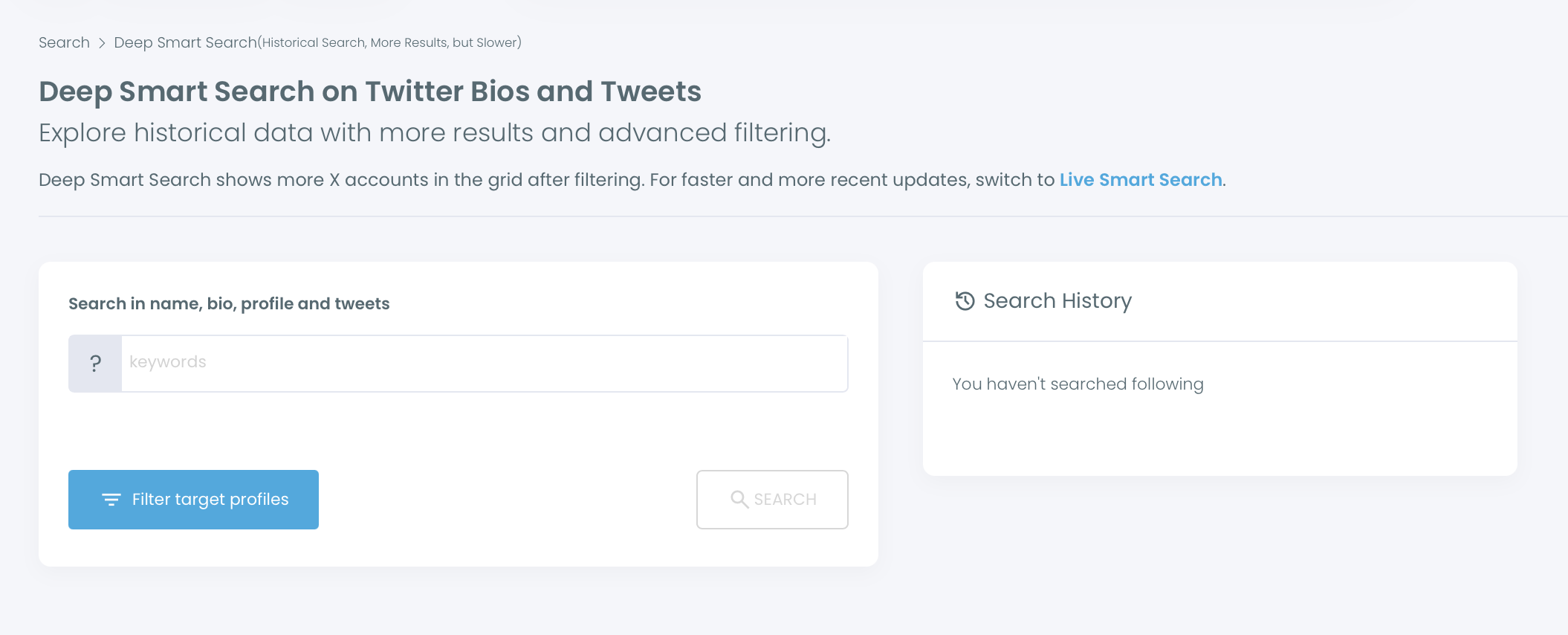
- Click Filter Options and narrow by location, bio words, follower count or follower quality.
- Open the profiles you plan to keep, because an account matched on an old tweet may have changed focus.
Save and follow the accounts you reviewed
- Select the accounts with their checkboxes and choose Add to List, Follow or Export.
- Confirm the action and let Circleboom pace it: follows run at 50 every 15 minutes and 400 a day, and the rest continue the next day.
This order puts the output before the outreach, because new contacts who open your profile should find recent posts waiting.
Review sits at two points for the same reason: published words and followed accounts both carry your name.
At a glance: connect, schedule, search, review, then list or follow.
If a draft will not come, the AI Tweet Generator can produce one from a topic. An attorney should keep it in review until every word is checked.
What Deep Account Search can and cannot tell an attorney
Deep Account Search matches a keyword against X bios and historical tweets, then lists up to 5,000 public accounts per query across up to 50 pages. It reaches established voices who post rarely, which a search of recent activity misses.
Three limits shape how a lawyer should read the results:
- Only public accounts and public tweets appear, so protected profiles are excluded.
- Account data reflects the time of retrieval, and the match may rest on a much older tweet.
- Searches and exports use your search token balance.
The filters available are Follower Quality, Verification Status, Find in Bio & Name, Whitelisted & Blacklisted, Follower, Following and Tweet Count, Follow Ratio, Join Date, and Filter by Location.
They combine with AND logic, so a narrow stack can hide good accounts.
The first keyword is often the weak link. A bio says "litigator" less often than you might expect.
Searching the words people use for the work itself, such as "wage claims" or "patent prosecution," tends to find more relevant accounts than searching a job title.
Start with two filters and one keyword, then read the first page of results before adding more.
If the list looks wrong, change the keyword or the filters rather than assuming the audience is missing, and record the combinations that work so the next search starts from them.
For more on that distinction, see how to search for keywords in Twitter profiles.
How to find local attorneys on X by city or jurisdiction
To find accounts in your own area, combine a practice-area keyword with the Filter by Location field in Deep Account Search. The field takes free text, such as "New York," so it matches what people wrote on their own profiles.
That free-text behavior creates the main pitfall: the same city can appear under several spellings, and some accounts list no location at all. Run the common spellings as separate filters, and add your state or region as a further pass.
A local list gives people more reason to reply, because shared courts, cities and news give them something to talk about.
A dedicated page lets you search Twitter by location.
For more of the local approach, see finding Twitter accounts in your local town or region.
The best place to keep attorneys and journalists you find on X
X Lists are the best place to keep them, because a list gives you a feed of those accounts without following anyone. Use Add to List in the search results to add every selected account to a new or existing list in one action, where X itself adds one profile at a time.
Separate lists by use:
- Local counsel.
- Reporters on your beat.
- Referral sources.
- Experts you learn from.
Two or three lists get read, and eight do not.
Manage them afterward with the Twitter List Manager.
Reading a list before a sitting also gives you topics for the week's posts, which links the two jobs together.
One more thing to settle before you become more visible: know what you would do about a damaging post. Twitter defamation and protecting your reputation is a useful read to have done in advance.
Summary of how attorneys can use X
Twitter for lawyers is two routines: a weekly batch of about three educational posts that keeps you findable, and a reviewed search that builds lists of the people you want to reach.
Plan around the real limits, which are 15 minutes of scheduling lead time, public accounts only, and 400 follows a day.
The value is a profile that stays current through a trial, and a network you can name.
Circleboom, an official X Enterprise Developer, runs both from one login.
→ Set up your X for lawyers posting routine
Twitter for lawyers FAQ
Should a lawyer spend the time on X or on LinkedIn?
Choose the platform your referral sources and press contacts use, and use both if you cannot tell. Circleboom's X Post Planner can cross-post to LinkedIn from the Schedule panel, up to 3,000 characters.
For a fuller comparison, read LinkedIn vs Twitter for professional growth.
Is an attorney or reporter who tweeted about my field years ago still worth following?
It may not be, because a historical match does not establish current interest and the account may no longer be run by the same person. The Active and Inactive column in Circleboom reflects current posting patterns, so read it with the profile itself before following.
Does Deep Account Search show protected accounts on X?
No. Deep Account Search returns public accounts and public tweets only, so protected profiles and their tweets stay out of your results.
How many accounts can an attorney follow per day through Circleboom?
Circleboom's daily safety limit is 400 follows, processed at 50 every 15 minutes. Anything left in the queue continues automatically the next day, after you have confirmed your selection.