How do you check a Twitter account's audience quality instead of trusting its follower count? You split the followers into real vs suspected bot, active vs inactive, ordinary vs overactive and quality tiers, then read each share with the count of accounts behind it.
What does audience quality mean on X, and how do you measure it?
It is how much of an account's audience is real, still active and able to respond to a post. With Circleboom's X Account Analysis tool, you can check it for any X account, yours or someone else's, as a set of shares and drill-down lists, calculated from X's official API at Enterprise level.
→ Check Twitter account audience quality with X Account Analysis
What audience quality means for an X account
Audience quality is the share of an account's followers who are real people, still active on X and likely to see and respond to what the account posts.
The follower count cannot show that. It is a running total of every account that followed and never left, and it never corrects itself. A follower who stopped logging in five years ago counts the same as one who replied yesterday.
So two accounts with the same follower count can have very different audiences. One may be mostly active people in its market. The other may carry thick layers of dormant and automated accounts.
Audience quality is the difference between the number on the profile and the people a post will actually meet.
Why audience quality decides reach on X
Audience quality is not a vanity metric, because of how X distributes posts.
Circleboom's report explains the mechanism on its Audience Quality page. X first shows a new post to a small test group of the account's followers and watches how they respond. Fast likes, replies, reposts and bookmarks expand reach. Slow signals stop it from growing.
If that test group is full of inactive, dead or bot accounts, they do not engage, and the first test fails even when the content is good. Large and older accounts are hit hardest, because they have had the longest to accumulate those followers.
That is why audience quality is also a reach question. The link is traced further in ghost followers are dragging down your engagement rate.
The five lenses of audience quality
Circleboom's X Account Analysis reads audience quality through five panels. Each answers a different question, and none of them alone is the full picture:
| Panel | The question it answers | How to read it |
|---|---|---|
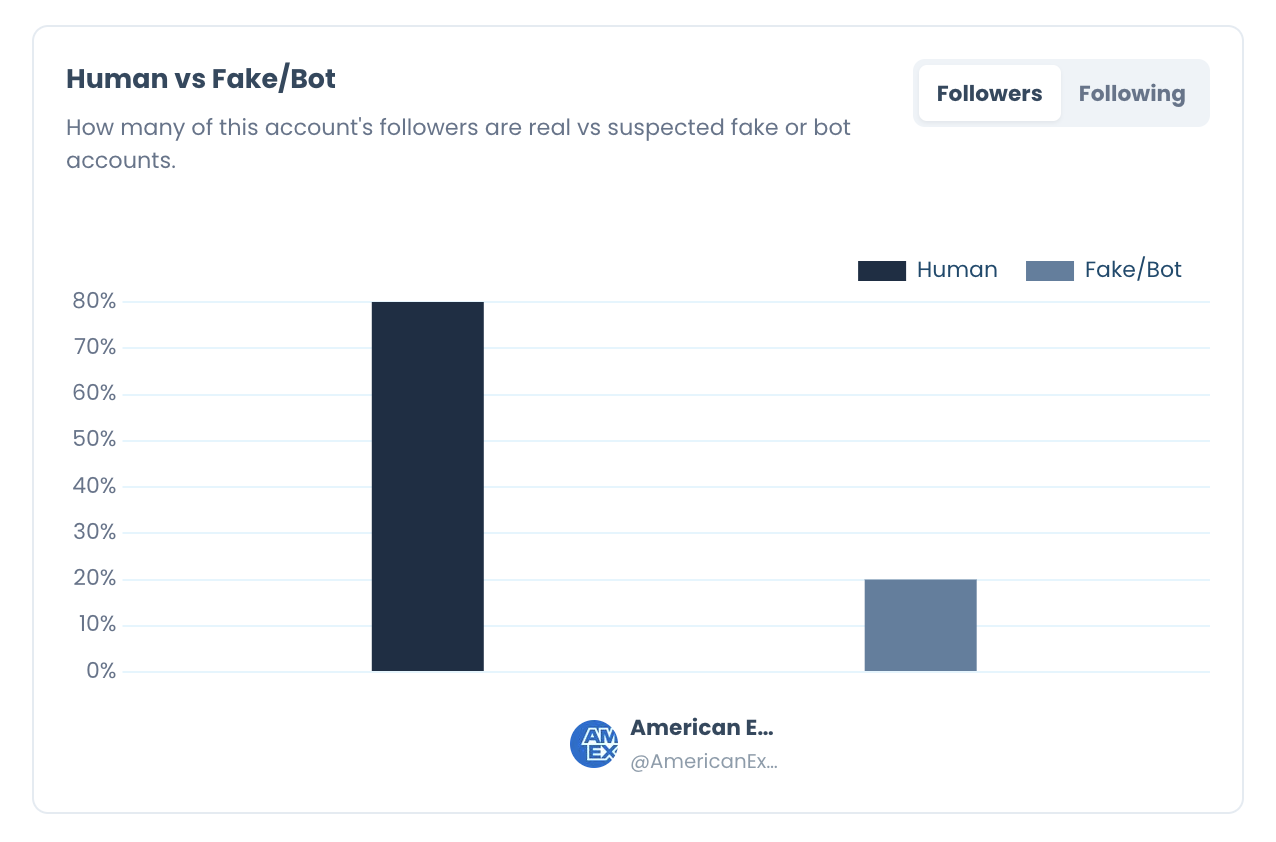
| Human vs Fake/Bot | How much of the audience is real? | A signal for review, not a verdict |
| Active vs Inactive | How many still post? | Measures posting, not reading |
| Ordinary vs Overactive | How many post far more than average? | Volume alone is not spam |
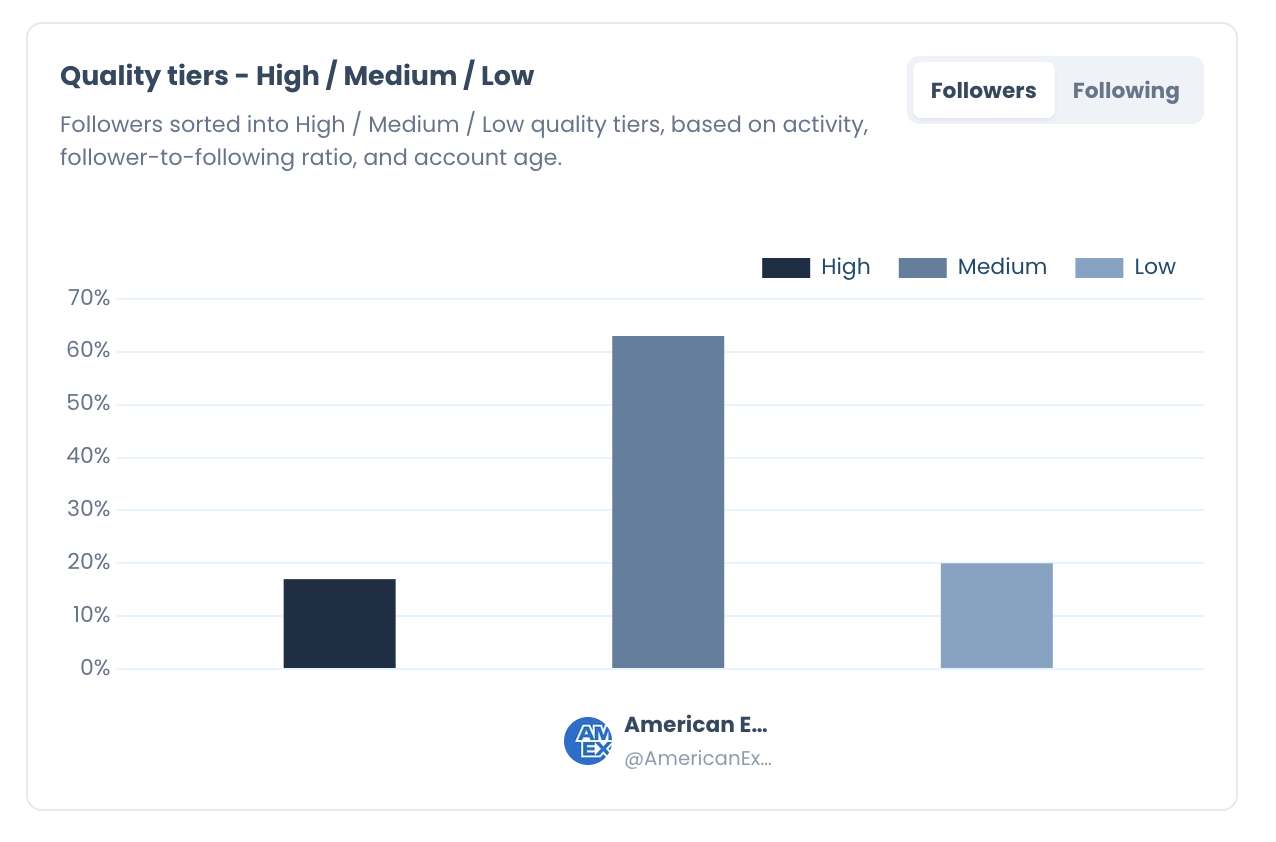
| Quality tiers | How strong is each follower's profile? | Based on activity, ratio and age |
| Verified by badge | How many carry a badge, and which? | Context, not relevance |
The quality tiers deserve a note. They sort followers into High, Medium and Low based on activity, follower-to-following ratio and account age, which makes them the best single summary of the other panels.
Read every share with its count
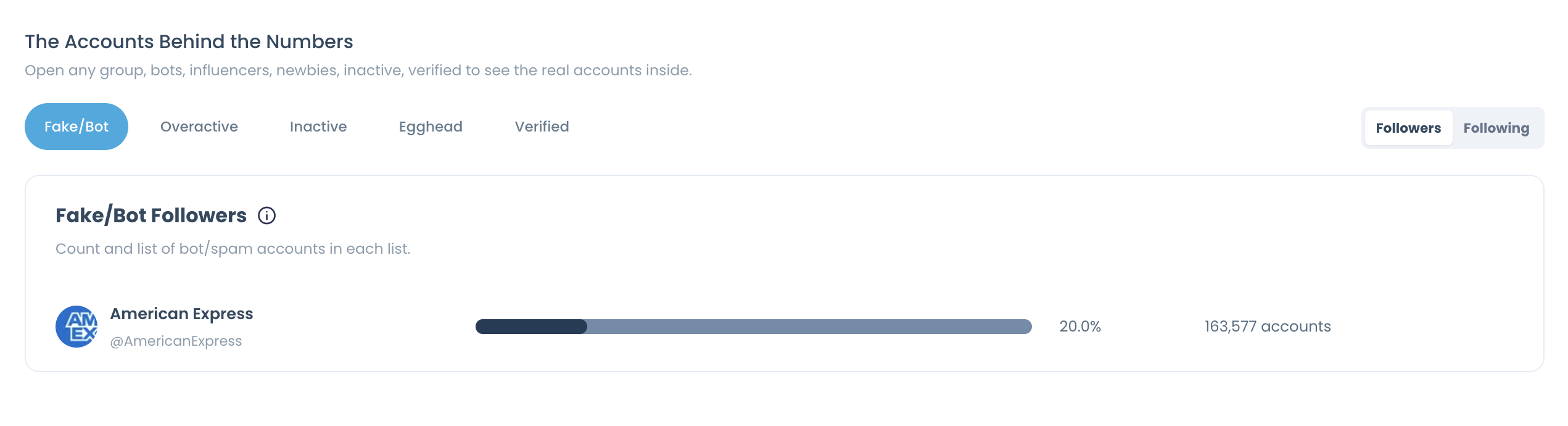
A percentage without a count can mislead in both directions. The drill-down panels in the report, called "The Accounts Behind the Numbers", fix that by showing the share and the number of accounts together.
There are five drill-downs: Fake/Bot, Overactive, Inactive, Egghead (accounts with no profile image) and Verified. Each one has a Followers and a Following version.
Here is an illustrative comparison of two accounts with the same 20,000 followers:
| Account A | Account B | |
|---|---|---|
| Suspected fake/bot | 4% (800) | 18% (3,600) |
| Inactive | 15% (3,000) | 34% (6,800) |
| High quality tier | 48% (9,600) | 21% (4,200) |
On the profile, both show 20,000. In the report, Account A has more than twice as many high-quality followers as Account B.
Same follower count, two different audiences.
How Circleboom checks audience quality
With Circleboom's X Account Analysis tool, you can check the audience quality of any X account by typing its handle. It can be your own account, a client's, an influencer's or a competitor's, and it does not need to be connected to Circleboom.
Circleboom retrieves the account's full follower and following lists through X's official Enterprise APIs, then calculates each classification from those records. No scraping is involved. That matters most here, because an audience quality share is only as good as the follower list it is calculated from, and scraping-based tools can miss records.
The classifications are Circleboom's, calculated from X's data, not labels issued by X. Treat them as signals that point you to accounts worth reviewing.
You can check Twitter account audience quality from any handle and work through the steps below.
How to check Twitter account audience quality with Circleboom
Run the report, read the five lenses, then open the drill-downs behind them. Seven steps in two phases.
Run the report on the account
- Log in to Circleboom Twitter with your X account.
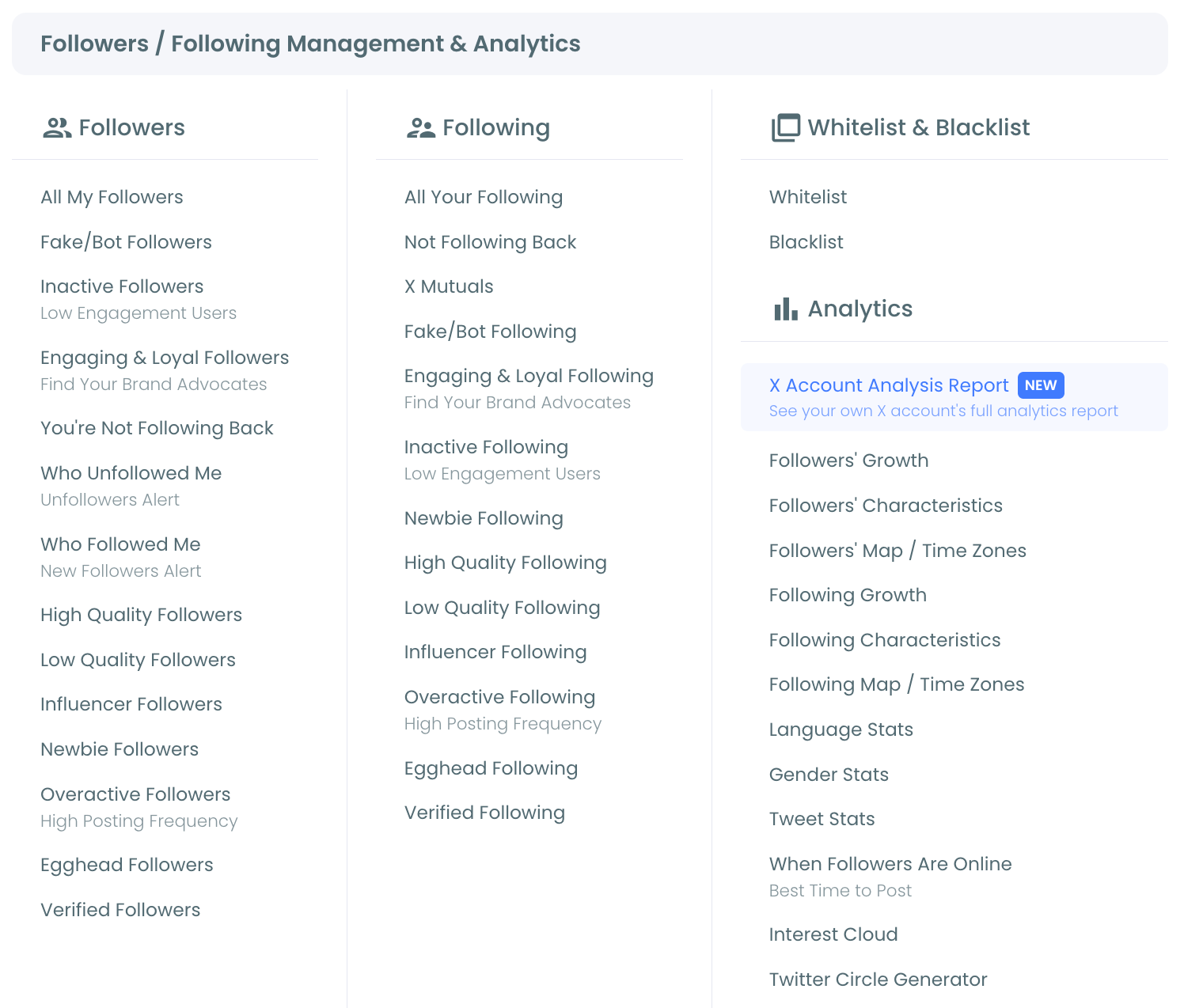
- Open the Followers / Following Management & Analytics menu and choose X Account Analysis Report under Analytics.
- Type the handle of the account whose audience you want to check, and click Start Account Analyses.
- Choose Keep it up to date every month to track audience quality over time, or Just this once for a single check.
Read the lenses and the accounts behind them
- Read Human vs Fake/Bot and Active vs Inactive first, for the two shares that most change the effective audience.
- Read Quality tiers, Ordinary vs Overactive and Verified for the shape of the rest of the audience.
- Open the drill-downs in The Accounts Behind the Numbers to see the count behind each share, then flip the Followers / Following toggle and repeat.
Real and active come first because they decide whether the follower count means anything. Tiers, volume and badges describe the audience that is left.
In short: type the handle, read real and active, then tiers and badges, then the counts behind them.
Active is not the same as real
Two of the lenses are easy to confuse, and mixing them up leads to bad decisions.
Human vs Fake/Bot asks who is behind the account. Active vs Inactive asks how often the account posts. They are separate measurements.
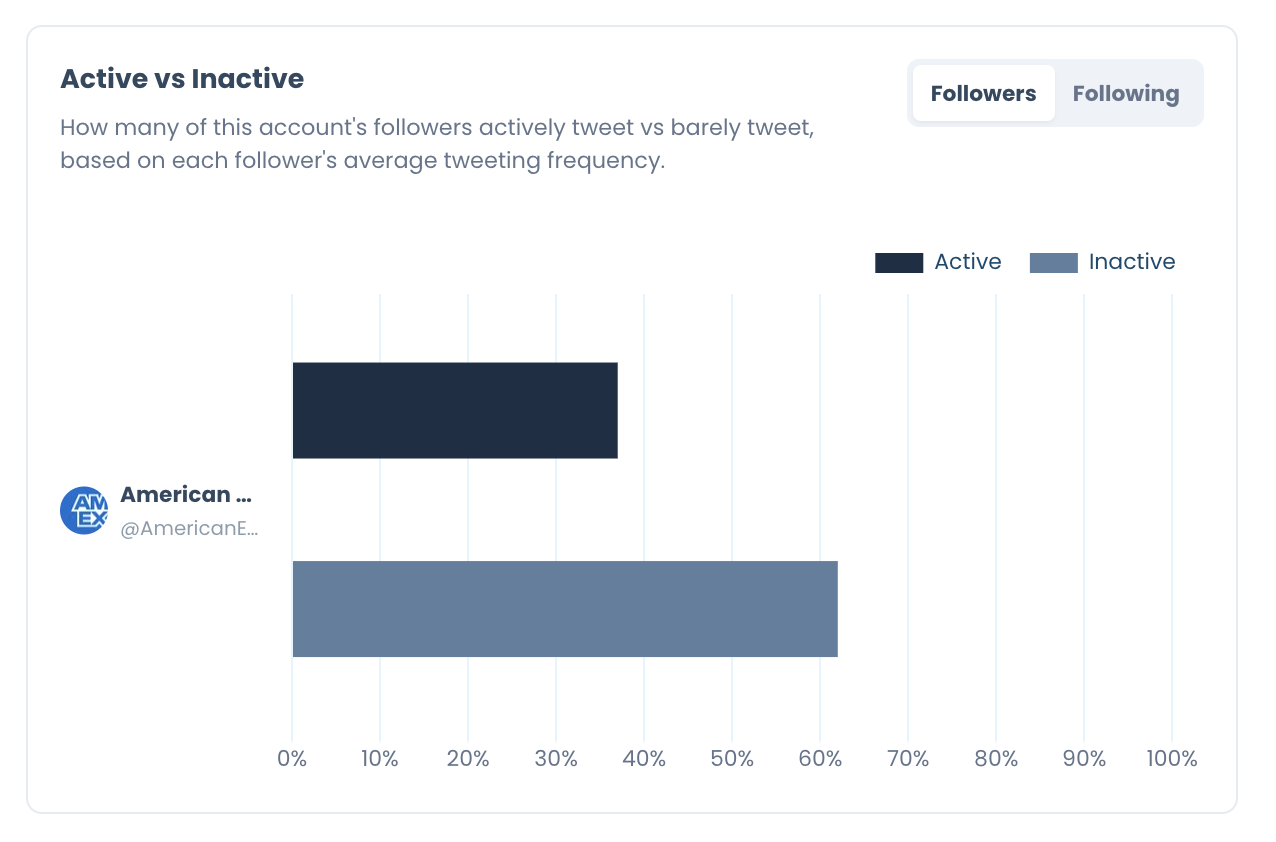
An inactive follower can be a real and valuable person who reads every post and never likes anything. A former colleague, a customer who follows for announcements, a journalist who watches quietly.
A suspected bot can be very active, posting all day. Activity tells you nothing about who runs it.
Count inactive and fake separately, or the audience will look worse than it is.
The same distinction runs through how many of your Twitter followers are active, which covers the active count on its own.
Badges and blank profiles: read them as context
Two drill-downs describe the profile, not the behavior, and both are easy to over-read.
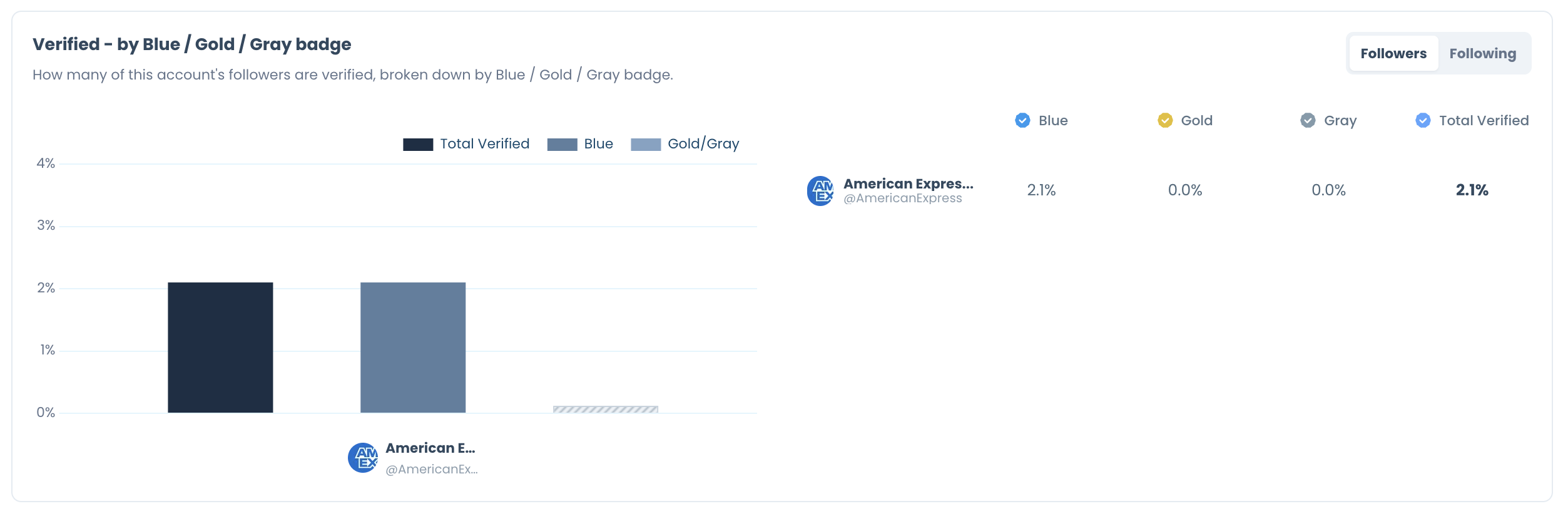
Verified. The Verified panel splits verified followers by Blue, Gold and Gray badge, with a table that separates each type. A badge says the account is verified; it says nothing about whether that follower is relevant to you. A meaningful Gold share means organizations follow the account, which matters for B2B accounts and much less for a personal one.
Egghead. The Egghead drill-down counts followers with no profile image. A blank avatar is one characteristic, often seen on new or abandoned accounts, but on its own it does not make an account fake.
The useful move is to read both against the quality tiers. Verified followers in the High tier are the core of the audience. Egghead followers who also sit in the Low tier with very few posts are the ones to review first.
For your own account, Verified Followers lists the badge holders by name, and High Quality Followers lists the strongest profiles, which are the accounts worth engaging with first.
Check the following side too
Audience quality has two sides. The Followers view shows who chose the account. The Following view shows who the account chose.
Every Audience Quality panel switches with the toggle: Fake/Bot Following, Inactive Following, Overactive Following, Egghead Following and Verified Following.
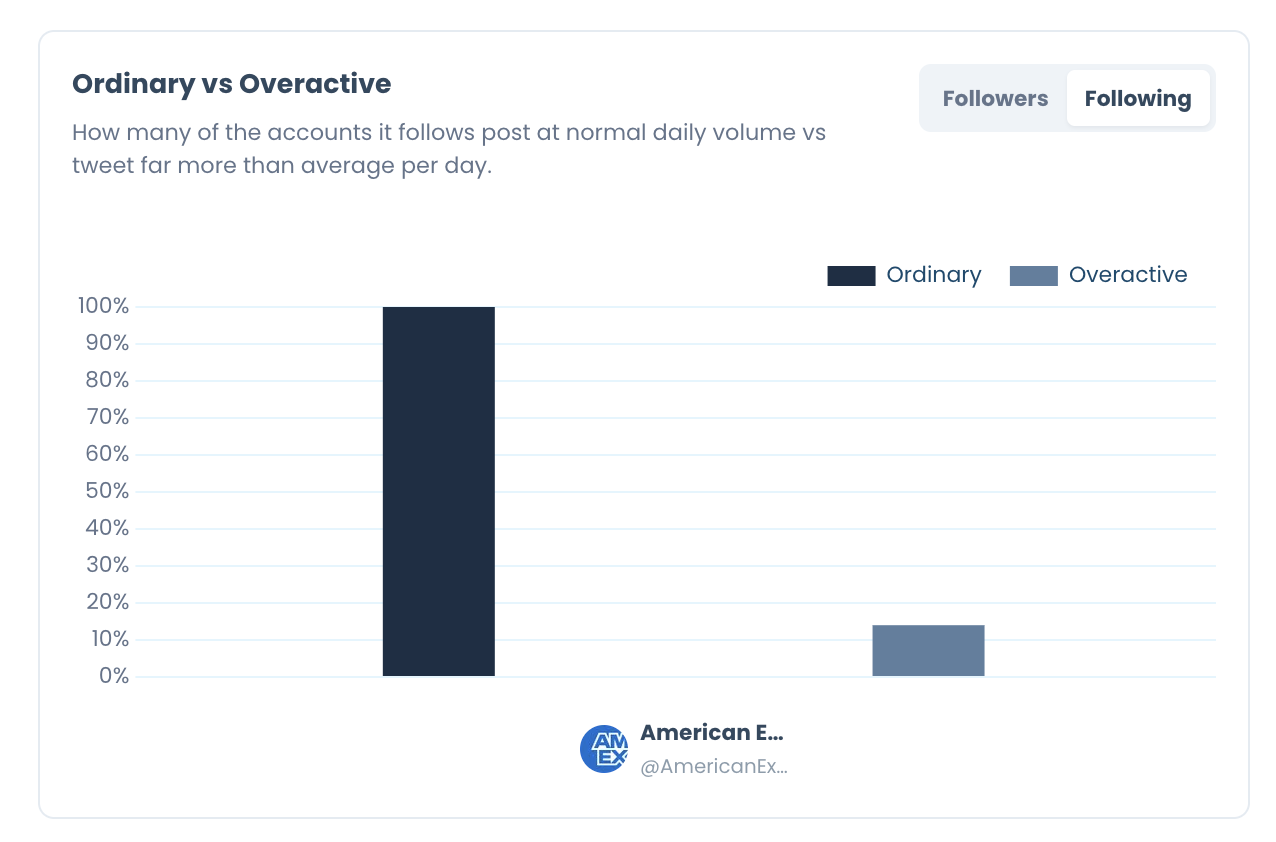
A following list full of abandoned and automated accounts does not hurt reach the way followers do, but it is visible on the profile, it clutters the timeline and it says something about how carefully the account is run. How to make a Twitter account look more credible goes into how visitors read it.
What to do when your own audience quality is low
When the account is yours, every lens maps to a review list in Circleboom. Review first, protect the accounts you know, then act:
- Suspected bots: review Fake/Bot Followers, whitelist recognized contacts, then remove the rest in bulk.
- Inactive followers: review Inactive Followers in context, because a quiet reader may still be worth keeping.
- Low tier: sort Low Quality Followers to prioritize the weakest profiles.
- Overactive accounts: inspect Overactive Followers for relevance before judging them.
Removal runs gradually through Circleboom's Chrome extension, which pauses automatically when X's rate limit is reached.
Then take a new analysis. Across two reports, a growing High tier after a cleanup is the clearest sign the cleanup changed the audience. Keep that separate from any claim about reach, which depends on more than composition.
A fuller cleanup routine is in how to do a fake follower audit on X.
Which step fits the quality you found
Your next move depends on what the lenses show and whose account it is:
- If real and active shares are high, audience quality is not the problem; look at posting habits and content next.
- If the fake/bot share is high on your own account, review and remove from Fake/Bot Followers, then run a new analysis.
- If the inactive share is high, review before acting, since many of those followers may be real readers.
- If it is someone else's account and quality is low, factor it into the decision: a partnership, a pitch or a comparison.
- If you need several accounts' audience quality side by side, use X Competitor Analysis, and read competitor audience quality on X for what usually changes when you do.
One lens at a time is enough. Each one points to a different action.
→ Check the audience quality of any Twitter account
The audience behind the number
A follower count is a total that only ever grows. Audience quality is the part of it that is real, active and able to respond, and it is the part X's first test runs on.
Circleboom measures it for any handle, from records retrieved by an Official X Enterprise Developer, with the accounts behind every share and a date on every report.
→ Run X Account Analysis and see your audience quality
Audience quality on X: open questions
Does a default profile photo mean an account is fake?
No. Egghead is one profile characteristic among several. Read it with tweet count, account age and follow behavior before you judge.
Can audience quality hurt my account if I do nothing?
Low-quality followers do not break any rule by being there, but they can make the first test of each post less reliable. If you are unsure whether they can cause bigger problems, can fake followers get your X account shadowbanned looks at that question.
Why do I have so many followers with numbers in their handle?
Many are new accounts that kept the username X suggested at sign-up, and only some are bots. Why accounts with random numbers in their name follow you explains how to tell them apart.
How often should I check audience quality?
Monthly is enough for most accounts. The monthly plan in X Account Analysis takes a new dated report on the day you choose, so changes after a cleanup or a growth spike are easy to see.