Ask how many options a Twitter poll can have and the answer is four at most, two at least. Each option holds 25 characters, so the real design work happens inside that small box rather than in the count.
X caps every poll at four choices, with two as the minimum and a 25-character limit on each answer, whether you build it in the X app or in a scheduler. Circleboom builds and schedules X polls with the same four-slot layout through X's Enterprise API access, and its poll panel counts every character while you type.
→ Build a Twitter poll with up to four options
Below: how to choose between two, three and four, and what to do when your answers do not fit.
How many options does a Twitter poll allow on X?
X allows a maximum of four options in a poll and a minimum of two.
X's help article About X Polls walks through the composer. The first answer goes into Choice 1, the second into Choice 2, and "+ Add a choice" opens more slots until you reach four.
Each option takes up to 25 characters. The question itself sits in the main compose box, where you can use the full character count your account allows, so the long thinking belongs in the question and the short labels belong in the options.
So the honest reply to how many options a Twitter poll has comes as three numbers, not one:
| Poll element | Limit on X |
|---|---|
| Fewest options | 2 |
| Most options | 4 |
| Characters per option | 25 |
| Photos in the poll post | Not allowed |
The count is rarely what stops a good poll. The 25-character box is.
If you are searching how many options a Twitter poll has, you may already have five or six answers in mind and need to work out which ones to cut.
Already know your four answers? Then the only open question is timing. Circleboom lets you schedule a Twitter poll with all four options filled on X and skip the rest of the drafting worry.
Why 25 characters shape an X poll more than the four-option ceiling
Any answer to how many options a Twitter poll allows is incomplete without the character limit. Four slots of 25 characters give you about 100 characters of answer space in total. That is shorter than most single sentences, so every word inside an option has to carry meaning.
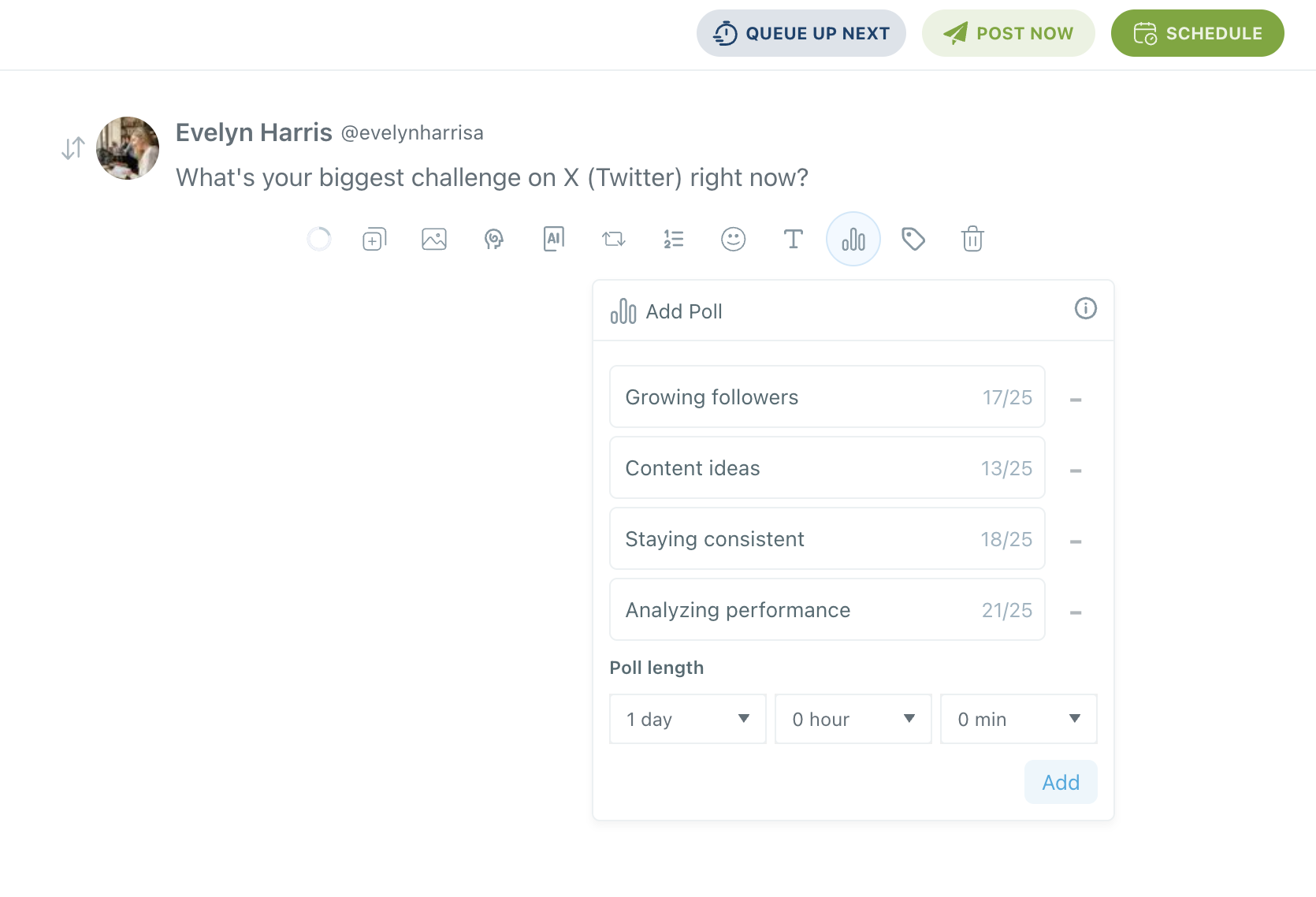
The Circleboom poll panel shows this well. In the sample poll below, "Growing followers" uses 17 of its 25 characters and "Analyzing performance" uses 21. Neither option has room for a qualifier like "mostly" or "for my brand," and neither needs one.
Here is what compression looks like in practice:
- "I post threads most days, mostly about design" (45 characters) becomes "Threads most days" (17).
- "Only when I have something new to share" (39) becomes "When I have news" (16).
- "Somewhere in between, depends on the week" (41) becomes "Depends on the week" (19).
Write each option so a follower can read it and tap before the feed scrolls past.
Circleboom's own guidance on polls makes the same point from the voting side: short, clearly different options get answered faster than long or overlapping ones.
"Morning" and "Night" get a tap. A full sentence about work habits gets a pause, and a pause in the feed can mean no vote.
Spaces and punctuation count toward the 25. Write options as bare labels and keep the punctuation in the question.
How to choose between two, three and four options on X
Knowing how many options a Twitter poll can have is the easy part; picking the right number for your question is where results get useful or muddy. The choice follows the shape of the question, not a wish to fill every slot.
| Options | Use it when | Example options |
|---|---|---|
| Two | The answer is this or that | Threads / |
| Three | Answers sit on a scale | Weekly / |
| Four | You are choosing among topics | Four content themes |
Two options work for a true either-or. The result reads cleanly because every vote is a vote against the other side, and you can quote the split in a follow-up post without explaining anything.
Three options suit a scale with a middle. If you ask how often followers want a newsletter, "Weekly," "Monthly" and "Rarely" cover the range without forcing anyone into an extreme.
Four options fit a menu: which topic your next thread should cover, which problem your audience struggles with most, which product name lands best. The poll in the screenshot later in this article does exactly that with four challenges creators face on X.
Keep options clean whatever the count
Whatever the count, the options must not overlap and must not lead. If two answers mean nearly the same thing, they split one opinion into two weak numbers. If one answer is written to sound obviously right, the result tells you about the wording, not the audience.
Still deciding what to ask? These Twitter poll ideas your followers will actually vote on already fit the four-slot format.
One habit costs a real answer: some accounts spend the fourth slot on "Just show me the results" (24 characters), because X only shows the running results after someone votes. That option gives lurkers a way in, but it also shrinks your useful answers to three.
If the question needs four real choices, keep all four for answers.
Choosing the topic is a separate decision from choosing the count. Circleboom's Twitter interest targeting data shows which interests your followers share, which helps you pick a poll topic they are likely to answer at all.
What to do when your Twitter poll needs more than four answers
Once you know how many options a Twitter poll can hold, a list of six answers becomes a structure problem. X will not take a fifth option, so a long answer list needs a different structure, not a workaround. Four approaches hold up:
- Run two rounds: a first poll with four options, then a second poll with the two leaders.
- Group answers into four categories and ask about the category first.
- Cut the weakest answers and invite the rest in the replies.
- Use one option as "Other (tell me below)" (21 characters) and read the replies.
The two-round format is the strongest when every answer matters. Round one narrows the field, round two settles it, and each poll stays clean.
Because the second round depends on the first, it helps to have both drafted and scheduled ahead, with the second one going out after the first poll closes.
Replies carry the nuance that options cannot hold. Circleboom's poll guidance says it directly: use replies to capture what the four options miss. A poll gives you the count; the replies tell you why.
When your list runs past four, the fix is a better question, not a bigger poll.
Do Circleboom polls get the same option limits as X?
Yes. A poll written in Write & Plan Your Post follows the same rules as X: up to four options, up to 25 characters each, and no images, GIF or video in the same post. Circleboom's help page on the image, GIF, video and poll limits for a scheduled tweet lists them.
The answer to how many options a Twitter poll can have is the same in both places.
What changes is the workspace.
Circleboom puts the poll inside the X Post Planner editor, behind the bar chart icon in the toolbar. The Add Poll panel shows Choice 1 to Choice 4, each with a live counter that starts at 0/25. A minus button beside every choice drops a slot, and the Add button attaches the poll to the post.
Until you click Add, the poll is not part of the post.
Circleboom connects to your account as a developer in X's official Enterprise program. A poll it publishes is an ordinary post from your account, and your login stays inside X's approved access. That matters when you plan polls weeks ahead and do not want to hand your account to a tool built on workarounds.
Draft the options before the post goes out
I draft all four options in the panel before writing the question, because the counter catches a 27-character answer while it is still easy to fix. In Circleboom, you can create Twitter polls with live character counters and schedule them in the same screen. That beats writing a poll at the moment you post and hoping the options fit.
Circleboom's Poll Generator lets you plan polls on X alongside every other scheduled post, so a weekly audience question becomes part of the calendar instead of something you remember on a quiet afternoon. If the question itself needs work, the AI Tweet Generator can draft or tighten the wording before you add the options.
How to create a Twitter poll with four options in Circleboom
To create a four-option Twitter poll in Circleboom, open the X Post Planner editor, click the poll icon, fill Choice 1 to Choice 4 within 25 characters each, set the poll length and attach the poll with Add. Then write the question and schedule the post. The six steps below run in two phases.
Open the poll panel in X Post Planner
- Log in to Circleboom Twitter and connect your X account through the official sign-in.

- Go to the X Post Planner menu and open Write and Plan Your Post.

- Click the poll icon (the bar chart) in the editor toolbar to open the Add Poll panel.
Fill the four choices and schedule the poll
- Type your answers into Choice 1 to Choice 4 and watch the counter on each; remove a spare choice with the minus button if you only need two or three.
- Set the poll length with the days, hours and minutes dropdowns, then click Add to attach the poll to the post.
- Write the question in the post text and click Schedule, choosing a time at least 15 minutes ahead.
Filling the choices before the question keeps the answers honest: you write the options with the counter in view, then phrase the question so every option reads as a real answer to it.
In short: poll icon, four choices under 25 characters, length, Add, question, Schedule.
Poll build, start to finish: the question written, the options filled and the poll queued for a set time in Circleboom's X Post Planner.
Where option choices fit in your wider X poll strategy
The number of options shapes how easy a poll is to answer, and timing shapes how many people see it at all. A clean four-option poll posted when your followers are offline still collects few votes. Read how the timing of your Twitter poll affects participation before you pick a slot.
Options also decide what you can do with the result. A two-option split turns into a one-line follow-up ("you picked threads"). A four-option result can seed a whole thread on the winning topic, which is the "we asked and you said" format that shows followers their vote changed what you published next.
That loop, question then answer then content, is the reason polls hold a place in a posting plan beyond a quick engagement bump. The broader case for why polls are strategically important to Twitter covers how two-way interaction differs from broadcast posts.
Voting is a one-tap action, so polls reach followers who never reply. A follower who would not write a sentence will still tap "Weekly."
Is engagement your main goal rather than research? Then learn how to use Twitter polls to increase Twitter engagement alongside the option rules above.
Picking how many options your Twitter poll has: the decision path
So how many options should your Twitter poll have? Four is the ceiling, two is the floor, and 25 characters is the box. Use this path to land on the right count:
- If the answer is this or that, use two options and quote the split afterward.
- If the answers sit on a scale, use three and keep a middle answer.
- If you are choosing among topics or problems, use four and keep each under 25 characters.
- If you have five or more answers, run two rounds or group them into categories.
- If one option sounds obviously right, rewrite it before the poll goes live, because options cannot be edited after posting.
→ Plan your next four-option Twitter poll
Twitter poll option questions people still ask
Can I add a photo or GIF to a Twitter poll with four options?
No. X does not allow photos in a poll, and Circleboom applies the same rule: a poll cannot share a post with images, a GIF or a video, because the poll takes the media slot. Put the visual in a separate post or a reply.
Can I change a poll option after the poll is live on X?
No. Once a poll is published, its options cannot be edited. To fix a typo you have to delete the post and publish a new poll, which starts again at zero votes.
Why can't some followers vote in my Twitter poll?
Each person can vote one time, and voting stops when the poll closes, so a repeat visitor or someone who arrives late sees the result instead of the choices. For the other causes, see why you can't vote in a poll on X.