Your profile shows two numbers, followers and following, and neither one tells you how many of those people follow you both ways. That missing third number is your mutual count, and X does not calculate it for you.
On X: two separate counts, no mutual figure, and a cross-check of both lists by hand. Circleboom: one header line with your exact mutual count, because Circleboom cross-references your Twitter followers and following through X's Enterprise API access.
→ Count your Twitter mutuals in one list
The number is only half the answer. What it means sits below.
Why X never tells you how many mutuals you have
A mutual is an account you follow that also follows you back. To know how many mutuals do I have on Twitter, X would need to compare your follower list against your following list and count the overlap.
The app never runs that comparison, so the overlap never appears on your profile, in your settings or in your notifications.
The symptom is a profile with two big numbers and no way to tell how much of either one is reciprocal.
The root cause is structural: mutuals are mixed into both lists without any label, so the only native method is to open one list and check every name against the other.
That manual check breaks down fast.
Take the sample account used later in this article, which follows 2,677 accounts. Answering the question by hand means opening 2,677 profiles, or scrolling 2,677 names against a second list, and writing down every match.
Even a careful count is out of date the moment someone follows or unfollows. For the wider set of methods, Circleboom has a separate walkthrough on how to check mutual followers on Twitter.
The faster route is a feature that does the comparison for you. Circleboom's X Mutuals lets you see your mutual count on Twitter as a header above the full list. The answer to how many mutuals do I have on Twitter then takes one page load.
What your mutual count on Twitter is made of
Your mutual count is the overlap of two lists you already have. Every mutual sits in your followers and in your following at the same time, which means the one number splits both profile counts into a two-way part and a one-way part.
That gives three groups, and each one has its own name in Circleboom:
- Mutuals: you follow them and they follow you.
- Not Following Back: you follow them, they do not follow you.
- You're Not Following Back: they follow you, you do not follow them.
Once you know your mutual count, the other two groups are simple subtraction.
Here is the arithmetic on a sample screenshot of Circleboom's X Mutuals screen, which reads "Displaying your 740 Mutual Connections of 2,677 following."
| Group | How to get it | Sample |
|---|---|---|
| Following | profile count | 2,677 |
| Mutuals | X Mutuals header | 740 |
| Not Following Back | following minus mutuals | 1,937 |
| Follow-back share | mutuals ÷ following | about 27.6% |
So roughly one in four accounts this person follows returns the follow. The other 1,937 are one-way, and Circleboom keeps them in a separate list called Not Following Back for review.
The follower side of the same count
The follower side works the same way. If that account had, say, 3,100 followers (an illustrative figure), then 3,100 minus 740 leaves 2,360 people who follow it without a follow back.
One number, the mutual count, turns two vague totals into three groups you can act on.
How to see how many mutuals you have on Twitter
To see how many mutuals you have on Twitter, connect your account to Circleboom and open X Mutuals in the Following section. Circleboom pulls your full following list and your full follower list, keeps only the accounts present in both, and prints the total above the table. The flow below takes four steps in two phases.
Circleboom reads both of your lists as an Enterprise-tier customer of X's API, so the count comes from X's own follow records rather than a scraped partial copy.
That matters for a number you plan to compare over time: a count built from incomplete data drifts for reasons that have nothing to do with your network.
When you are ready, you can check how many mutuals you have on Twitter in Circleboom and act on the list from the same screen.
Open your follow lists in Circleboom
- Log in to Circleboom Twitter and connect your X account.

- Go to the Followers and Following menu and choose X Mutuals under Following.

Read the count and sort the list
- Read the header line above the table: the first number is your mutual count and the second is your following count.
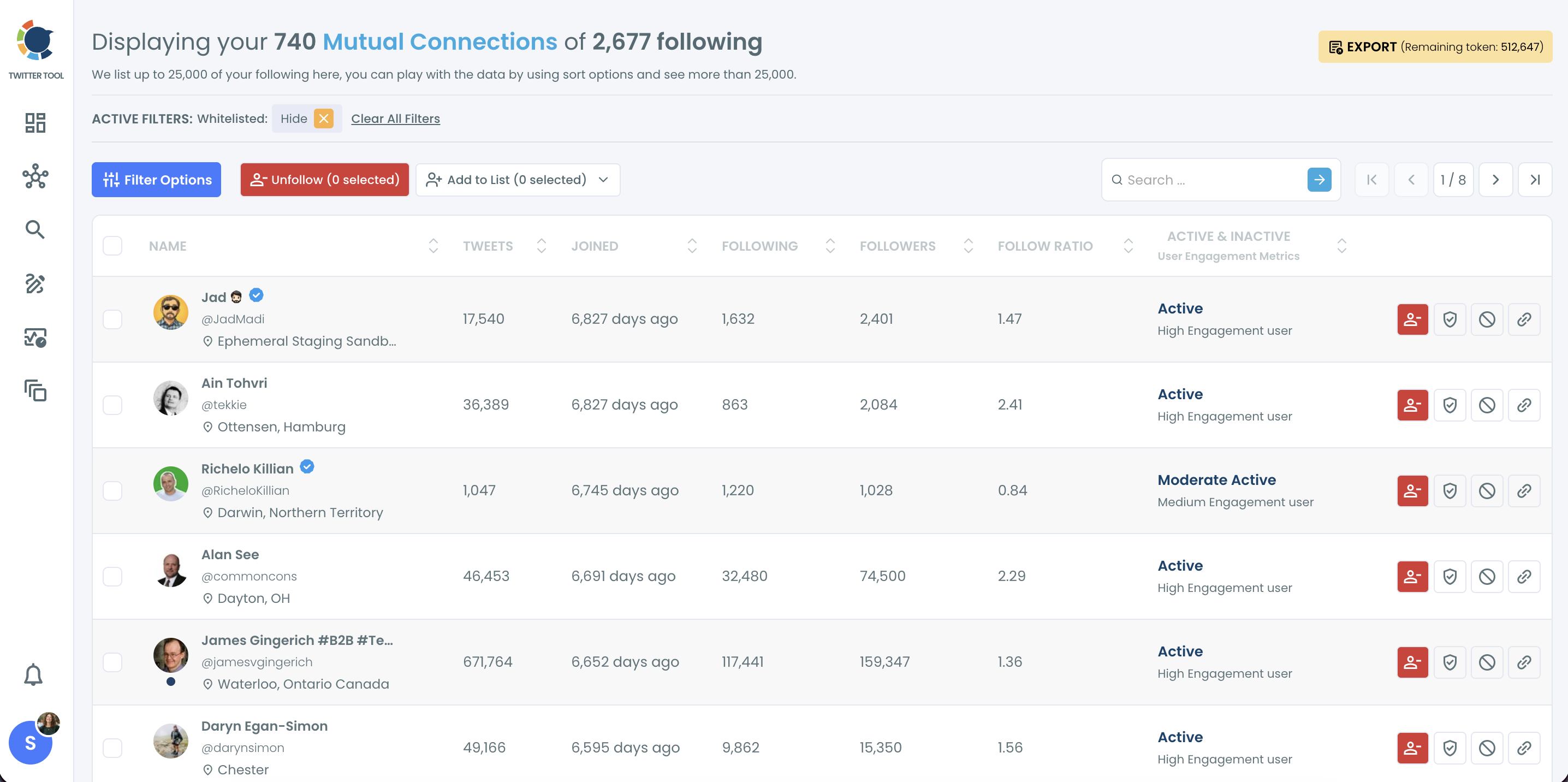
- Sort the list by the Followers or Active & Inactive column to see which mutuals carry the most reach or activity.
Connecting comes first for a reason: the header only makes sense against a fresh, complete pull of both lists, so open the reciprocal view next and read the figure before any filter shrinks the table.
In short: connect, open X Mutuals, read the header, sort by activity.
From a count to a working list: how the X Mutuals screen in Circleboom shows every two-way follow on X and lets you organize it.
Is a high or low mutual count on X good?
Once you know how many mutuals you have on Twitter, neither number is good or bad on its own. The useful reading is the mutual count compared with your following count, because that share shows how reciprocal your follow strategy has been.
Circleboom's X Mutuals documentation describes the two ends of the range:
- A large mutual count relative to following: a highly reciprocal network, where most of the people you chose to follow chose you too.
- A large following count with a small mutual count: many one-sided follows, where your feed is built around accounts that do not see your posts from a follow.
Circleboom's other sample screens show how wide the range runs. One account reads 429 mutuals of 662 following, about 65 percent. Another reads 138 of 525, about 26 percent.
Same feature, same header, very different networks.
Both ends can be fine.
A news reader who follows publications and journalists should expect a low share, since a publication has no reason to follow each reader back. A creator who builds relationships with peers in a niche should see a higher share.
What the count leaves out
What the count cannot tell you is quality. Circleboom's own limits note is direct about it: mutual status does not guarantee engagement or current relevance, and some mutuals date from an old follow-for-follow phase that no longer fits your goals.
The mutual count measures how reciprocal your network is, not how active it is.
To find the active part, sort X Mutuals by the Active & Inactive column. You can also open Engaging & Loyal Following, which shows the accounts you follow that have retweeted your posts.
That active slice is the part of the count that moves your reach. Mutuals reply to and retweet each other, so a few replies from active mutuals in the first minutes after a post give it the early engagement that helps distribution.
Circleboom's documentation gives an example: if 60 of 200 mutuals are active, those 60 are the ones who start that loop.
Circleboom also explains how to see mutuals who engage with your tweets when you want the two filters together.
Why your Twitter mutual count went down
If the answer to how many mutuals do I have on Twitter is smaller than last month, there are two possible causes, and only one of them is a lost relationship. Either someone stopped following you, which removes them from your followers and so from your mutuals, or you unfollowed someone, which removes them from your following.
There is also a timing effect. Circleboom compares both lists at the time of the last sync, so a follow-back that happened a few minutes ago may not appear yet, and it shows up after the next sync. A count read twice in one hour can differ for that reason alone.
Read the drop against your two profile counts
The profile counts tell you which side moved. Compare them with the day you last checked your mutual count:
- Your follower count fell along with your mutuals: someone who followed you both ways stopped following you.
- Your following count fell along with your mutuals: an unfollow on your side removed a two-way follow, often during a cleanup.
- Both counts held steady: the change is likely the sync timing above, so check again after the next sync.
This takes a minute and saves you from treating your own cleanup as a wave of lost followers.
When the drop is real, the question becomes who left. Circleboom's guide to mutuals who unfollowed you on Twitter covers how to spot them and what to do next.
Treat a sudden drop in your mutual count as a prompt to look, not as proof that people are leaving.
What to do with your mutuals once you have the number on X
A mutual count becomes useful when the list behind it gets a job. Circleboom's X Mutuals documentation points to three jobs, and each one starts from the same screen.
Turn your Twitter mutuals into one focused list
Select the mutuals you want, open Add to List, and choose Twitter List to add them to an existing list or a new one.
On X, accounts join a list one profile at a time; Circleboom adds the whole selection in one action.
The result is a focused feed of the people already connected to you, separate from the noise of your full following timeline. Engaging with that list regularly takes less time than hunting for the same accounts in your home feed.
Export the list for outreach planning
The Export button above the table downloads your mutuals as a CSV file and uses export tokens, with the remaining balance shown on the button. A spreadsheet of your mutuals is a practical starting point for partnership or collaboration outreach, because every contact on it already follows you.
Start outreach from a warm position
Sort by Followers to find high-reach mutuals, then open their profiles with the link icon on each row. Any conversation with those accounts starts from a connected position instead of a cold message, which is the reason the mutual count deserves more attention than the follower count when you plan collaborations.
Protect your mutual count before any X cleanup
The quickest way to lose mutuals is your own bulk unfollow.
An unfollow run aimed at inactive or low-quality accounts can catch a mutual in the filter, and an unfollowed mutual still follows you while you no longer follow them back.
Circleboom's recommended order is short. Open X Mutuals, select all, and use Add to List to whitelist them before any cleanup.
Whitelisted accounts are protected from bulk actions and hidden from cleanup lists by default, so a later unfollow pass in Not Following Back or Inactive Following cannot touch them.
Bulk unfollows in Circleboom are paced at 50 every 15 minutes, with a daily safety limit of 800, and anything left in the queue continues automatically the next day. Each run starts only after you confirm the selection, so the whitelist step costs nothing in time and keeps the count you just measured intact.
Open X Mutuals again once the queue finishes and check how many mutuals you have on Twitter now. If the whitelist held, your following count went down while your mutual count stayed where it was, which is the clearest proof that the cleanup removed only one-way follows.
If the mutual count fell too, the drop-reading check above tells you which side moved.
The count is the starting point on Twitter
How many mutuals you have on Twitter is one number, but it is the only number that splits your followers and your following into the people who chose you back and the people who did not.
→ Get your exact Twitter mutual count in Circleboom
Counting your X mutuals: FAQ
How can I check if one specific account is my mutual on X?
Open X Mutuals in Circleboom and type their name or username into the search bar above the list. If they appear, the follow goes both ways. Circleboom also has a guide to checking if you and another account are mutuals on X.
Can I see the mutual followers of two other Twitter accounts?
Yes, with a different feature. Circleboom's Compare X Accounts shows the shared audience between accounts, which answers a different question from your own mutual count.
Why is a new follow-back missing from my mutual count?
The mutual list is built from both lists at the last sync, so a follow-back from the last few minutes may not be counted yet. It appears after the next sync, with no action needed on your side.