

There is no fixed amount: set a capped pilot budget against what one customer post is worth to your business, measure each post with its own tracked link, then scale or cut on the result.
Fixed price per post: no authority publishes one, so any figure copied from a vendor page is a guess. Measured budget: Circleboom Publish gives each rewarded customer's link its own UTM code from the social media post composer and tracks your own posts' performance, so the reward pot follows the visits and sales each customer brought.
→ Measure your own posts' performance on every platform
How much should you spend rewarding customer social media posts? The four-step budget method below turns that into a number you can defend.
Why there is no standard price for a customer's social media post
A customer post has no market price because its value depends on who sees it and what they do next. A salon regular with a few hundred local followers can send more paying visitors than a stranger with thousands who live in another city.
None of the platform or regulator pages on this subject gives a per-post reward benchmark, and the figures that do circulate tend to be reward apps quoting their own fees.
That leaves most small businesses guessing in one of two directions:
- Too generous, rewarding every tag the same way and never checking what came back.
- Too cautious, skipping the program entirely because the spend cannot be justified.
Both mistakes have the same cause: the post's result is invisible.
Social traffic without tags shows up in Google Analytics as generic "social" or "referral" visits, with no trace of which customer sent it. The working answer to what rewarding customer posts on social media should cost starts by making each post traceable, with per-platform post analytics covering the business's own posts.
Circleboom Publish handles that part in the same place the business already writes its posts. Its composer builds UTM-tagged links for any of the social media platforms it publishes to, and its post analytics report how the business's own posts perform.
What counts as a reward, and what each one costs you
A reward is anything of value a customer receives for posting, and the type you pick sets both the cost and the paperwork. The common options for a small business:
- A discount on the next order, which costs margin only when it is redeemed.
- A free product, which costs the product and is easy to hand over in person.
- Cash or store credit, which is the simplest to count and usually the most expensive per post.
Each one is still payment. That matters for disclosure, covered further down, because a free product creates the same duty to disclose as cash does.
For most shops the free product or the discount is the right place to start. Both tie the reward to the business itself, so the cost lands on the books as product or margin rather than as a payout.
Decide two rules before the first reward goes out. The first is how often one customer can earn: once per post, once per week, or once per month. The second is when the reward is handed over, either on the spot or after the post has stayed up with its disclosure.
A per-customer limit stops one enthusiastic regular from emptying the pot, and paying after the check keeps the disclosure habit honest.
How to set a reward budget you can defend
A defensible reward budget is a capped pilot sized against what a customer post is worth, reviewed after a stretch of tagged posting and scaled only on measured return. The four steps fit in one table:
| Step | Question to answer | Where the number comes from | What you do with it |
|---|---|---|---|
| 1. Value of a post | What do visits and sales from one customer's link add up to? | Google Analytics, filtered by that customer's utm_content code | Sets the most a reward can cost and still pay |
| 2. Reward type | Discount, free product or cash? | Your own margins and how you hand rewards over | Sets the cost per reward |
| 3. Cap | How much can the business lose if nothing comes back? | Your monthly marketing budget | Sets the pilot pot, fixed in advance |
| 4. Review | Did the tagged posts return more than the rewards cost? | The same Google Analytics report, after a stretch of tagged posting | Scale the pot, keep it, or cut it |
The table reads left to right and top to bottom. Step 1 has no answer until step 4 has run once, which is why the pilot exists: the first month buys the measurement, not the result.
The review step is the one that gets skipped. A business that tags its links but never opens the report is back to guessing. Put a recurring date in the calendar for it, and judge each customer code on orders, not on visits alone.
A worked example of the four steps
Take an online shop that sells candles and decides to reward customers with a free candle for each post. The figures here are illustrative, to show how the method reads, not results from a real shop:
- Step 1 starts empty, so the shop assumes nothing about value yet.
- Step 2 picks the free candle, which costs the shop its product cost and postage.
- Step 3 caps the pilot at ten free candles for the month, a loss the shop can absorb.
- Step 4 runs after the month: say four customer codes brought orders and six brought none.
The next month's pot goes to the four codes that sold, plus two new customers on a single trial round. The six that brought nothing get a thank-you note instead of another candle. Nothing in that decision depended on an industry average, which is the point.
A budget built this way does not need a benchmark, because it is checked against your own sales every month.
Is rewarding customers cheaper than paying micro-influencers?
Rewarding customers is usually cheaper per post, because a discount or free product costs less than a creator's fee, but the cheaper option only wins if its posts bring visits.
The two routes reach different people. A customer's audience is small and often local, which suits a salon or a neighborhood shop. A creator's audience is larger and built around a topic, which suits a product sold online.
If you are weighing the second route, start with how to find micro-influencers who fit your niche before you set a fee.
The differences are easier to see side by side:
| Rewarding customers | Paying micro-influencers | |
|---|---|---|
| Typical reward | Discount, free product or store credit | A fee, often plus free product |
| Audience | Small, often local, already knows you | Larger, built around a topic |
| Disclosure | Required when the post is rewarded | Required for paid and gifted posts |
| How to measure | One utm_content code per customer | One utm_content code per creator |
Measure both the same way. Give the creator a utm_content code just as you would a customer, and the Google Analytics report puts them side by side. The comparison then rests on orders per reward, not on follower counts or on how professional the photos look.
Every rewarded Instagram post is branded content
A post made in exchange for a reward is branded content, so the customer has to disclose it. Instagram's branded content policies treat content a creator was compensated for, with money or something of value including gifted products, as branded content that must carry the paid partnership label.
The business carries part of that duty. The FTC's Endorsement Guides: What People Are Asking page says a business that gives free products should ask for disclosures and monitor them. The Endorsement Guides behind that advice were revised in 2023.
Those are US rules; other countries have their own advertising regulators and their own wording.
In practice that means three habits:
- Put the disclosure request in writing when you hand over the reward.
- Check rewarded posts for a clear disclosure after they go up.
- Ask for a fix when one is missing, before the next reward.
How to track the return on rewarding customer social media posts
To track what each rewarded customer brings in, give every customer a link with its own utm_content code, publish the business's own posts with tagged links too, and read the results in Google Analytics. Circleboom Publish does the tagging inside the composer, so no separate URL builder is needed. The six steps below run in three phases.
Open the composer with the right accounts
- Log in to Circleboom Publish using the account that holds your business pages, so every tagged link is built in one workspace.
- Confirm your business accounts are connected under Manage Social Accounts, since the composer can only post to connected accounts.
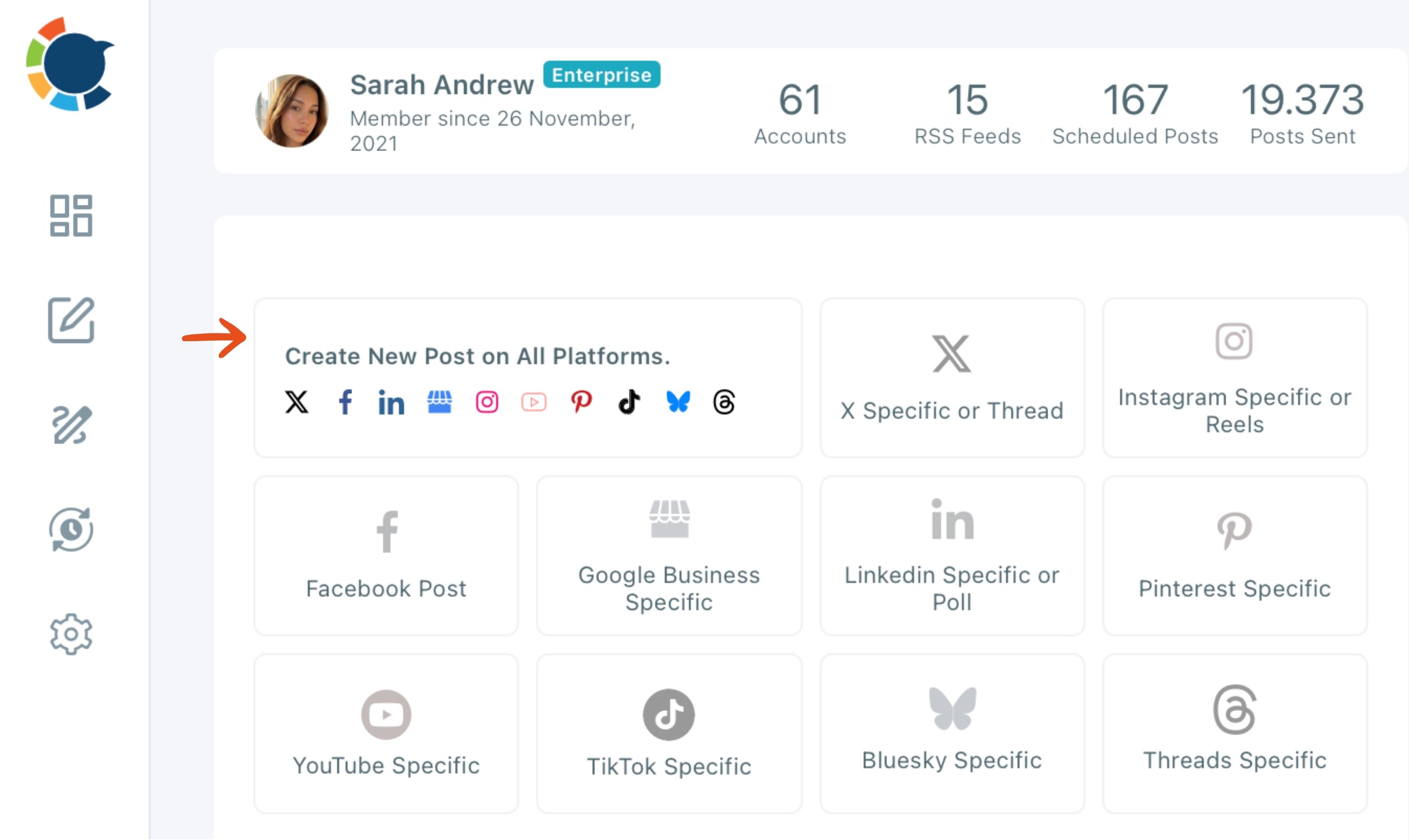
- Click the Create New Post on All Platforms card on the dashboard and select the accounts that will carry your reward announcement.
Build one tagged link per customer
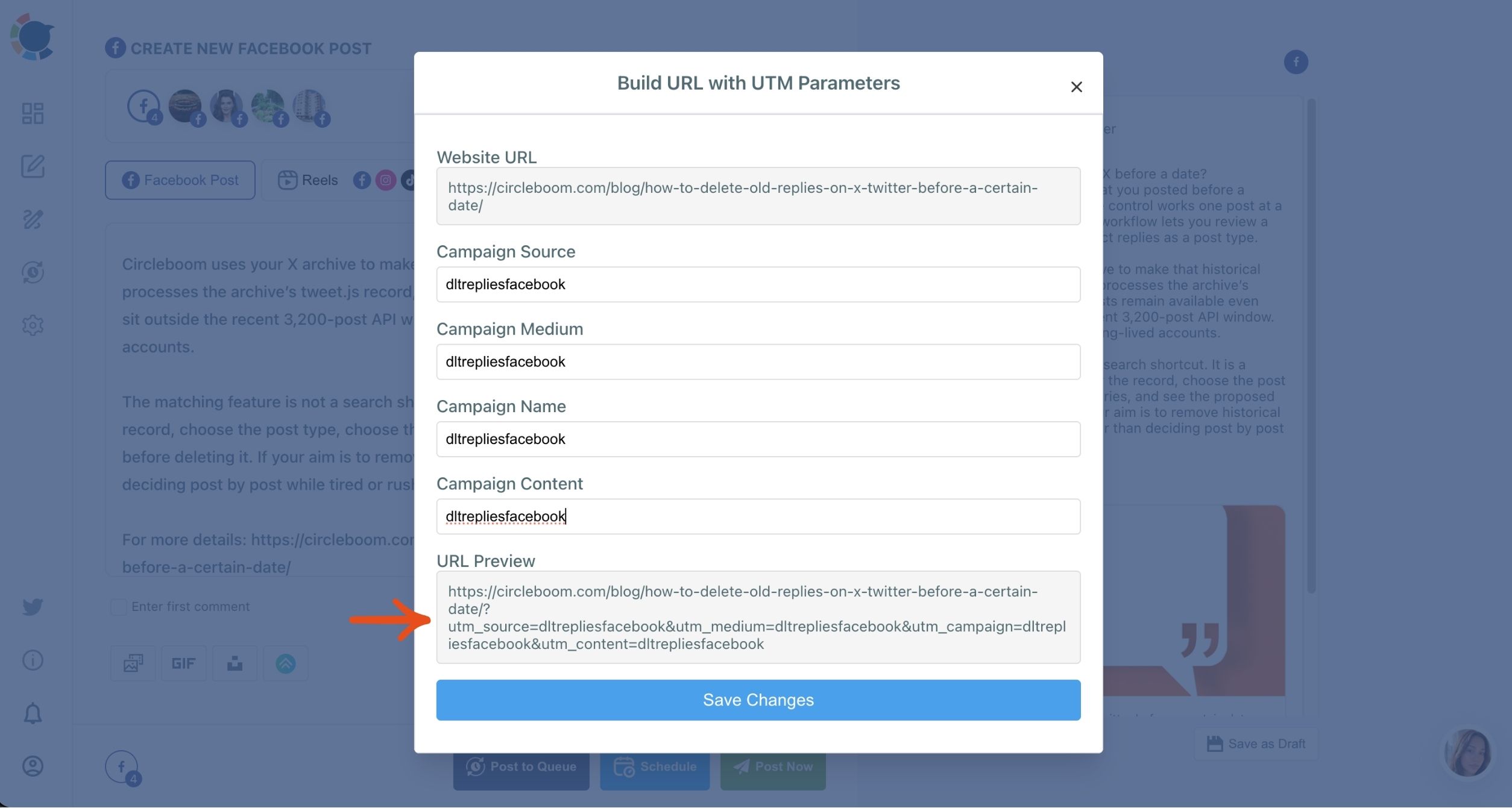
- Paste the destination link into the post text and click the link icon next to it.
- Enter Campaign Source, Campaign Medium, Campaign Name and Campaign Content, using a short code in Campaign Content rather than the customer's name.
Publish and review
- Schedule the announcement at a suggested best time, then give each customer the URL Preview version that carries their code.
Tagging before sharing is what makes the sequence useful. A link posted untagged can never be traced afterwards, so the code has to exist before the first post goes up.
Which platform turns customer posts into sales
The platform that deserves more of the reward budget is the one where tagged visits turn into orders, not the one with the most likes. Tag the same link with a different Campaign Source for each platform and Google Analytics splits the traffic by source, so a business can see which audience buys.
Keep the pattern consistent or the report falls apart. Use the same Campaign Name for the whole reward program, one Campaign Source value per platform, and one Campaign Content code per customer. A customer who posts on two platforms then shows up twice, once under each source, and you can see where their audience clicked.
That split matters most when you sell online. A product page that gets most of its tagged visits from one platform is telling you where to put next month's rewards and your own posting time. The usual social media tips for ecommerce assume you already know which channel sells; tagged links are how a small shop finds out.
The winning platform then gets more of the business's own content. An Instagram scheduler keeps a steady run of posts going at each account's suggested times while the reward program runs alongside it.
On-platform numbers next to click numbers
On-platform numbers and after-the-click numbers answer different questions, and a reward program needs both. Circleboom Publish's post performance reports show how the business's own posts perform on each platform, while the tagged links show what happened once someone clicked. Read together, they tell you whether a platform is worth more reward money or only more posting.
When writing those posts takes too long, the social media post generator drafts captions for each platform from a short brief.
Branded hashtags and reward programs
Many reward programs ask customers to use a branded hashtag. Tagged links measure visits and sales; they do not measure how far a hashtag traveled. If that number matters to you, the question of how many people saw my hashtag needs a separate answer.
A keyword hashtag tracker covers the other half of that picture: the tag itself rather than the click.
Before the program grows
Three checks keep a growing program clean:
- Reward only accounts that look like real people with real interaction, since fake accounts can take rewards without sending anyone.
- Share a customer's post on your own account inside the platform's app and with their permission, because Circleboom Publish resends only the business's own past posts.
- Ask customers in person, at the moment they say something good about you, since that gets them posting in the first place.
Pay for what the link proves
The right amount to spend rewarding customer social media posts is the amount each customer's tagged link has shown it returns, inside a cap you set before the first reward goes out.
→ Read your post results on every platform
Customer post reward FAQ
How do I give each customer their own trackable link?
Build the link once per customer with a unique code in the Campaign Content field, which Google Analytics reports as utm_content. In Circleboom Publish that happens through the link icon in the composer; outside it, Google's own URL builder does the same job.
Can I reward customers for leaving a Google review?
No. Google's Maps contribution policy does not allow offering payment, discounts, or free goods or services in exchange for a review, and reviews written that way are removed. Keep rewards for social media posts and ask for reviews without an incentive.
What should I do if a rewarded customer forgot to disclose?
Ask them to edit the post and add a clear disclosure such as "ad" before you hand over the next reward. The FTC expects a business that gives free products to monitor disclosures, so keep a note of the request.






)