Sending one post to every account is the easy half of the job, and any multi-account composer does it in a click. The harder half is knowing which networks should not get that exact post, and most advice on posting everywhere skips it.
How do you post on all social media at once without every network getting a post that doesn't fit?
Circleboom Publish sends one composed post to any mix of connected accounts across Instagram, Facebook, LinkedIn, Pinterest, Threads, Bluesky, Google Business Profile, YouTube and TikTok in a single action, and a quick check of each network's limits tells you which accounts need their own version.
→ Reach all your social media accounts with one post
The short answer: one send for the shared version, a separate post for the exceptions
To post on all social media at once, select every account in one universal composer and send a single post, then give a separate version only to the networks whose limits or audiences the shared post does not fit. That is the whole method in two moves.
The first move covers most posts. Circleboom Publish lets you pick any number of connected accounts, across any of its ten supported platforms, and publish, schedule or queue the same post to all of them at once.
One documented send reached 30 Facebook Pages from a single composer action.
The second move is the part that keeps a brand from looking copy-pasted. The universal composer sends one text to every selected account; it does not hold a different caption per network. When a network needs different words or different media, that network gets its own post from its own composer, timed to match.
Circleboom Publish works as the multi-platform composer for both moves: it sends the shared post to Instagram, LinkedIn, Pinterest and every other selected account, and it opens each platform's own composer for the exceptions. That pairing is the practical way to publish one post to all your social accounts at once without a separate tool for the networks that need special handling.
Where the two routes start on the dashboard
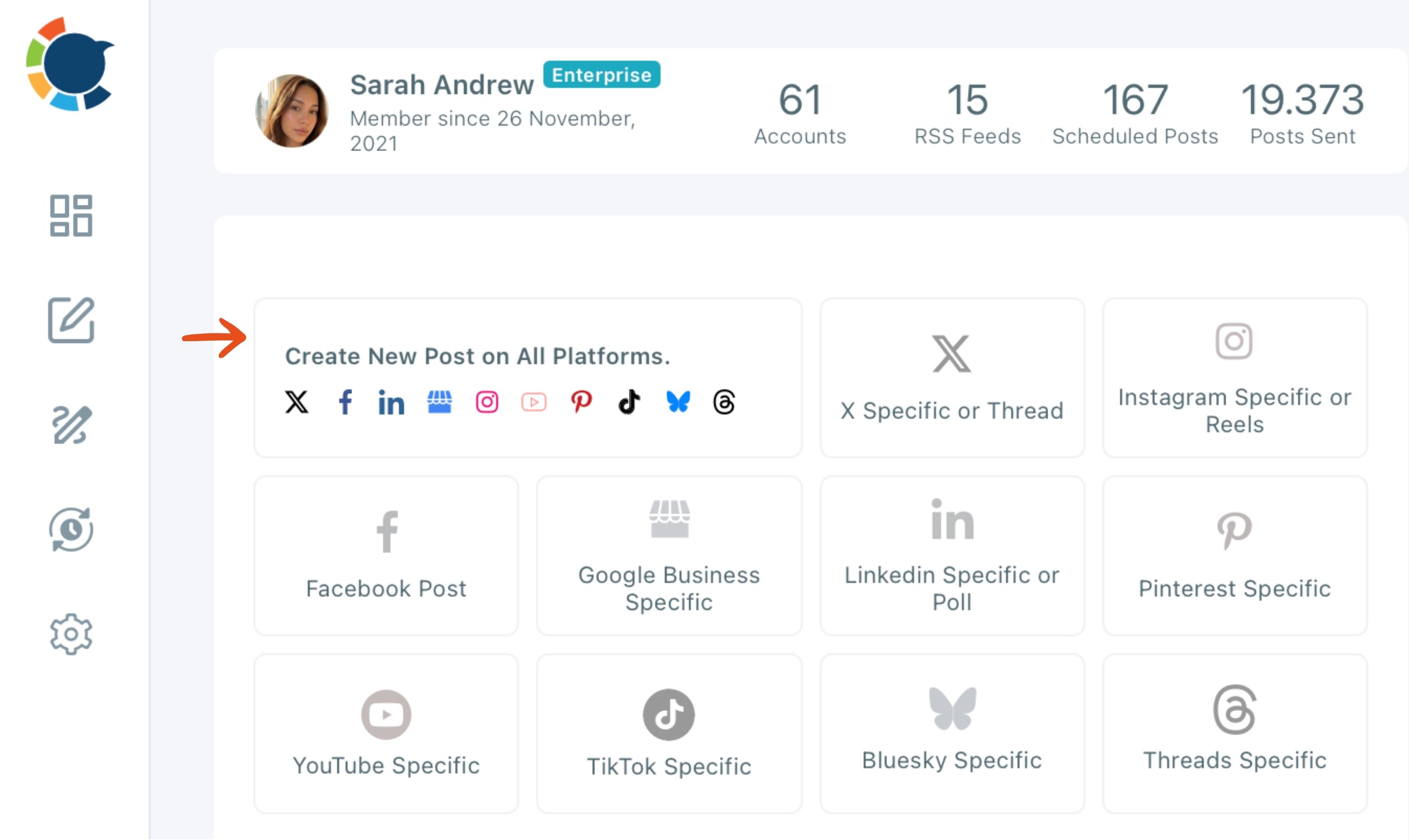
Both routes begin on the same screen. The Create New Post on All Platforms card opens the universal composer, and the platform-specific cards next to it open each network's own composer for the posts that need one.
Why posting app by app is the slower and riskier route
Rebuilding the same post in every app costs time that grows with each account you add, and it adds nothing the networks reward. For a small business weighing social media management tools for small businesses, this is the first test: whether one composer replaces a string of separate logins.
The cost grows in a straight line. Every extra account adds another login, another upload and another paste for each post you plan, while one composer send stays one send however many accounts it carries.
Speed is not the main risk, though. Pasting by hand tends to produce identical posts everywhere, and identical posts on two accounts of the same platform count as duplicate content. The way to post on every social account at once without that problem starts with the decision table below.
Same post or its own version: a decision table
Use one send when the post fits every selected network, and split off a network only when one of the conditions below applies. Each row comes from the per-platform limits Circleboom Publish lists for its composer:
| Situation | What breaks | What to do |
|---|---|---|
| The post fits every selected network | Nothing | One send from the universal composer |
| Text is over 300 characters and Bluesky is selected | Bluesky caps posts at 300 characters | Condense with the AI writer for everyone, or post a shorter version from the Bluesky composer |
| Text is over 500 characters and Threads is selected | Threads caps posts at 500 characters | Condense, or post a Threads-specific version timed to match |
| The post carries several images and Pinterest is selected | A pin takes 1 image | Leave Pinterest out and post one image from its own composer |
| The post is text-only and Instagram is selected | Instagram requires at least one image or video | Add media, or leave Instagram out of the send |
| Two or more accounts are on the same platform | Identical posts across accounts count as duplicate content | Ask the AI writer for a separate version per account |
Read the table from the top: a post that clears every row goes out once; a post that trips a row gets one extra post for that network, not a new plan.
Which row is easiest to trip
The 300-character row is the easiest to trip, because it is the lowest text limit in the send and a caption written for LinkedIn or Facebook rarely starts that short. Writing the shared version to 300 characters from the start removes most splits before they happen.
When text length is the problem
The strictest text limit in the send decides whether one version can go everywhere. Circleboom Publish lists these text limits for the networks most likely to trip a shared post:
- Bluesky: 300 characters.
- Threads and Pinterest: 500 characters.
- LinkedIn: 1,300. Google Business Profile: 1,500.
- Instagram: 2,200. Facebook: 5,000.
A 500-character post fits Threads, Pinterest, LinkedIn, Google Business Profile, Instagram and Facebook, and does not fit Bluesky.
The AI social media post generator built into the composer can condense it, but only when you tell it the limit. It does not read the selected accounts and enforce their caps on its own.
When the post needs a different format
Some posts are not a length problem at all. A thread, a LinkedIn poll, an Instagram Reel or a Pin saved to a specific board uses tools the universal composer does not have, because those tools belong to one network.
For those, the decision is made before the table: the post goes out from that platform's own composer, which keeps the network's own options.
The universal composer stays the fast, consistent baseline for everything that does not need them, and a long caption that will not fit Bluesky or Threads can also become a thread on that network instead of being cut down.
When several accounts share one platform
Two Pages, two Instagram accounts or two Company Pages on the same platform should never receive word-for-word the same post. The AI writer's Rephrase for Clarity shortcut, or a free-text instruction asking for a new angle, gives each account its own version before the send. For the LinkedIn case in detail, see managing multiple LinkedIn Company Pages.
Do the same photos and videos fit Instagram, Pinterest and Bluesky?
Yes, if the media fits the strictest network in the send, and image counts are where most shared posts break. Circleboom Publish lists these image limits:
- Pinterest: 1 image per pin, up to 20 MB.
- Bluesky: up to 4 images, 2 MB each.
- Up to 10 on Instagram, Facebook, Threads and Google Business Profile.
- LinkedIn: up to 20.
A six-image post therefore works for Instagram or Facebook, not for Bluesky, and becomes one image on Pinterest.
Video sizes split the same way: Facebook accepts up to 10 GB, Instagram up to 300 MB and LinkedIn up to 200 MB, so a 400 MB clip fits only the first.
A text-only post headed for Instagram does not have to be held back for lack of a picture. The composer's media bar pulls from Unsplash, Giphy and Google Photos, and opens Canva for editing, so an image can be added without leaving the post.
Video-only networks and clips
YouTube Shorts and TikTok take video and no images at all, so an image post leaves both out by definition. A single clip meant for Reels, Shorts, TikTok and Facebook together runs through the video cross-posting flow, which starts from one platform's Reels or Shorts composer rather than the universal one.
Post Preview is the check that catches all of this. It shows the post as it will look on each selected network, with a tab per platform, the media with a slide counter and the caption cut off with a "more" link where that network would cut it.
A Facebook post carried over to LinkedIn, the smallest case of one start reaching two networks.
How timing works when one post goes everywhere
Every send ends with the same three buttons, and they apply to all selected accounts at once:
- Post Now publishes to every selected account immediately.
- Schedule sets a date and time, with suggested best-time slots for the account.
- Post to Queue drops the post into each account's next open recurring slot.
When the table splits a network off, schedule its separate post for the same date and time as the shared send. The launch then goes live together, and the Outbox calendar shows the shared post and the split versions on the same day, filterable by platform or account.
Aren't Instagram's and Meta's own share buttons enough?
They are enough for the Meta pair and nothing beyond it. Meta's help page on Facebook and Instagram posting in Meta Business Suite says a post goes to a connected Facebook Page and Instagram account by default. You can deselect one, and it previews both feeds.
Instagram has its own Also share on toggle and an automatic Sharing across profiles setting, both covered in its help page on sharing your Instagram posts to Facebook.
Those tools reach the apps inside Meta's family. They do not reach LinkedIn, Pinterest, Bluesky, Google Business Profile, YouTube or TikTok, and most native schedulers still work one account on one platform at a time.
For a creator whose whole presence is Instagram plus Threads, an automatic route can be enough, and auto-posting from Instagram to Threads covers that pairing. Once a brand runs accounts on four or more networks, a single composer for every account is the route that scales.
Why the same message still needs a native feel on each network
Each network rewards a slightly different version of the same idea, and that is the reason the fork exists at all. A caption that reads well on Facebook can feel long on Threads; a single strong image suits Pinterest better than a carousel squeezed into a pin.
Choosing the best content for each social media platform is a deeper subject than one send can settle. For a daily routine, the practical rule is simpler: keep the shared message in one composer, and give a platform its own post only when the decision table says so.
Circleboom Publish keeps both routes in one place. The universal composer opens from the dashboard card or the pencil-icon flyout in the left sidebar, and each platform-specific composer sits one click away in the same flyout.
The clip below shows the shared route end to end: accounts picked across platforms in one grid, one post written, one send.
If you log in to Circleboom, the same composer is the first card on the dashboard.
Checking what the send did afterwards
After the posts go out, post analytics show how each one performed on each platform. That is where you find out whether the split versions earned their extra minute, or whether the shared post did just as well and the next send can skip the split.
A checklist for your next all-platform send
Every post that has to reach all your accounts can run through the same short list:
- Write the shared version first, ideally under 300 characters if Bluesky is in the send.
- Select every account in the universal composer, or pick a saved Share Group.
- Run the post through the decision table: length, image count, media required, shared platforms.
- Open every tab in Post Preview, starting with the strictest network.
- Send the shared version, then schedule any split versions for the same time from their own composers.
That routine keeps the one-click speed and drops the copy-paste look, which is the whole point of posting everywhere.
The first few sends take a little longer while the table is new. After that, the checks become habit: you notice a caption running long for Bluesky while you write it, and you reach for a single image when Pinterest is in the mix.
Learning how to post on all social media at once well is mostly that habit, built one send at a time, with the shared version doing the heavy lifting and the exceptions kept small.
→ Start posting to all your social media at once
What people ask about one post on every network
Do I need to connect every account before I can post everywhere?
Yes. The composer only lists connected accounts, and a platform with nothing connected shows as a greyed-out icon. Connect accounts under the gear icon in Manage Social Accounts, which also shows how much of your plan's account allowance is in use.
Will Circleboom Publish catch a caption that is too long for one platform?
Do not count on it. The AI writer does not check the selected accounts' limits, so open that network's Post Preview tab, then condense the text for everyone or leave that platform out and post a shorter version from its own composer.
Can the preview change the text for one network?
No. Post Preview only shows how the post will render on each selected network, so you can catch a cut-off caption or missing image. Changes happen in the text field, which applies to every selected account, or in that platform's own composer.
Can I reuse a post that already went out to every account?
Yes. Sent Items lists every published post with a Share Again action that copies it into an editable version. Ask the AI writer to rephrase it first, so the repeat does not read as duplicate content.