
Most agents treat the Share button as free exposure for a colleague. Realtor rules treat it as advertising someone else's listing, and that needs the listing firm's consent first.
Without permission: a share or new post about another agent's listing counts as advertising it, which NAR's Code of Ethics and model MLS rules reserve for the listing broker. With permission: Circleboom Publish schedules your credited listing post to Facebook, Instagram and LinkedIn accounts in one send, held for approval if your brokerage reviews posts.
→ Reshare your own past listing posts
Can realtors post other agents' listings on social media? Below: a decision table for each situation, where the credit goes, and the posting steps.
Why sharing a colleague's listing counts as advertising
Realtors cannot post other agents' listings on social media without permission from the listing firm. NAR answers the question directly in its Code Comprehension on displaying competitors' listings on social media. The answer fits in one line: "Not without permission of the listing firm."
Three rules sit behind that answer:
- Standard of Practice 12-4: Realtors shall not offer for sale or advertise property without authority.
- Case Interpretation 12-16: copying and publishing another broker's listing information is advertising and needs specific authority from the listing broker.
- Model MLS rule Section 2.7: a listing is not advertised by any participant other than the listing broker without the listing broker's prior consent.
The current wording of Article 12 and its standards sits in the 2026 Code of Ethics and Standards of Practice. NAR also notes that state licensing laws may apply on top of the Code.
What counts as advertising another agent's listing
More than the obvious "for sale" post counts. Association guidance treats several everyday moves as advertising a listing that is not yours:
- Pressing Share on another agent's listing post so it lands on your own timeline.
- Posting about a property after walking through someone else's open house.
- Reusing MLS photos or details in a caption of your own.
- Filming your own video tour of another broker's listing, which can look even more like you are the listing agent.
The common thread is simple. If a reader could take the post as your marketing of that home, treat it as advertising and get consent before you post other agents' listings on social media.
What still varies by state, MLS and brokerage
So the answer depends on more than NAR. Your state's license law, your MLS's local rules and your brokerage's policy can all add conditions. Check with your broker and your MLS before you share another agent's listing anywhere.
Four questions settle most of it in one conversation with your broker:
- Does our firm let affiliated agents share each other's listings?
- Has our MLS adopted any local rule for displaying listings on social media?
- Does our state's license law say anything about advertising another broker's listing?
- Who reviews listing posts before they publish, if anyone?
Circleboom Publish schedules an agent's own listing posts to Facebook Pages, Instagram accounts, LinkedIn Pages and Google Business Profile locations from one composer. Circleboom Publish also resends an agent's best past posts from Sent Items, so a thin week can be filled with content that needs nobody else's consent.
That second point matters more than it looks. Many agents reach for a colleague's listing because their own pipeline is empty, and the safer fix is their own material: past listing posts, market updates and local content. If that is your situation, the rule on other agents' listings is a nudge toward your back catalogue, not a dead end, and social media reposting brings those past posts back.
When is sharing another agent's listing allowed?
Sharing another agent's listing is allowed when the listing firm has given consent, or when the action is not advertising the listing at all, like linking to the listing broker's own site. The table sorts the four situations agents ask about, using only what NAR's own pages say.
| Situation | What NAR's pages say | What you do before posting |
|---|---|---|
| A colleague in your own brokerage lists it | The listing firm is your own brokerage; the authority rule in SOP 12-4 still applies | Ask your broker whether the firm lets affiliated agents share each other's listings |
| An agent at another brokerage lists it | Copying and publishing it is advertising and needs the listing broker's specific authority (Case Interpretation 12-16, model MLS rule 2.7) | Get the listing broker's consent, then credit them |
| You only link to the listing broker's website | Linking to another broker's site does not require permission (Case Interpretation 12-15) | Link to their page instead of copying photos or details |
| You run an IDX feed on a social profile | Allowed only when the display follows the IDX rules, such as refreshing at least every 12 hours | Confirm your feed meets your MLS's IDX rules; other displays need local MLS approval and the listing broker's consent |
Two details the table settles
The link row is the one most agents miss. A short post that points to the listing broker's own page is treated differently from a post that copies their photos and price onto your feed.
Consent also covers the native share. Say the listing agent agrees to a share of their video. The steps to repost a video on Instagram happen inside Instagram, and their name stays on the original.
The IDX row is narrower than it looks. NAR's answer covers an IDX feed on a profile, not a one-off post built from a listing, and MLS Policy Statement 7.98 lets a local MLS create other display options only with the listing broker's specific consent.
Where the credit goes when you post a permitted listing
Credit goes in the first line of the caption, before any feed truncates it. A reader scrolling past should see the listing agent's name and brokerage without tapping "more", and your own brokerage should be named so nobody mistakes the listing for yours.
I put the credit in three places, each one a backup for the last:
- The caption's opening line: "Listed by" with the agent's name and their brokerage.
- A tag on the listing firm's account where the network supports it.
- A scheduled first comment on Facebook and Instagram that repeats the disclosure and says who to contact for showings.
The first comment is written and scheduled together with the post, so it is already in place the moment the listing goes live. That way the disclosure sits under the post from the start, before any other comment can land there.
On LinkedIn, tagging the listing firm's company Page is the cleanest credit, and the guide to tag a company in LinkedIn posts walks through it.
Tagging the listing firm in Circleboom Publish
Tagging inside Circleboom Publish follows each network's own limits:
- Facebook: type @ and the name to tag a Facebook Page; personal profiles cannot be tagged.
- Instagram: @ plus the exact username links the profile.
- LinkedIn: @ plus the company name tags a company Page; personal profiles cannot be tagged from a scheduled post.
When the listing agent has only a personal profile, the written credit in line one does the work.
Instagram needs the most care. Circleboom Publish caps an Instagram caption at 2,200 characters, and a property description, the credit and hashtags all compete for it. The AI Instagram caption generator can tighten the description so the credit line stays at the top, and the first comment holds whatever does not fit.
Can you post the same listing on all your accounts?
You can post the same listing on all your own accounts, but not as identical copies on one platform. Sending the exact same text to several accounts on the same network reads as duplicate content, which can limit reach and, in serious cases, get an account restricted.
The fix is built into the composer. Circleboom Publish's AI writer rewrites the post for each account, so your personal agent Page and your team Page on Facebook each carry their own version of the same listing. One tool to manage multiple social media accounts then sends them all in one pass.
If the same set of accounts gets every listing, save it as a Share Group: your agent Page, the team Page, your Instagram account and the brokerage's LinkedIn Page become one click in the composer. The Outbox can then be filtered by that Share Group to see every scheduled listing post for those accounts in one calendar.
Cross-platform sends are a separate check. The shared composer sends one text to every network you pick, so it has to fit the strictest limit: Circleboom Publish allows 5,000 characters on Facebook, 2,200 on Instagram and 1,300 on LinkedIn.
Spacing matters as much as wording. A listing that appears on every account on the same morning, then again two days later, feels like a flood; a month mapped out ahead gives each property a clear slot.
Who checks a listing post before it goes live at a brokerage?
At a brokerage that uses Circleboom Publish's Team Management, an Admin checks every post a User schedules before it publishes. There are only two roles: an Admin posts directly, and a User's scheduled posts land in Waiting for Approval until an Admin approves or rejects them, with an optional comment explaining why.
That review step is where a brokerage can confirm permission and credit on any listing that is not the agent's own. A User also sees only the accounts assigned to them, so an agent cannot post to the brokerage's main Page by accident.
The model fits a multi-office brokerage: each office manager gets User access to that office's accounts and posts local listings, while head office approves every post.
How to post a permitted listing on social media the right way
Scheduling clip: how a Facebook Page post is scheduled in Circleboom Publish, the same flow a credited listing post follows.
To post a permitted listing correctly, write one credited post, adapt it for each account, preview it per network and schedule it, with approval if your brokerage requires it. The same flow is how you resend your own listing posts when the market gives an old one a new reason to run. Circleboom Publish handles both from one composer, in six steps.
Open the composer with the right accounts
- Log in to Circleboom with the account that holds your agent Page and any brokerage accounts you post to.

- Connect any missing account under Manage Social Accounts in Settings, such as your Instagram account or your LinkedIn Page.
- Click Create New Post on All Platforms on the dashboard, then select the accounts the listing will go to.
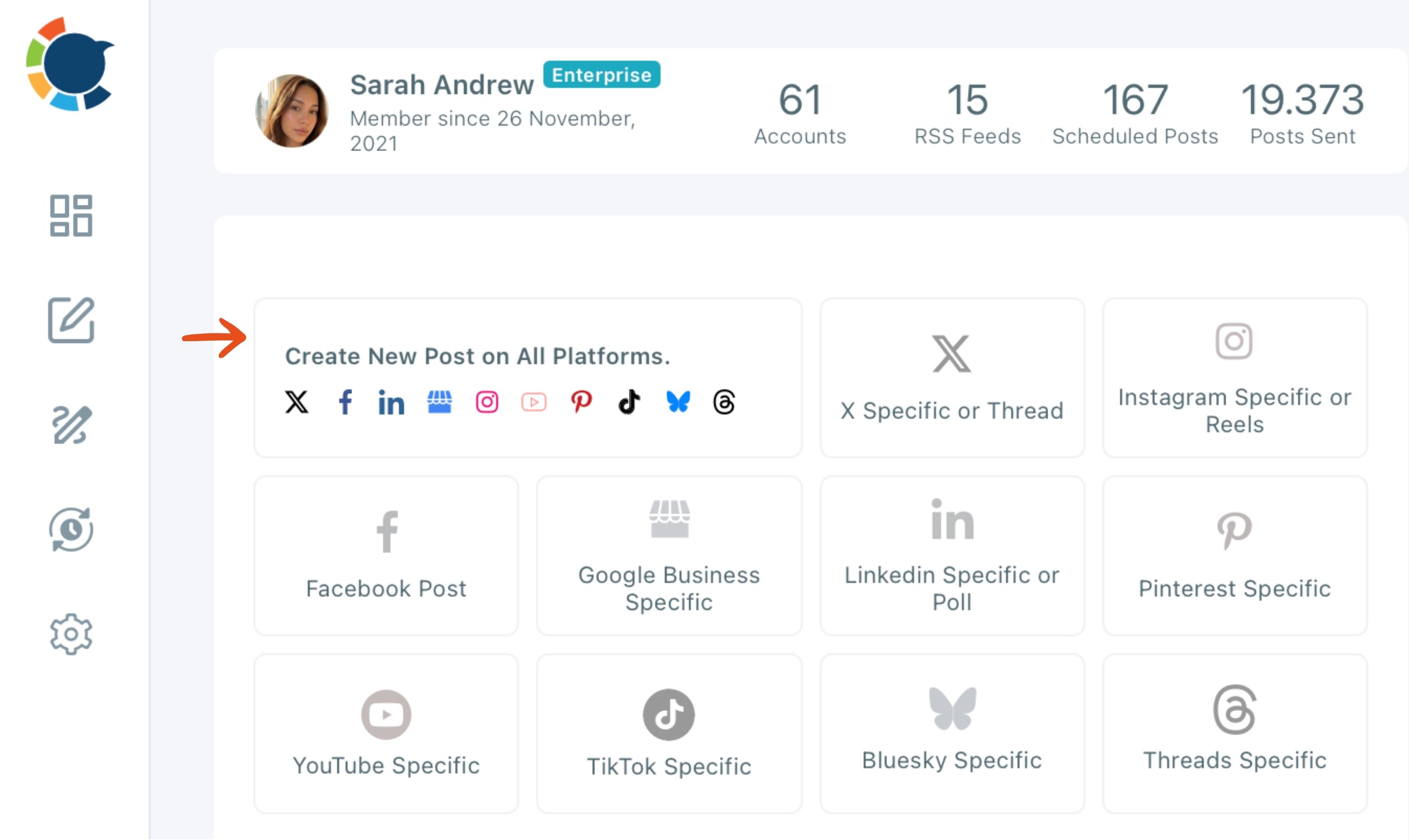
Write, check and send the credited version
- Write the caption with "Listed by", the agent's name and both brokerages in the first line, then type @ to tag the listing firm where the network allows it.
- Check the Post Preview tab for each network to confirm the credit line is visible before the "more" cut.
- Schedule the post at a suggested best time, or let it wait for an Admin's approval if you post as a User.
This order puts the account choice before the writing, so you write for the networks you actually picked, and the preview step catches a buried credit line before any reader does.
Some weeks bring no permitted listing at all. Curated articles, a post generated from a market report and a planned month of local posts keep the calendar moving, and so do helpful non-listing posts such as home maintenance tips.
Which route fits your listing post
Pick the route by your situation:
- If it is your own listing, post it, adapt it per account and bring it back when the price, open house or status changes.
- If another brokerage lists it and you have written consent, credit them in line one and in the first comment, and name your own brokerage.
- If you have no consent, link to the listing broker's page or skip it, and post your own content instead.
- If your brokerage reviews posts, schedule as a User and let an Admin approve it.
Whichever branch you are on, the safest content is the content you own. Your own listings, your own market notes and your own proven past posts are yours to publish whenever you choose, and every one of them points buyers back to you.
→ Resurface your past listing posts
Realtor listing-sharing FAQ
Should I hit share on the agent's post or write my own post about the listing?
With the listing firm's permission, either works, and a native share keeps the listing agent's own credit intact. The steps to repost on Facebook happen in Facebook's own app, since Circleboom Publish resends only your own past posts.
Can I bring back my own older listing posts for a price drop or a sale?
Yes. Circleboom Publish's Repost From Sent Items resends any post you published before, as it was or edited with the new price, open house or "sold" update. Pick the candidate from Content Performance Analytics rather than memory, and space repeats out. Instagram's own archive works differently, as the guide on whether you unarchive a post on Instagram explains.
What if the listing goes under contract after my post is live?
Update or remove the post as soon as the status changes. Article 12 of NAR's Code asks Realtors to present a true picture in their advertising, and a stale "for sale" post about another firm's listing misleads buyers.