

Knowing what to tweet on any given day is a workflow problem, not an inspiration problem.
The seven-category rotation maps the next 14 days across original insight, curated perspective, audience question, useful resource, behind-the-scenes, hot take, and recycled top performer. The AI Tweet Generator produces hook drafts against each category.
The Bulk Schedule queue distributes them on cadence. The combined workflow turns "what should I tweet" from a daily anxiety into a 90-minute weekly setup.
What this guide gives you.The seven categories that prevent the content well from running dry.The AI generation workflow that produces hook drafts in 3 minutes per post.The 14-day Bulk Schedule queue that runs cadence without daily input.
Built on Circleboom's verified Enterprise developer access on X. Start with the Twitter post idea generator.
Why a Rotation Beats Inspiration
The "what should I tweet" framing is the bottleneck most accounts never solve. Three structural reasons explain why.
The first is that inspiration is not reliable on a daily cadence. Operators who depend on inspiration produce content in bursts and then run dry, which collapses the cadence and trains the algorithm that the account is unreliable.
The second is that single-shape repetition compresses reach. Operators who find a shape that works and post it repeatedly trigger the algorithm's low-signal-account heuristic. The article on why use an AI tweet generator covers the production-shape side directly.
The third is that production rate is the actual cap. Most accounts plateau because they cannot produce content at the rate the cadence requires. A rotation framework plus an AI generator closes the production-rate gap that inspiration alone cannot.
The Seven Categories
These are the seven shapes the rotation cycles across.
- Original insight. A claim, observation, or framework you have not seen elsewhere. One per week is usually enough.
- Curated perspective. A quoted or paraphrased external piece with your take attached.
- Audience question. A direct question to the audience that invites reply.
- Useful resource. A link to something concretely useful, with a hook explaining why.
- Behind-the-scenes. Process, mistakes, decisions.
- Hot take. A claim that disagrees with consensus on a topic adjacent to your niche.
- Recycled top performer. A previous high-engagement tweet, recycled with a fresh hook.
Two posts per category per week produces 14 daily posts plus padding. The article on best AI tweet generator tools covers the production-tool comparison directly.
How to Run the Rotation Step by Step
The setup runs from one Circleboom dashboard. Five phases: connect, map, generate, schedule, recycle.
Hands-on demo: how the AI tweet generator produces drafts that do not sound like a robot.
The flow, in order.
Phase 1: Connect
- Log in to Circleboom Twitter and connect your X account through the official OAuth handshake.
- Open the X Post Planner menu for the scheduling and AI workspace.
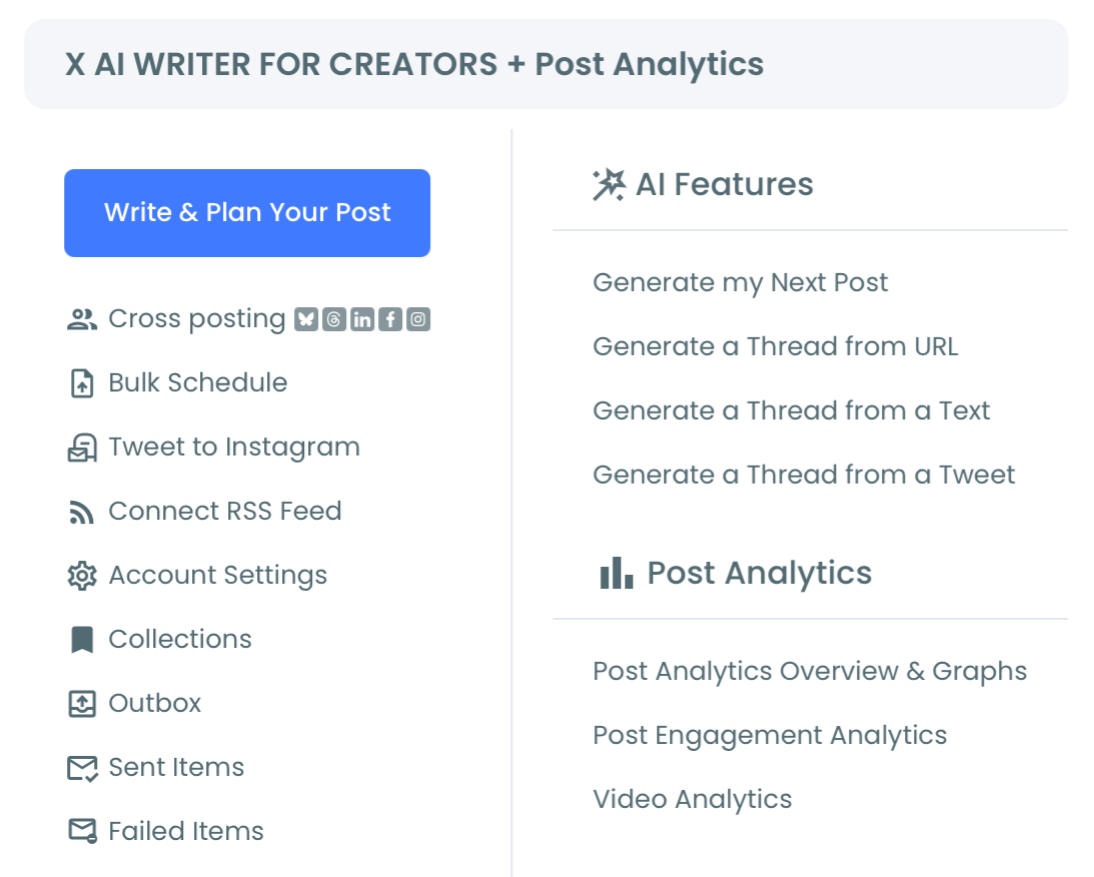
Phase 2: Map
- Map the next 14 days across the seven categories on a 2-2-2-2-2-2-2 distribution.
Phase 3: Generate
- Use the AI Tweet Generator to produce hook drafts in each category.
- Edit drafts to match voice before queuing.
Phase 4: Schedule
- Build the 14-day Bulk Schedule queue with the edited drafts.
Phase 5: Recycle
- Set Auto Retweet on top performers for time-zone amplification.
- Track engagement by category weekly and rebalance the rotation.
That sequence runs cadence without daily input. Each phase removes a different bottleneck: mapping removes the "what should I tweet" question, generation removes the production-rate cap, scheduling removes cadence-reliability, recycling removes the back-catalog waste.
Quick recap:
- Connect through OAuth.
- Open X Post Planner.
- Map seven categories across 14 days.
- Generate drafts with AI.
- Edit and queue.
- Track and rebalance.
What Each Category Specifically Produces
Audience questions produce the highest engagement-rate lift. Replies are weighted heavily by the algorithm; questions that get 10+ replies typically lift reach for the next 3 to 5 posts.
Behind-the-scenes produces the highest inbound-DM rate. The audience that develops connection through process posts is the audience that converts to business outcomes.
Original insight produces the lowest volume but the highest authority signal. One a week is enough to anchor what the account is known for.
Recycled top performers produce surprising volume. Tweets that performed three months ago catch fresh time-zone audiences when Auto Retweet pushes them back into the queue. The article on how I regenerated my viral tweets with AI covers the recycling-plus-AI angle.
Hot takes are the high-variance category. One a week, on a topic adjacent to the niche, with substance behind the take.
Common Mistakes Operators Make
The first mistake is over-allocating to original insight. The category is the hardest to produce; over-allocation burns the well faster. Two per week is the safe ceiling for most accounts.
The second mistake is skipping audience questions. They feel low-effort but produce the highest engagement-rate lift. Most accounts under-allocate by 50% or more.
The third mistake is treating hot takes as a daily category. Once a week is the safe ceiling. Daily hot takes erode credibility within 30 to 60 days. The article on trending hashtags on Twitter covers a related variance dynamic.
What to Do Next
The rotation is concrete: seven categories, AI generation, scheduled distribution.
- Step 1: Open Circleboom and walk through the AI Tweet Generator.
- Step 2: Map the next 14 days across the seven categories.
- Step 3: Generate hook drafts and edit to voice.
- Step 4: Build the 14-day Bulk Schedule queue.
- Step 5: Set Auto Retweet on top performers.
→ Generate your next tweet now
What to Know Before You Start
How many tweets per day should the rotation produce?
Most accounts find their cadence between 2 and 5 tweets per day. The seven-category rotation works at any volume in that range; the per-category allocation scales with the daily target.
How do I keep the AI drafts from sounding like AI?
Edit every draft. Feed the generator your existing tweets through Brand Voice so it picks up on phrasing patterns. The video above shows the editing pattern.
Can I run the workflow on multiple accounts?
Yes. Circleboom supports multi-account management; the rotation runs identically on each account.
Is the workflow safe under X's rules?
Yes. All layers run through Circleboom's Enterprise developer access. No scraping, no browser scripts, no automation outside platform policy.






