

Every day, people tweet about problems they're trying to solve and products they're considering.
Someone asking which smartwatch to buy. Someone is complaining that their fitness tracker doesn't work. Someone is looking for a recommendation. That intent is sitting in public tweets, visible to anyone who knows where to look.
With Circleboom Twitter, you can search that intent historically or catch it the moment it's expressed in real time. Either way, you see the accounts behind the tweets and can follow, export, or reach out directly.
Can you find potential customers on Twitter?
Yes. Twitter is full of people publicly expressing purchase intent, asking for recommendations, and discussing problems your product solves.
Circleboom Twitter gives you two modes to find them. The Historical Tweet Search lets you search deep tweet data using AI-powered natural language queries, filter by date range and content type, and discover the accounts behind matching tweets.
The Real-Time Tweet Search monitors keywords in real time so you catch fresh intent the moment someone tweets it, not days later. Both modes let you act on the accounts you find directly from the results.
 infocircleboom.com
What Is Circleboom Twitter?
Circleboom is an Official X Enterprise Developer, which means all data is retrieved through X's official APIs. Historical tweet data, account information, and all actions taken are fully compliant with platform rules. No scraping, no workarounds.

Here's what Circleboom Twitter gives you for customer discovery:
- Search historical tweet data using plain language queries powered by AI
- Filter by date range, tweet type, engagement level, and language
- View matching tweets with full engagement data including impressions, likes, retweets, and replies
- Switch to profile view to analyze the accounts behind matching tweets
- Follow, add to lists, or export discovered accounts directly from the results
How to Find Potential Customers on Twitter with Circleboom Twitter
Step #1: Log in to Circleboom Twitter and connect your X account.
Circleboom is an Official X Enterprise Developer, meaning all tweet and account data comes directly from X’s official APIs in a safe and compliant way.

Step #2: Open the left menu and go to “Historical Tweet Search”.
You can find it under:
“X Account Search / on Tweets” → “Historical Tweet Search”
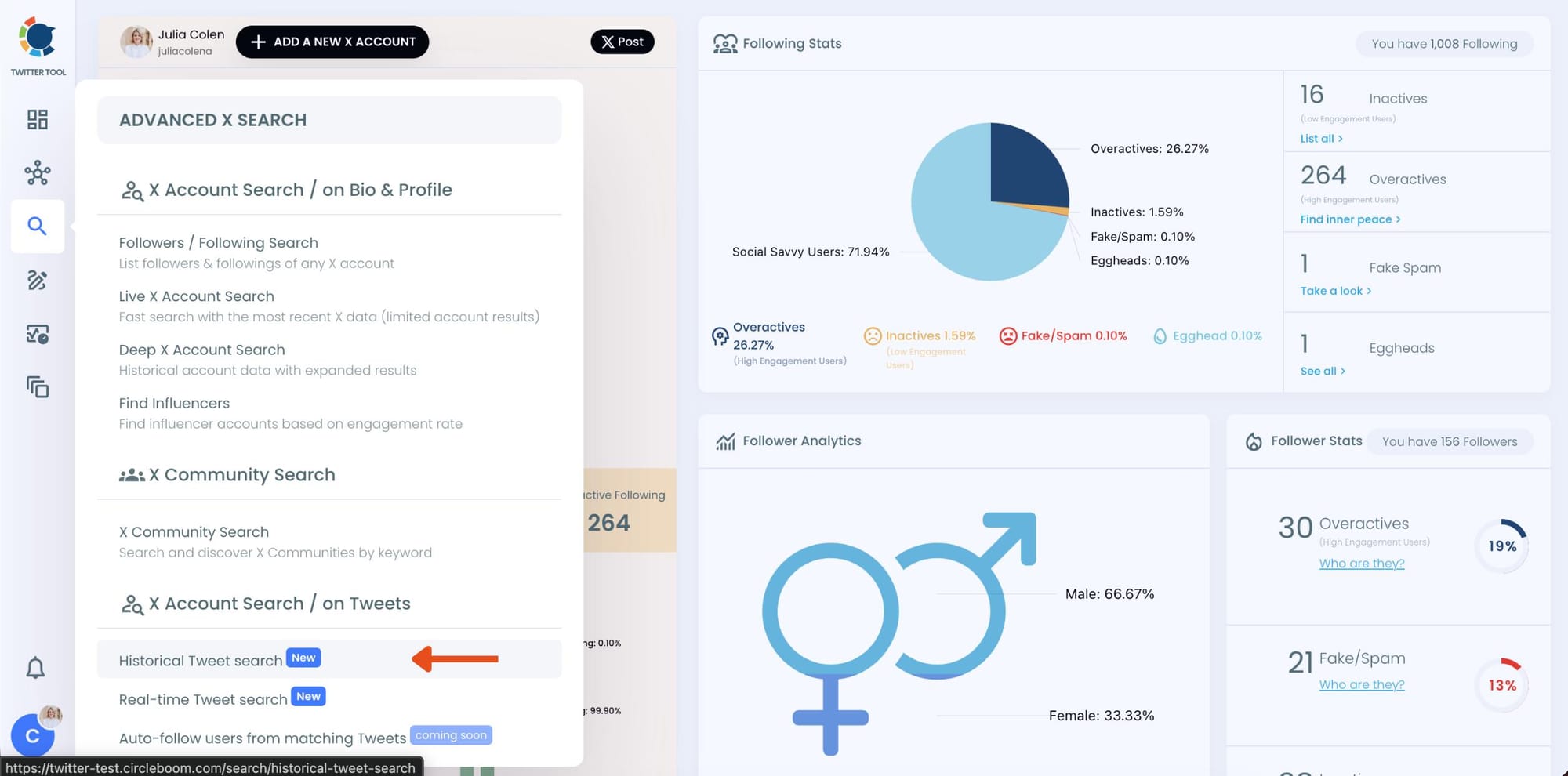
Circleboom also offers “Real-time Tweet Search” in the same section. Historical Tweet Search helps you discover people who tweeted about a keyword in the past across a selected date range, while Real-time Tweet Search continuously monitors new tweets as they happen.
Step #3: Describe the tweets you want to find using AI Smart Search.
Instead of writing complicated Twitter search operators, you can simply type what you are looking for.
For example:
“Find tweets about people looking for a smartwatch or fitness tracker, exclude retweets.”
Circleboom AI automatically understands the intent behind your query, extracts the important keywords, and applies filters automatically.
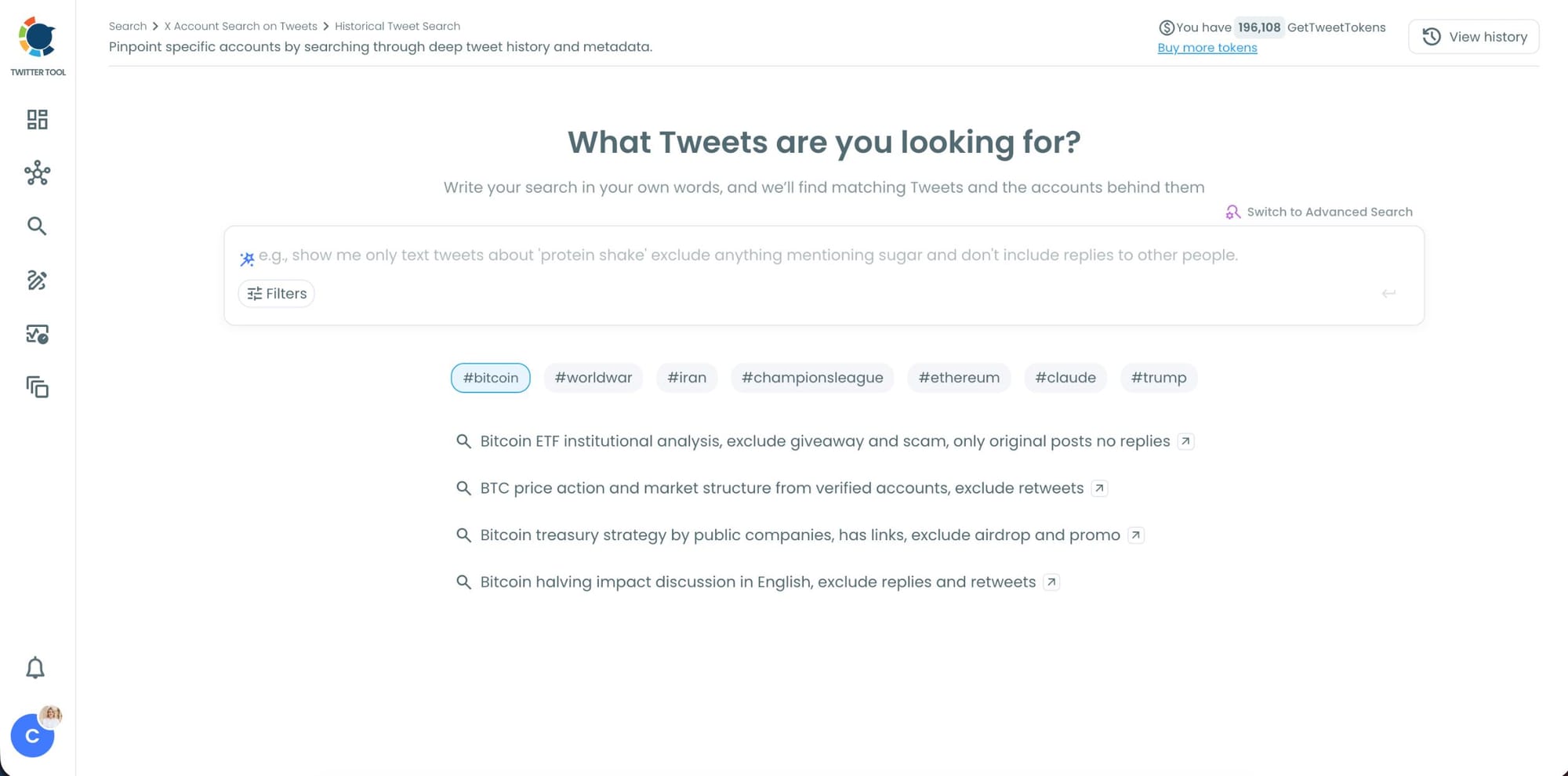
Step #4: Refine your keyword monitoring search with AI suggestions and filters.
Circleboom also suggests ways to narrow your search results. You can focus on intent, comparison posts, replies, or specific languages while filtering out spam, retweets, and noise.
This helps you find more relevant people tweeting about your keyword instead of scrolling through random tweets.
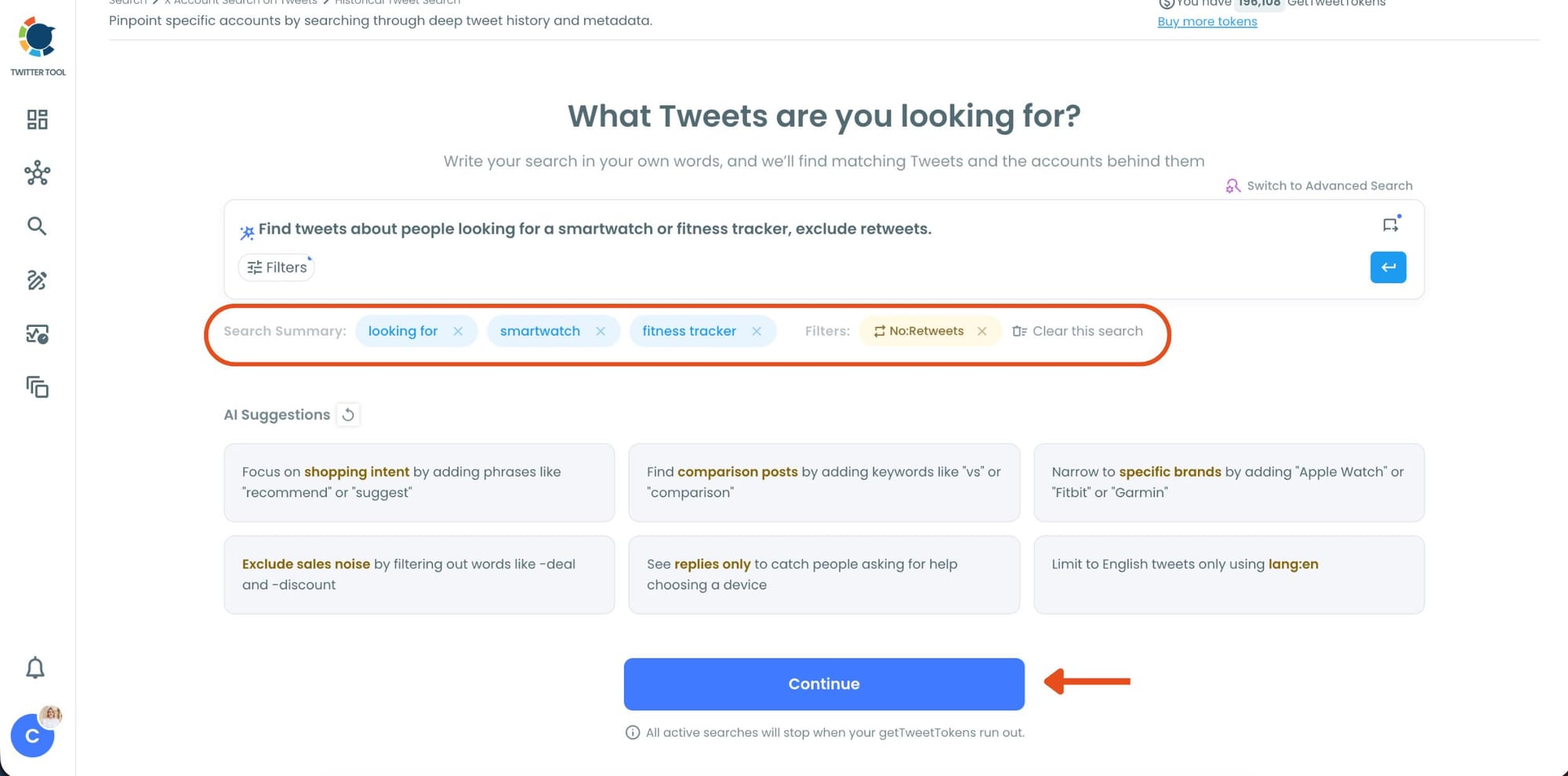
Step #5: Select your historical search date range.
You can monitor tweets from the last 30, 60, or 90 days, search across the last year, or define your own custom date range.
This makes it possible to discover people who tweeted about your topic weeks or even months ago, not just recent tweets.
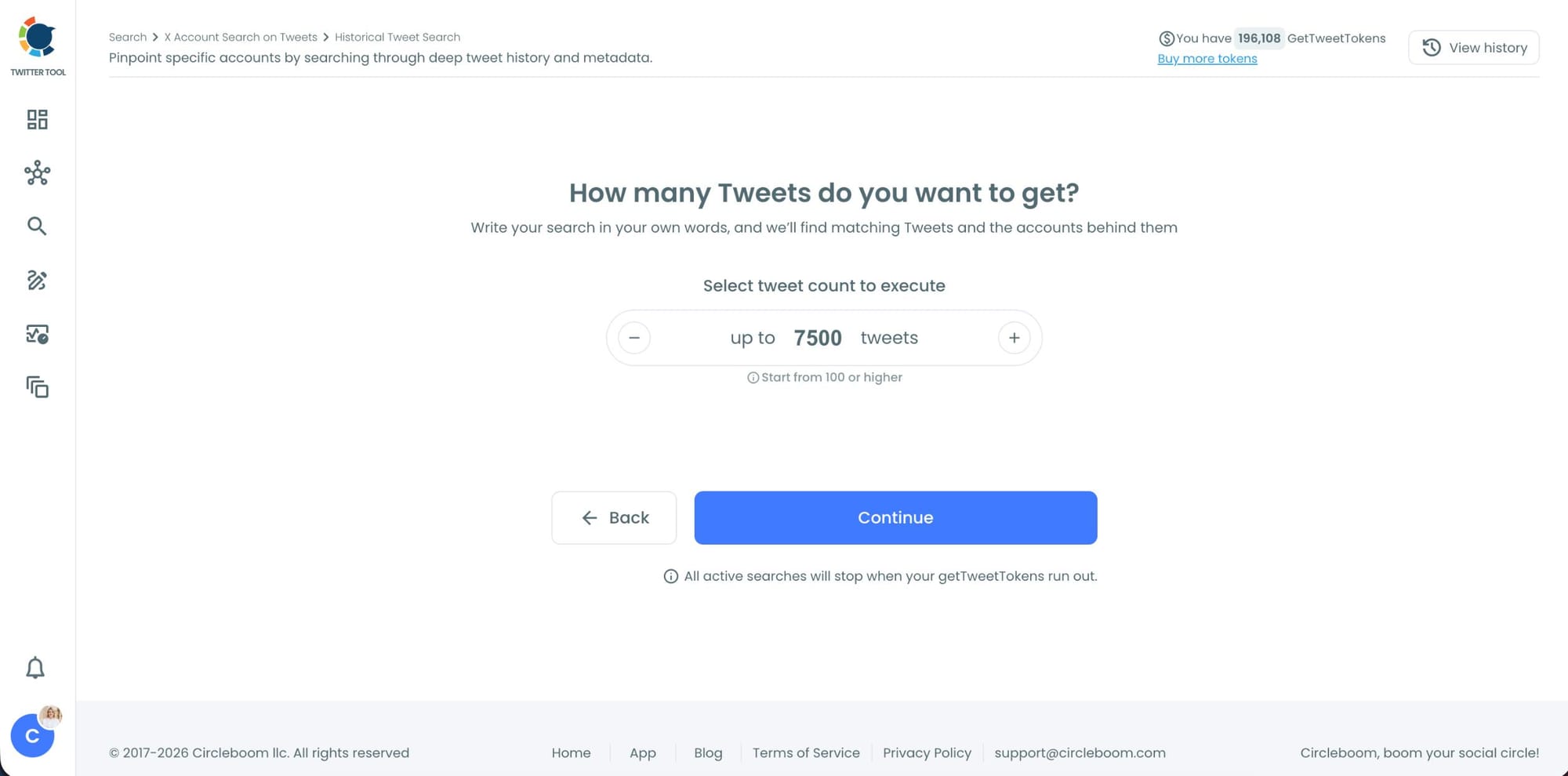
Step #6: Choose how many tweets Circleboom should collect.
Before the search starts, Circleboom lets you select the tweet volume you want to analyze.
Once you click “Continue”, Circleboom scans historical tweet data and starts collecting matching tweets together with the accounts behind them.
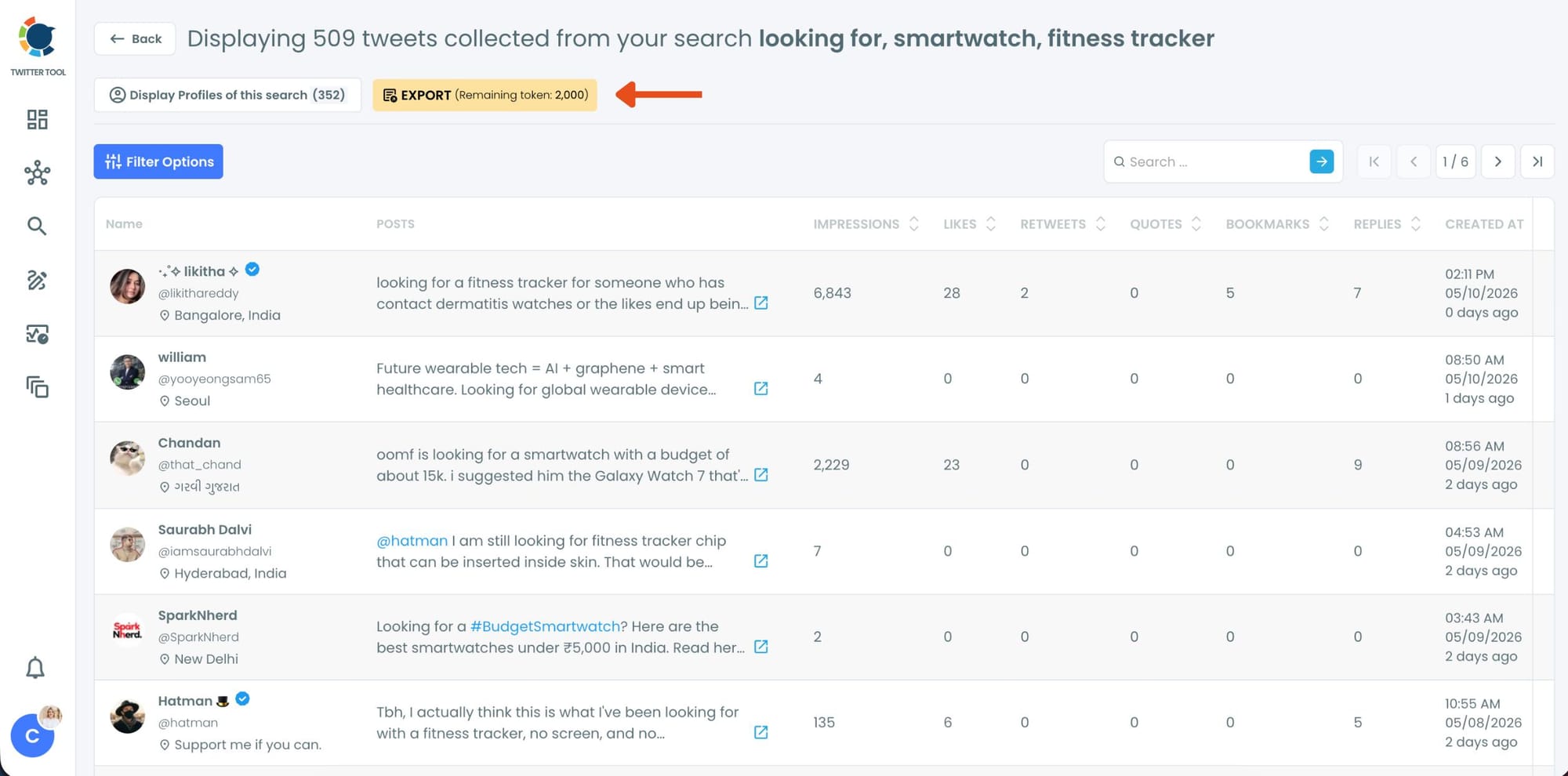
Step #7: Analyze the matching tweets and discover the accounts behind them.
Tweet View displays the matching posts together with impressions, likes, retweets, replies, bookmarks, and posting dates so you can quickly understand which conversations are getting attention.
You can also switch to Profile View to focus on the people behind those tweets.
Profile View displays follower count, following count, account age, tweet count, follow ratio, and engagement activity levels so you can evaluate account quality before interacting with them.
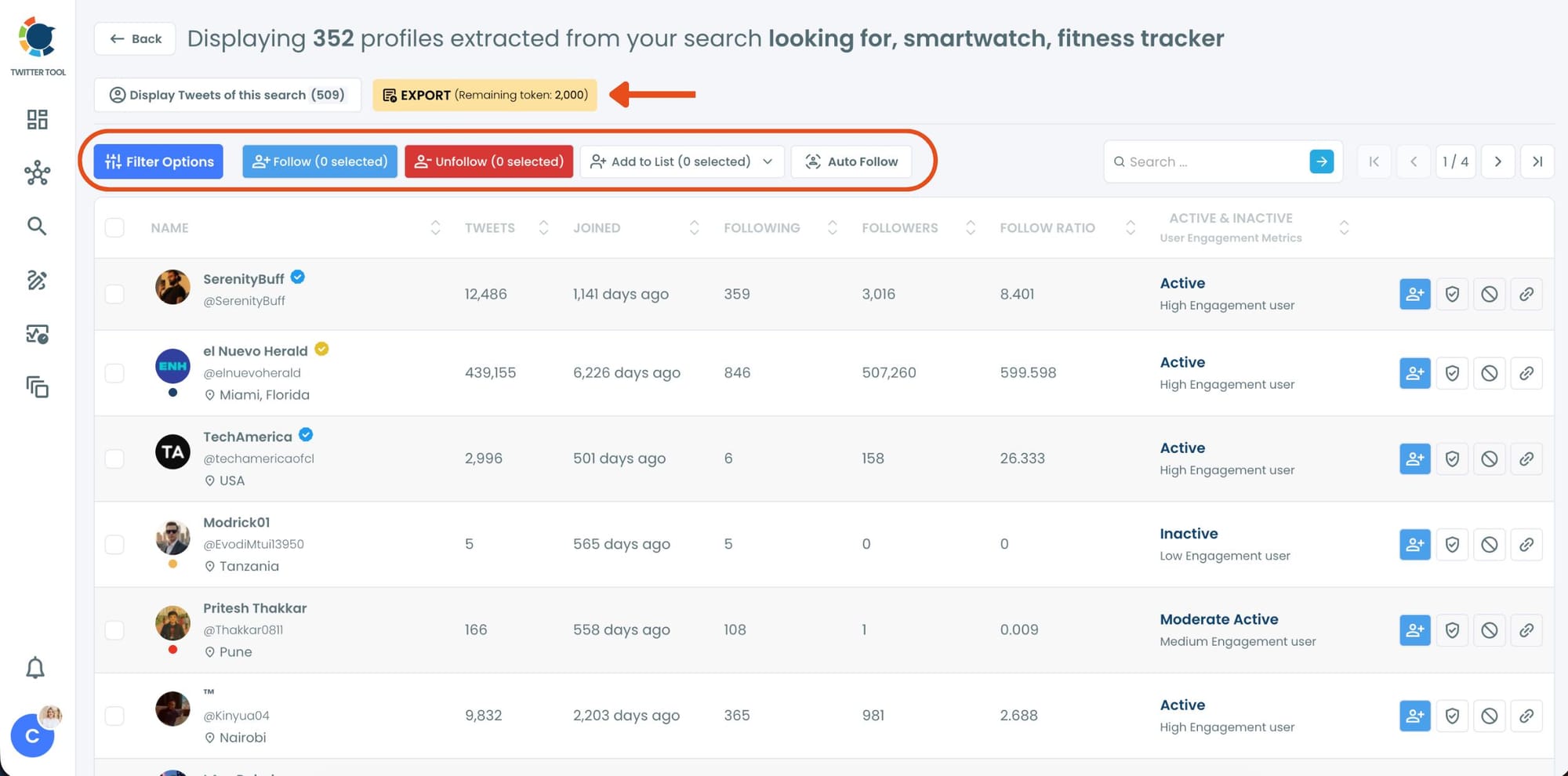
From there, you can directly follow accounts, unfollow them, add selected users into Twitter/X Lists for ongoing monitoring, auto-follow matching users, or export the collected profiles and tweets as CSV files.
How the Historical Tweet Search Works
This is the part that makes Circleboom Twitter genuinely different from native X search.
Instead of typing keyword operators, you describe what you're looking for. The AI-powered Smart Search interprets your intent, extracts the relevant keywords, and applies filters automatically. A query like "find tweets about people looking for a smartwatch or fitness tracker, exclude retweets" becomes a structured search without any manual operator syntax.
The search runs against historical tweet data, not just what was posted in the last hour. You choose the depth: last 30 days, last 60 days, last 90 days, last year, or a custom date range you define. You also select how many tweets you want to collect before starting the search, from a minimum of 100 up to thousands of results.
Once the search runs, the results come back in two views.
Tweet view shows you the matching posts with full engagement data: impressions, likes, retweets, quotes, bookmarks, replies, and the exact date the tweet was posted. You can see the conversation, evaluate the intent, and identify which posts reflect the kind of customer signal you're looking for.
Profile view switches the same results to show you the accounts behind the tweets. For each account you can see tweet count, account age, follower count, following count, follow ratio, and an active or inactive status with an engagement level indicator.
This is where discovery turns into action. You follow promising accounts, add them to a Twitter List for ongoing monitoring, or export the full list as a CSV for outreach or CRM workflows.
📌 The AI also surfaces suggestions to help you refine the search as you go. If you searched for smartwatch buyers, it might suggest focusing on shopping intent phrases, narrowing to specific brands, filtering replies only to catch people asking for help choosing a device, or excluding sales noise. Each suggestion is clickable and adjusts the search parameters without starting over.
What Purchase Intent Actually Looks Like on Twitter
The tweets you're looking for aren't hard to find once you know what signals to look for. They show up in several distinct patterns.
Direct buying questions. "Anyone know a good fitness tracker under $100?" "What smartwatch works with Android?" These are the highest-intent tweets. The person has a budget, a use case, and is actively researching.
Problem statements. "My Fitbit keeps losing charge after two days, time for something new." The purchase hasn't been made yet but the decision is close. This is warm intent.
Comparison requests. "Garmin vs Apple Watch for marathon training?" People asking comparison questions are evaluating options. They're in the middle of the buying decision.
Frustrated complaints. "I've been looking for a smartwatch with these features for months." A specific, unfulfilled need expressed publicly is one of the strongest signals available.
All of these show up in historical tweet data. Circleboom Twitter's search surfaces them at scale so you can find the people behind them before they've made their decision.
What You Can Do with the Results
Follow matching accounts. Following someone who just tweeted about a problem your product solves puts you in their feed at the exact moment they're actively thinking about the topic.
Add them to a Twitter List. Creating a private list of high-intent prospects lets you monitor their activity over time without the relationship being visible to others. You see when they post again about the same topic, when they make a decision, and when the timing is right to engage.
Reply with genuine value. Because you found them through a specific tweet, you know exactly what they said. A contextual reply that addresses their specific situation is the highest-quality engagement you can make on Twitter. It doesn't feel like outreach. It feels like someone helpful showed up at the right time.
Export for CRM or outreach workflows. The full profile dataset exports as a CSV. Username, bio, follower count, account age, engagement status. That data can go straight into a CRM for tracking, into an ad platform for custom audience targeting, or into any outreach workflow you already use.
Build an ongoing monitoring campaign. Setting up recurring searches for the same customer intent signals keeps a fresh pipeline of prospects coming in without repeating the manual work. New tweets matching your query surface new accounts. The campaign compounds over time.
Monitor in real time with Real Tweet Search. Beyond historical data, Circleboom Twitter also offers a real-time search mode. When someone tweets about your keyword right now, it shows up immediately. If you want to catch purchase intent the moment it's expressed rather than discovering it days later, the live search runs continuously so you never miss a fresh signal. Someone just tweeted that they're looking for a smartwatch. You can be the first to respond.
Frequently Asked Questions
Can you find potential customers on Twitter?
Yes. People regularly tweet about purchase intent, product research, and problems they're trying to solve. Circleboom Twitter's Historical Tweet Search lets you find those tweets at scale using AI-powered natural language queries and access the accounts behind them for direct outreach.
How does the AI Smart Search work?
You write what you're looking for. The AI interprets your query, extracts the key terms, and applies relevant filters automatically. You can also review and adjust the detected keywords before the search runs. The result is a structured search without needing to know any operator syntax.
How far back does the historical search go?
You can search the last 30, 60, or 90 days, the last year, or a custom date range you define. The depth of historical data available depends on the tweet volume and the date range you select.
Can I see who posted matching tweets and follow them?
Yes. The profile view in the search results shows you the accounts behind every matching tweet with full profile data including follower count, account age, activity level, and engagement status. You can follow accounts, add them to Twitter Lists, or export the full list directly from the results.
Can I export the results for use in other tools?
Yes. Both tweet data and profile data are exportable as CSV files. The profile export includes username, bio, follower count, following count, account age, and activity status, ready to import into a CRM, ad platform, or outreach tool.
Is this safe and compliant with X's rules?
Yes. All data retrieved through Circleboom Twitter comes through X's official APIs. Circleboom is an Official X Enterprise Developer and all search and discovery actions are fully compliant with platform rules.
Can I set up recurring searches to find new customers over time?
Yes. Once a search is configured, you can run it again at any point to pull fresh results. Setting up regular searches on the same customer intent signals creates an ongoing pipeline of newly expressed intent without repeating the manual setup.
Final Thoughts
Twitter is full of people telling you exactly what they need. The gap has always been finding them efficiently and acting on what you find before the moment passes.
Circleboom Twitter's Historical Tweet Search closes that gap. Search by intent in plain language, see the full conversation with engagement data, identify the accounts behind the tweets, and reach them directly through follow, list, reply, or export workflows.
Find potential customers on Twitter with Circleboom Twitter.
infocircleboom.com





