Take a beginner who runs a small nonprofit's social accounts for 30 days, as a volunteer, with a written plan, a fixed posting schedule and tagged links. At the end of the month they have something most applicants do not: a case with numbers they produced themselves.
That is an illustrative scenario, not a named success story, but the shape of it is the answer to how to get into social media marketing.
Skills matter, tools matter, and a certificate can help. What opens the first door is proof that you can run an account and show what happened.
You get into social media marketing by learning a handful of core skills, practising them on a real account, and turning that practice into a measured portfolio piece before you pitch a first client. Circleboom Publish gives a beginner one place to schedule posts, write with AI and publish to X, Instagram, Facebook, LinkedIn and six more platforms, the same setup a first client's accounts will need. Most entry routes skip the measuring, and that is the part hiring managers and clients ask about.
→ Manage your first clients' social media accounts from one login
The skills, the tools and a 30-day portfolio plan follow.
Is social media marketing worth getting into as a career?
Yes, for people who like writing, testing and reading numbers, though the official statistics do not track "social media marketer" as its own job.
The U.S. Bureau of Labor Statistics files the work under broader categories, so the nearest figures are a range, not a promise.
Here are the two closest occupations BLS publishes:
| Occupation (BLS) | Median pay, 2025 | Outlook, 2025 to 2035 |
|---|---|---|
| Advertising, promotions and marketing managers | $165,780 | 6%, faster than average |
| Public relations specialists | $74,750 | 2% |
The manager figure is a later-career number. BLS notes on its advertising, promotions and marketing managers page that the role typically needs a bachelor's degree and related work experience.
The public relations specialists page is closer to where many social roles start.
Neither table is about social media alone, which is exactly why a portfolio carries so much weight: it shows the specific work the job titles blur together.
The demand side is clearer.
Pew Research Center's social media fact sheet finds YouTube and Facebook used by 84% and 70% of U.S. adults, with Instagram, LinkedIn and X well behind but still large. Every business whose customers sit on those platforms needs someone to show up there.
The skills a new social media marketer needs first
The skills a new social media marketer needs first are practical, not theoretical. A hiring manager looking at a junior candidate wants to see that you can do five things:
- Write for each platform: a LinkedIn post, an Instagram caption and an X post are three different jobs.
- Plan and stay consistent: a calendar that survives a busy month.
- Read the numbers: reach, saves, shares, comments and clicks, and what each one means.
- Make simple visuals: an image or short video that fits the platform's format.
- Work with a client: briefs, approvals and plain-language reporting.
None of these needs a degree to start practising. All of them need a real account to practise on, which is where most beginners stall.
For a longer walk through the career path itself, our guide on how to get into social media marketing covers the roles and routes in more detail.
The skill most beginners underrate is consistency. Writing one strong post is easy.
Keeping a client's three accounts posting every week while you also handle two other clients is the actual job, and it is where a beginner's day falls apart if every account lives in a different app.
That is why it pays to learn early how to run social media marketing for several accounts without switching apps, before the second client arrives.
Picking a direction once the basics hold
Social media marketing splits into paths once you have the basics: community management, paid social, content creation, analytics, and partnerships with creators. You do not have to choose on day one.
If creator partnerships appeal to you, our roundup of influencer marketing tips shows what that side of the work involves.
Practise on an account you control before anyone pays you
The fastest way to practise is on an account where nobody can fire you. That can be your own professional profile, a side project, a friend's small business, or a local nonprofit that would welcome a volunteer.
Your own presence counts more than people think. A recruiter or a first client will look you up, and a marketer with a quiet, unfinished profile is a hard sell.
Our guide to personal branding for professionals covers how to make that profile work for you.
X is a good practice ground because it rewards writing and timing more than production budget. Short posts, quick feedback, and a public record of what you tried. Our list of Twitter marketing tips for beginners is a solid starting set.
The rule for practice accounts is the same as for client accounts: post on a schedule, not on a mood. An account that posts every day for a week and then disappears teaches you nothing about what works, because there is no steady baseline to compare against.
The tools to learn, and why one dashboard beats ten apps
The tools to learn first are a scheduler, an AI writing assistant, a design tool and an analytics view, ideally in one place. Circleboom Publish puts the scheduler, the AI writer, Canva, Unsplash, Giphy, Google Photos and a hashtag generator inside one composer that posts to ten platforms, so a beginner learns one workflow instead of ten.
That matters more than it sounds. Your first client will not have one account.
A small business usually has a Facebook Page, an Instagram account, a LinkedIn Company Page and a Google Business Profile. A scheduler that holds all of them is how you manage social media marketing clients from one dashboard.
Short tour: the one dashboard where a beginner can practise scheduling, AI writing and posting to several accounts at once.
Every post starts from the dashboard. The Create New Post on All Platforms card opens the universal composer, and each platform also has its own composer for formats like threads, Reels or polls.
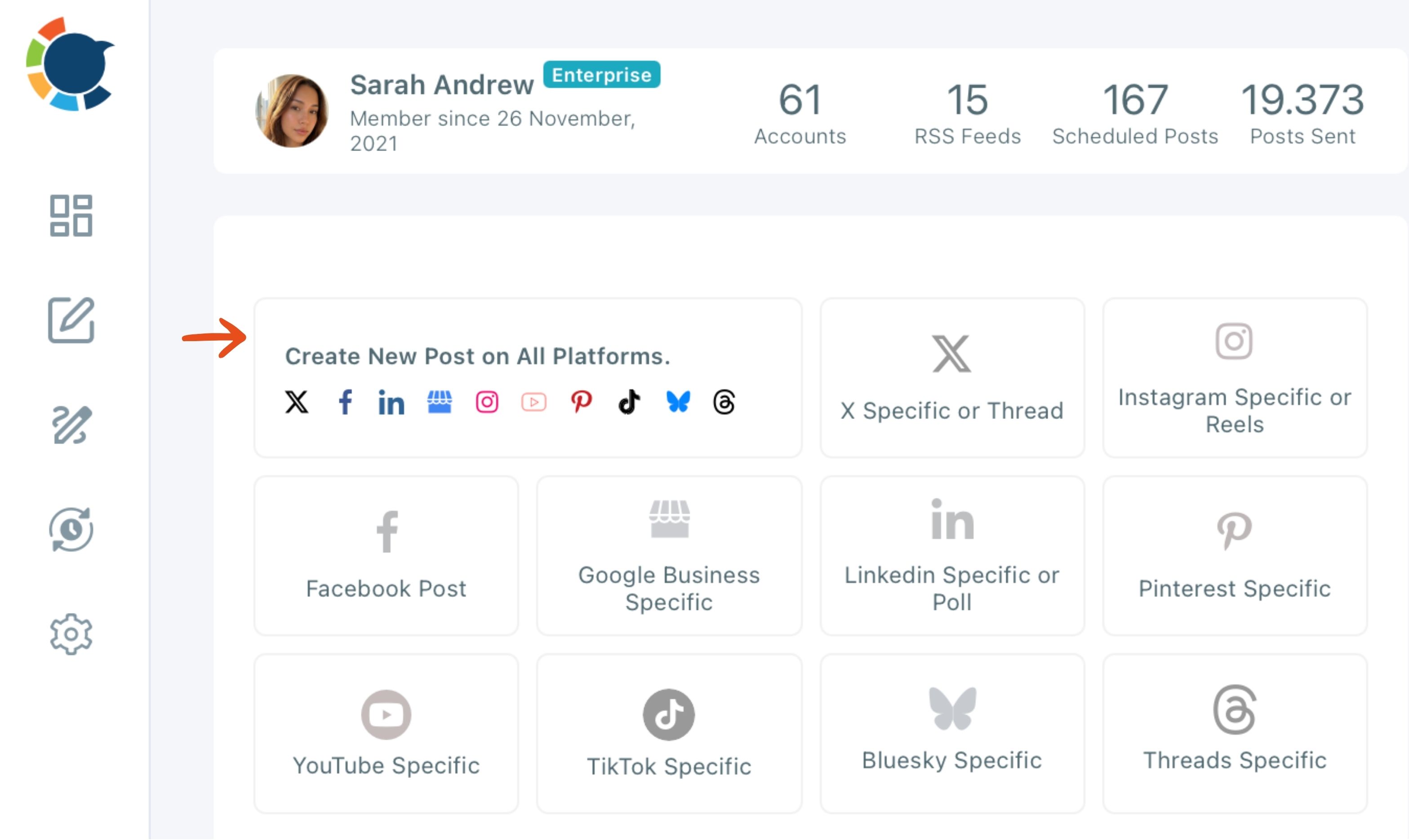
In that composer you select the accounts, write once, check how the post renders on each platform in the preview, and send it to all of them in one action.
Learning to use AI without letting it write for you
The AI writer is included with the membership, so you do not need a separate AI subscription to draft captions. After a first draft, an "Improve this response" field lets you give a follow-up instruction, such as making the post short enough for X, without leaving the window.
One habit to learn early: the AI does not enforce each platform's character limits on its own. X allows 280 characters on a standard account, and Circleboom Publish takes up to 1,300 for a LinkedIn post, so you tell the AI the limit.
The AI social media post generator page shows the platforms it writes for.
If you want to compare AI tools before settling on one, our review of AI assistants for social media management lays out the options.
For X accounts, it also helps to know the tool is approved. Circleboom is an official X Enterprise Developer company, so a client's X account is connected through approved access, not a shared password.
A first portfolio piece you can measure without a client
Most portfolio advice says "show results," then skips how a beginner gets results without a client. The answer is to run one account for 30 days as if it were a client engagement, and document it the whole way.
Here is what the finished portfolio entry should contain:
| Part of the entry | What it shows | Where it comes from |
|---|---|---|
| The written plan | You can set a goal | A one-page brief before day one |
| The posting schedule | You can stay consistent | Your scheduler's calendar view |
| Tagged links | You can prove clicks | UTM tags read in Google Analytics |
| Before and after | You moved a number | Screenshots on day 1 and day 30 |
The plan is a single page: the account, the goal, the audience, three content themes and the posting frequency. Writing it before you start is what turns a month of posting into a case study instead of a diary.
The schedule is the proof of discipline. Batch the month's posts in a few sittings, queue them, and keep the calendar view as a screenshot. Consistency is the skill clients pay for, and a full calendar shows it at a glance.
Proving clicks, not just likes
Tagged links are what most beginner portfolios miss. Circleboom Publish has a UTM builder inside the composer: paste a link, click the link icon, fill in source, medium and campaign, and the tagged link replaces the plain one.
Google Analytics then shows which platform and which post sent visitors.
A portfolio line that reads "posts on Facebook sent more site visits than posts on LinkedIn, so I moved the schedule" is worth more than any follower count. It shows judgment, not just activity.
You can also read each post's reach and engagement through post analytics and put both halves side by side.
The before-and-after screenshots close the case. Take them on day 1 and day 30, from the platform's own analytics, and write two sentences on what changed and why you think it did.
Running your first client's social media accounts
When the first client signs, the work shifts from posting to operations. The setup that keeps a beginner calm is the same one an agency uses, just smaller.
Connect the client's accounts, for example their Instagram, Facebook Page, LinkedIn Company Page and Google Business Profile, and save the four as a Share Group named after the client. From then on, every post for that client starts with one click on their group.
When the client wants to review posts before they go out, team management handles it. There are two roles, Admin and User, and a User's scheduled posts wait for an Admin's approval before going live.
A Share Group only groups accounts. Team roles are what decide who can post where, so set both up on the first day.
You do not need a paying client to start building proof
The biggest barrier for most beginners is the belief that experience has to come from a job. It does not.
A volunteer account, a side project or your own professional profile, run for 30 days with a plan, a schedule and tagged links, is real experience you can show.
You also do not need a stack of paid tools to start. One scheduler that covers your platforms, the AI writer inside it and free analytics are enough for a first case study.
Start with one account this month. Write the one-page plan, queue the posts, tag the links and take the day-one screenshot. By the time you pitch a client, you will be showing work, not describing it.
When that first client says yes, you can set up your first social media marketing clients in one place from the start.
Questions from new social media marketers
Can I manage a client's accounts without asking for their passwords?
Yes. With Team Management, the accounts are connected to a Team workspace, and each member is invited by email and given access only to the accounts assigned to them, so no password changes hands. Circleboom's guide to adding users to a team and setting up permissions walks through the setup.
Can I post the same content for every client?
No. Each client needs its own voice, and even within one client, the same post sent to several accounts on one platform counts as duplicate content that can limit reach. Use the AI writer to give each account its own version.
How many client accounts can I handle at once in Circleboom Publish?
The number of accounts you can connect depends on your plan's account allowance, shown in Manage Social Accounts. Within that, one post can go to many accounts in one send, and a real example sent one post to 30 Facebook Pages at once.