
Most firms assume four accountants sharing one video means four times the reach.
Shared word for word, it mostly means the same caption landing four times in the same overlapping feeds.
Yes to the same video, no to the same caption. Circleboom Publish lets a firm post video to multiple LinkedIn accounts by attaching one clip in the LinkedIn composer and scheduling a differently worded version for each accountant's Profile.
→ Post video to multiple LinkedIn accounts with a caption for each voice
Below: the file limits, the rewording step and how to space the four posts.
Can four accountants post the same LinkedIn video?
Yes, four accountants can post the same LinkedIn video, but each one should post it with his or her own caption and on a different day.
The clip is the asset. The words around it are what tell LinkedIn, and each accountant's network, that this is a new post.
Accountants at one firm share a lot of connections: the same clients, the same referral partners, the same local business owners. When four Profiles publish an identical paragraph on the same morning, those shared connections see the same text up to four times. Most of them engage once at best, and the other three posts look like noise.
Circleboom's own LinkedIn guidance is blunt about it: LinkedIn doesn't reward duplicate content, and repeating the same text across accounts looks lazy to both the algorithm and the network. The same principle holds on every platform, as the piece on how often to post duplicate content on social media explains.
Share the video, not the caption.
That one rule decides whether four posts add reach or split it.
So the real question is how to post video to multiple LinkedIn accounts without four people pasting the same words. Nobody should have to log in four times to upload the same file, either.
What a LinkedIn video post allows in Circleboom Publish
A LinkedIn Post in Circleboom Publish takes one video per post, up to 200 MB, with a caption of up to 1,300 characters. Those are the numbers to plan the clip around before anyone hits record.
LinkedIn's own video specifications for Pages add the platform side: MP4 is among the supported formats, MOV files are no longer supported, and a Page video can run up to 10 minutes.
For four accountants posting from personal Profiles, the practical target is simpler: a short MP4 clip that stays well under the 200 MB limit.
The limit matters most for recorded webinars and client seminars:
- A 500 MB seminar recording will not upload as it is.
- Export a shorter or lower-resolution cut under 200 MB.
- Or turn the key points into a Document post and link the full recording in the First Comment.
A two-minute cut of the best answer usually serves the feed better than the full hour.
Short clips are easier to watch to the end in a professional feed. The guide to video marketing on LinkedIn covers formats and lengths in more depth.
Why one send gives every LinkedIn account the same caption
Each send in Circleboom Publish targets every selected account with the same composed content. Select four Profiles, attach the video and click Schedule, and all four publish the identical caption.
That is the right behavior for a firm announcement that should read the same everywhere. It is the wrong behavior when you post video to multiple LinkedIn accounts that share a network, so the workflow below composes one post per Profile from the same clip.
Circleboom, the company behind Publish, is a verified Enterprise partner of X. For a regulated profession that status is a useful signal, because the accounts a firm connects are handled through approved platform access, not scraping or shared passwords.
The LinkedIn composer also puts personal Profiles and Company Pages in the same account selector. That makes it easy to schedule one video to several LinkedIn Profiles with separate captions, one Profile per version, without logging out of anything.
How to post video to multiple LinkedIn accounts without duplicate captions
To post video to multiple LinkedIn accounts without looking copy pasted, upload the clip once, write one caption per Profile and schedule each Profile on its own day. The AI generator produces the extra captions in seconds, so the work stays inside one session. The four steps below run in two phases.
Connect the Profiles and attach the clip once
- Log in to Circleboom Publish and connect each accountant's Profile under Settings, then Manage Social Accounts, where each accountant signs in to LinkedIn and clicks Allow.
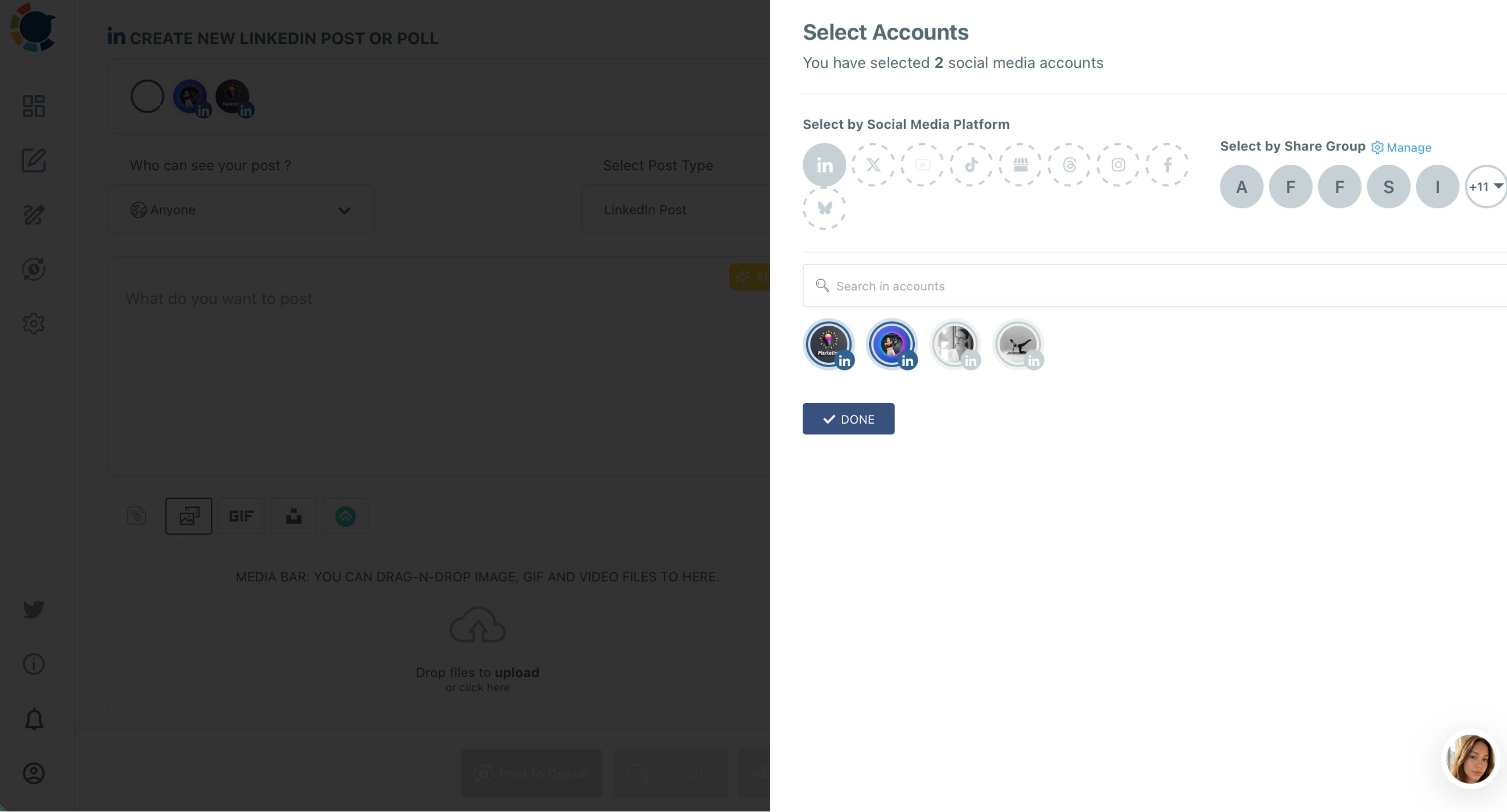
- Open the LinkedIn Specific or Poll card, choose LinkedIn Post, attach the video in the media bar and select only the first accountant's Profile.
Reword each version, then space the schedule
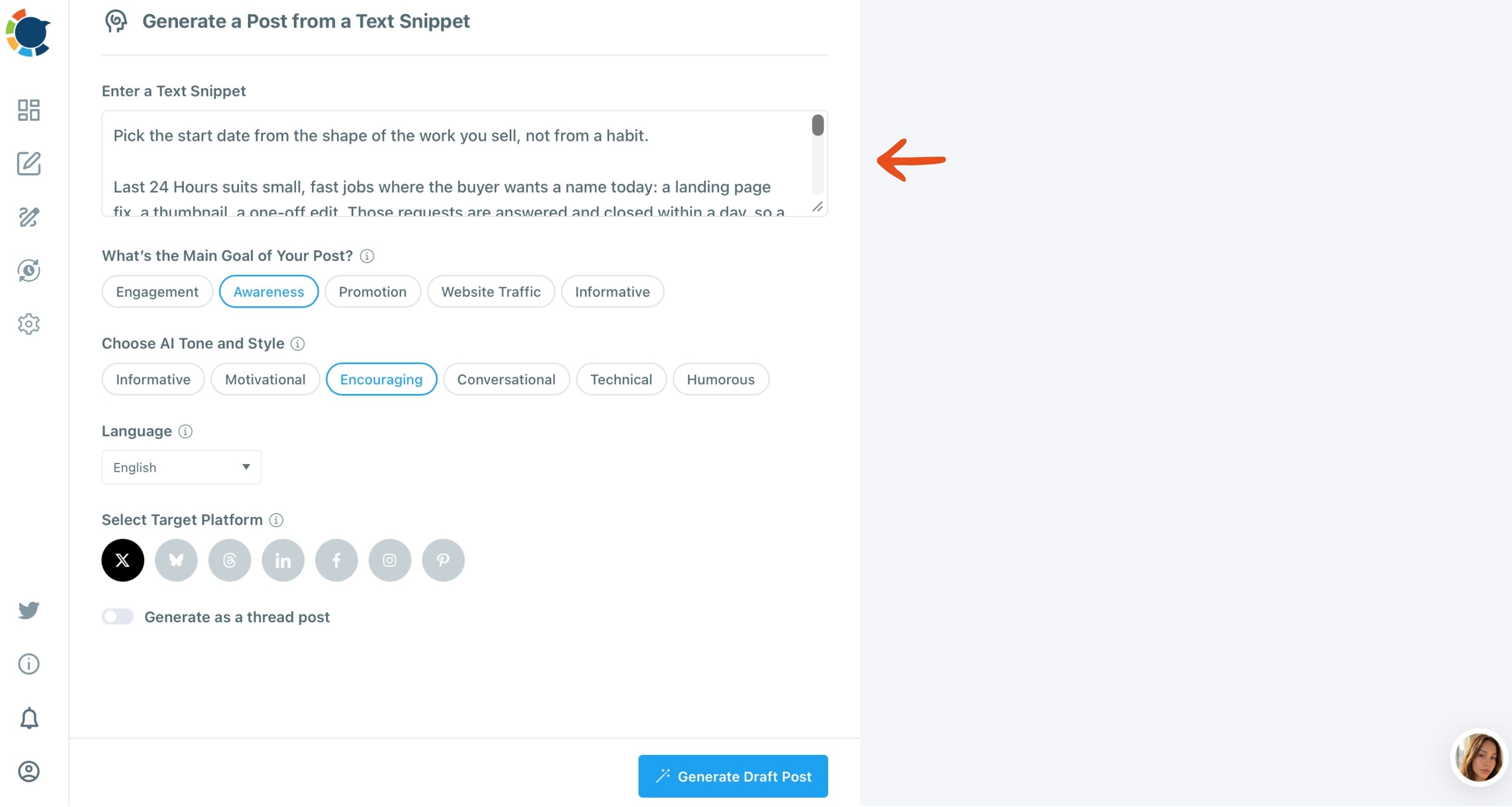
- Generate the other three captions with Generate Post from Text: paste the first caption, choose a Main Goal, a different AI Tone and Style for each accountant, LinkedIn as the target platform, then click Generate Draft Post.
- Attach the same clip to each draft, select one Profile per version and schedule each from "Pick your best post time" on a different day.
Uploading once and rewording three times keeps the expensive part, the video, identical, and makes the cheap part, the caption, unique. That split is what lets four Profiles share one asset without their networks seeing a repeat.
The AI social media post generator is a separate tool from the AI button inside the composer. Generated drafts open in the composer, where you edit them before scheduling. If you prefer to stay in the composer, Duplicate the first post and use the AI button's quick edits instead.
What should change in each accountant's LinkedIn caption?
The facts stay the same in all four captions. The voice, the angle and the example change. Circleboom's LinkedIn guidance puts it as reusing ideas, not wording: first person on a Profile, company voice on a Page, and a new insight, example or number in each version.
For a two-minute clip on, say, a change to small-business expense rules, the four versions could split like this:
- The partner writes about what clients asked most this month.
- The tax specialist adds the one deadline people miss.
- The payroll accountant connects it to staff expenses.
- The newest accountant shares the question she had to look up herself.
Each version opens differently, so a connection who follows two of them sees two posts, not one post twice. That is the practical meaning of a firm that can post video to multiple LinkedIn accounts and still sound like four people.
Use the First Comment for whatever does not belong in the caption: the link to the full recording, a booking page or the source document. The comment is written in the same composer and scheduled together with the post, so each accountant's version carries its own top comment from the start.
The caption is where an accountant's expertise shows. The clip only sets the topic.
Should the firm's LinkedIn Company Page post the video too?
Yes, if the firm has a Company Page, and it should go first. The Page carries the company voice and the facts. The four accountants then post first-person takes that point back to the same clip.
The two kinds of accounts behave differently:
| Account | Voice | Visibility options |
|---|---|---|
| Company Page | Firm, third person | Anyone, LinkedIn Users only |
| Accountant Profile | First person | Adds Connections Only |
| Both together | One send, same caption | Use only for announcements |
Connections Only is disabled for Company Pages, because a Page has followers rather than connections.
For a Page post, the LinkedIn post planner composer is the same one the accountants use. The Page version and the four Profile versions get prepared in one sitting.
How far apart should four accountants post the same LinkedIn video?
When you post video to multiple LinkedIn accounts, space the four posts across the week, one or two per day, each at that Profile's own suggested time. A personal Profile and a Company Page are computed independently in Circleboom Publish, and so are four Profiles: the Schedule modal shows six suggested slots per account, computed from that account's real connections and followers.
That is why one fixed hour for everyone fails. The partner whose clients are business owners may see activity early, while the tax specialist's network is active later. The reasoning behind those differences is laid out in the guide to the best time to post on LinkedIn.
Auto posting to LinkedIn Profiles and Company Pages: how each version lands in its own queued slot.
If scheduling four dates per video feels like too much, set up a Queue once. The LinkedIn auto poster works with recurring time slots per account, filled from Add Best Times to Post. Post to Queue drops each version into that Profile's next open slot.
Spacing also answers a worry many firms have about frequency. One video and its follow-ups across a week is a steady presence, not spam. The trade-offs of posting more often are covered in is it good to post a lot on LinkedIn.
Who should schedule the four LinkedIn posts at a small firm?
One person should schedule all four, and the accountants should only review. Asking four busy accountants to upload and time their own posts is how a video ends up posted twice on Monday and never on Thursday.
Circleboom Publish Team Management fits this split. A marketing assistant added as a User sees only the Profiles assigned to her, and every post she schedules waits in a Waiting for Approval view until an Admin approves it or rejects it with a comment. An Admin, usually the managing partner or the practice manager, posts directly and sees every account in the team.
That gives the firm one place to post video to multiple LinkedIn accounts on schedule, while each accountant still reads his or her own caption before it goes live.
What to watch after the video goes out on four LinkedIn Profiles
Watch each Profile's impressions for the first few days, not the combined total. If one Profile's video reaches far fewer people than its usual posts, check the caption first: an identical or near-identical caption is the first thing to rule out.
If reach drops across all of a Profile's posts, not only the video, read the signs in the LinkedIn shadowban checker guide.
The safest pattern on a professional network is the one this workflow already follows: a steady, scheduled cadence, varied wording and relevant hashtags rather than long lists.
I would rather see one video posted well by four people over a week than posted identically by four people in one hour.
The first builds four reputations. The second builds one repeat.
Which LinkedIn video setup fits your firm?
Every firm that wants to post video to multiple LinkedIn accounts lands in one of four situations. Pick the branch that matches yours:
- If the four accountants share most of their connections, give each a distinct caption and spread the posts over four days.
- If the firm has a Company Page, post the company version first, then the four first-person versions.
- If the clip is over 200 MB, export a shorter cut or turn the key points into a Document post.
- If nobody has time to pick dates, set up a Queue per Profile and use Post to Queue.
Each branch ends in the same place: one clip, four voices, no repeat in anyone's feed.
→ Share one LinkedIn video across every accountant's Profile in its own words
Accountant FAQ: sharing one video on several LinkedIn Profiles
Can the same video go to LinkedIn and other platforms at once?
Yes. The Create New Post on All Platforms composer in Circleboom Publish sends one post with the video to LinkedIn and other platforms together. Check each platform's limits first, since LinkedIn takes video up to 200 MB.
Is a full webinar recording too long for a LinkedIn post?
Usually, yes. The file decides it in Circleboom Publish: a LinkedIn video must be under 200 MB, so a long recording needs a shorter or lower-resolution cut, or a Document post that summarizes it.
What is the biggest mistake firms make with a shared video?
Scheduling all four Profiles for the same hour with the same caption. Different captions on different days fix most of it, and it costs one extra AI step per version.