My best posts on Twitter had one thing in common, and it was not my writing. Each one covered something my followers were already discussing with each other, and I had stumbled onto it by accident.
Making content your Twitter followers will like starts with that reversal: read what they talk about first, then find the place where it meets what you actually know.
Content your Twitter followers will like sits where their recurring conversations meet your own expertise, and those conversations can be read instead of guessed. Circleboom reads the tweets your followers post and turns their recurring topics into an Interest Cloud for your X account, using X's Enterprise API access.
→ Find the topics behind content your Twitter followers will like
Below: the guessing trap I fell into, the seven steps I use now, and how I check which posts landed.
Why guessing what your Twitter followers like keeps missing
Guessing fails because you only see the audience from your side of the screen. You know your follower count, your last few replies and the names you recognize. You do not see the hundreds of conversations your followers have every week without you.
So the topic list gets built from memory. I would pick a subject because a loud follower mentioned it, or because I had just read something interesting, or because a big account was posting about it. Then I would wonder why a post I liked got silence.
The private explanations were always about me. Maybe the writing was flat. Maybe the hook was weak. Maybe X had changed something and my posts were simply not being shown.
I rewrote openings, tried threads, tried shorter posts, and never once asked whether the subject itself was something my followers spent any time on.
The pattern behind that silence is simple. A post lands when the reader recognizes it as being for them, and the fastest signal of that is a topic they already care about.
Circleboom's own writing on how to use interest targeting to increase engagement on Twitter is built on the same premise.
Twitter does not hand you that list. Its analytics describe your posts, not your audience's conversations. So every content plan of mine now starts with a tool that can plan content your Twitter followers will like from their own words rather than from my hunches.
The audience already wrote the brief. Most of us never read it.
The failed attempt: copying what worked for bigger accounts on X
Before I read my own followers, I studied other people's. I picked a few accounts in my niche with strong engagement and borrowed their topics, their formats, their posting rhythm.
Some of it worked for a week. Most of it read as borrowed, because it was, and borrowed topics are rarely content your Twitter followers will like. Their audience and mine overlapped only partly, and the posts that earned replies for them earned polite likes for me.
Studying a rival is still useful. A proper way to analyze a competitor's content strategy on X tells you about format, frequency and positioning. What it cannot tell you is what your own followers talk about when nobody is posting at them.
That gap is the whole problem:
- A competitor's top posts reflect their audience, not yours.
- Your past top posts reflect what you happened to try, not what you never tried.
- Trend lists reflect everyone on X, not the people who chose to follow you.
None of those three sources is your followers' own conversation.
What Interest Cloud showed me about my own Twitter audience
Interest Cloud is the Circleboom Twitter feature that reads the tweets your followers post and shows their most frequent topics as a word cloud. Larger words appear more often in the analyzed tweets; smaller words are less frequent or more specific.
The first time I opened it, the biggest words were not the ones I would have written down. Two of my regular topics barely showed. Several tools and job titles I had never posted about sat in the middle of the cloud, mentioned again and again by the people who follow me.
That was the moment the guessing stopped. Circleboom is an Enterprise developer X itself lists. The follower tweets behind the cloud come through X's own approved access, so I was not wondering whether the data was scraped or partial.
Circleboom also lets you export the cloud as a PNG, JPG or PDF, which turned a private hunch into something I could put in front of a client. If you want to see what your followers already talk about on Twitter, the cloud is one screen, read-only, with no filters to configure.
How I read the cloud before writing anything
The cloud is a planning signal, not a census, and a word only becomes content your Twitter followers will like after you read it in context. Size shows how often a topic appears in the analyzed tweets; it is not a percentage of followers, and it says nothing about whether the mentions were praise or complaints.
This is the reading table I keep beside it:
| Signal in the cloud | What it tells me | What I write |
|---|---|---|
| Recurring topic I know well | Candidate content theme | A series from my experience |
| Specific niche term | A narrower conversation | One concrete question answered |
| Unexpected nearby topic | A possible connection | A post that explains the link |
| Generic or vague word | Little context alone | Nothing until read with neighbors |
The last row matters most. Common words win on frequency and tell you almost nothing, so the useful material usually sits in the smaller tool names, occupations, acronyms and community hashtags.
The mismatch check I run before every plan
Before I choose anything new, I put my last month of posts next to the cloud. If the subjects I write about most are small or missing in my followers' cloud, that gap is a relevance question worth investigating before I blame the writing, the hook or the algorithm.
The check works in the other direction too. A topic that sits large in the cloud and that I have never covered is an opening where the interest already exists and only the post is missing.
Circleboom's documentation gives a plain example: if remote work is a leading interest, a post sharing three remote-work tips is more likely to earn replies than a generic productivity post.
The gap is a reason to look closer, not a verdict. A topic can be absent from the cloud simply because it did not show up in the tweets analyzed, so I treat a missing word as unobserved rather than unwanted.
How I make content my Twitter followers will like
The process I settled on has three phases and seven steps, and it starts inside Circleboom before a single word is drafted.
Open your followers' topics in Circleboom
- Log in to Circleboom Twitter and connect the X account you post from.

- Go to the Followers and Following menu and open its Analytics section.
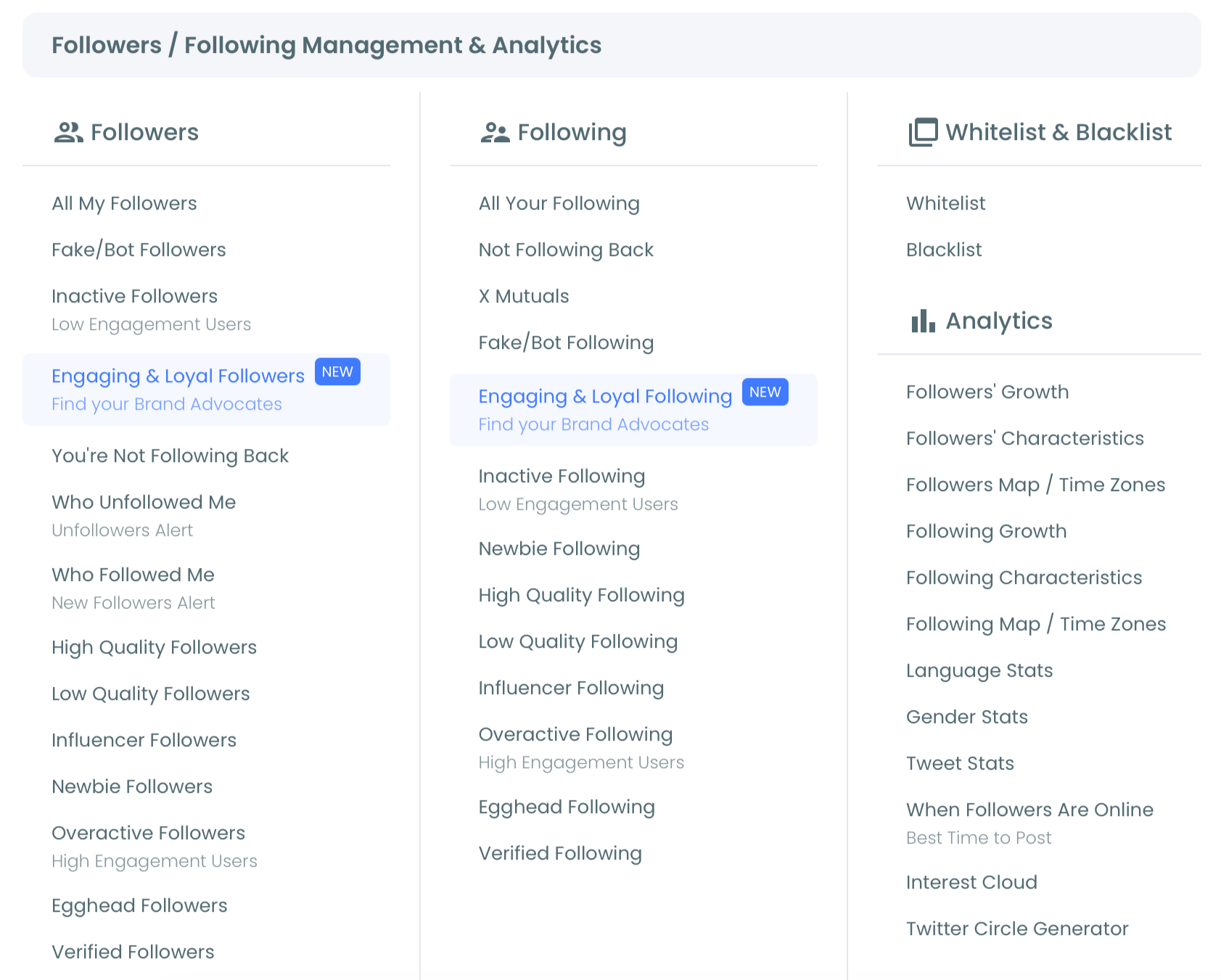
- Select Interest Cloud and stay on the Follower Interests tab, where each word's size reflects how often it appears in your followers' tweets.
Choose the topics worth a post
- Hover the words you are unsure about to see their counts, then switch to the Following Interests tab to compare what the accounts you follow discuss.
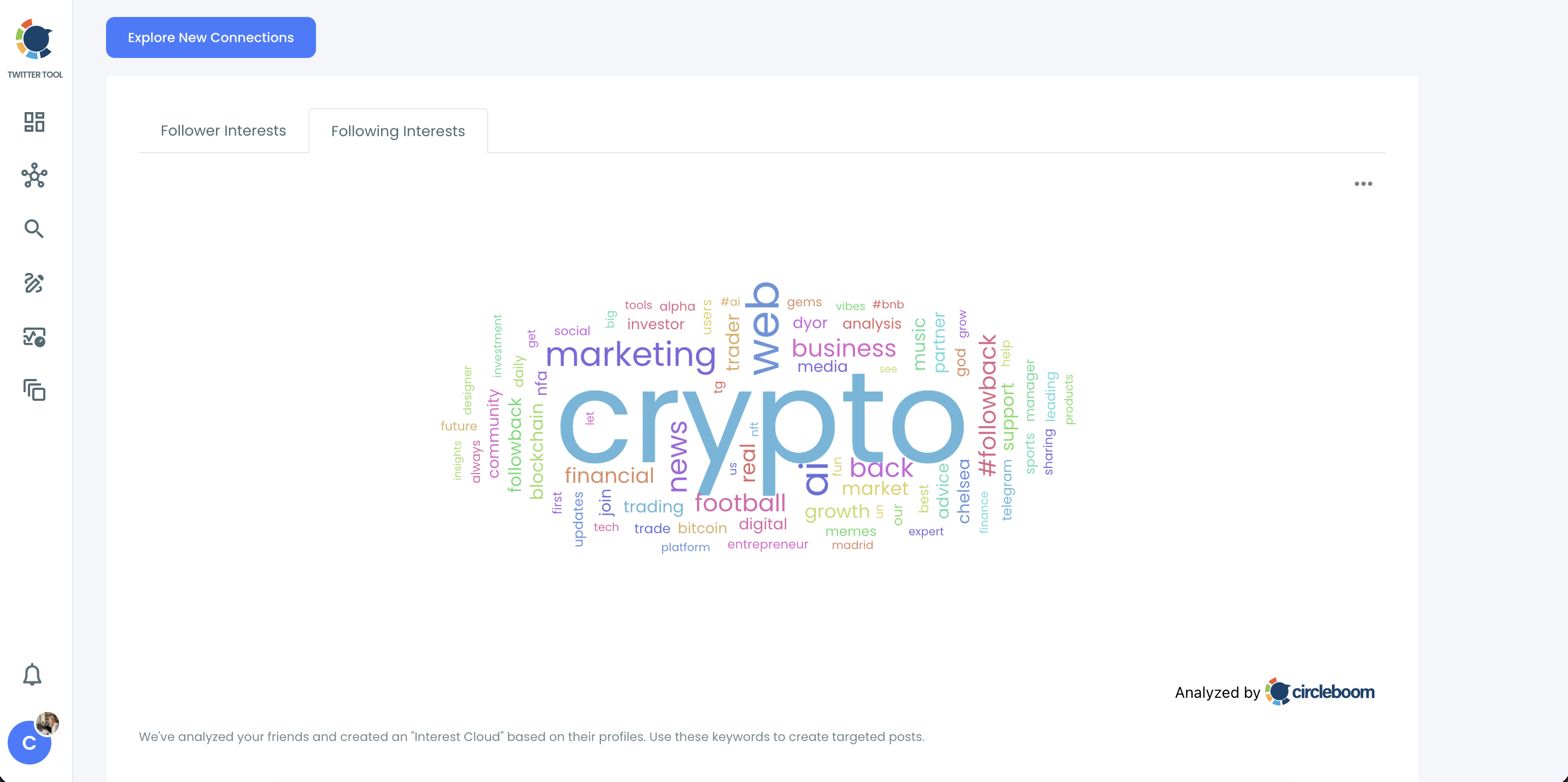
- Pick three topics that appear in the follower cloud and that you can speak about from real work, reading each niche term together with the broad words around it.
Write the posts and send them out
- Open X Post Planner and draft one post per topic, writing it yourself or starting from the AI Tweet Generator when a blank page slows you down.
- Schedule each post from the Schedule window, using Find your best posting time to pick one of the 6 suggested slots based on audience activity.
Reading before writing is what keeps the cloud from becoming a list of buzzwords. The tab comparison shows which words belong to my followers rather than to my own feed, and the three-topic limit forces every post to come from something I can back with experience.
Ideas run dry even on a topic you know well. When one of my three topics stalls, I open a list of content ideas for the days you run dry. Each idea goes through the topic filter before I write it.
Turning three topics into a weekly X content calendar
Three topics become a calendar once each one gets a fixed slot in the week, and the calendar is where content your Twitter followers will like turns into a habit instead of a lucky post. Circleboom's own guidance for the feature is to take the top three relevant topics and treat them as content pillars, so the calendar has a clear focus instead of a mood.
My week looks like this:
- One topic gets a practical how-to post.
- One gets an opinion or a lesson from my own work.
- One gets a question or a poll that invites replies.
The structure is borrowed from a longer walkthrough on how to build a Twitter content calendar around audience interests. The principle is the same: the pillars come from the audience, the angles come from you.
Where the calendar lives matters less than people think. A spreadsheet works for some teams, a scheduler for others, and the trade-offs are laid out in this comparison of content planning tools: spreadsheets, boards and schedulers. I keep mine in X Post Planner, because the drafts and the schedule sit in the same place.
A calendar built on their topics fills itself faster than one built on my moods.
How do you know the content your Twitter followers liked actually worked?
You check it post by post, not by the account total. Interest Cloud tells you what followers talk about; Post Engagement Analytics tells you how each of your posts was received, and the two answer different questions.
In Circleboom, Twitter engagement analytics lists your tweets with impressions, engagements, engagement rate, likes, retweets and link clicks, and any column can rank the whole list. It works on the most recent 3,200 tweets that X's API returns for the account.
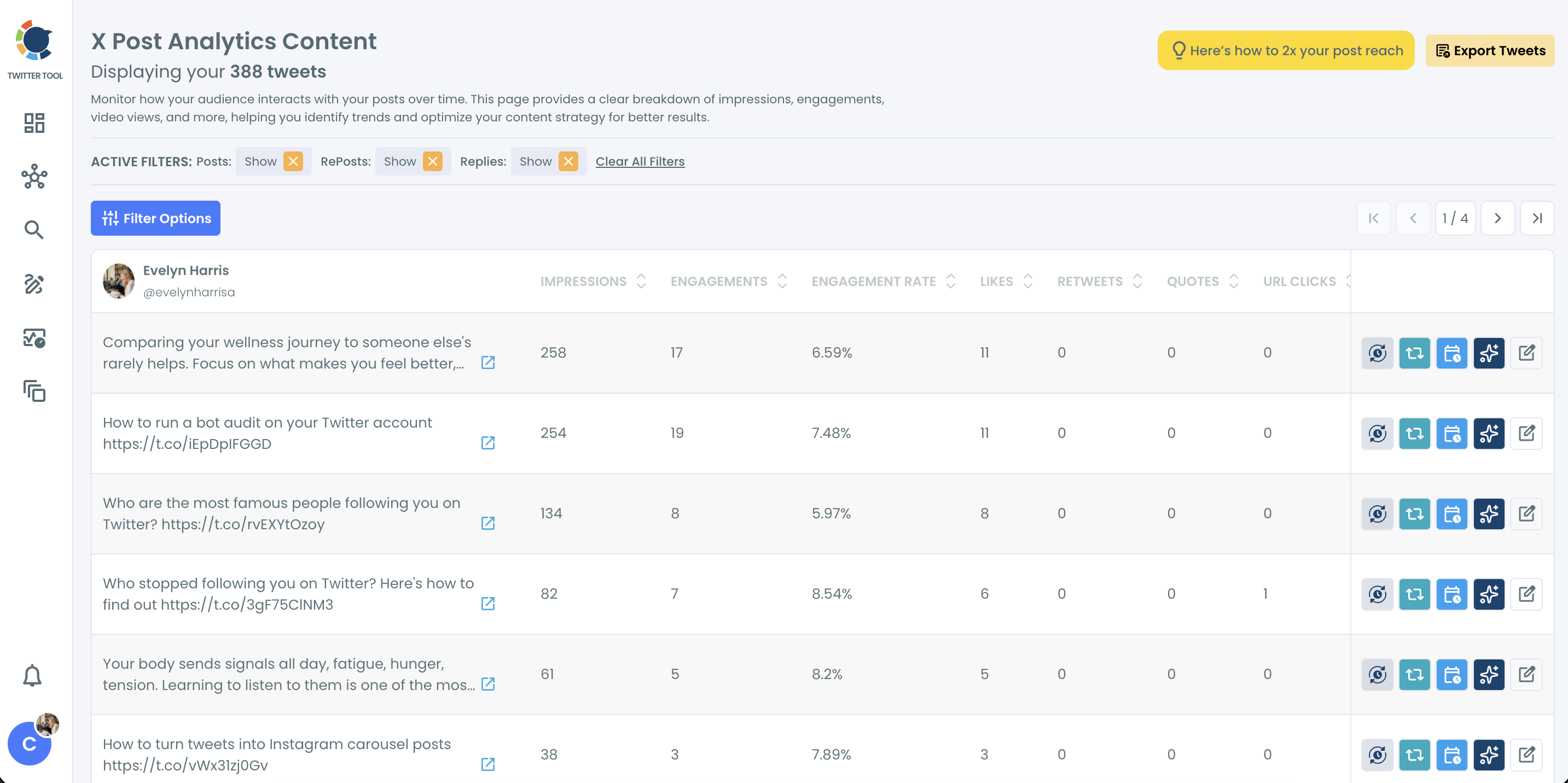
Here is how I read it after a month of topic-led posts. Engagement rate is total engagements divided by impressions, so 100 engagements on 5,000 impressions is 2 percent.
I compare each new post with my own average, not with a generic benchmark: if the account averages 1.2 percent, a post at 2.4 percent is twice my normal and worth studying.
The keyword filter is what turns this into a topic check. Filtering by one pillar's keyword shows only the posts about that topic, so I can see whether the subject is pulling its weight or whether one lucky post is carrying it.
Two cautions keep me honest:
- A post with very few impressions can show a high rate on tiny numbers, so I read the rate beside the raw counts.
- A high reply count can include criticism, so I read the replies before calling a topic a winner.
The cloud picks the topic; the post data decides whether it stays.
Looking back on a season of writing to the cloud
Looking back, the change was not a new writing skill. It was the order of operations.
I used to write first and hope the audience agreed; now the audience's own conversation decides the topic, my experience decides the angle, and the post data decides what stays on the calendar.
Over the next 90 days, that loop is the plan I would hand anyone stuck on what to post. Read the cloud once, pick three topics you can speak to, give each a weekly slot, then let the engagement view tell you which pillar earns a fourth month.
Making content your Twitter followers will like stops being a guess once you can see their topics, and it stays honest once you check every post against them. Circleboom's direct access to X keeps both views on data from your own account.
→ Build next month's posts around what your Twitter followers already discuss
Content your Twitter followers will like: three questions after the first month
Should I check the Interest Cloud again after removing inactive followers?
Yes. The cloud reflects public follower activity at the time it is retrieved, and inactive or private followers contribute little signal. A cleanup, a growth spike or a campaign that brought in a new audience type is a reason to rerun it before planning more content.
Can I repost a tweet my followers clearly liked?
Yes. From X Post Analytics you can set auto-retweet on a winning post, and Circleboom's Twitter auto retweeter handles the repost cycle. Circleboom's guidance is to keep repost cycles within a day or two for timely posts and to space a reworded version of an evergreen winner a few weeks or more after the original.
Should a big topic that has nothing to do with my account become a pillar?
No. Circleboom's guidance is to start from the intersection of your followers' conversations and your account's purpose, and a prominent but unrelated subject need not become a content pillar. If the topic sits next to yours, explain how it connects before you add it to the plan; if it does not, leave it to the accounts that can speak to it.