A salon that uploads every video five times, once to the salon account and once to each of four stylist accounts, pays for it in hours and in missed posts. The video meant for all five accounts reaches two of them, days late, because nobody had time to post to multiple TikTok accounts by hand.
Can one salon post the same TikTok to 4 stylist accounts at once?
Yes. Circleboom Publish lets you select several TikTok accounts in its TikTok composer and send one video to all of them in a single post, with TikTok's required settings filled in once.
→ Post to multiple TikTok accounts from one upload
Why posting to every stylist's TikTok by hand breaks down
The salon in this guide runs five TikTok accounts. There is the main salon account, and there are four stylist accounts, one for each senior stylist, where clients follow the person who cuts their hair.
That setup is common in hair and beauty, because clients book a stylist, not a building.
The trouble starts with the shared videos. A new balayage technique, a holiday-hours notice, a product launch from the retail shelf: these belong on all five accounts.
Natively, that means logging in and out of TikTok five times and filling in the same upload form five times.
The arithmetic is plain. Three shared videos a week across five accounts is 15 uploads a week, roughly 60 a month. At even five minutes each, that is five hours a month spent repeating one form.
The bigger cost is the posts that never go out.
The same pattern shows up in many multi-stylist salons that try to post to multiple TikTok accounts manually. The owner posts to the main account, two stylists post when they remember, and the other two accounts go quiet for weeks.
On TikTok that silence matters, because the For You feed tests new videos from active accounts, and an account with nothing recent has nothing to be tested.
The fix for the five-login routine sits at the source. Post to multiple TikTok accounts from one scheduler and let one upload do the work of five. The rest of this guide shows the setup step by step.
Check this before you connect the salon's TikTok accounts
Two things decide whether the setup goes smoothly: the account type and the account count.
Each stylist account should be one the salon can log into and connect, which usually means a business or creator account the stylist has agreed to share. If some stylists still run personal accounts, the start TikTok for Business walkthrough covers the switch.
A common worry here is reach. Stylists sometimes refuse to switch because they have heard business accounts are shown to fewer people. The question of whether TikTok business accounts get less views has a clear answer, and it is worth reading before the conversation with your team.
The second check is your plan. Total connectable accounts are capped by plan in Circleboom Publish. Circleboom Publish costs $34 a month for 10 accounts with one team member, so five TikTok accounts plus the salon's Instagram, Facebook Page and YouTube channel still fit inside one plan.
What Circleboom Publish does for a salon with several TikTok accounts
Circleboom Publish is a multi-platform publishing suite for ten social networks, and its TikTok composer is where you post to multiple TikTok accounts in one send, from the salon account to every stylist profile. Select several TikTok accounts at once, and the same video goes out to all of them together.
Circleboom is an official X Enterprise developer, so the company behind the tool works through approved platform access rather than workarounds.
Three parts of the TikTok composer matter most for a salon:
- Account selection. The Select Accounts panel lets you tick the salon account and every stylist account for one video.
- TikTok's own settings, set once. Who can watch the video, Comment, Duet and Stitch permissions, and the Music Usage Confirmation are filled in on the same screen.
- Account-specific timing. The Schedule step suggests best times built from the selected account's own followers.
Circleboom Publish also lets you schedule the multi-account TikTok video for later, so the stylist who films on Tuesday can choose Friday's slot without being online at that hour. That is the core of how you schedule one TikTok to every stylist account in the steps below.
Compared with five separate uploads in the TikTok app, the difference is one upload, one settings check and one scheduling decision.
Will TikTok flag the same video on four stylist accounts?
It can, if every account posts the identical video with the identical caption.
TikTok's own guidelines say you can run multiple TikTok accounts but not to deceive others. The same page makes unoriginal or reused material without anything new ineligible for the For You feed.
For a salon, the safe line is easy to hold. A shared announcement (new opening hours, a booking link campaign) can go to all five accounts in one send. A technique video works better when each stylist's version carries its own caption in that stylist's voice.
Circleboom Publish's advice for this case is direct: when one video goes to more than one TikTok account, vary the caption for each, and pick a different track with Add Music where it fits.
In practice, that means composing the shared video once for the accounts that can carry the same text, and as a separate post for each stylist who needs their own description.
Identical posts across five accounts look like one account copied five times.
The AI writer in the composer handles the rewriting. Give it the video's hook and the stylist's angle ("Mia's take on low-maintenance blonde"), and it returns a different description each time.
How to post to multiple TikTok accounts at once
Eight steps in three phases take the salon from five unconnected accounts to one scheduled video.
Connect the salon and stylist accounts once
- Log in to Circleboom Publish with the account the salon's social team will share.

- Connect each TikTok account under Settings, Manage Social Accounts, with the CONNECT NEW ACCOUNT button, and watch the usage indicator against your plan's allowance.
- Create a Share Group under Settings, Manage Share Groups, named something like "Salon TikToks," holding the main account and all four stylist accounts.
Compose the video and TikTok's settings once
- Open the TikTok composer from the TikTok Specific card on the dashboard or the Create New Post menu in the sidebar.
- Select the accounts in the Select Accounts panel, or pick the "Salon TikToks" group under Select by Share Group to tick all five in one click.
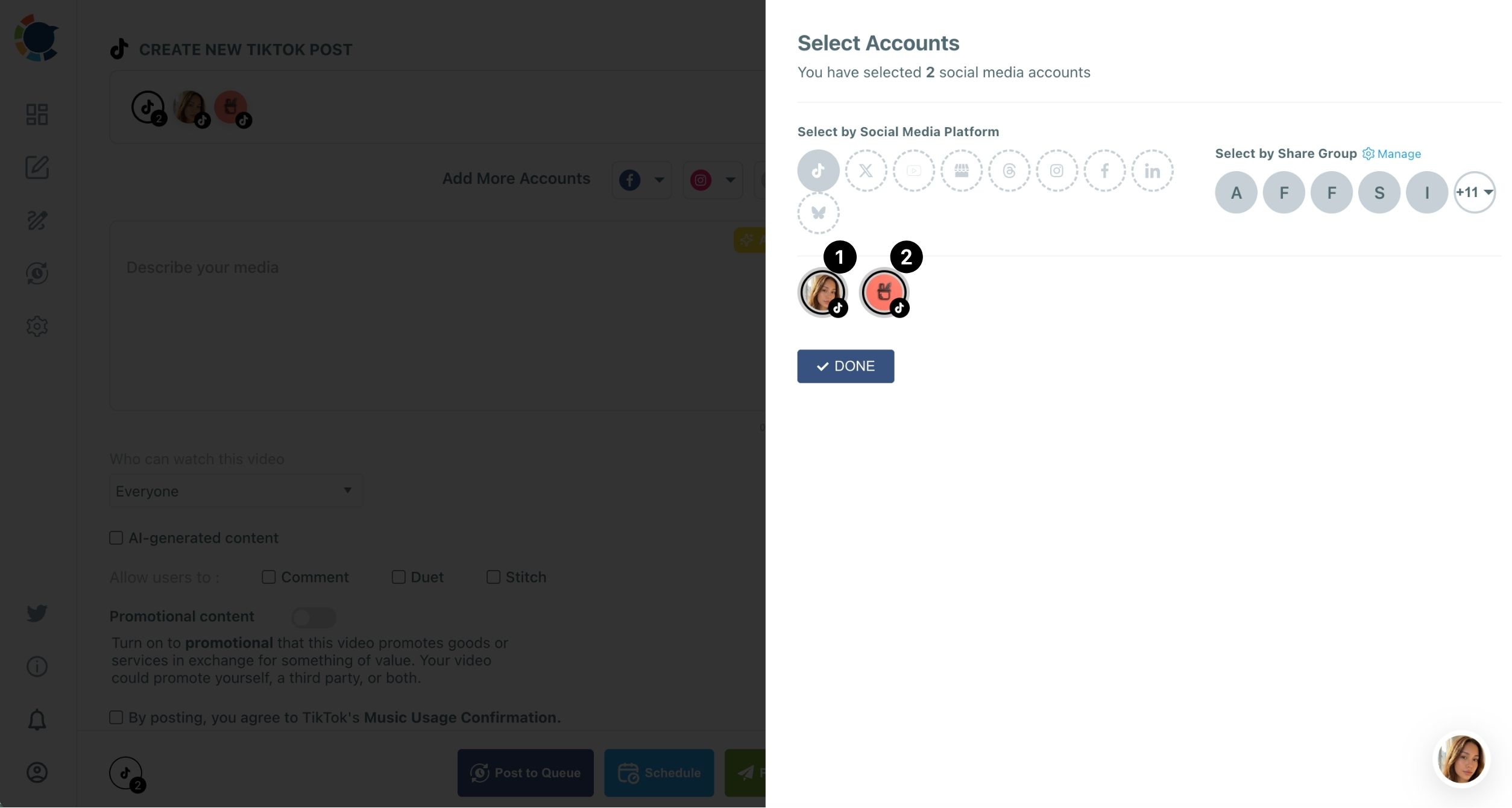
- Upload the video and write the caption, using the AI button above the caption field for a first draft; the caption holds up to 4,000 characters.
- Set TikTok's own fields: choose who can watch the video (Everyone, Friends or Only You), tick the AI-generated content box if it applies, set Comment, Duet and Stitch, turn on Promotional content for paid product mentions, and confirm Music Usage.
Send it now or at the best time
- Click Schedule and pick one of the suggested best post times, or use Post Now or Post to Queue; the buttons stay disabled until the privacy choice and the Music Usage Confirmation are both set.
Connecting accounts and building the Share Group happen once, so every later video starts at step 4. Checking TikTok's two required fields before step 8 saves you from a disabled Schedule button at the last moment.
Which TikTok settings each stylist video needs
Every TikTok sent through Circleboom Publish carries the same settings TikTok asks for in its own app. Two are required: the "Who can watch this video" choice and the Music Usage Confirmation checkbox. The other three are decisions worth making on purpose.
Comment, Duet and Stitch control what other TikTok users can do with the video. For a salon, comments are almost always worth leaving on, since a question under a transformation video is often a booking in disguise.
Duet and Stitch suit trend and reaction content; leave them off for before-and-after client videos where the client agreed to one post, not to remixes.
Promotional content is the setting salons most often forget. Turn it on when the video promotes goods or services in exchange for something of value, such as a sponsored hair-care product.
A few format limits apply on every account:
- One video per post
- A caption of up to 4,000 characters
- Videos up to 10 minutes and 4 GB, ideally as .mp4 in 9:16 vertical or 16:9 landscape
Alt text is not available for TikTok, and TikTok has no carousel option, so photo dumps belong on Instagram.
Scheduling stylist TikToks at each account's best time
Choosing to post to multiple TikTok accounts at once solves the upload problem. Timing is the next one, because a stylist account followed by evening clients does not behave like the main salon account followed by local daytime shoppers.
The Schedule modal in Circleboom Publish opens with a calendar, a Set Time field and a panel of six suggested slots built from the selected account's own followers.
For shared videos, pick the slot that suits the main account. For each stylist's own variant, open the Schedule step for that account and take its own suggestion.
The best times to post on TikTok explain why these windows shift from account to account.
A posting time does not guarantee views. It removes timing as a reason a good video underperforms, which matters on a platform that weighs the first hours heavily.
Film in one sitting, release across the week.
The salon's weekly rhythm can look like this. Stylists film three or four videos on the quietest weekday, the social lead schedules them across the following seven days, and nothing goes out in a cluster that makes the videos compete with each other.
For a fixed cadence, the Queue goes one step further. Set recurring day-and-time slots per account in Time and Queue Settings, turn on Add Best Times to Post, and Post to Queue drops each new video into the next open slot.
Stylists who want their accounts to grow past regulars can pair this rhythm with the habits in how to get 1000 followers on TikTok.
Giving each stylist TikTok access without sharing passwords
The last piece for a salon is who does the posting once you post to multiple TikTok accounts every week. Some owners keep everything with one social lead. Others want each stylist to schedule their own videos.
Team Management in Circleboom Publish covers the second case. Add each stylist as a team member, assign only their own TikTok account, and route their posts through Admin approval before anything goes live.
The owner sees every account; a stylist sees only theirs.
That arrangement also protects the main salon account. A stylist with access only to their own profile cannot post to the salon account by mistake, and nobody needs to text TikTok passwords around the team.
For a wider look at shared workflows, the comparison of which social media management tool offers the best collaboration features shows what to look for. Circleboom's team management page explains the roles in more detail.
Your salon TikTok checklist for this week
Posting to multiple TikTok accounts takes one setup session and a weekly habit. Here is what to do this week:
- Connect the main salon account and all four stylist accounts once, so you can post to multiple TikTok accounts from then on.
- Build one Share Group so every shared video reaches all five accounts in one click.
- Write a fresh caption for each stylist's version of a technique video, with the AI writer doing the rewrite.
- Schedule each video into the account's own suggested time slot, spread across the week.
- Add hashtags that match TikTok's niche signals before you schedule.
Once that is in place, a salon that used to manage 60 uploads a month manages a handful of scheduling sessions. Small businesses that want the wider picture can see how social media can help a small business beyond one platform.
When every stylist needs a different description by Friday, the AI TikTok caption generator writes them in minutes.
If you run several accounts on other networks too, manage multiple social media accounts from the same dashboard.
→ Start sending one video to every stylist TikTok account
Salon owner questions about posting to several TikTok accounts
When I post to multiple TikTok accounts, can the same video go to Instagram Reels and YouTube Shorts too?
Yes. The TikTok composer in Circleboom Publish can add Instagram, Facebook and YouTube accounts as extra destinations, so one upload reaches every selected TikTok account plus those platforms. Keep the clip under 60 seconds and 300 MB if YouTube Shorts and Instagram are included.
What happens if a scheduled TikTok fails on one stylist account?
It shows up in the Outbox under Failed Items, which lists every video that was scheduled but not published, each with the specific error reason. Fix the cause it names and schedule that post again.
Can I post TikToks to stylist accounts automatically from our blog or RSS feed?
No. RSS Feed does not support TikTok in Circleboom Publish, so automated TikTok posting runs through the Queue and scheduling instead.