
Five shop accounts posting the same video every week sounds like the most efficient TikTok plan a coffee chain can run. It is usually the least effective one, because TikTok treats identical reused material very differently from five shops each saying something of their own.
Yes, a chain can share one weekly video across five TikTok accounts, but not as five identical copies. Circleboom Publish lets a coffee chain schedule TikTok videos on multiple accounts from one composer, with recurring weekly slots per shop, while each shop's version keeps its own caption.
→ Schedule TikTok videos on multiple accounts for every shop
Below: what to share across all five shops, what to keep local, and the weekly setup.
Why five identical TikToks every week is the wrong plan
Five identical TikToks every week look like one account copied five times. That is the core problem, and it costs more than it saves.
TikTok's own Integrity and Authenticity guidelines on unoriginal content make content ineligible for the For You feed when it includes unoriginal or reused material without anything new.
The same page allows multiple accounts, as long as they are not used to deceive.
A chain with five real shops is not deceiving anyone, but five copies of one clip with one caption give TikTok little reason to treat each upload as new.
Circleboom Publish's own guidance points the same way. TikTok does not like duplicate content, and identical posts across accounts can cost reach or get accounts flagged.
Sharing a video is fine. Sharing an identical post is the risk.
The useful question for a coffee chain is which videos should go everywhere and which should stay local. Then comes how to schedule TikTok videos on multiple accounts without filling the week with copies.
A TikTok scheduler built for several accounts handles the mechanics; the plan below handles the judgment.
What a coffee chain should share across all five TikTok accounts
Chain-wide moments are the right videos to share when you schedule TikTok videos on multiple accounts. They are true for every shop, so the same footage fits every account:
- a new seasonal drink launching at every location;
- a loyalty-app change or holiday hours;
- a brand story video about the roaster or the beans.
Even these work better with a caption written for each shop. "Our pumpkin latte lands Friday" reads one way on the downtown account and another on the campus shop that opens at 6 AM for students.
The AI writer in Circleboom Publish rewrites a description in seconds from a short instruction, so five captions take minutes, not an afternoon.
A different track also helps. Add Music, Circleboom's built-in library filtered by genre, tempo and mood, lets the campus shop's version carry an upbeat track while the quiet neighborhood shop gets something calmer.
When the same footage goes out under different words and sound, each upload gives viewers something of its own.
A duplicate-heavy feed is only one cause of stalled videos. Shops stuck at low numbers should also read why a TikTok gets 0 views.
What should stay on one coffee shop's TikTok only
Local videos belong on one account. A barista's latte-art streak, a regular's dog that visits every morning, the downtown shop's new window seats: none of that is true for the other four shops.
Local content is where most of each account's personality comes from. A chain where all five accounts post the same five videos has five accounts and one voice. A chain where each shop adds two local videos a week has five voices that also share news.
The weekly plan that works: one shared video, adapted per shop, plus local videos per shop.
For the shared video, Circleboom Publish lets you select several TikTok accounts in one send. For local videos, you select only that shop's account. The same composer handles both, so the difference is one click in the account panel, not a separate tool.
The comment section is the other local asset. Customers ask about opening times and oat milk under a video, and a quick reply turns a viewer into a visit.
When replies pile up across five accounts, a TikTok comment generator helps keep the tone friendly without writing every line from scratch.
How Circleboom Publish schedules TikTok videos on multiple accounts
Circleboom Publish is a multi-platform publishing suite for ten social networks, and its TikTok composer can send one video to several TikTok accounts at once or to a single shop's account. Each video carries TikTok's own settings, and each account can follow its own weekly rhythm.
Circleboom is an official X Enterprise API partner, the kind of approved-access standing that matters when a company is handed five shops' social accounts at once.
Users rate it 4.8/5 on Capterra, which is reassuring for a chain putting every location in one dashboard.
For a coffee chain, four parts of the product do the work:
- Select Accounts. Tick every shop's TikTok for a shared video, or one shop for a local one.
- Share Groups. Save an "All shops" group plus one group per shop, and pick either in one click.
- The Queue. Set recurring weekly slots per account in Time and Queue Settings.
- Best times. Suggested post times are built from each account's own followers.
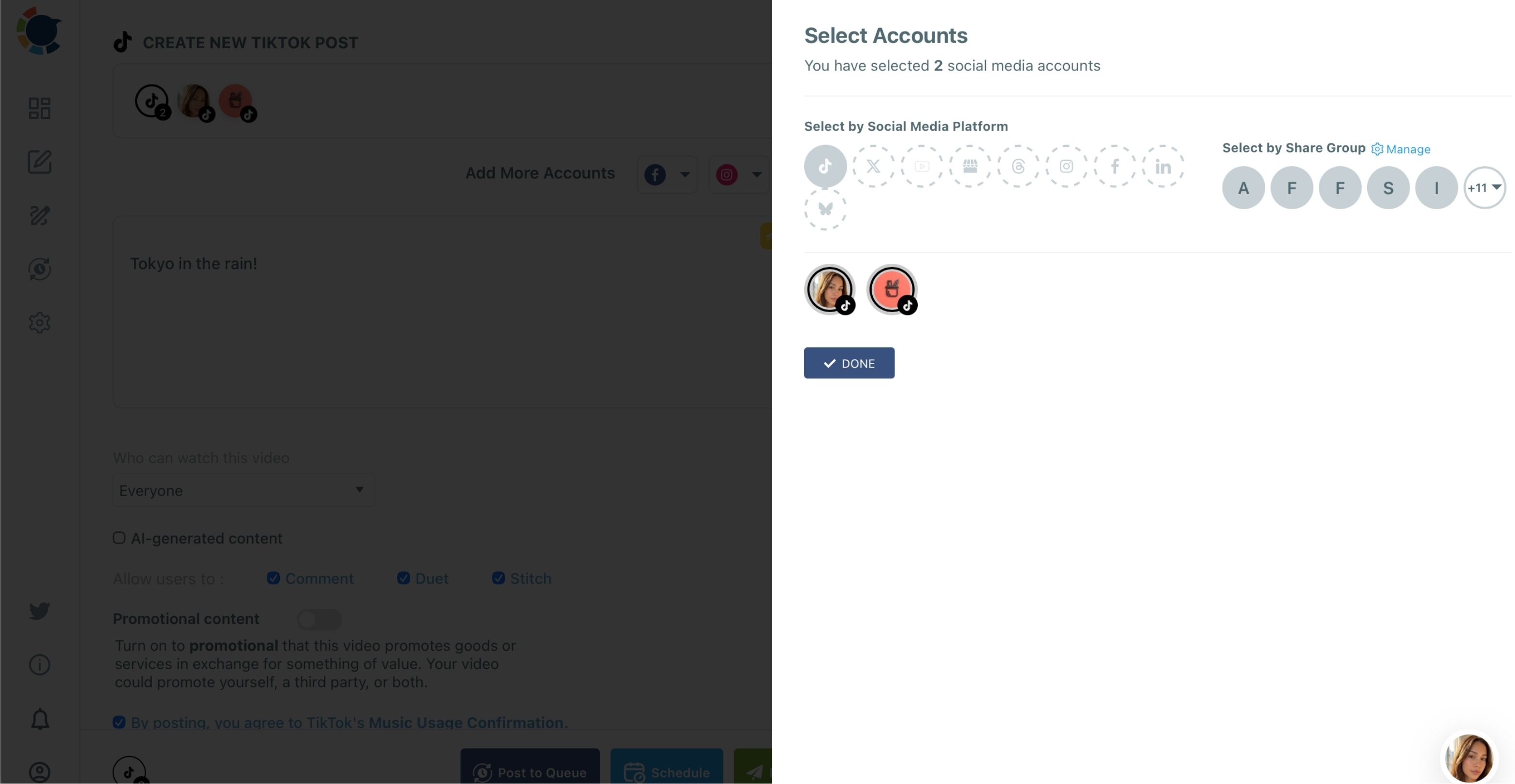
Selecting more than one account sends the same video to all of them in one post.
To give each shop its own caption, compose that shop's version as its own post, which takes a minute once the video is uploaded and the AI has the instruction. This is how you schedule TikTok videos on multiple accounts while keeping each shop distinct.
Circleboom's best time to post on TikTok page explains how the suggested slots are built.
→ Plan every shop's weekly TikTok in one sitting
How to schedule TikTok videos on multiple accounts every week
To schedule TikTok videos on multiple accounts every week, connect each shop's account once, group them, then compose each video and send it to a recurring Queue slot. The shared video goes to the "All shops" group with a caption per shop, and local videos go to one shop's group. The five steps below fall into two phases.
Set up the five shop accounts and groups once
- Log in to Circleboom and connect each shop's TikTok account under Settings, Manage Social Accounts.

- Create Share Groups under Settings, Manage Share Groups: one "All shops" group and one group per shop.
- Set weekly Queue slots for each account in Time and Queue Settings, and turn on Add Best Times to Post to fill them from each account's own followers.
Compose each week's videos and queue them
- Open the TikTok composer, pick the group under Select by Share Group, upload the video, write the caption with the AI button, and set who can watch the video and the Music Usage Confirmation.
- Click Post to Queue so the video drops into each selected account's next open slot, or use Schedule for a fixed launch date.
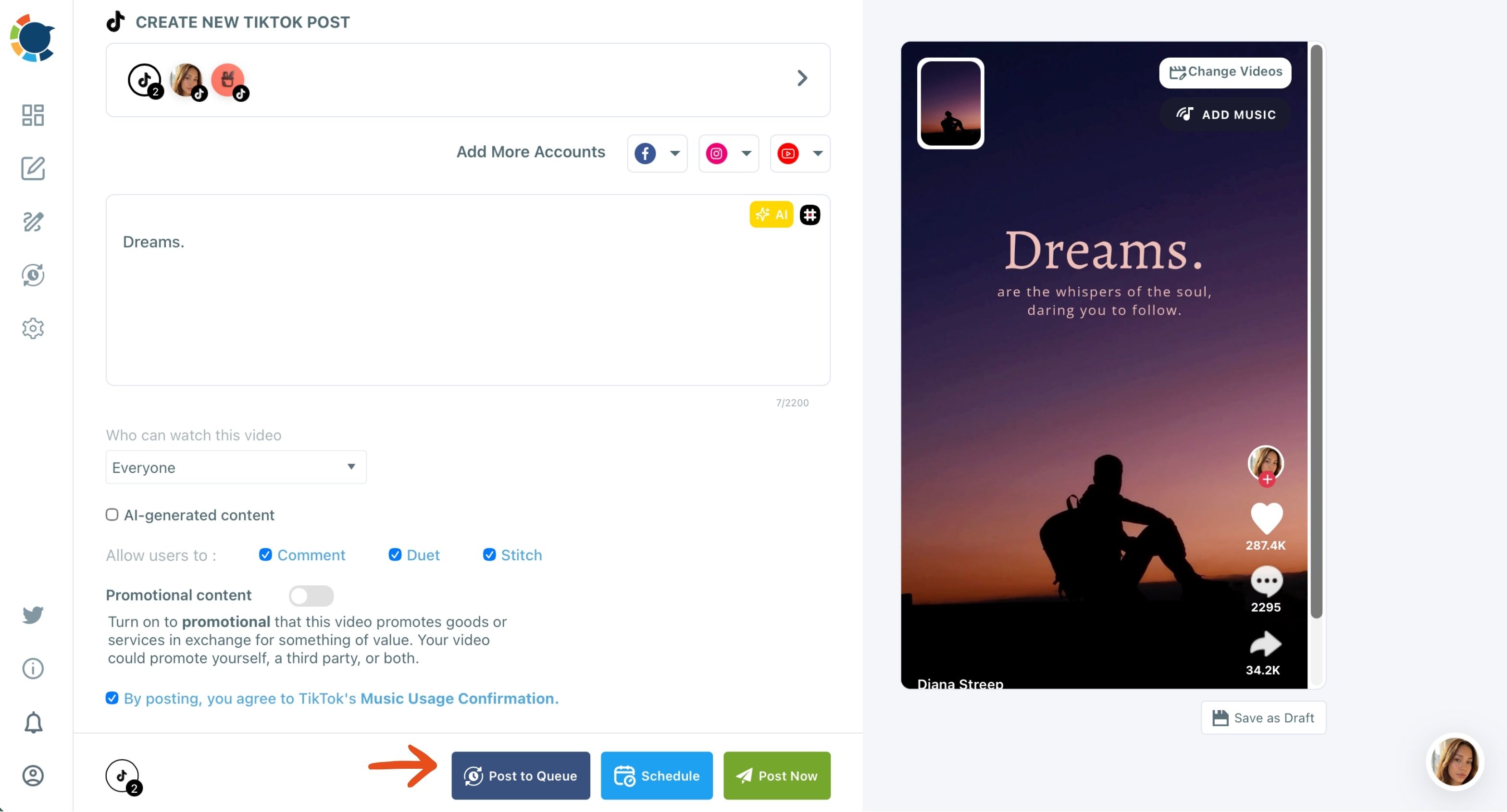
The setup steps run once, and every week afterward starts at step 4.
Weekly slots per account are what keep five shops posting on a steady rhythm, and TikTok reads that steady rhythm as an active account worth testing with new viewers.
Does posting the same day hurt five coffee shop TikToks?
It can, mostly by clustering. If all five accounts publish the shared video at the same minute, the versions compete for overlapping local viewers in the same early window that TikTok uses to judge each video.
When you schedule TikTok videos on multiple accounts, spreading the shared video across each account's own suggested time fixes that. The downtown shop's followers may be most active at lunch, the campus shop's in the evening. Circleboom Publish's Schedule modal offers six suggested slots per account, built from that account's followers, so each version gets its own opening window.
A suggested time is not a promise of more views. It removes timing as one reason a good video stalls.
If a shop's numbers drop suddenly anyway, the TikTok shadow ban explainer shows what to check before blaming the video.
How long it takes to schedule TikTok videos on multiple accounts each week
Less than most chain owners expect, once the setup is done.
Take a plan of one shared video plus two local videos per shop. Across five shops that is five versions of the shared video and ten local videos, 15 TikToks a week.
Uploaded natively, each one means logging into that shop's account and filling in TikTok's upload form again.
In Circleboom Publish all five accounts sit in one composer:
- No logging in and out
- The AI writes each shop's caption from one instruction
- Post to Queue picks the time
If a native upload with the account switch takes ten minutes and a composed one takes five, 15 videos drop from two and a half hours a week to about an hour and a quarter.
One composer replaces five logins.
Chains that want to plan the whole month at once can batch social media content in one session instead of weekly.
Hashtags are the last step before each video goes in. The TikTok hashtag generator adds a few niche, local tags in one click, which help TikTok understand which neighborhood a shop's video is for.
The same Queue logic works beyond TikTok. To keep a fixed weekly rhythm on the shops' Instagram and Facebook too, see how to automate social media posts across networks.
Cross-posting walkthrough (2:54): one video uploaded in Circleboom Publish's Reels window and sent to Instagram, TikTok, YouTube and Facebook with a caption, first comment and soundtrack, then queued or scheduled.
How to tell whether the weekly TikTok plan is working
A plan to schedule TikTok videos on multiple accounts is working when each shop's local videos earn their own views and the shared video performs comparably on every account. If one shop's version always lags, its caption or its time slot is the first thing to change.
Click-through matters too, since a coffee video's job is a visit or an order. A useful benchmark is what's a good CTR on TikTok, measured on the bio link each shop uses.
Some chains stop sharing videos entirely after one bad month. That swings too far. The fix is usually smaller:
- Better captions on the shared video
- More local videos around it
- A slot that matches each shop's crowd
The habits in how to go viral on TikTok apply to all five accounts. A hook in the first two seconds and a loop at the end matter on every one.
A decision tree for five coffee shop TikTok accounts
Most weekly decisions for a five-shop chain start from one question about each video:
- If it is true for every shop (a launch, hours, brand story), send it to the "All shops" group with a caption written for each shop and a slot per account.
- If it is true for one shop (a barista, a regular, a local event), send it to that shop's group only.
- If every shop should do the same idea (a weekly "drink of the week"), have each shop film its own version and queue all five in one sitting.
- If a shop has nothing local this week, let the Queue carry the shared video and skip forcing a copy.
Whichever branch a video takes, you still schedule TikTok videos on multiple accounts from the same composer, so the tree changes the account selection, not the tool.
→ Queue each coffee shop's TikTok videos for the week ahead
Coffee chain FAQ on weekly TikTok scheduling
Can each shop manager schedule only their own shop's TikTok?
Yes. Team Management in Circleboom Publish lets you add each manager as a user and assign only their shop's account, with Admin approval before posts go live. Share Groups organize the accounts; the access separation comes from Team Management.
Is there a limit on how many TikTok accounts a chain can connect?
Total connectable accounts are capped by your Circleboom Publish plan. Manage Social Accounts shows a usage indicator against the plan's allowance.
Can the weekly TikTok also go to the shops' Instagram and Facebook?
Yes. From the TikTok composer you can add Instagram, Facebook and YouTube accounts so one upload reaches all four platforms. Keep the clip at 60 seconds or less and under 300 MB when YouTube Shorts and Instagram are included.
What happens to a queued video if a shop has no open slot left?
Post to Queue places each video in that account's next open slot, so a crowded week moves it to the next free slot rather than dropping it. Add slots in Time and Queue Settings if the shop needs a faster rhythm.