

The question came up during a campaign-planning call with a regional director who was about to launch a community-building program in three metro areas. "We need 150 local influencers in each city to seed the launch. How do we even find them?" The question carried the assumption that local-influencer discovery required either hiring a local agency or running a multi-week manual research project. The operator who had run the same workflow for a prior launch had a faster answer.
The right tool was Circleboom's bio-and-profile search, scoped to each metro's location terms, filtered by follower count and engagement-likelihood signals. A search session for the three cities ran in under 90 minutes, produced 450 to 600 candidates per city, and shipped a CSV of the top 150 per city for the regional director's outreach team by end-of-day. The community-building program launched four weeks ahead of the original plan because the candidate-research phase compressed from weeks to hours.
The local-outreach search workflow runs in four operational steps.Open Search Twitter Bios and Profiles and connect the X account through OAuth.Enter the city, state, or region term as the search query; quoted phrases scope to exact matches.Apply the activity-date filter (60 to 90 days) and the follower-count filter (per the campaign's reach threshold).Export the result set as CSV or add the candidates directly to a Twitter list for outreach tracking.
The workflow runs through the official X Enterprise APIs and produces sortable results in seconds. → Search Twitter accounts by location
Why the "Hire a Local Agency" Approach Was Always Inefficient for This Task
The "hire a local agency" approach treats local-influencer discovery as a specialized task that requires geographic expertise. The framing made sense when the discovery method was reading magazines, attending events, and building personal networks. It stopped making sense when the platform's public bio data made the discovery a structured-search problem rather than a relationship-building problem.
The structured-search approach scales linearly. One city or fifteen cities, the per-city search takes the same 5 to 15 minutes; the local agency's per-city cost scales with their internal labor instead. The agency might add value on the outreach side (relationship-building, pitch-craft), but the discovery side is where the search tool produces 10x or 20x the throughput at a fraction of the cost.
The Circleboom piece on finding Twitter accounts in your local town, region, or city covers the structured-search framing in detail and is the right starting point for operators who have been outsourcing this work to local agencies and want to bring it back in-house.
What Makes a Local Account a Good Outreach Candidate
The bio search produces the candidate pool; the filter criteria distinguish strong candidates from weak ones. Three filters matter for most local-outreach use cases.
The first filter is follower-count threshold. The right threshold depends on the campaign's reach goal: 1,000+ for community-building, 10,000+ for partnership outreach, 50,000+ for influencer-marketing campaigns. The threshold scopes the candidate pool to the operators with enough reach to deliver against the campaign's metric.
The second filter is activity-date freshness. Accounts active within the prior 30 to 60 days are far more likely to engage with outreach than dormant accounts; the date filter typically removes 20 to 40% of the raw candidate pool and tightens the conversion rate substantially.
The third filter is topic alignment. The location is a necessary but not sufficient criterion for most campaigns; the candidate's bio or recent post topics need to match the campaign's theme. The topic-keyword filter (added alongside the location term) narrows the pool to accounts that are not just in the right city but also focused on the right subject area.
The Circleboom piece on how to find and filter nearby tweets on Twitter covers the related nearby-tweet workflow that some operators run alongside the bio search; the two methods produce different candidate pools and combining them can broaden the reach of a local-outreach campaign.
How to Search Twitter Accounts by City or Region Step by Step
The workflow runs in two phases: the location query, then the filter and export. Both phases together typically run 5 to 15 minutes per city.
Phase 1: Run the Location Query
Log in to Circleboom Twitter
- Log in to Circleboom Twitter with the X account used for the search. OAuth keeps credentials with X directly and supports the search through the sanctioned API.

Open Search Twitter Bios and Profiles
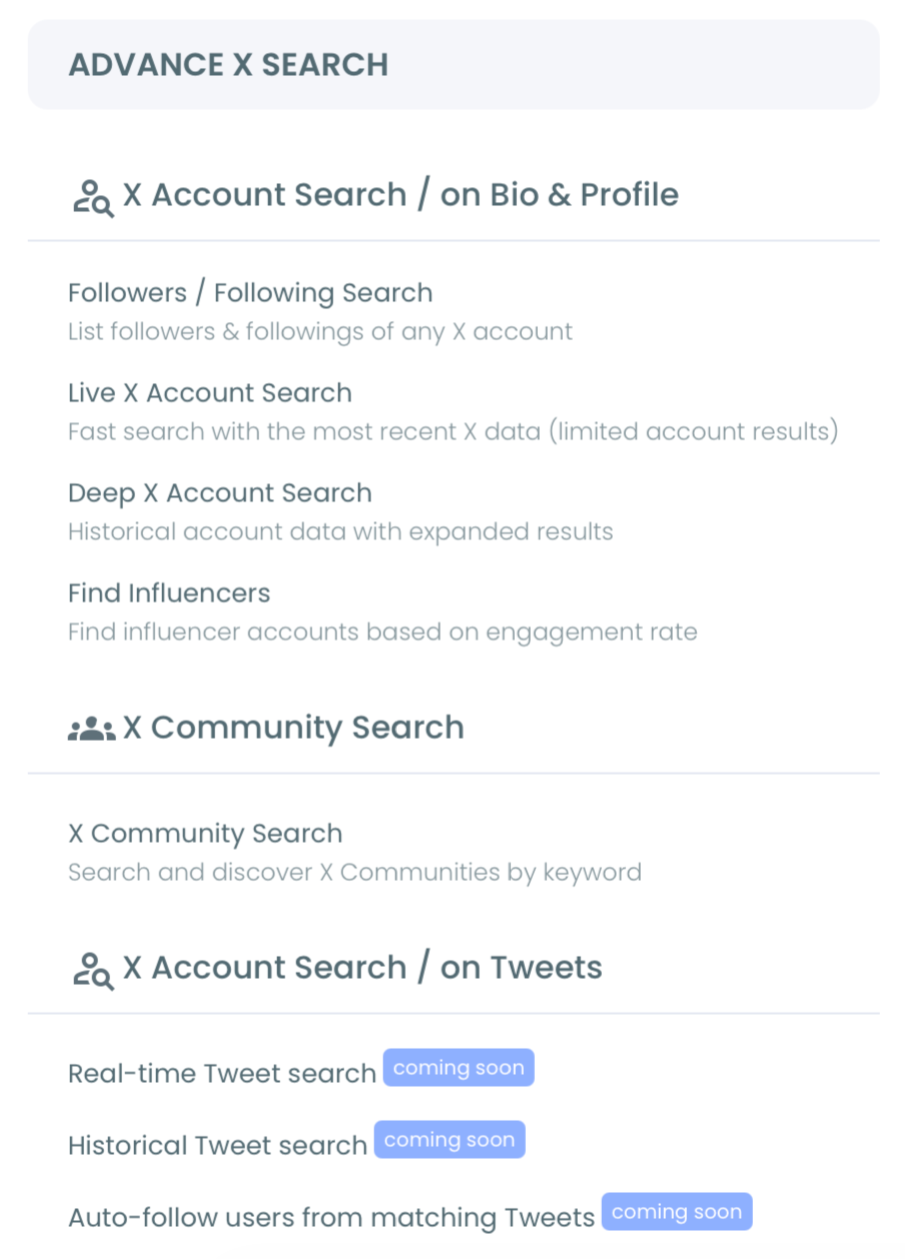
- Open Search Twitter Bios and Profiles in the Advanced X Search menu. The tool surfaces a search field, filter options, and a sortable result table.
Enter the location query and topic-keyword combination
- Enter the location query alongside any topic-keyword that scopes to the campaign theme. "Austin food blogger" or "Atlanta tech founder" produces a much tighter candidate pool than "Austin" alone.
Phase 2: Filter, Sort, and Export
Apply the activity-date filter
- Apply the activity-date filter to scope to accounts active within the prior 30 to 90 days based on the campaign's pace requirements. Dormant accounts skew the candidate pool toward stale candidates.
Apply the follower-count threshold
- Apply the follower-count threshold corresponding to the campaign's reach goal. Multi-tier campaigns sometimes export at multiple thresholds simultaneously (1,000+ for community, 10,000+ for partnership) for separate outreach tracks.
Export the filtered candidate list as CSV
- Export the filtered candidate list as CSV for outreach team handoff. The dashboard also supports adding the candidates to a Twitter list for tracking once outreach begins.
The six-step sequence is the full workflow. The query design and the filter combination are the strategic decisions; the export is mechanical.
Video walkthrough: how to search Twitter bios and profiles to find targeted people by keywords.
What the Bio-Search Workflow Produces for Local Campaigns
The output is a structured candidate pool per city or region, with the campaign-specific filtering applied at the discovery step. The pool supports outreach prioritization, partnership pitching, and community-building without the multi-week manual research phase that local agencies typically charge for.
The compounding payoff is the rerun. A second city or a second campaign uses the same workflow with different location terms; the operator's discovery throughput stays high while the outreach team handles the relationship-building work that the agency was actually adding value on.
The Circleboom piece on finding influential Twitter users on a specific topic within a specific region covers the topic-plus-region combined search that supports the most common local-outreach use case.
Two adjacent surfaces extend the bio-search workflow. The Twitter ID Finder landing covers the ID-lookup workflow that supports integrating the candidate list into external CRM or outreach-automation tools. The Who to Follow on Twitter landing covers the recommendation-side discovery for operators who want platform-suggested candidates alongside the bio-search results.
Related Circleboom reading on the local-outreach theme.
- Create your local marketing strategy with SEO on the broader local-marketing framing that the bio-search outreach fits into.
Action Summary
The local-outreach workflow is a per-city pass: enter the location query, apply the filters, export the result. The three-city launch that the regional director had budgeted four weeks for becomes a 90-minute discovery session and an outreach pipeline that ships on the accelerated timeline.
Search Twitter accounts by location and the "hire a local agency" framing for discovery gives way to a structured-search workflow that the operator runs in-house at a fraction of the cost.
Still Wondering?
How does the search handle multi-city campaigns where the cities have different language or cultural contexts?
Multi-city campaigns usually require separate searches per city, with the location term and any topic-keyword adapted to the local context. A campaign targeting Mexico City, São Paulo, and Buenos Aires would run three separate searches with Spanish and Portuguese keyword variants; the result sets stay separate for per-city outreach but can be combined in a master CSV for cross-city analysis.
What if my campaign needs accounts in a specific neighborhood or suburb rather than a whole city?
Neighborhood-level queries work the same way as city-level queries; the bio search matches whatever location text the user has self-declared. Accounts that mention a specific neighborhood ("Williamsburg," "Mission District," "East Austin") appear in the result set when that term is the query. The catch is that fewer users mention sub-city neighborhoods in their bios, so the candidate pool is smaller and the filter combination matters more.
Can I combine the location search with the verified-followers list or other filters?
Yes. The Advanced X Search filter suite supports combining location with verification status, follower-count band, activity range, and topic keywords. Multi-filter queries produce tighter result sets that match more specific campaign criteria; most local-outreach campaigns run two or three filters together for the optimal pool.
How accurate is the bio location data? Do many users use fake or aspirational locations?
The bio-location data is self-reported, which means it includes a small percentage of aspirational ("Mars," "the internet") or vague ("everywhere") entries. The filter usually catches these because the campaign-relevant queries scope to specific city or region terms that the aspirational entries do not match. For most outreach use cases, the noise is well under 5% of the candidate pool.
Does the workflow work for international campaigns in cities outside major English-speaking markets?
Yes. The bio search supports any language and any location term. International campaigns sometimes need language-adapted topic keywords to scope effectively, but the location-side mechanics work identically across markets. The candidate pool size varies with the platform's penetration in each market; some smaller markets have thinner pools than U.S. metros.






