

At some point, I wanted to take a closer look at another account’s network on Twitter.
I clicked on their profile, opened the Following tab, and started scrolling.
At first, everything looked normal. A few familiar accounts appeared, then some others. But the more I scrolled, the stranger it felt. The list didn’t seem complete. Accounts I knew they followed were missing, and loading more didn’t really solve it.
That’s when I realized something important: Twitter does not actually show the full following list in a clear and reliable way.
Why Twitter Doesn’t Show the Full Following List
On Twitter (X), the Following tab is not designed to give you a clean, complete view of an account’s followings.
 Kevin O. Frank
In practice, several things happen:
- The list loads partially and inconsistently
- Scrolling does not always reveal every account
- There is no way to confirm whether you’re seeing the full list or just a portion
Twitter also does not offer tools to sort, filter, or export someone’s followings. You only see what the interface decides to show, and that makes proper analysis almost impossible.
So even though the Following tab exists, it does not function as a complete data view.
What You Can and Can’t Do With Twitter’s Native Following Tab
Using Twitter alone, you can:
- View a limited portion of an account’s followings
- Sometimes see if an account follows you back
But you cannot:
❌ See the full following list reliably
❌ Sort followings by follower count or activity
❌ Export the list
❌ Identify fake, bot, or spam accounts efficiently
For casual browsing, this might be fine. For research, growth, or analysis, it’s not enough.
The Tool I Use to See Everyone Someone Follows
To actually see a complete following list, I use Circleboom Twitter.

Circleboom Twitter is an official X Enterprise Developer and a full Twitter management tool. It is built specifically to analyze followers, followings, and account relationships in a way Twitter itself does not support through its interface.
It includes many features such as:
🟢 follower/following management,
🟢 bot and fake account detection,
🟢 bulk follow, unfollow, remove followers and block,
But for this specific problem, the most powerful feature is Account Search.
How Circleboom Account Search Works
With Circleboom’s Account Search, you can look up any public Twitter account and pull its complete followers or followings list within seconds.
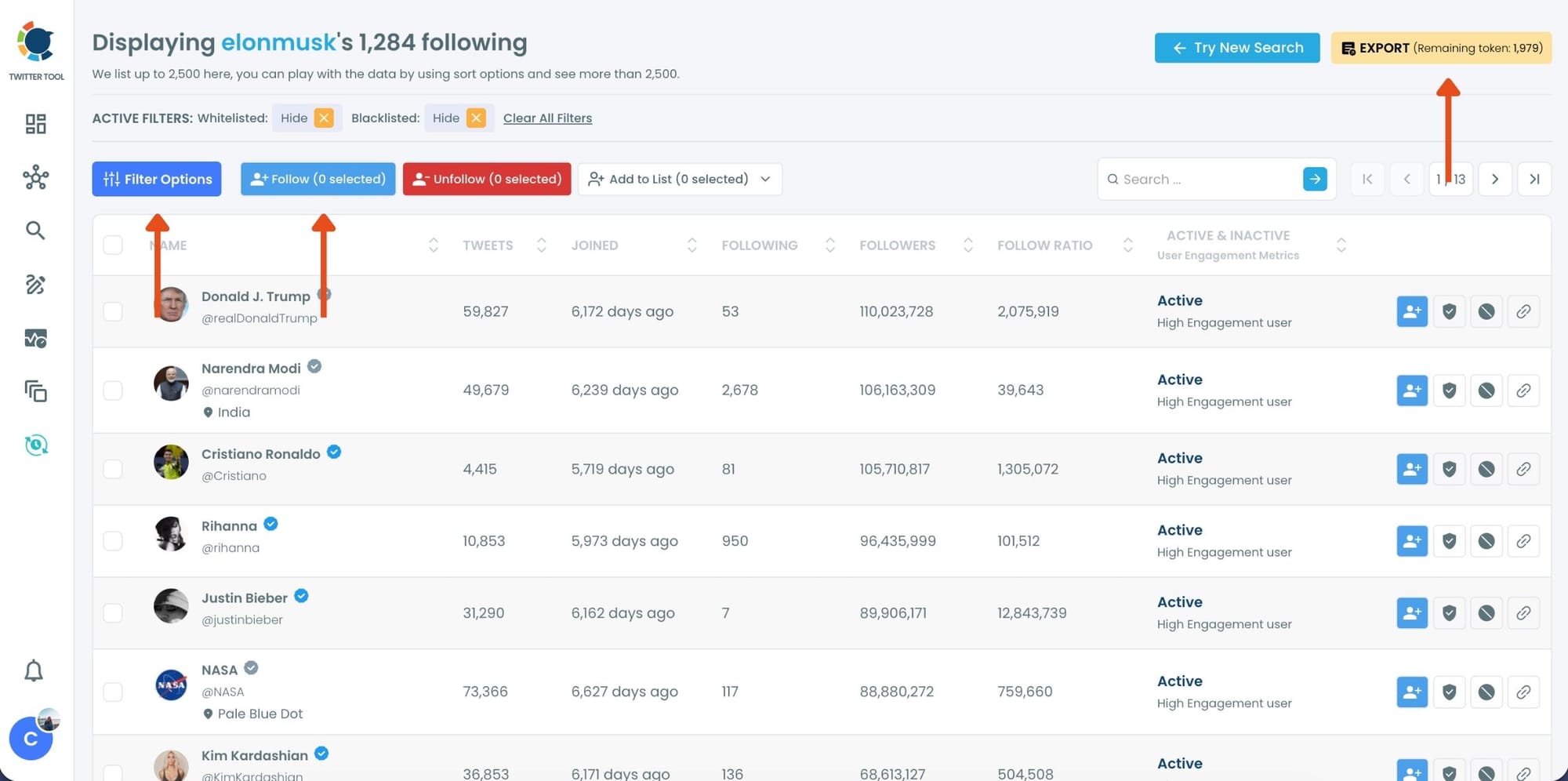
Instead of scrolling endlessly, Circleboom loads the entire dataset and displays it in a structured table. For each account in the list, you can see detailed information such as:
- Total tweet count
- Follower and following numbers
- Account creation date
- Verification status
- Clear indicators showing whether an account looks real or bot-like
This instantly turns a hidden, partial list into usable data.
What You Can Do With the Full Following List
Seeing the full list is only the beginning.
From the same screen, Circleboom allows you to:
➡️ Follow selected accounts in bulk
➡️ Unfollow accounts you already follow
➡️ Export the list for deeper analysis or outreach
➡️ Filter out bot or spam accounts
This is especially useful if you are researching competitors, discovering communities, or building targeted lists based on who someone follows.
Step-by-Step: How to See Everyone Someone Follows With Circleboom Twitter
Step #1: Log in to Circleboom Twitter.
If you don't have a Circleboom Twitter account, you can quickly sign up by clicking "Create an account."

Step #2: Find the "Advance X Search." tool on the left-hand menu and navigate over it.
From the dropdown menu, select "Followers / Following Search."

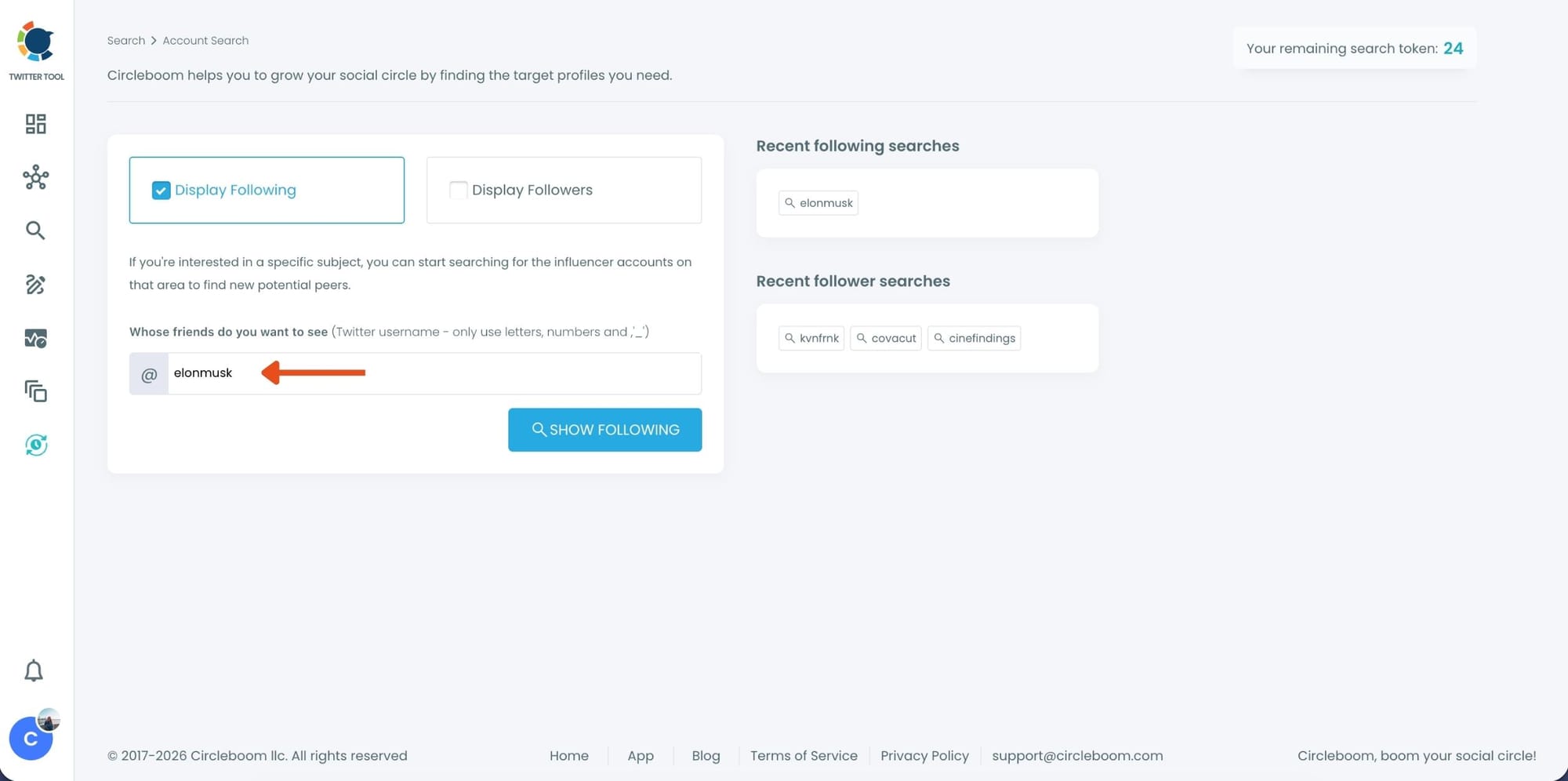
Step #3: If you want to search someone's Twitter followings, click the "Display Followings" option. Or, you can select "Display Followers" to search to see all of someone's followers on Twitter.
Then, you need to type the Twitter account's username in the search bar.
Step #4: A Following list of targeted Twitter profiles will be listed.
You can check these accounts. and if you wish you can add them to Twitter lists where you can see the content of X accounts without really following them!
Or mass follow/unfollow with one click!

Step #5: You can search for a specific keyword to narrow down the list using the keyword search bar as the lists are ready.
Circleboom also provides users with advanced search filter options to search someone's Twitter followers without eggheads, inactives, etc.
If you want to enjoy Circleboom Twitter services on the go, you can download it iOS app below:

If you don't have an iOS device, no worries! Circleboom Twitter is working great on mobile browsers for Android users! Just have a try. You won't regret it!
If you need a more detailed guide, you can watch our video:
Why This Makes a Real Difference
Once you see a full following list with context, patterns become obvious.
You can understand what kind of accounts someone follows, how active those accounts are, and whether the network is built around real people or inflated with low-quality profiles. This level of clarity is simply not possible with Twitter’s native interface.
Stay Informed About New Followings Without Constantly Checking
Even if you don’t need to view someone’s entire following list, you can still stay informed about new followings as they happen.
With Circleboom Twitter, you can set up tracking for any X (Twitter) account and get notified about new following activity—without manually checking profiles every day.
 infocircleboom.com
Once tracking is enabled, Circleboom automatically sends you daily or weekly reports showing:
- Which accounts that user started following
- Which new accounts appeared in their network
This way, you don’t need to repeatedly visit profiles or scroll through lists. You simply review the reports and instantly see what’s new.
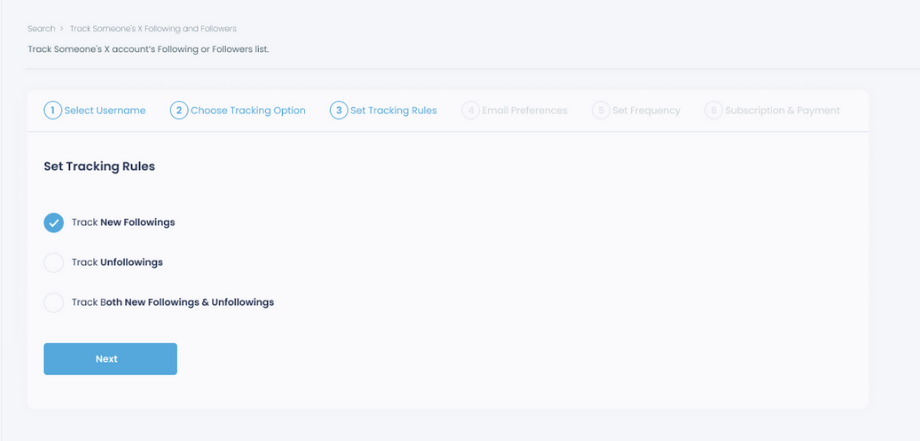
It’s a simple, efficient way to monitor networking activity, discover relevant accounts early, and stay updated without seeing or exporting the full following list unless you want to.
Final Thoughts
Twitter’s Following tab gives the impression that you can see who someone follows, but in reality, it only shows a limited and unreliable slice of the data.
If you want to see everyone an account follows, along with meaningful details and the ability to act on that information, you need a tool built for analysis.
For me, Circleboom Twitter turned following lists from something vague and frustrating into something clear, structured, and actually useful.
)
