
Clean up your following list without this check and you will unfollow people who retweet you. X gives no warning, because the follow-back label and the retweet history sit on different screens.
The fix takes one sitting, and it starts from a list most people never pull.
How do you see the mutuals who engage with your tweets?
Circleboom finds the accounts you follow that retweeted your posts on X across your last 3,200 tweets, using X's official Enterprise APIs. Match that result against your mutual list and the overlap is the group you are looking for.
→ Twitter mutuals who engage
What a cleanup costs when X mutuals all look the same
On X, every mutual looks identical: a name with a "Follows you" label. The account that shared your last five posts and the account that has not opened the app in a year carry the same label.
That sameness is harmless until you act on it. The mistake I see most often is a cleanup built on profile signals alone, such as low follower counts or odd follow ratios. Small accounts fail those tests all the time, and a small account can be one of your steadiest retweeters.
Three things go wrong when the engaged group is invisible:
- You unfollow supporters during a cleanup and only notice when your retweets drop.
- You spend replies on accounts that never answer, and none on the ones that do.
- You leave them out of the lists where you could keep up with their posts.
The follow is a setting. The retweet is a behavior, and only behavior tells you who is in your corner.
So the task is narrow. You need to pull the mutuals who retweet you on Twitter into one view, then protect them before anything else touches your following list.
Start with the plain list of your Twitter mutuals
The prerequisite is the mutual list itself, because the engaged group is a subset of it. If you have never pulled that list, do it first.
X does not hand it over. You can see "Follows you" on a single profile, but there is no page that lists all of those accounts together. The manual routes and their limits are laid out in how to check mutual followers on Twitter.
Inside Circleboom, the list is one click. The X Mutuals view shows every account you follow that follows you back, in a grid you can sort, filter and select from.
Mutual list first: this video shows how to find mutual followers on Twitter/X before you add the engagement layer.
Why the engaged view is an overlap, not a ranking
One product behavior is worth understanding before you run anything. The engaged view is the intersection of two sets: the accounts you follow, and the accounts that retweeted you.
It is read over your most recent 3,200 tweets, which is the maximum the X API indexes. Anything older is outside the window.
That has a practical consequence. A mutual who shared your posts faithfully a few thousand tweets ago can be missing from the result today. Missing means "not inside the window", and it never means "never supported you".
Keep that in mind when a familiar name is absent.
What Circleboom reads to find engaged mutuals on X
Circleboom's Engaging & Loyal Following view identifies the accounts you follow on X that retweeted your posts. It retrieves your recent tweets and the public engagement on them, attributes that engagement per account, and keeps the accounts that are also in your following list.
Because Circleboom is an official X Enterprise Developer company, that data arrives through X's own channel. Nothing is scraped, and only public engagement data is read. DMs and restricted posts are never touched.
The result is a table, and each row carries enough to judge the account without opening its profile:
- Name, handle and location
- Tweet count and join date
- Following count, follower count and follow ratio
- An activity label: Active, Moderate Active or Inactive
An interaction circle is a different thing. You can generate a Twitter circle as a shareable picture of your top interaction accounts, ordered by activity. It is good for a post and no use for a cleanup, because a picture has no rows to select.
Filters that narrow the engaged group
The Filter Options button above the grid opens a side drawer, and every filter in it can be combined with the others. For this task, five of them do most of the work:
- Engagement, to keep only the most active accounts
- Verification Status, when verified supporters matter for a campaign
- Find in Bio & Name, to pull one niche or job title out of the group
- Filter by Language and Filter by Location, for regional work
- Follower Count, with a minimum and a maximum
Applied filters appear as removable tags in an Active Filters bar, with a Clear All Filters option. Read that bar before any bulk action. It states exactly which segment you are about to act on.
Each row also has its own controls. From a single row you can whitelist the account, flag it, or open its X profile in a new tab, which is useful when one name needs a closer look before you decide.
The table is what makes the next section possible. Once you can list engaging Twitter mutuals as rows, you can sort them, select them and protect them.
How to see mutuals who engage with your tweets, step by step
The process has seven steps in three phases: open the following views, build the retweet list, then match it against your mutuals.
Open the following views in Circleboom
- Open Circleboom Twitter and connect the X account you want to analyze.

- Select the Followers and Following menu and expand the following types. Every view about the accounts you follow is grouped there, including X Mutuals.

Build the list of accounts that retweeted you
- Click Engaging & Loyal Following, then Calculate my Engaging Accounts. Circleboom counts the engaging accounts among the people you follow and loads the data. A long tweet history with a large following list can take up to 1 to 3 hours.
- Read the result as an overlap. Every row is an account you follow that retweeted you inside your last 3,200 tweets. The result is a snapshot from the last sync, so use the date picker and refresh button above the grid when you need a current one.
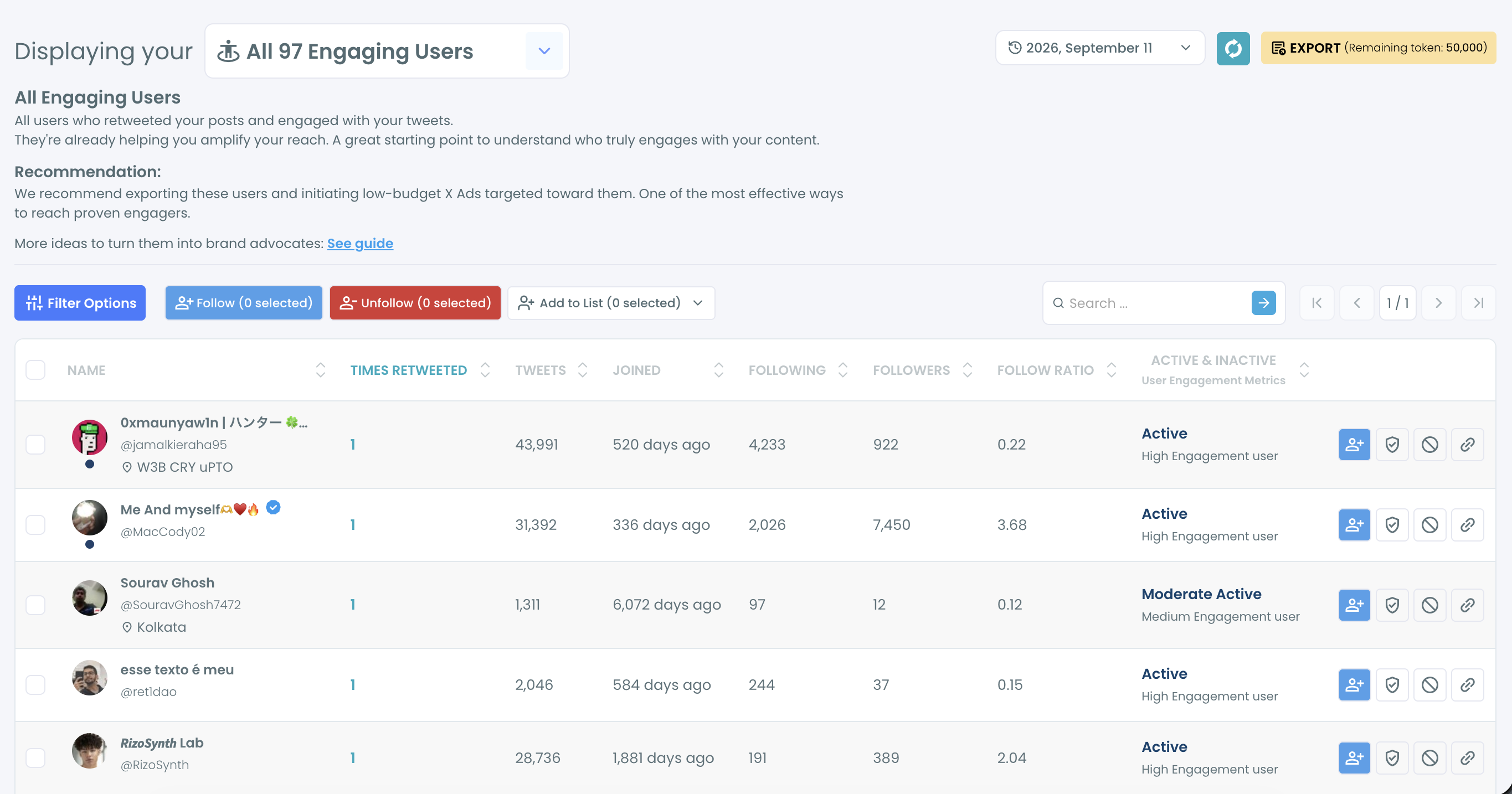
- Sort by the Times Retweeted column. One click sorts ascending and a second click sorts descending, which puts your most frequent retweeters on top.
Match the result against your mutuals
- Switch to X Mutuals in the same menu. This is the plain list from the prerequisite section, shown in the same kind of grid.
- Compare the two lists. Pick the route that fits the size of your result:
- For a short result, type each name into the inline search bar above the mutual list. It searches by name and username.
- For a long result, export both views as CSV and match them on the Username column. Export uses tokens, and the remaining balance is shown on the button.
The retweet list goes first because it is the slow part and the part X cannot give you. While it loads you lose nothing, and once it exists the mutual list becomes a simple lookup instead of a second research job.
The sequence in short:
- Connect the account and open the following types.
- Calculate the engaging accounts and sort by retweets.
- Look each top account up in X Mutuals.
How to keep engaged mutuals out of an unfollow cleanup
Whitelist them. A whitelisted account is excluded from every bulk action in Circleboom, so no later filter can sweep it into an unfollow by accident.
Do this the same day you find the group:
- Tick the engaged mutuals in the result list, or use the master checkbox for the whole page.
- Open the Add to List dropdown.
- Choose Whitelist.
Two behaviors catch people out afterwards. Whitelisted accounts are hidden from this view by default, so the engaged list can look emptier after you protect it. And the Whitelisted & Blacklisted filter in the Filter Options panel is how you bring them back into view.
That filter is also a second way to see the overlap. It is available across the follower and following views, so applying it inside X Mutuals shows the mutuals you have protected. If the engaged group is all you have whitelisted, that filtered view is your list of mutuals who engage.
The label-by-label walkthrough is in how to blacklist and whitelist Twitter accounts on Circleboom.
What the protection looks like in numbers
Circleboom's own example makes the stakes concrete. Whitelist 60 accounts that regularly engage with you before a 1,500-account unfollow, and all 60 relationships survive the cleanup.
The cleanup itself is paced. Circleboom processes unfollows at 50 every 15 minutes with a daily safety limit of 800. A 1,500-account queue therefore runs 800 on the first day and the remaining 700 the next day, with no manual restart.
Nothing starts until you confirm the selected count in the pop-up. Check the Active Filters bar and that count before you click, because an unfollow cannot be undone in bulk through Circleboom.
How do you get more mutuals who engage on Twitter?
You get more of them by returning engagement to the ones you have and by following back the supporters you have missed. Both moves start from lists you can already see.
Return the engagement first. The accounts in your result are already investing in your reach. Regular replies and reposts on their content keep that investment going, and Circleboom's guidance is to prioritize behavior over audience size: a small account that shares you consistently can be worth more than a large one that never does.
Keep outreach for later. Circleboom's recommended order is to protect the account, add it to a list, engage with its recent posts and learn its current topics before any pitch. Exporting the group for outreach planning comes last, once relevance is confirmed. Reversing that order turns your warmest contacts into a cold sales list.
Give them their own feed. A dedicated list keeps their posts from drowning in your timeline. X's page on how to use X Lists explains that a List can be public or private, and that a List has its own timeline you can read.
Building that list one profile at a time is slow on X. The quicker route is in how to create Twitter lists with a few clicks.
Turn loyal followers into new mutuals
Some people retweet you without being followed by you. They appear in a separate view, Engaging & Loyal Followers, and following them back is the shortest path to a new engaged mutual.
Beyond that group, growth is ordinary work done on the right accounts. The tactics for it are collected in how to get mutuals on Twitter.
Once the group grows, maintenance matters. You can manage your Twitter lists in one place, moving or removing members as people drift in and out of the engaged group, so the feed stays honest.
One caution from Circleboom's safety notes applies here. Past retweets say nothing about this month, and an account near the top of your result may have shifted focus since. Check each name's recent activity before you build plans around it.
What you lose by treating every X mutual the same
Without the engaged list, every decision about your following list is a guess. A cleanup can remove the accounts that share your posts. Your replies go to whoever posted last. A launch goes out to a crowd you have never sorted.
With it, the same decisions get easier. Your Twitter mutuals split into a protected group that retweets you and a larger group you can judge calmly, one account at a time.
I run this check before every cleanup now, and again after any long stretch of posting. The second run matters because the window moves. New tweets push old ones out of the 3,200, so the result drifts toward whoever supports you today.
The cost of skipping it is small each time and large in total: one lost supporter per cleanup, repeated for years.
→ Run the check on your Twitter mutuals
Mutuals FAQ for the edge cases
Why do some mutuals never engage with anything I post?
Silence is the normal case: you read their posts, and yours rarely reach them in a way that leads to a retweet. In Circleboom, a mutual missing from the engaged view has not retweeted you within your last 3,200 tweets on X, which is narrower than "never engaged". Decide what to do by why you follow them: for their content, keep them; for a two-way relationship, engage first and reassess later.
Is checking likes and retweets post by post on X enough?
Only for a single post. X shows engagement per post and does not organize the accounts you follow by how much they engage with you, so you would repeat the check for every post and then open each profile to confirm the follow-back. Circleboom runs the same comparison across up to 3,200 tweets on X in one pass.