

Bots following you on X usually starts as a small annoyance. You notice one weird account, then another, and you think, “Okay… happens to everyone.” That’s exactly how it began for me too.
My account was clean in the beginning. The followers were real people, they reacted to what I posted, and the engagement felt natural. But at some point, bot accounts started showing up and following me repeatedly. And the more they came, the more obvious the damage became.
My follower count kept going up… but my engagement kept going down.
That’s the part that hurts. Because from the outside, it looks like your account is growing.
But inside, your audience quality is getting worse. You end up with a big number on your profile, and a timeline that feels strangely quiet.
If you’ve been in that situation, here’s the uncomfortable truth:
You don’t stop bots by fighting them one by one. You stop them by removing the reason they keep showing up.
Let me explain.
 Fatih Kemal Oksuzoglu
Why Bot Followers Kill Your X Growth (Even If You Like “More Followers”)
Bots don’t just follow you and stay there harmlessly. They change how your account performs.
When your followers are filled with fake accounts:
- Your engagement rate drops, because bots don’t like, reply, or share like real humans.
- Your content gets pushed into a low-quality audience pool.
- Your posts look less “trustworthy” to real users who check your follower list.
- Your analytics become misleading because your audience isn’t real anymore.
Basically, bot followers make your account look bigger… while making it perform smaller.
And once bots become a visible percentage of your followers, they bring a second problem with them.
Bots Work Like Magnets (And It Gets Worse Over Time)
This was the most important thing I learned:
Bots attract bots.
Once you have bot followers, your account becomes more likely to get followed by even more bots. It’s like they recognize each other. And it doesn’t stop there.
The same thing happens if you’re following bot accounts too.
Even if you didn’t mean to, following low-quality accounts connects your profile to the same network, and that increases the chance of getting surrounded by bots again.
 Kevin O. Frank
That’s why it feels like zombies. You remove a few, and more show up. You block one wave, then another arrives.
So instead of asking “How do I stop bots from following me forever?” the better question is:
How do I stop attracting them?
And the answer is simple:
You clean your bot followers and your bot followings.
The Best Solution: Clean Your Followers and Followings Completely
You can’t control who tries to follow you on a platform like X. Bots will always exist.
But you can control what your account looks like when they arrive.
If your follower list is already full of bots, it sends the wrong signal. It makes your account look like an easy target, and it encourages more fake accounts to stick around.
So the real fix is doing two cleanups:
- Remove bot followers (so fake accounts aren’t sitting on your profile)
- Unfollow bot accounts (so you’re not connected to the bot network)
Doing this manually is possible, but it’s slow and painful, especially if you’re dealing with hundreds or thousands of fake profiles.
That’s why I used Circleboom Twitter.
How I Removed Bot Followers Using Circleboom Twitter
Circleboom Twitter is the tool I used to clean my account properly without spending days doing it manually.
And one important detail: Circleboom Twitter is an official X developer partner.

That mattered to me because it means Circleboom works through official systems rather than risky shortcuts.
But what made it truly useful is that it doesn’t only focus on bots.
Circleboom Twitter analyzes both your followers and your followings, and helps you identify different types of low-quality accounts, including:
🟢 Accounts not following you back
So instead of guessing who is real and who is fake, you can actually see the data and clean your audience based on real signals.
And the best part is Circleboom doesn’t stop at analysis.
It gives you the removal actions directly.
How to Remove Bot Followers on X with Circleboom (Step-by-Step)
Step #1: Go to the Circleboom Twitter website and log in with your credentials.
If you’re a new user, sign up—it’s quick and easy!

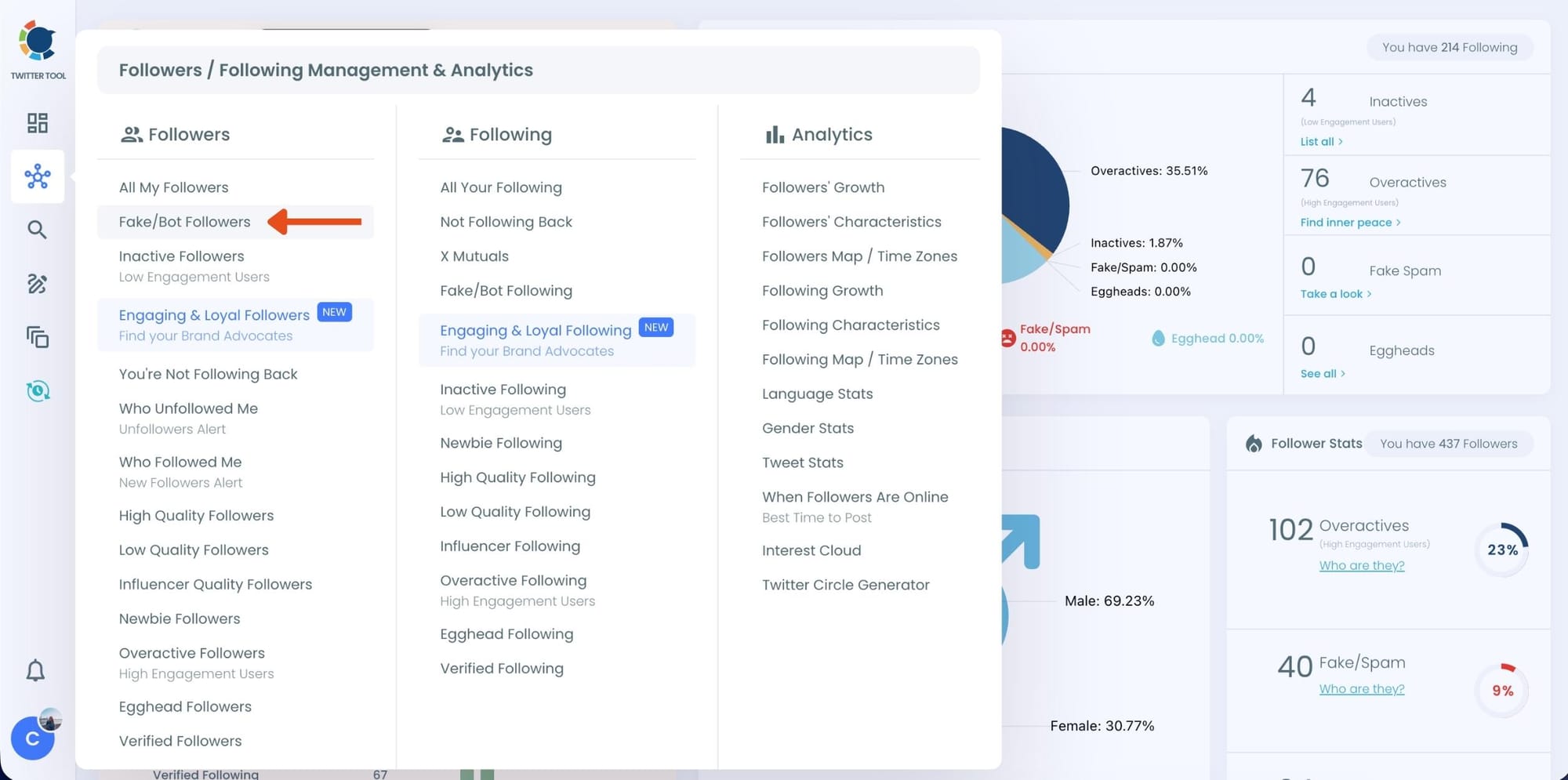
Step #2: On the left-side menu, click on the Followers / Following Management section. A dropdown menu will appear. Select Fake/Bot Followers to see the full list of your followers.
If you want to remove specific accounts, such as inactive users, you can directly select these categories from the dropdown menu instead of viewing all followers.
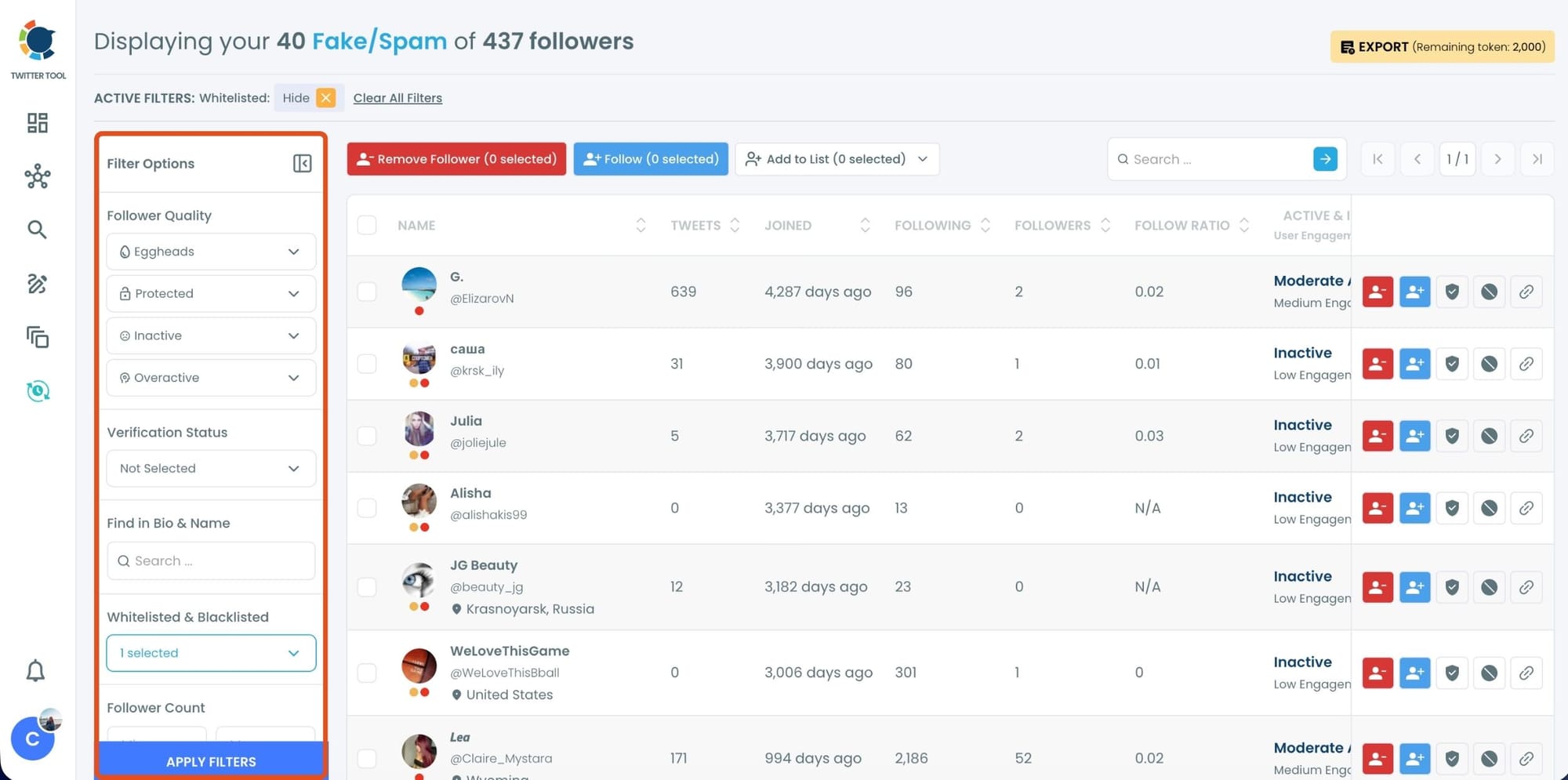
Step #3: You will see a complete list of your fake/bot followers.
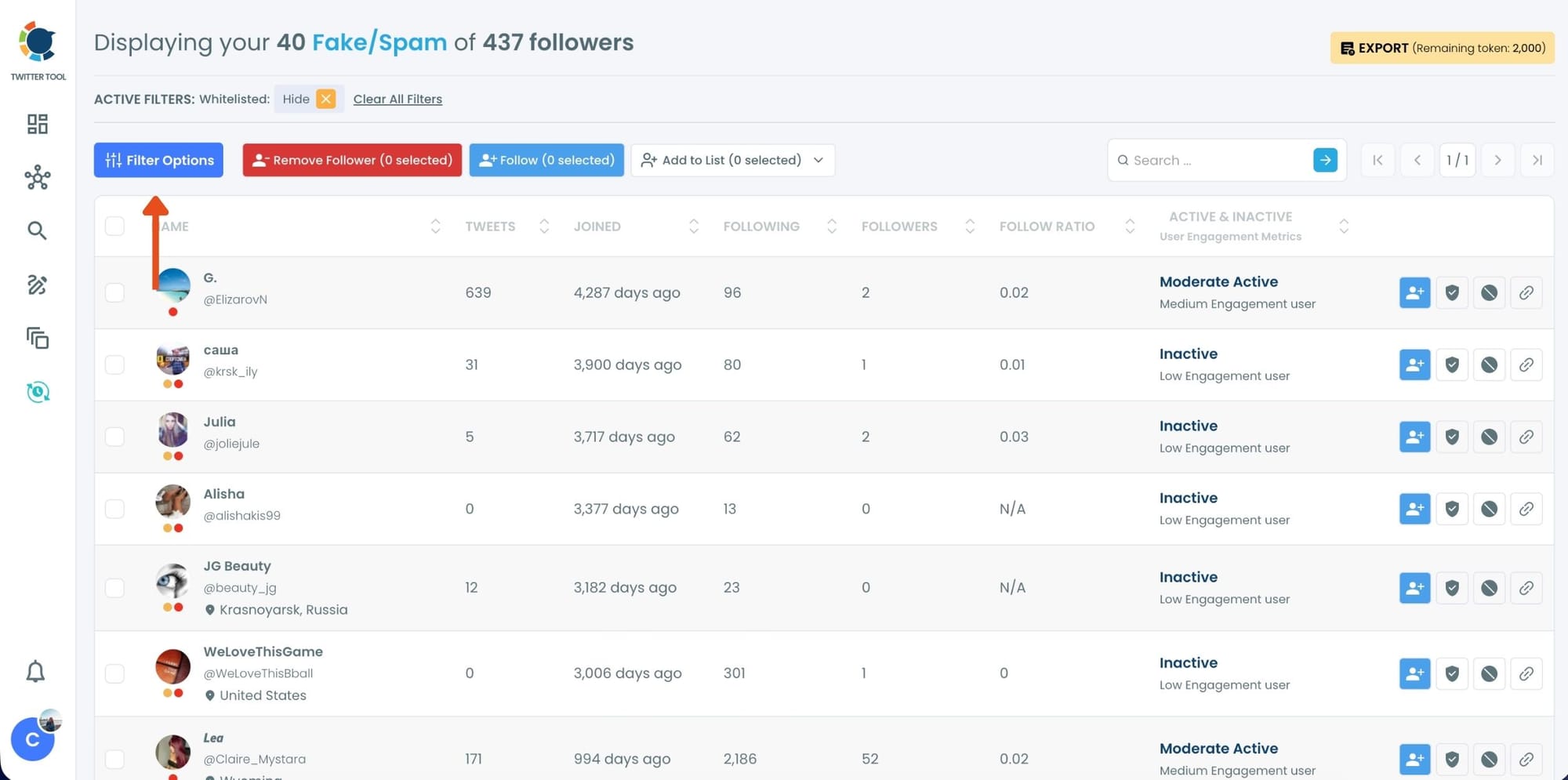
Use the Filter Options on the left side to refine your list.
You can filter followers based on engagement levels, inactivity, verification status, follower/following count, and more.
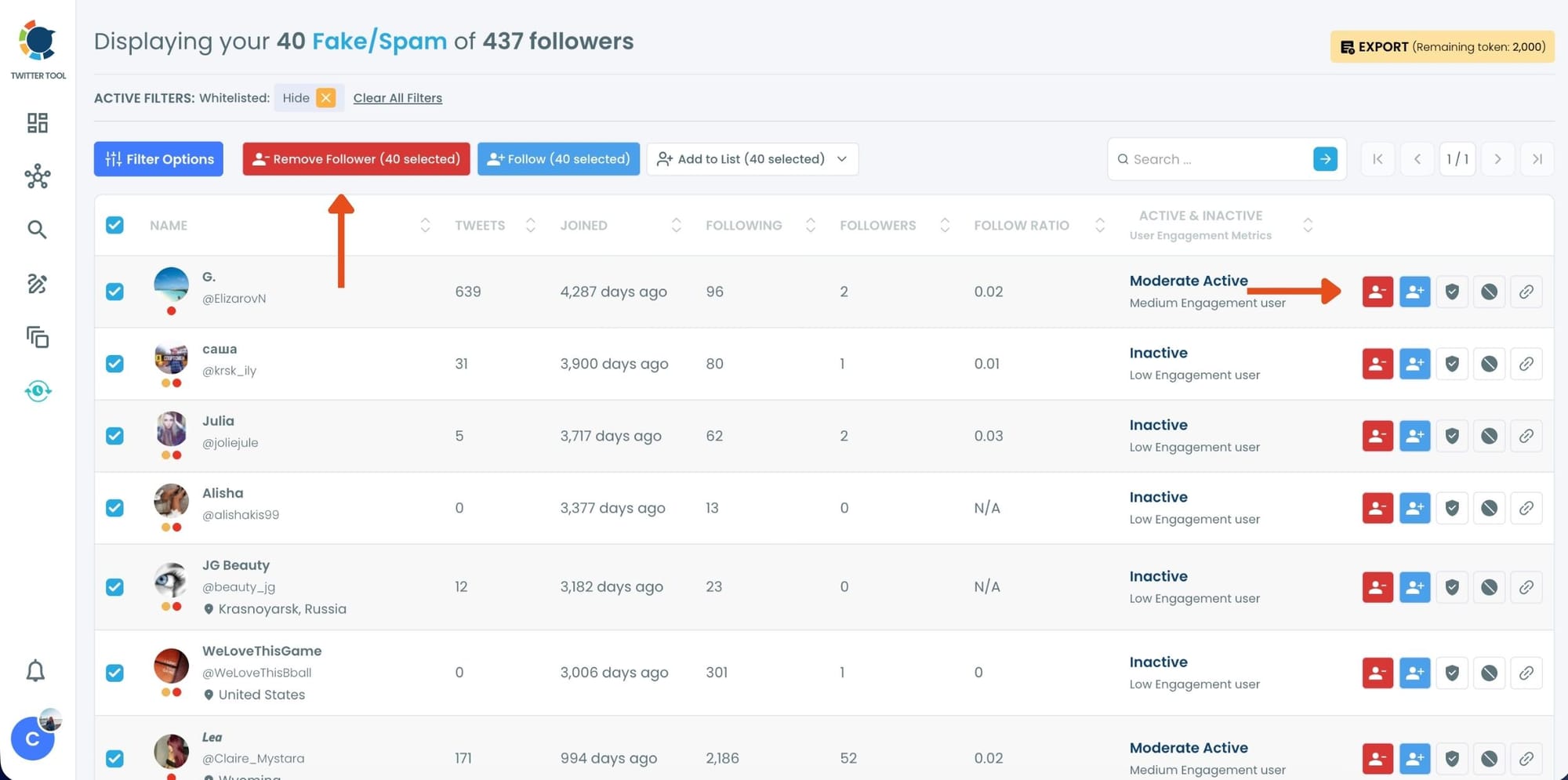
Step #4: Browse through your followers and check the boxes next to the users you want to remove.
You can also select multiple users at once. Once you have selected the users, click on the Remove Followers button at the top. Alternatively, you can remove individual followers by clicking the red remove icon next to their name on the right side of the list.
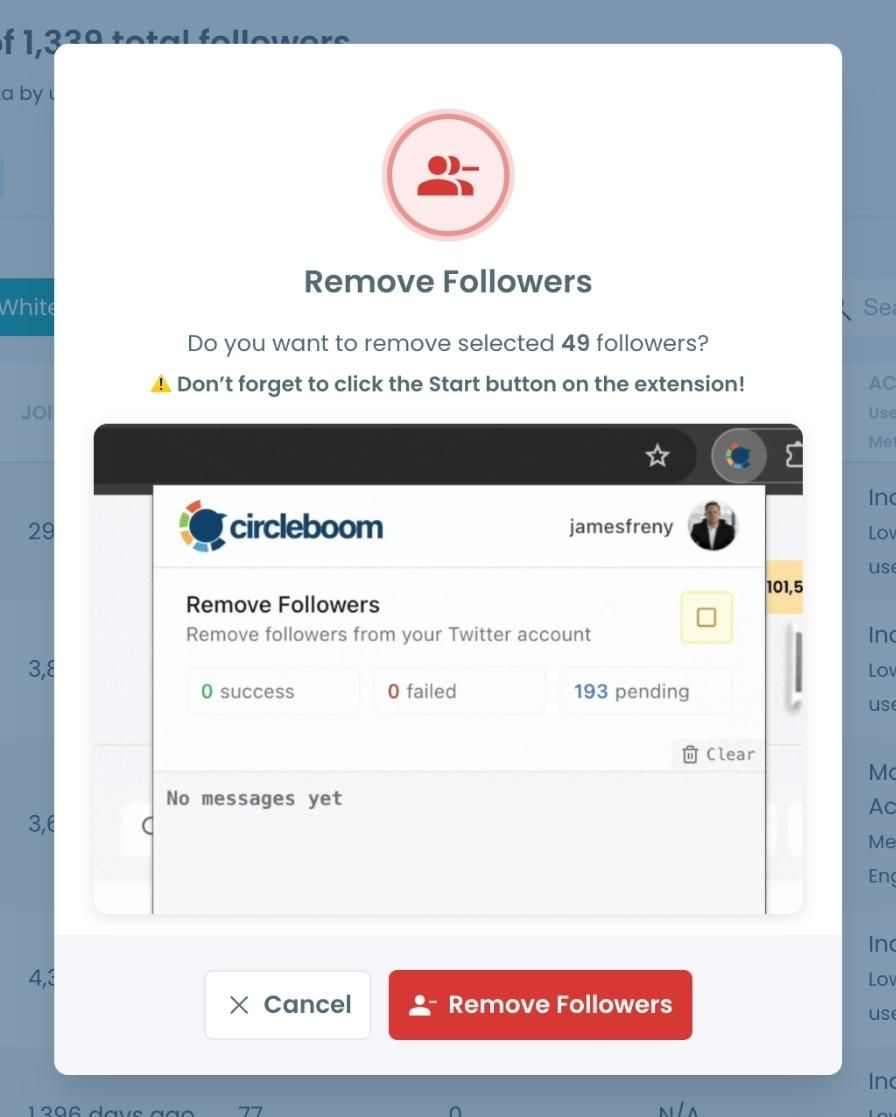
A confirmation message will appear asking if you are sure you want to remove the selected followers.
Click ''Remove Followers''.
Step #5: Since the removal action is processed via the Circleboom Remove Twitter/X Followers extension, you need to install it to complete the process.
Click on Download the Extension and install it from the Chrome Web Store. Once installed, you can easily remove followers.

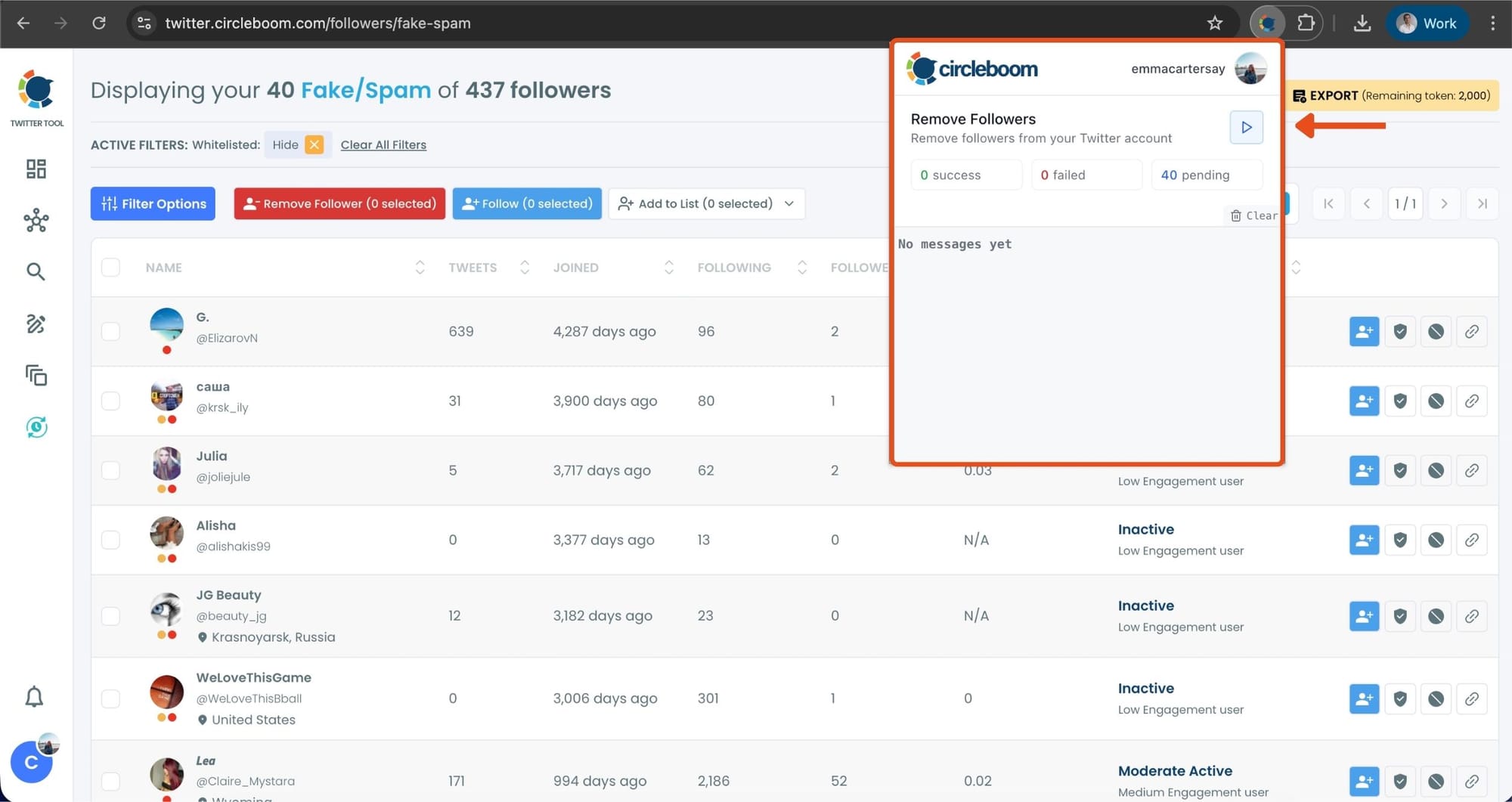
Step #6: After installing the extension, Circleboom will automatically add all your removal requests to the extension queue.
Click on the Start button to begin the removal process. The extension will process your requests and remove the selected followers.
That's it!
Your selected followers are now removed automatically.
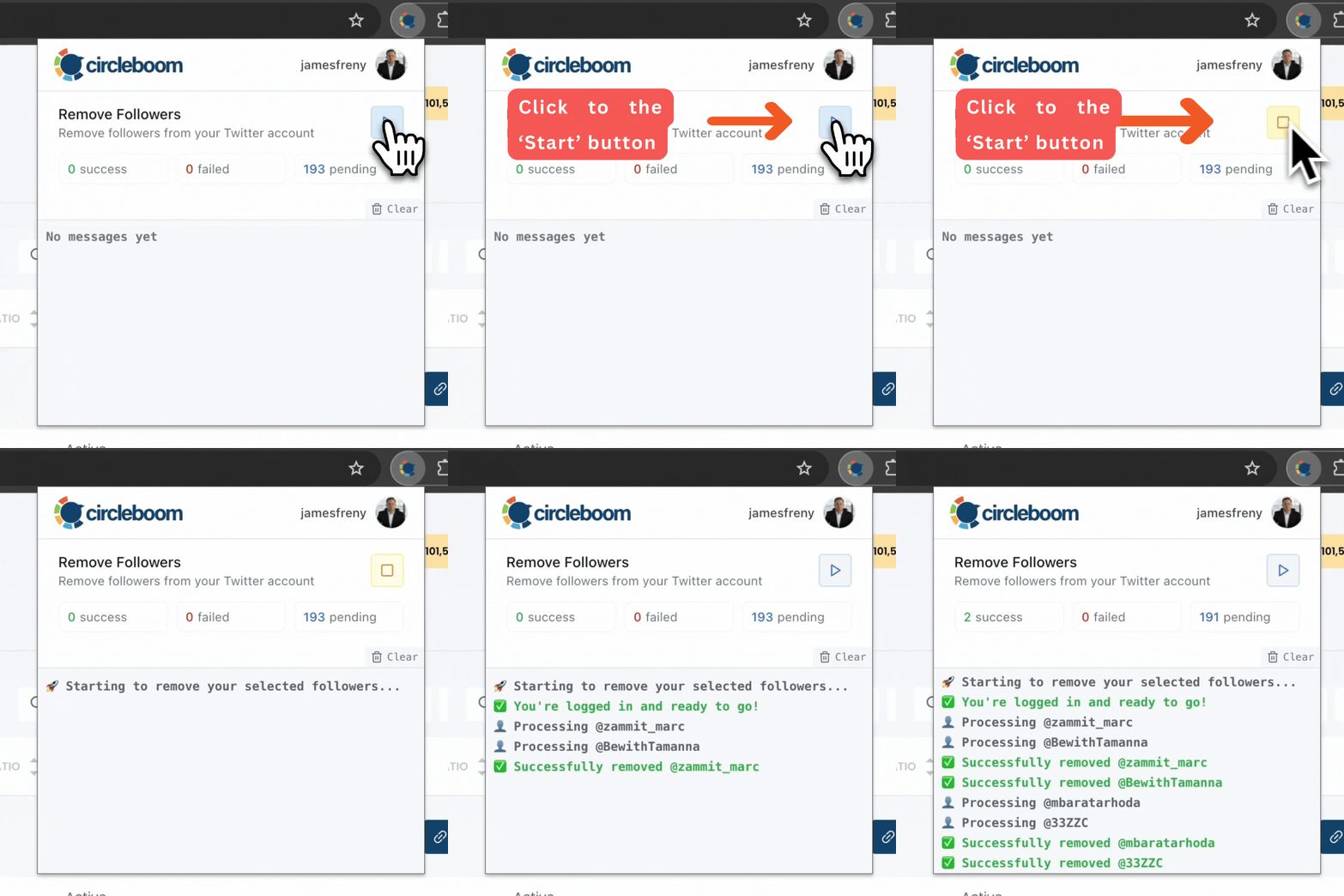
⚠️ Important Warning: Once the removal process begins, do not close your Chrome browser or the Circleboom tab. The tool will automatically remove followers in the background, but if you close the tab or exit Chrome, the process will stop.
If you need a more detailed guide check this video ⬇️
Once you have these accounts before you, you can also choose to add them to your Twitter lists or export them into CSV, both without having to leave the platform.
To prevent unwanted removal, Circleboom also includes a whitelist feature. You can read more about “How to Whitelist My Twitter Followers.”
How to Unfollow Bot Accounts You’re Following (Also Step-by-Step)
Removing bot followers is half of the fix. The other half is cleaning your followings.
Step #1: On the left-side menu, click on Followers / Following Management & Analytics.
A dropdown menu will appear. Under the Following section, select Fake/Bot Following to view the accounts you follow that are detected as fake or bot-like.
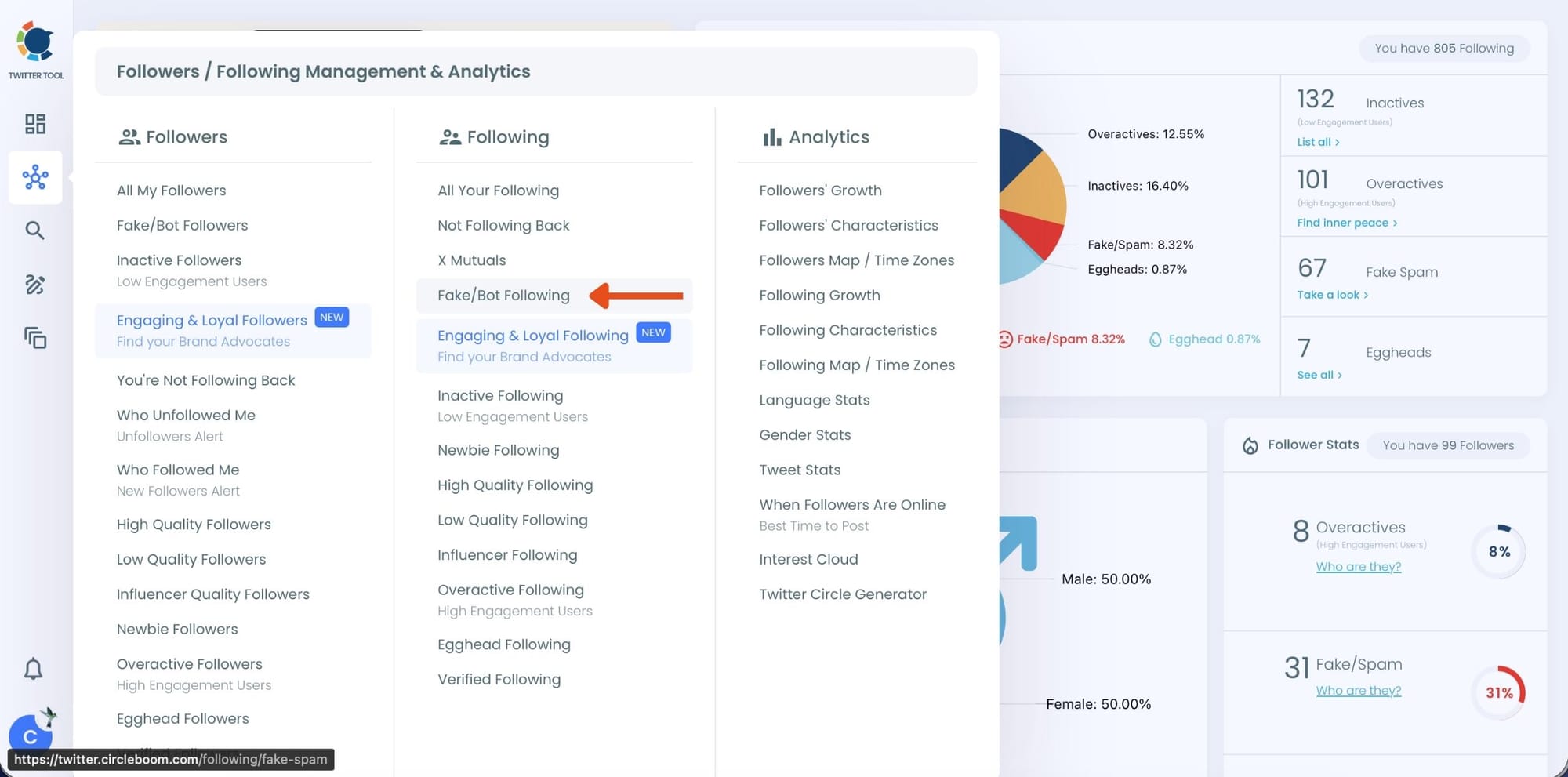
Step #2: You’ll now see a complete list of your Fake/Bot Following.
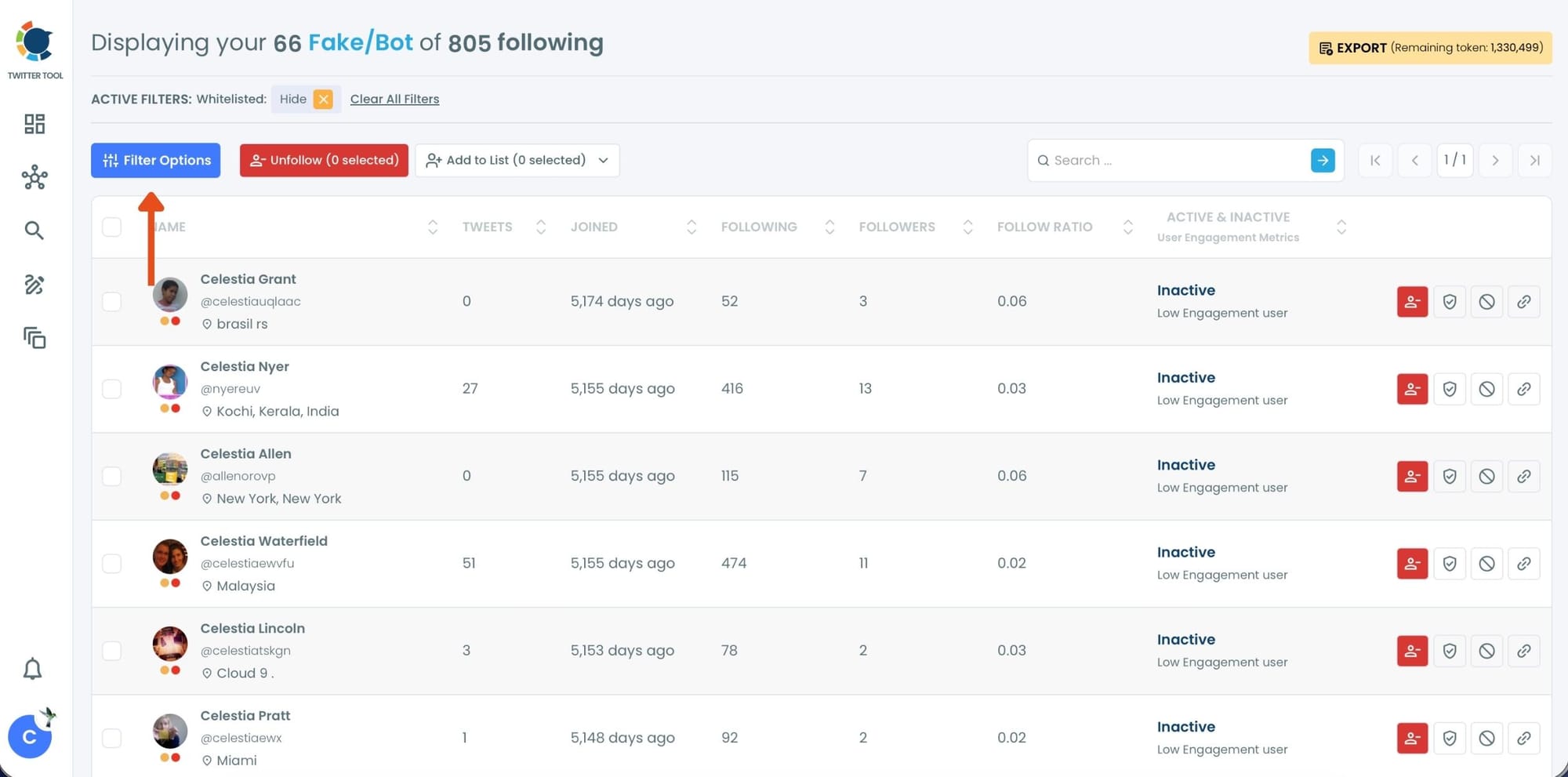
To narrow things down even more, click Filter Options at the top and use the filters on the left panel.
You can filter accounts by follower quality (inactive, overactive, eggheads), verification status, follower/following count, and more.
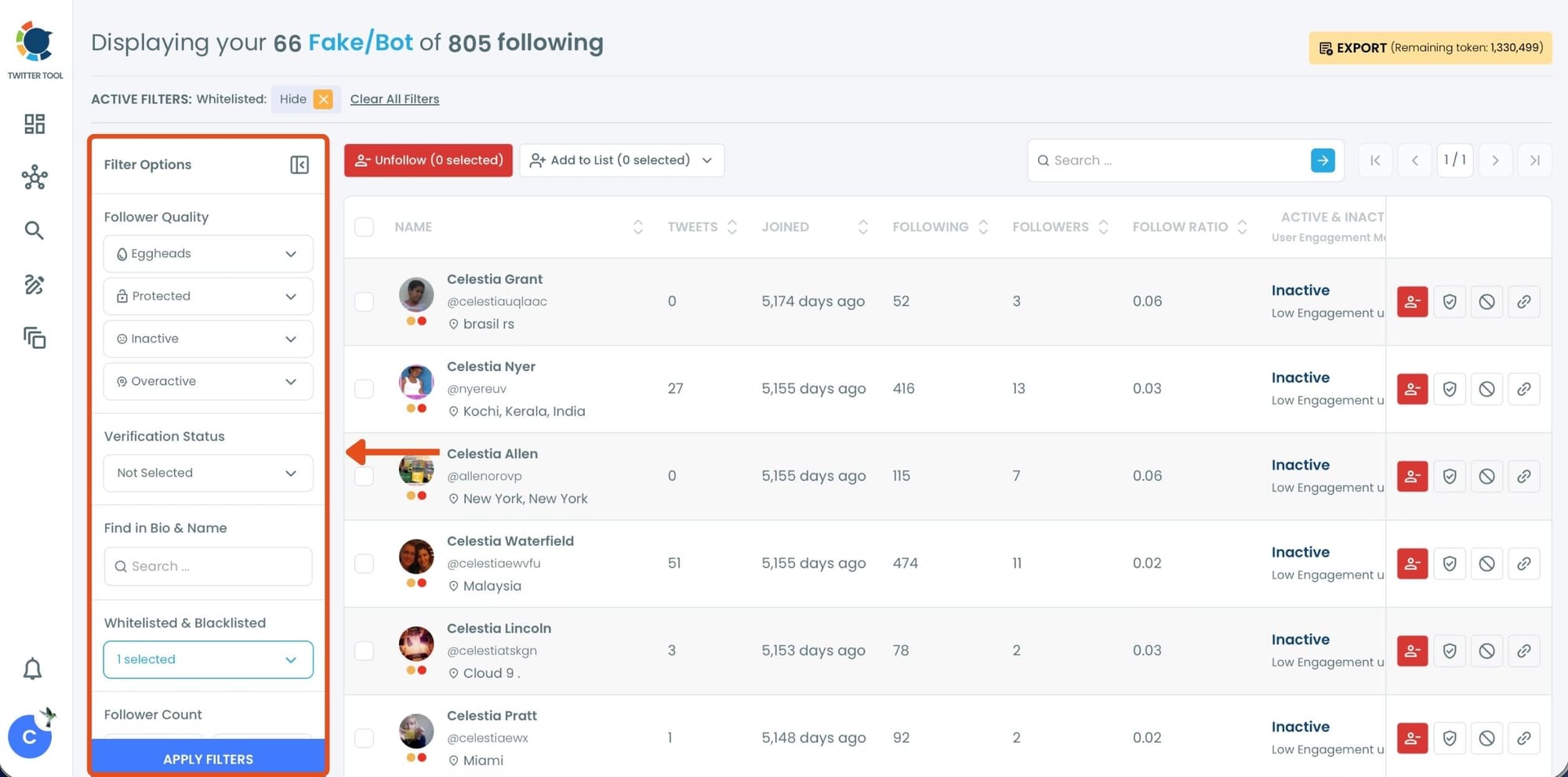
Step #3: Review the list and select the accounts you want to unfollow by checking the boxes next to their names.
After selecting the accounts, click the Unfollow button at the top to unfollow them in bulk.
Alternatively, you can unfollow accounts one by one by clicking the red unfollow icon on the right side of each profile row.
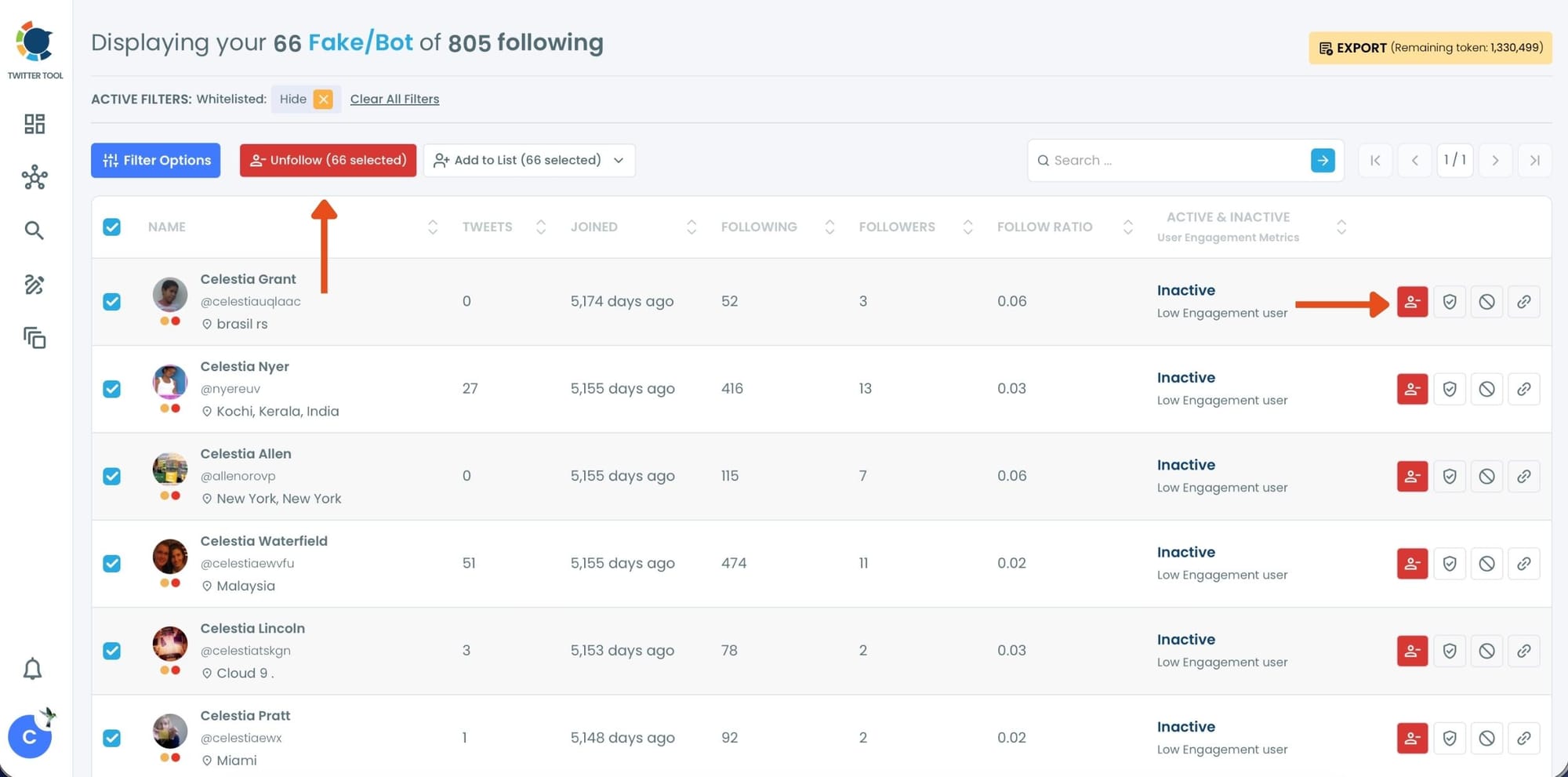
Step #4: A confirmation pop-up will appear asking if you want to unfollow the selected profiles.
Click “Unfollow selected profiles” to complete the process.
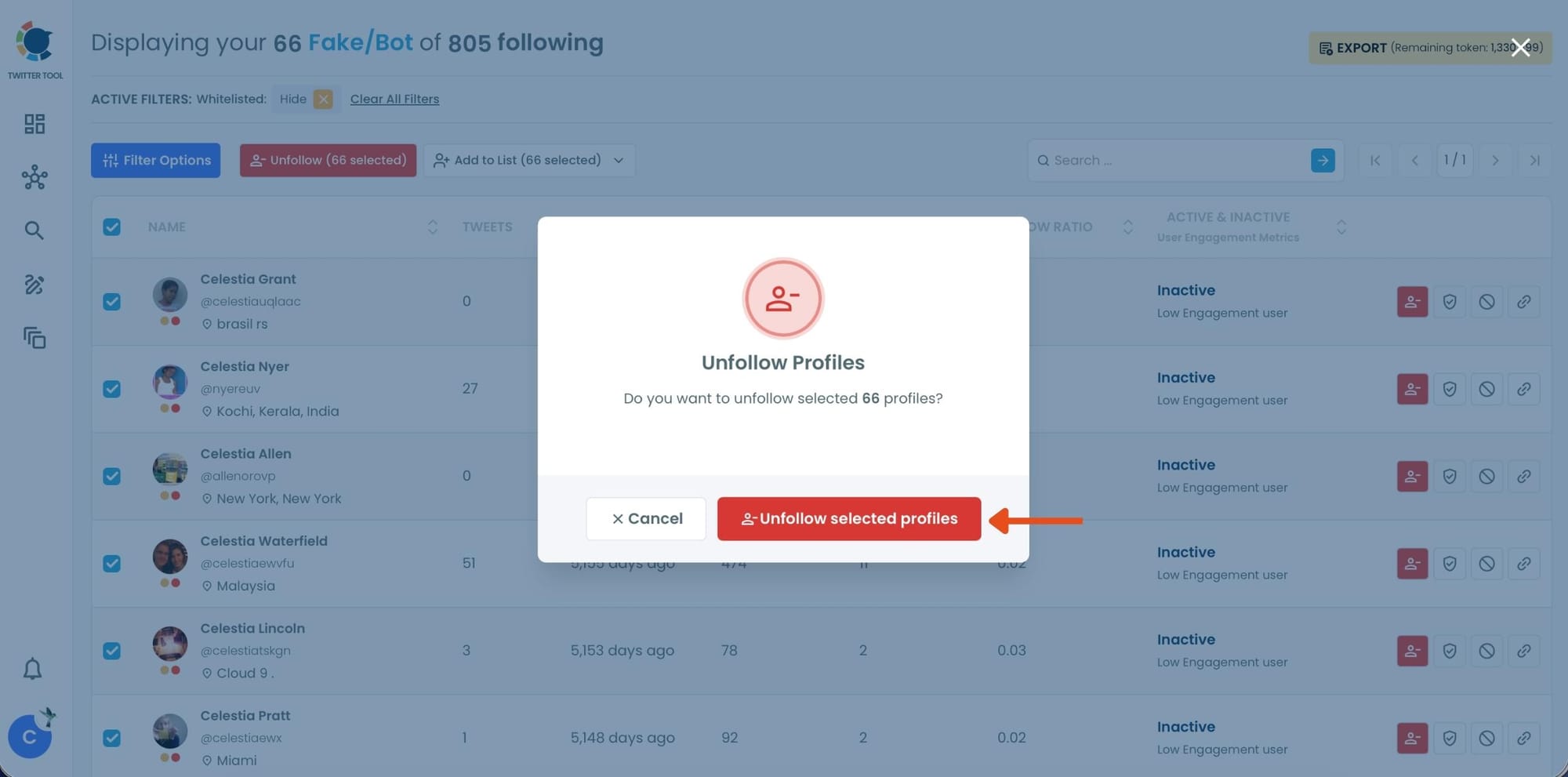
Circleboom automatically unfollows them, which helps disconnect your account from the bot network and reduces the chance of attracting the same issue again.
Extra Cleanup That Makes Your Account Feel “Real” Again
This is the part many people skip, but it matters a lot.
If you’re cleaning bots, you can also clean the other “silent killers” that hold accounts back:
➡️ Low-quality followers that never engage
➡️ Not-following-back accounts that hurt your follower/following balance
➡️ Inactive accounts that make your feed less valuable
Circleboom Twitter makes it easy to find and manage these too, which turns your cleanup into a full “account reset.”
Final Thoughts: You Don’t Stop Bots by Blocking Them. You Stop Them by Cleaning Your Account
Bots don’t follow you because you did one thing wrong. They follow you because they exist everywhere.
The real problem starts when your profile becomes the kind of account where bots can build up and stay.
That’s why the smartest move isn’t trying to fight bots forever.
It’s cleaning your follower list, cleaning your following list, and making your account attractive to real people again.
Once you remove bot followers and bot followings properly, you’ll notice the difference fast: your audience starts looking human again, your engagement becomes more meaningful, and your growth stops feeling fake.

)
