
A defensible Twitter mention-tracking operation in 2026 captures four parallel layers (direct @-mentions, indirect prose mentions, hashtag mentions, misspelled-name mentions) and de-duplicates across them into one daily review surface. Notification-only monitoring captures roughly 40% of total volume; the four-layer setup captures the full picture.
The setup runs from one Circleboom dashboard, takes 15-20 minutes for initial configuration, and produces a daily-summary email plus real-time alerts on negative-sentiment mentions.
What this guide gives you.The four mention layers most operators miss with notification-only monitoring.The configuration that captures direct, indirect, hashtag, and misspelled mentions.The daily-review cadence that prevents alert fatigue.
Built on Circleboom's verified Enterprise developer access on X. Start with the Keyword and Hashtag Tracker workspace.
Why Notification-Only Monitoring Misses the Picture
The "X notifications are the mention surface" framing collapses to ~40% coverage for most brands. Three structural reasons explain why.
The first is that notifications fire only on @-handle tags. Indirect mentions (brand name in prose without @) are 1.5-3x the volume of direct @-mentions for established brands and never produce notifications. The article on keyword and hashtag tracker fundamentals covers the upstream-tracker mechanics.
The second is the hashtag layer. Users tag #brand without the @-handle when they want to be discoverable in topic threads but not direct interactions. Hashtag mentions are entirely invisible to notifications. The article on trending hashtags dominating Twitter covers the hashtag-mechanics side.
The third is the misspelled layer. Users misspell brand names at 5-15% depending on brand complexity. Misspellings are invisible to notifications and to single-keyword tracking.
The Four Mention Layers
These are the layers the workflow operates on.
- Direct @-mentions. Notification surface; about 30-40% of total volume.
- Indirect mentions. Brand name in prose; 30-50% of total volume.
- Hashtag mentions. #brand and campaign tags; 10-20% of total volume.
- Misspelled mentions. Typos and variations; 5-15% of total volume.
The four layers compose into the actual mention picture. Operators capturing only the notification surface see roughly 40% of volume.
How to Set Up the Four-Layer Tracker Step by Step
The setup runs from one Circleboom dashboard. Five phases match the configuration.
Hands-on demo: how to search Twitter X accounts by keyword as the foundation of the tracker.
The flow, in order.
Phase 1: Connect
- Log in to Circleboom Twitter and connect your X account through the official OAuth handshake.
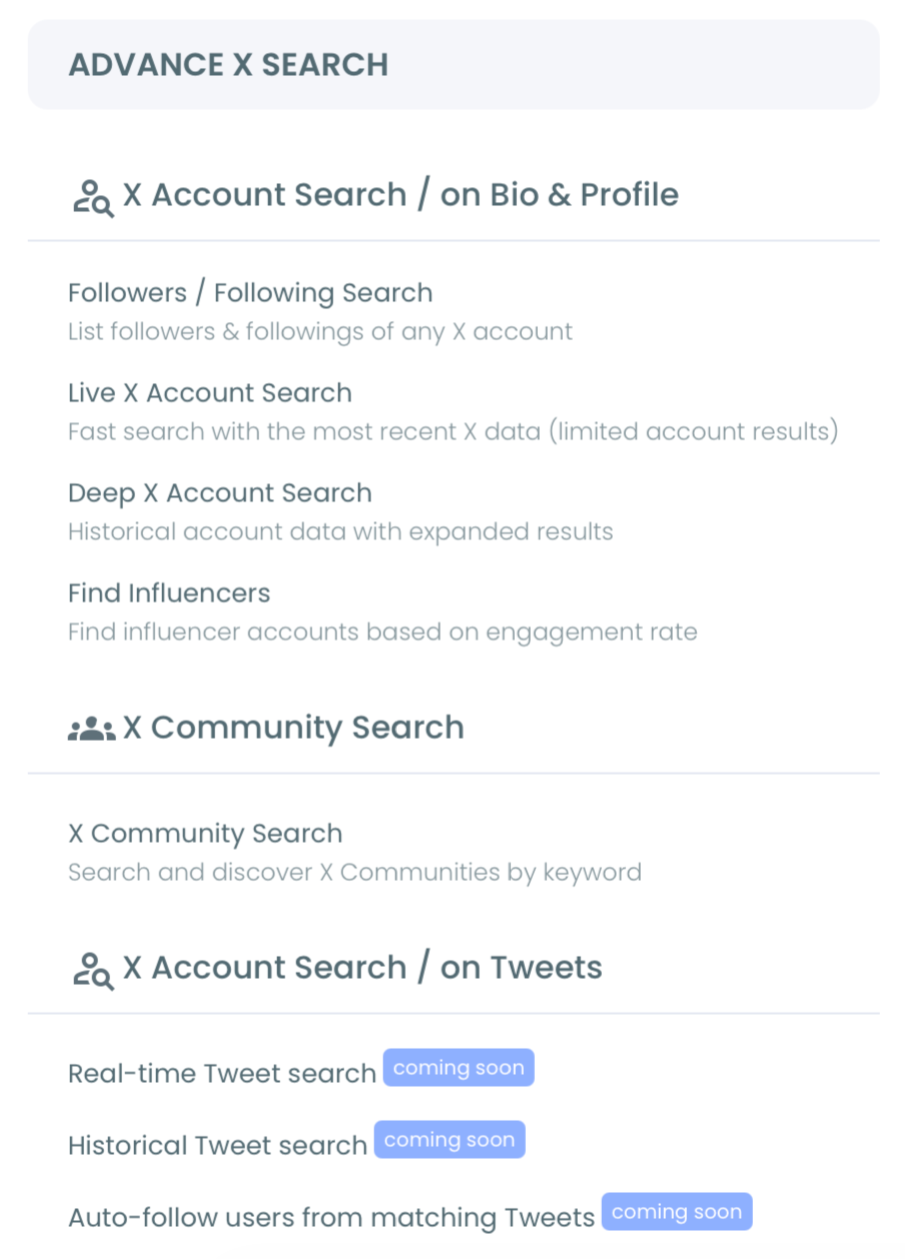
- Open the Advanced X Search menu for the tracker workspace.
Phase 2: Configure the four-layer queries
- Set the direct-mention layer with @-handle as keyword.
- Set the indirect-mention layer with bare brand name as keyword.
- Set the hashtag-mention layer with #brand and campaign hashtags as keywords.
Phase 3: Configure misspellings
- Add 3-5 common misspellings based on the brand name's complexity.
Phase 4: Activate review cadence
- Enable daily-summary email plus real-time alerts on negative-sentiment mentions.
That sequence captures the four layers. Each phase removes a different gap: connection enables access; layer queries surface volume; misspellings catch typos; review cadence prevents fatigue.
Quick recap:
- Connect through OAuth.
- Configure @-handle, bare name, hashtags as separate keywords.
- Add 3-5 misspellings.
- Activate daily-summary email plus selective real-time alerts.
What Each Layer Specifically Catches
The direct layer catches the customer-support and engagement signals notifications already surface. About 30-40% of total volume.
The indirect layer catches reviews, comparisons, complaints, and recommendations where users skip the @. The article on how social media listening increases customer advocacy covers the listening framing.
The hashtag layer catches campaign engagement and topic-adjacent mentions. Volume spikes during active campaigns. The article on how many people saw my hashtag covers the reach-side framing.
The misspelled layer catches the 5-15% of mentions that single-keyword tracking misses. Most operators are surprised by what shows up here, including partnership inquiries from accounts that misspelled the brand name.
Common Mistakes Operators Make
The first mistake is notification-only monitoring. The native surface caps coverage at 40%; layered tracking is the only path to full coverage.
The second is single-keyword tracking. Tracking only the @-handle or only the bare name still misses two of the four layers. The article on what are the best trending hashtags on Twitter covers a related discovery angle.
The third is real-time-only alerts. Alert fatigue kills response cadence within 2-3 weeks. Daily-summary email plus selective real-time alerts (negative sentiment, partnership keywords) solves the fatigue.
What to Do Next
The workflow is concrete: configure four layers, add misspellings, activate review cadence.
- Step 1: Open Circleboom and connect your X account.
- Step 2: Configure the four-layer keyword queries.
- Step 3: Add 3-5 misspellings.
- Step 4: Activate daily-summary email and selective real-time alerts.
- Step 5: Set the daily 20-minute review block on calendar.
→ Open the Keyword and Hashtag Tracker
 infocircleboom.com
What to Know Before You Start
How long does the initial setup take?
15-20 minutes for the four-layer configuration plus 3-5 misspellings. Real-time alerts activate within minutes of saving.
What is the typical volume increase?
Most brands see 60-150% volume increase moving from notification-only to four-layer. Established brands with high indirect-mention rates see 100%+ increases.
Should I respond to every mention?
No. Customer-support mentions get prompt responses; reviews get acknowledgment; passing mentions get monitoring without engagement. Selective response is the sustainable cadence.
Is the workflow safe under X's rules?
Yes. All tracker layers run through Circleboom's Enterprise developer access. No scraping, no browser scripts, no automation outside platform policy.