
Take an English-language account where 2,000 followers read Portuguese first. Once it adds AI-translated Portuguese versions of its best posts, replies start arriving from a group that used to scroll past without a word. Nothing about the ideas changed, only who could read them.
Bilingual tweets work when you write the post once, translate it for the second language your followers use, fit each version to your character limit and schedule each one for the hours its readers are online. Circleboom measures the language mix of your X followers through X's official Enterprise API and translates drafts with AI Tweet Generator inside X Post Planner.
→ See which languages your bilingual tweets need
The guide below covers each step, plus the timing math most accounts skip.
Why one-language tweets miss part of a Twitter audience
English-only posting fails quietly.
Followers who read another language first do not complain; they stop reacting, and a post that should have done well earns fewer replies than the last one with no visible reason.
The usual reaction makes it worse. Accounts rewrite the hook, change the posting time or switch topics, while part of the audience simply could not read the post in the first place.
Circleboom flags the symptom to watch for: engagement that varies a lot between posts of similar quality and topic. When part of the audience reads another language first, that gap can come from comprehension rather than craft.
The content takes the blame for what is a fit problem, and bilingual tweets never get considered because nobody measured the cause.
X itself treats language as a reader setting. Its help page on changing your language settings separates the display language of the app from the languages people choose to see posts in. A follower who picked Spanish there has already told X what they prefer, and an English-only feed asks them to work against that choice.
The fix is not to translate everything. Translation costs time on every post.
So the first job is to read your follower language split before writing bilingual tweets, and only then decide how much to invest.
I have seen accounts skip that step and give up on double posting quickly. The ones that last write for a group they have measured.
What Circleboom adds to bilingual tweets on X
Circleboom splits the job into three tools that hand off to each other, all inside one Circleboom Twitter account:
- Language Stats ranks the languages of your followers by share, with a separate tab for the accounts you follow.
- AI Tweet Generator inside X Post Planner translates a tweet into another language while keeping the account's tone.
- X Post Planner holds both versions, checks length and schedules each one for its own time.
Circleboom reads the language mix of your follower list and helps translate your drafts on X. Generated drafts never go out on their own, and every version waits for your review before it is scheduled.
That access runs through X's own channels. Circleboom is listed in X's Enterprise customer directory. The follower data behind your language split comes from the platform itself, not from a scraper that could put the account at risk.
Before translating a single post, map the languages your bilingual tweets should cover. The ranked breakdown tells you which language earns the second version and which ones are still too small.
Language Stats in motion: how a Twitter or X account finds out which languages its followers speak before any translation starts.
What topics does a second-language audience on Twitter care about?
The topics that land with a second-language group are often not the ones you would pick by translating your usual posts. Circleboom's advice here is direct: Interest Cloud helps you find topics within the audience's language context, rather than translating generic themes.
In practice that means two separate questions. Language Stats tells you who reads Spanish or Portuguese first. Interest Cloud tells you what your followers already care about, so the translated post has a subject they would have stopped for anyway.
Interest Cloud gives you your audience's interest terms. Pick one that fits the second-language group and use it as the topic you give the AI, instead of a phrase you would have written in English first.
The translation step then has better input. AI Tweet Generator works best with a specific topic, audience and tone, and Interest Cloud supplies the topic.
If you want a fuller walk through the interest data itself, the guide on how to check interests on Twitter covers reading it.
A translated post about the wrong topic is still the wrong post, just in better grammar.
How to keep your voice when AI translates a tweet on X
A translation that sounds like a textbook tells the reader a machine wrote it. The goal is a version that reads like the same account, just in another language, and that takes a little setup.
AI Tweet Generator learns from the account's previous tweets: writing tone, language patterns, common topics and tweet structure. Over time its drafts lean toward how the account already sounds, which is what keeps a translated post from reading like a notice.
The prompt does the rest. The generator's guidance is that specific input creates specific output, so a translation request works better with:
- The objective of the post, such as a reply, a click or a vote.
- The audience, named in plain words, like Spanish-speaking developers.
- The tone you want kept, casual or formal.
- Any fact or figure that must survive the translation unchanged.
Generate more than one variant and keep the one with the strongest first line.
The first line decides whether a reader stops scrolling, in any language.
Then review it like a careful editor would. Generated text can carry factual slips or phrasing that is off-brand, and the user is responsible for what publishes.
The Rephrase for Clarity and Fix Grammar quick actions help, but a native speaker reading the draft once is the check that catches what they miss.
Start with your best posts, not your newest ones. Circleboom's example for the generator is an account with 20 percent Spanish-speaking followers posting Spanish versions of its top three tweets each week.
A proven idea in a new language is a safer first test than a fresh idea in a new language.
How to fit two languages inside X's character limit
The space you have depends on the connected account. X Post Planner follows whatever character limit X permits for that account, so there is no single number that applies to everyone, and a draft that fits one account may not fit another.
That leaves three shapes for a bilingual post:
- One bilingual tweet when both versions are short enough to sit together inside the limit.
- Two separate versions when they do not, each scheduled for its own readers.
- A bilingual thread for a short series, where each tweet counts separately toward the limit and up to 25 tweets go out per thread.
The live character counter in the composer shows where each version stands while you type.
When a translation runs long, the Condense quick action in AI Tweet Generator shortens it while keeping the core message, and the generator's rule is that any draft over the account's limit must be shortened before it can publish.
Translations rarely come out the same length as the original.
For the background on what X allows, the guide to how many characters you can use on X explains the limits in more detail.
Some accounts eventually outgrow all three shapes and give the second language its own profile. If that day comes, you can manage multiple Twitter accounts from one dashboard, but it is a later decision, not a starting point.
How to write bilingual tweets for a mixed-language audience, step by step
The workflow runs in three phases, and each phase hands a finished piece to the next.
Measure the language split before writing anything
- Open Circleboom Twitter Management and sign in through X so Circleboom can read your follower list.

- Go to the Followers and Following menu and choose Language Stats under Analytics.

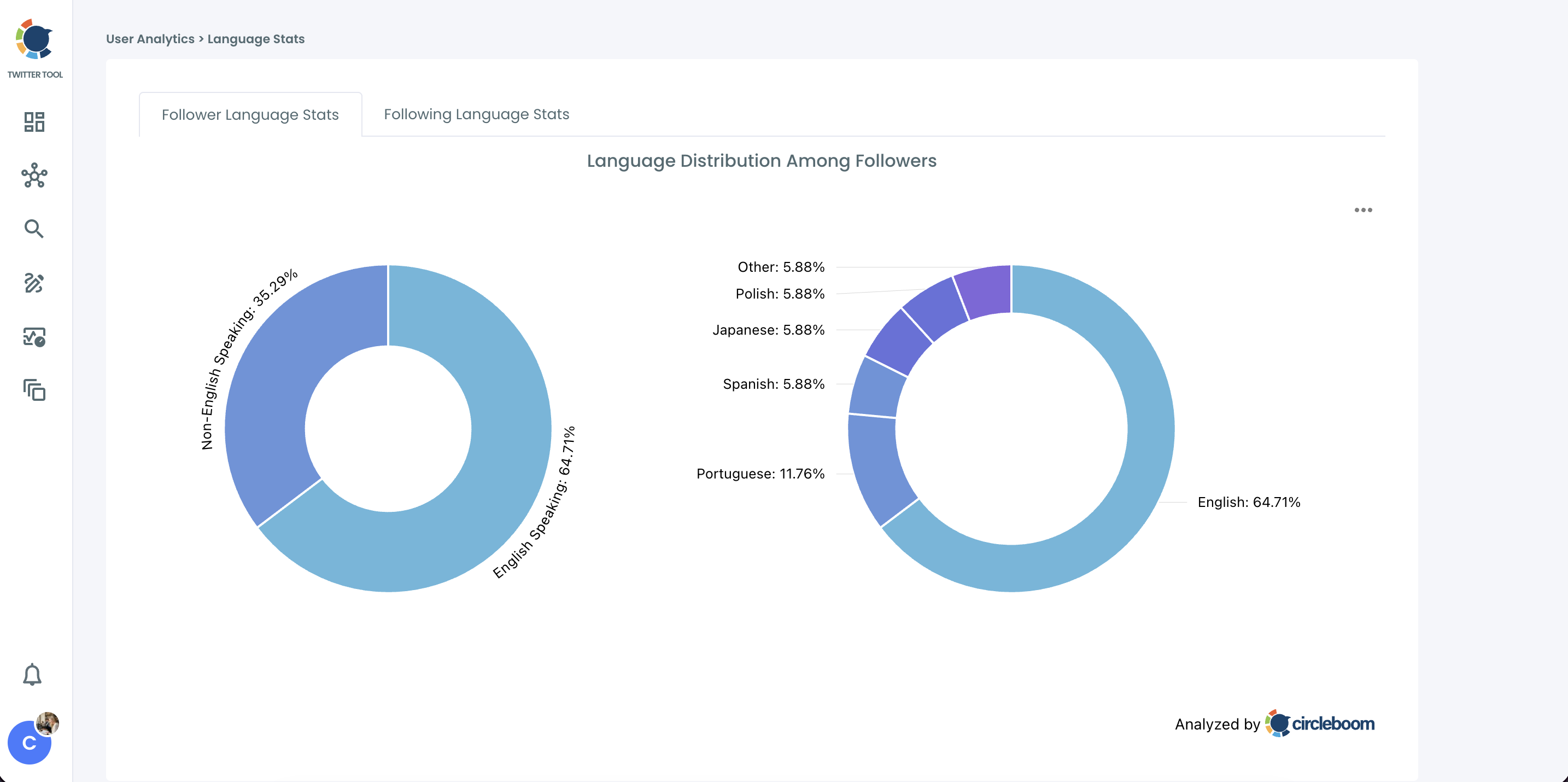
- Read the right-hand donut on the Follower Language Stats tab and note the largest language other than your main one, with its percentage.
Draft and translate each version
- Write the original tweet in X Post Planner, using the Interest Cloud topic you picked for that group.
- Open the AI assistant from the composer toolbar and ask it to translate the draft into the target language in the same tone. The AI Tweet Generator guide goes further into tweeting with it.
- Check each version against the character counter and apply Condense to any translation that runs over. Save each version to Collections if you are not scheduling right away, because generated drafts are not saved automatically.
Schedule each version for its group's hours
- Click Schedule on each version, use Find your best posting time or enter the hour that group is online, and confirm. Each version needs a slot at least 15 minutes in the future.
The order matters because each phase removes a reason to waste the next one. Measuring first stops you translating for a group that is too small, and translating before scheduling means each version gets a time chosen for its own readers instead of inheriting the original's slot.
Why the Spanish version should not go out in your US morning slot on X
A translated tweet only works if its readers see it, and that depends on when it goes live. Circleboom's guidance is to combine Language Stats with Followers' Map, Time Zones and Best Time to Post, so a localized tweet goes out when that language group is online.
Here is the math on an illustrative account:
| Figure | Value |
|---|---|
| Total followers | 10,000 |
| Read Spanish first | 3,500 |
| Share | 35 percent |
| Threshold | 30 percent |
At 35 percent, the Spanish group is above the 30 percent line where Circleboom's Language Stats guidance says adding Spanish versions, translated with AI, becomes worthwhile.
The open question is when to post them.
Say the account posts in English at 9:00 New York time. For most of the year that slot lands at 15:00 in Madrid, the middle of a working afternoon. Circleboom's example moves the Spanish version to 20:00 Madrid time instead, when that group is far more likely to be online.
Readers who are busy when the Spanish version lands never see the translation you worked on.
The when your followers are online guide explains how to read the activity data.
In the planner, Find your best posting time suggests six slots based on audience activity, so you can pick the one that fits the language group instead of the whole account.
Two scheduled versions of one idea, five hours apart, reach two audiences at their best moment.
One version at one time reaches the larger group and asks the smaller one to catch it late.
Your bilingual tweet checklist for X
The mistake I see most often is translating every post from day one.
The accounts that keep bilingual tweets going pick one group, one series and one slot, and widen only once the numbers back it up.
Before your next post, run through this:
- Check the largest single language on the Follower Language Stats tab, and its share.
- Pick a topic from Interest Cloud for that group.
- Write, translate and condense until each version fits the account's limit.
- Schedule the second version for its group's hours, not the original's slot.
I keep that list short on purpose. Every extra step is a reason to stop after two weeks.
→ Get the language split behind your next bilingual tweet
Bilingual tweet FAQ for mixed-language followers
How many followers need to speak the second language before it is worth it?
Circleboom's Language Stats treats a non-primary language as a significant minority at roughly 15 to 25 percent of followers, and 30 percent or more as a strong case. Below that, the better move is to grow that language audience first through search and growth workflows on X.
How do I tell whether my bilingual tweets are working?
Compare the second-language posts with your regular ones in Circleboom's Post Analytics, looking at replies and reposts from the same period. Then recheck Language Stats after a few weeks of posting, since a growing share of that language shows the series is reaching new readers.
What if my Twitter followers speak three or more languages?
Translate for one group at a time, starting with the largest named language on the right-hand donut. Add a third language only once it passes the same share on its own, because each extra version adds writing time to every post.