
Most attempts to find developers on X fail in the same way: they are long, unsized and half dormant. A search for "developer" returns job boards, bootcamps and brand accounts next to real engineers, with no way to tell a 2,000-follower specialist from a million-follower company page. This guide shows how to find developers on Twitter with stack-based searches, size the results and keep only the people who still write code.
How do you find developers on X?
Search the stack, not the job title. Circleboom's Deep X Account Search matches language, framework and tool keywords against X bios and past tweets through X's official Enterprise APIs, then lets you filter the list by follower range and activity.
→ Build a sized list to find developers on X
Why a "developer" search on X returns the wrong list
When I build a developer list for a launch, the first search is never the one I keep.
The word most people type first is the word engineers use least.
Developers tend to describe what they build: a language, a framework, a project name, a city. A job title is more common in recruiter bios than in engineer bios.
The second problem is size. A generic search hands you accounts of every scale in one pile, and the biggest accounts dominate the first screens. For outreach, partnerships or hiring, the mid-size engineers who reply to messages are usually the better target, and they sit far down a list sorted by fame.
The third problem is time. Plenty of accounts that match a keyword stopped posting long ago. A list that looks full can be half empty once you check who is still active.
Each of these problems has a filter, but only if the tool searches accounts rather than posts.
X's native search is built around posts, so you can read what people said, yet you cannot sort the people who said it by size or activity. You can search X for developers by language and framework once the search runs on bios and tweet history together.
A plain bio search helps too. The search Twitter bios and profiles page shows that route, and it works well when the stack term is likely to sit in a profile.
A keyword map for developer searches
A keyword map is a short list of the terms a developer in your target stack would use, grouped by type, with each term run as its own search. It replaces one vague search with four precise ones, and it does more for a developer list than any single filter.
Build the map from four kinds of terms:
- Language: the language name and its common nickname.
- Framework: the framework or library the role depends on.
- Tool: a runtime, database or build tool only practitioners mention.
- Role or problem: a narrower role word or a problem word, such as "latency".
For a team hiring for an Elixir backend role, the map might read: "Elixir", "Phoenix", "Postgres", "distributed systems". Four searches, four result sets.
The developers who appear in two or more of those result sets are your strongest matches.
Why separate searches beat one long query
That cross-reference is the point of running terms separately. Someone who has written about the language, the async runtime and the database behind it has shown sustained interest, not one passing mention.
Each term type catches a different kind of developer. A language term finds people who put it in their bio. A tool term finds practitioners, because only people who use a runtime or a build tool every day tweet about its quirks. A problem term finds the engineers who answer questions, which is often the group you most want to meet.
Write the map down. A keyword and filter combination that produced good engineers once will produce them again next month, and a documented search is easier to hand to a teammate.
The post on how to find people with the same interests on X covers the same idea for any niche.
One limit of a keyword map: it finds people by words, not by what they said with them. To read the posts behind a match, run the same term through historical tweet search, which returns the tweets and the accounts that wrote them.
How Circleboom searches bios and past tweets for developers
Circleboom finds developers on X with Deep X Account Search, which scans account bios and historical tweet content for a keyword and returns up to 5,000 matching accounts per search across up to 50 pages. Because it reads tweet history, it includes the selective posters that a recent-activity search misses: specialists who post only when they have something worth saying.
Circleboom works as an X Enterprise API partner, so the data comes from X's own records rather than a scraper that skips accounts without telling you. That matters when the list feeds a hiring pipeline or a developer-relations program.
The easiest way to find developers on Twitter with it is to run your keyword map term by term, then filter each result.
A keyword search from niche term to ranked account list, with the columns you use to judge reach and fit.
Unlike a manual search that shows posts one tab at a time, the results arrive as a sortable table you can filter, select from and act on in one place.
Actions on each developer row in the X results
Each row carries its own actions. You can:
- Follow one account.
- Whitelist it to protect it from later bulk actions.
- Blacklist it so it stops showing up in future workflows.
- Open the profile in a new tab.
Every column header sorts the table, which is the quickest way to see the smallest or newest accounts in a stack before you filter.
A small detail that trips people up: Follow Ratio shows N/A when an account follows nobody. That is common for project and release accounts, which is one more way to spot a brand among the people.
How to find developers on X step by step
The process runs in two phases: open the deep search with your first keyword, then narrow the list to working developers and act on it.
Open the deep search with your first stack keyword
- Log in to Circleboom with the X account that will follow or list the developers you find.
- Go to the Advanced X Search menu and choose Deep X Account Search.

- Type one term from your keyword map into the search box and start the search. Run one term at a time so you can compare result sets later.
Narrow the list to developers who still write code
- Review the results table. Each row shows the account's tweet count, join date, following and follower counts, follow ratio and an Active, Moderate Active or Inactive label.
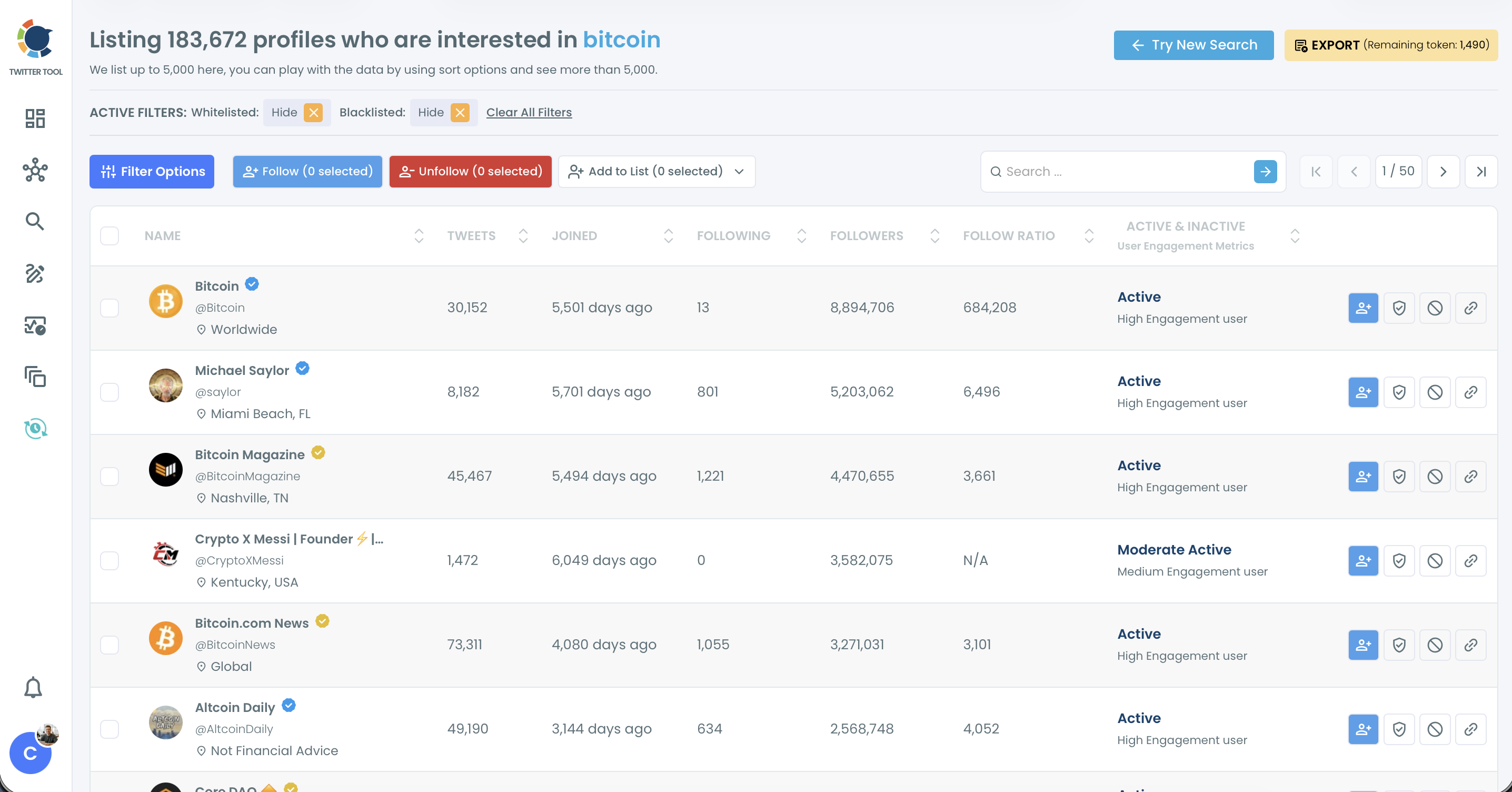
- Open Filter Options and set a minimum and maximum follower count, exclude Fake/Bot and Eggheads, and use Find in Bio & Name for a second stack term. Filters combine with AND logic, so each one tightens the list.
- Select the accounts that pass review and choose Follow or Add to List. Bulk follows run at 50 every 15 minutes, up to 400 a day, and the rest of the queue continues the next day.
Searching one term at a time keeps each result set clean enough to compare, and filtering before you select means every bulk action lands only on accounts you have already judged.
Skip the filter and the follow goes to brands and dormant profiles.
Now you have a filtered list. The next decisions are about size and activity, the two places where most attempts to find developers on X lose their quality.
How to size developers by follower count on X
Set a follower band rather than a minimum alone. Sizing is what turns a search that can find developers on Twitter into a list you can work through.
A band such as 3,000 to 15,000 followers keeps working engineers with an engaged audience and drops both the brand-new accounts and the famous ones that rarely answer a message.
The Follower Count filter takes a minimum and a maximum, so the band is two numbers. Pick the band by goal, and expect to adjust it after the first look:
- Peer network: a lower band, where developers reply to each other.
- Developer relations: a middle band, people with an audience who still engage.
- Launch amplification: a higher band, accepting slower replies.
Two other filters help sizing. Follow Ratio separates accounts many people follow from accounts that follow everyone back. Tweet Count removes profiles with almost no posts. The post on how to filter accounts by follower count goes further on choosing a band.
A sized list beats a long list, because every account on it is someone you can reach.
Treat the band as a guess. If a niche stack returns too few accounts, widen it before deciding the developers are not on X. A narrow framework term returns far fewer matches than a broad word like "software", and a tight band on a small set can leave you with nobody.
The order matters too. Size first, then judge quality. A follower band removes the accounts you would never contact anyway, so the time you spend reading profiles goes to people who fit.
Why some developers in your results look inactive
Some developers look inactive in the results because Deep X Account Search matches historical tweets, while the activity label reflects how the account posts today. An engineer who wrote about a framework two years ago can match the keyword and still be labelled Inactive now.
That is a feature for research and a risk for outreach.
A dormant account may have changed focus, changed jobs or stopped using X. For a reading list, an inactive expert can still be worth keeping. For a message or a follow, you want current activity.
Three checks handle it:
- Exclude Inactive in the Follower Quality filter when activity matters.
- Cross-check a short list against Live X Account Search, which is anchored to current activity.
- Read the latest posts of anyone you plan to contact.
For that last check, X's own advanced search narrows posts by account and date, so you can see what one developer posted recently. The post on how to see if someone is active on Twitter lists more signals.
A match on old tweets is a lead, not a verdict. Review it before acting on it.
Inactive does not always mean useless.
Some long-time engineers post rarely now but still read everything, and they often know who else is worth meeting. If your goal is listening rather than outreach, keep a few of them on a reading list and let the label inform the next step instead of deciding it.
Which developer search on X fits your goal
Most readers arrive with one of four situations. Pick yours:
- If you know the stack, run each keyword map term on its own and keep the accounts that repeat.
- If the list is too long, set a follower band and exclude Fake/Bot, Eggheads and Inactive before you look at a single profile.
- If you need proof of expertise, read the posts behind the match before you follow or message anyone.
- If you want to follow slowly, add the reviewed accounts to a private X List first and follow from that list over time.
Each branch starts from the same search; only the filters and the next action change.
In my experience the second branch is where most lists go wrong: people skip the band, follow from a raw result and wonder why nobody follows back.
→ Pull your first filtered list of developers on X
FAQ on finding developers with Circleboom
Can I pull the developers who follow a popular dev-tool account?
Yes. Circleboom's Followers / Following Search lists the followers of any public X account, so the audience of a framework or dev-tool account becomes a filterable list of its users. Use it to search Twitter followers. The post on how to find people who follow a certain account walks through the workflow.
Is there a developer community on X I can join?
Often there is. Circleboom's X Community Search finds X Communities by keyword and filters them by member count, creation date and open or restricted access; you join from the community's own page on X, since the tool is discovery only.