
One bio search for "co-founder," a follower range and a city can turn a 5,000-row result into a shortlist of founders you can review in an afternoon. Add three quality filters and the fake and week-old "founder" accounts drop out before you ever follow anyone.
This guide walks through that exact setup on X, from the first keyword to an exported list.
By hand: hours of scrolling hashtags and opening one profile at a time, with no filter for the founders you find. With Circleboom: Circleboom searches X bios and past tweets for founder terms and returns up to 5,000 matching profiles through official X Enterprise APIs, ready to filter by followers, location and join date.
→ Search X bios to find startup founders
Below: the steps, the three filters that clear out fake founders, and when a live search is the better pick.
Why a famous-founders list on Twitter is the wrong starting point
Most people who set out to find startup founders on Twitter start with the obvious names. They follow a roundup of well-known founders, browse #startupfunding and save the accounts that keep showing up in their feed.
That produces a list, but it is a list of the founders everyone else is already pitching.
When founder outreach on X stalls, the cause is usually the same: the list was built from attention, not from fit.
A hand-picked list of investor Twitter accounts to follow is a fine way to learn how the market thinks. It is a poor way to build deal flow or a prospect list, because those accounts are a few dozen people with full inboxes.
What a seller, scout or partnerships lead needs looks different:
- Hundreds of founders who describe themselves that way in their bio.
- A way to keep only one vertical, stage or city.
- A way to remove fake, bot-run and brand-new "founder" profiles.
- An exportable result that can feed a CRM, a list or an ad audience.
X's native search can find posts with "founder of" in them, but it cannot filter the people behind those posts by follower range, join date or quality. That gap is the reason to find startup founders on Twitter with a bio search instead of the search bar.
What a deep account search on X does for founder prospecting
Deep X Account Search is the Circleboom feature that matches a keyword against X bios and historical tweets, then lists every matching account in one sortable, filterable table.
For founders, that means "co-founder" in a bio is enough to put someone on your list, even if they post twice a month.
Circleboom is an official X Enterprise Developer company, so the profile data comes from X's own records through official APIs. Scraping-based collection can drop rows or misread fields when a page fails to load, which is exactly the kind of gap that hurts a prospect list.
A search returns up to 5,000 accounts across up to 50 pages. Each row shows:
- Name, @username and location.
- Tweet count and join date.
- Following, followers and follow ratio.
- An activity label: Active, Moderate Active or Inactive.
That historical reach is what makes it useful when you want to find startup founders on X who rarely post. A technical founder heads-down on a product may tweet once a month, which keeps them out of any search tied to this week's activity.
Their bio still says "co-founder," and that is all a bio search needs.
From the same screen you can follow, add to a list, whitelist, blacklist or export. That is why the tool suits structured prospecting rather than a quick look.
You can open the X account finder and run the steps below as you read.
Profile picking on X, shown on screen: how Circleboom's Smart Search tools turn a keyword into a list of accounts worth following.
Which founder keywords to search on X
When you find startup founders on Twitter by bio, the keyword you start with decides who appears, because founders do not describe themselves in one standard way. A bio search matches the exact words people chose, which means a single term always misses part of the market.
These terms cover most of the ground:
- "founder" and "co-founder," the most common self-descriptions.
- "CEO," which catches founders who lead with their title.
- "building," as in "building X for Y," common among founders in public.
- "stealth," used by founders who have not announced a product yet.
Run each term as its own search rather than stuffing them into one box.
Separate searches keep the result sizes readable, and a founder who shows up under two terms is usually a stronger match than one who shows up under only one.
Check each result's Name column before moving on. When a term pulls in the wrong crowd, such as "CEO" returning large company executives, tighten it with a follower range in the next step instead of dropping the term.
How to find startup founders on X, step by step
The process runs in three phases: search, narrow, then act.
Start the search from founder terms in bios
- Open Circleboom Twitter and sign in with the X account you plan to use for outreach.
- Go to the Advanced X Search menu and choose Deep X Account Search from the account search tools.

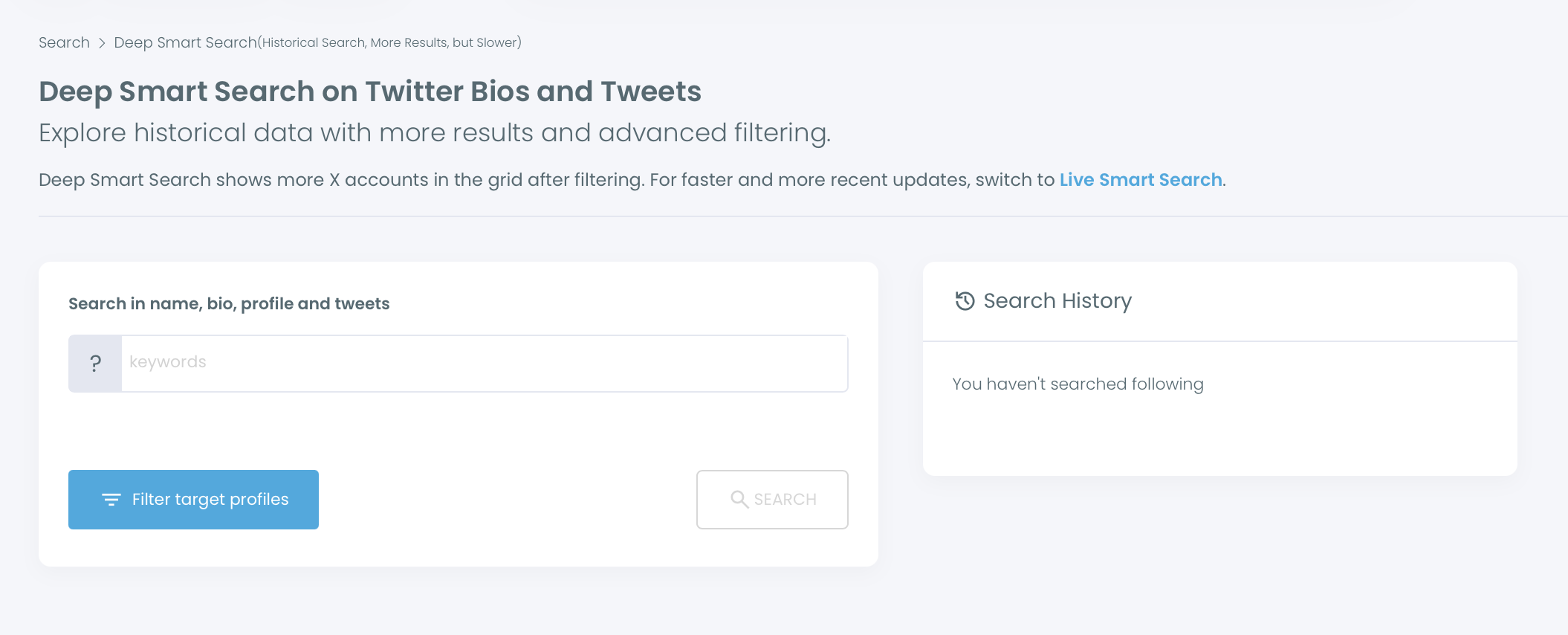
- Type a founder term such as "co-founder" or "founder" into the keyword box, which searches name, bio, profile and tweets, then press Search.
Narrow the result to the founders you can use
- Open Filter Options and set a Follower Count range with Min and Max values, so the list leans toward early-stage founders instead of household names.
- Add your vertical in Find in Bio & Name, for example "fintech" or "devtools," to keep only founders who name that market in their bio.
- Enter a city in Filter by Location when meetings or local events matter, then sort by the Followers or Joined column to review the strongest rows first.
Act on the shortlist without overdoing it
- Select the founders who pass review with the row checkboxes, after opening any profile you are unsure about.
- Add the selection to an X List, follow it or export it from the bulk action row: lists keep a watch group, Follow runs paced at 50 every 15 minutes up to 400 a day, and Export downloads a CSV using search tokens.
Each phase shrinks the pool before the next one acts on it. Searching by bio finds the people, filtering keeps the ones who fit, and only then does anything touch your account or your token balance.
The whole run, in four lines:
- Search one founder term per query.
- Narrow by followers, vertical and city.
- Review the profiles you are unsure about.
- List, follow at a paced rate or export.
Three filters that remove fake founders on X
"Founder" is one of the most borrowed words in X bios. Spam accounts, crypto promoters and freshly made AI personas all use it, so any attempt to find startup founders on Twitter needs a quality pass before you trust the result.
Three filters in the same Filter Options panel do most of that work.
Fake/Bot for spam-like behavior
The Fake/Bot option under Follower Quality flags accounts with suspicious or spam-like behavior. Turn it on first. It removes the obvious offenders without you opening a single profile.
These labels are computed signals, not verdicts. A real founder who posts in bursts can trip a signal, and a careful fake can slip past, so the filter is a first pass, not the last word.
X itself bans fake personas, including stock, stolen or AI-generated profile photos, under its authenticity rules, but enforcement takes time and your list needs to be clean today.
For a single doubtful account, a separate Twitter bot checker gives a second opinion before you reach out.
Eggheads for faceless profiles
The Eggheads option drops accounts with no profile photo. A founder who is building in public almost always shows a face or a logo, because that is how people recognize them in replies.
A blank avatar next to "Founder | CEO | Investor" is a strong hint the account was made to farm follows.
Join date for brand-new founder accounts
The Join Date filter takes an earliest and a latest date, and it is the filter most people skip.
Set the latest date to a few months back, and every account created after that drops out, including the batch of "founder" profiles that appeared last week.
A founder account younger than the company it claims to run deserves a second look.
The Joined column shows account age in days, so you can also sort by it and read the newest accounts last. The guide to search Twitter accounts by join date walks through this approach step by step.
For one account at a time, the Twitter join date checker gives the creation date in a single lookup.
Used together with AND logic, the three filters cut the noise hard. Start with all three, then loosen one if the list looks too thin, because over-filtering early can hide good founders too.
Should you use a live or deep search to find founders on X?
Use Deep search to build the list and Live search to catch who is posting right now. The two answer different questions, and a founder workflow usually needs both at different moments.
| Question | Better mode | Why |
|---|---|---|
| Who are all the founders in my niche? | Deep | Scans bios and past tweets, up to 5,000 rows |
| Who is posting about a launch today? | Live | Anchored to recent activity |
| Which quiet founders post rarely? | Deep | Finds accounts outside this week's feed |
| Whom should I reply to this morning? | Live | Shorter list of active voices |
Deep search has one blind spot worth knowing.
At 5,000 results, the volume can feel complete while including founders who were active in a past cycle and have since gone quiet. Running a Live search on the same terms helps you tell the two groups apart.
For how the search modes and the grid behave in practice, see Smart Search and Grid Power Search on Circleboom.
Once the list is built, pick a short watch group of founders and investors. You can then track someone's followings on X to see who they start paying attention to.
The cost of skipping the filtered list
Without a filtered list, founder outreach on X runs on whoever the feed shows you: the famous, the busy and a steady share of fake profiles. Every reply, follow and message you spend there has a low chance of landing.
The fake accounts are the quiet cost. Every reply sent to a bot-run "founder" profile is effort you never get back, and every follow it gets from you makes your own following list a little less credible to the real founders who check it.
With a filtered list, you spend the same effort on founders who match your vertical, have been on X long enough to be real and are active enough to answer.
I would rather reach 150 of those than 1,500 of the other kind.
Circleboom's search runs through X's own data as an official Enterprise partner of X, and its bulk actions move at a pace designed to protect your account.
The part left to you is the keyword.
When you find startup founders on Twitter this way, the hard part is done before the first message goes out.
→ Build a filtered founder list on X in one search
Founder search FAQ for X
Is it safe to follow a few hundred founders at once on X?
It is safe when the pace is controlled: Circleboom follows 50 accounts every 15 minutes up to 400 a day and resumes the rest of the queue the next day.
X sets its own follow limits and treats aggressive following as a rule break, so a reviewed list beats a big one. The guide to bulk follow Twitter accounts covers the confirmation step.
Can I use my founder list as an X Ads audience?
Yes. Export the filtered list as a CSV and upload it in X Ads Manager as a custom audience. Founders in a target city, active recently, with bots and new accounts removed, usually match a niche far better than X Ads interest categories do.
Does exporting the founder list cost anything?
Export uses search tokens, and the number used grows with the size of the export. The remaining balance shows before and during the export, so you can trim the list first if the balance runs low.