Most podcasters assume every platform needs its own upload. I believed it too, and for months each episode clip cost me three uploads, three captions and three logins.
The opposite turned out to be true for my three channels: I can cross post video from X to LinkedIn and Facebook in a single send. One clip, one caption, one send, as long as I used the right composer and cut the file to the strictest platform's rules.
Manual: about 15 minutes per clip, uploading the same file to X, then LinkedIn, then Facebook, and rewriting the caption each time. Circleboom Publish: one upload in its universal composer sends the clip to your X account, LinkedIn and Facebook Page together, scheduled at a time each audience is online.
→ Cross post video from X to LinkedIn and Facebook in one send
One rule decides whether it works: cut the clip to X's limits first.
Why my podcast clips kept dying on LinkedIn and Facebook
My show goes out every week. From each episode I cut three short clips, and X was always where they landed first, because that is where my listeners talk back.
LinkedIn and Facebook got the leftovers. Some weeks I posted the clips there two days late. Some weeks I didn't post them at all.
The math explains why. Three clips a week across three platforms is nine uploads. At five minutes per upload, counting the login, the caption rewrite and the wait for the file to process, that is 45 minutes a week of pure logistics, before I had answered a single comment.
So I did what most people do with a chore: I skipped the platforms that felt optional. My LinkedIn audience, the guests' colleagues and the industry people who book speakers, saw almost none of it.
The clips weren't failing on LinkedIn and Facebook. They were never getting there.
The tool I assumed would fix it
My first attempt to cross post video from X to LinkedIn and Facebook went through the video cross-posting flow I had seen for short videos. I uploaded a clip, looked for X and LinkedIn in the list of destinations, and they weren't there.
That flow was never built for my mix. Circleboom's cross post videos engine shares one short video across Instagram, Facebook, YouTube and TikTok, from any of those four entry points. It does not cover X or LinkedIn at all.
I lost an evening to that assumption. What I needed was a way to cross post video from X to LinkedIn and Facebook without three separate sessions, and that lives somewhere else.
Which Circleboom flow carries a video from X to LinkedIn and Facebook
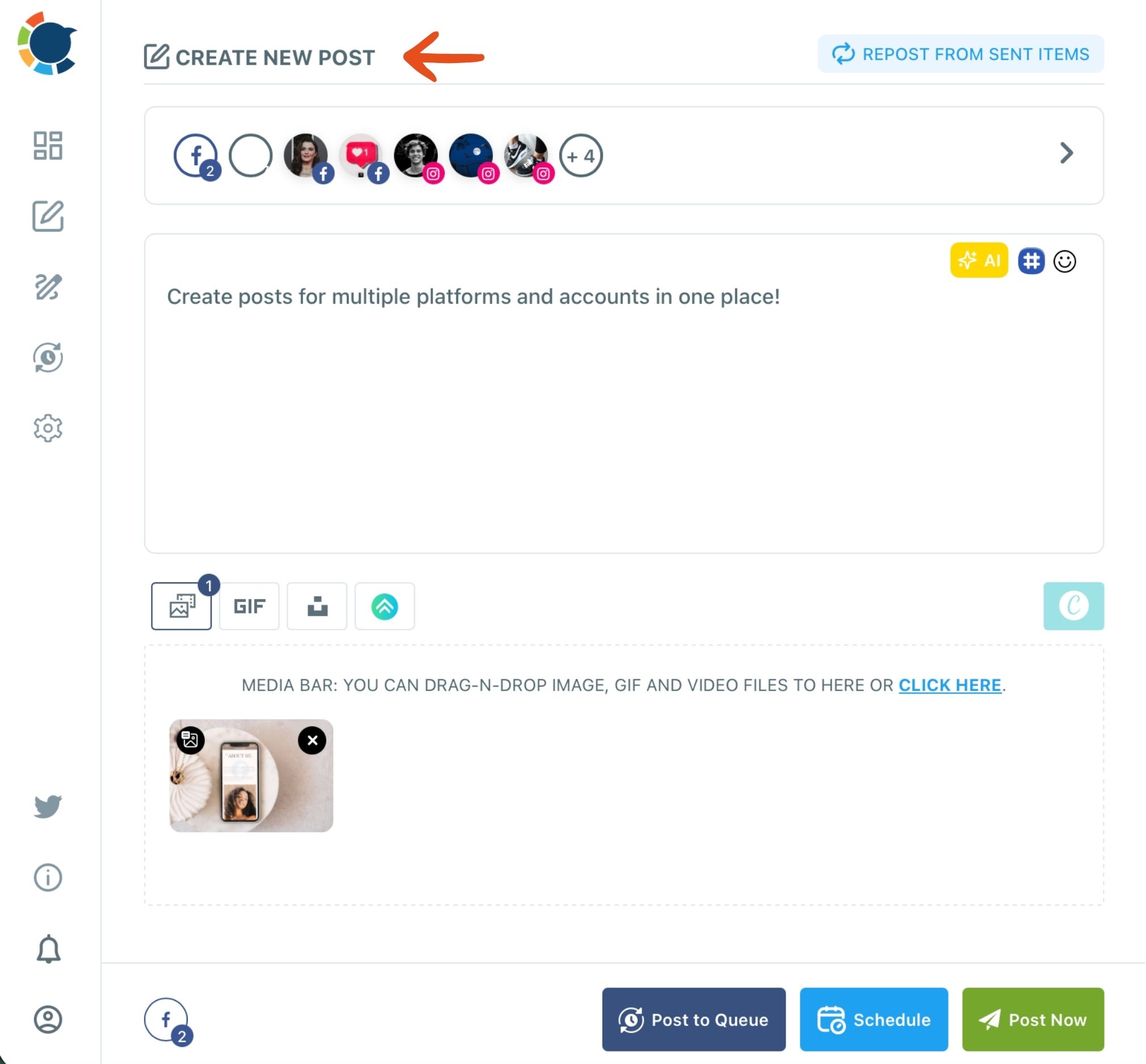
Circleboom Publish's universal composer, labeled "Create New Post on All Platforms," is the flow that carries one uploaded video to X, LinkedIn and Facebook together. It sends the same composed post, clip included, to any mix of connected accounts across platforms in one send.
That distinction matters, so here it is plainly:
- Create New Post on All Platforms: one post and one video to X, LinkedIn and Facebook together. This is the route for my clips.
- X Specific Post or Thread: X only, one account per post, with threads and Auto Repost.
- Video Cross-Posting: Instagram, Facebook, YouTube and TikTok only; no X, no LinkedIn.
Circleboom's own documentation gives exactly my case as the example for the universal composer: a video that needs to go out on several platforms at the same time.
The deciding question is how many platforms one post needs to reach. More than one, and the universal composer is where you cross post video from X to LinkedIn and Facebook.
I also checked the safety side before handing over my X account. Circleboom is listed on X's Enterprise customer directory, so the account connects through X's approved access rather than a scraping workaround. That is the reason I was comfortable letting it post on a schedule.
The X-first route, when the clip starts life as a tweet
There is a second path, and it suits a different habit. Some people write every post on X first, inside Circleboom's X Post Planner. Its Cross Posting setting lets them share your X clips on LinkedIn and Facebook automatically when the tweet publishes.
You connect LinkedIn, Facebook, Instagram, Threads or Bluesky once, then switch each one on in the schedule panel. Text tweets and media posts both go across.
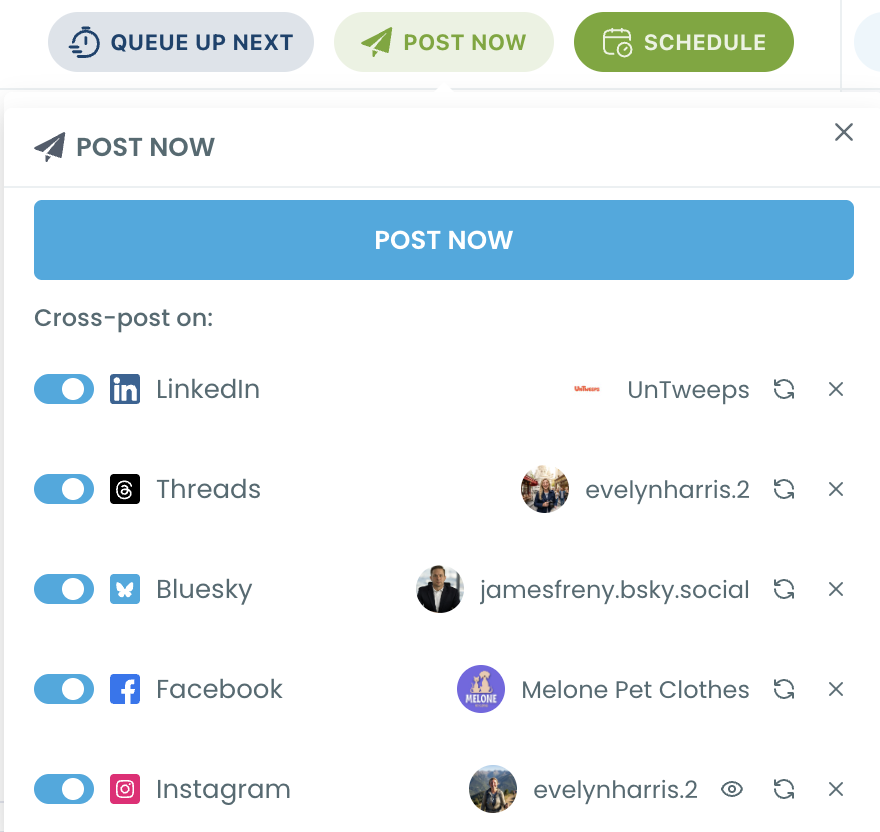
I use Publish for my clips because I also schedule to other channels there, and because its per-platform preview shows me each version before it goes out.
If X is the center of your show and the other networks are add-ons, the X Post Planner route is worth a look.
Cut the clip to X's limits first, because X is the strictest
This was the insight I did not expect.
The bottleneck when you cross post video from X to LinkedIn and Facebook is not the tool. It is the file, and X sets the tightest rules of my three platforms.
Circleboom's limits for the three, side by side:
| Platform | Text | Video |
|---|---|---|
| X | 280 characters | 0.5 to 140 seconds, up to 512 MB |
| 1,300 characters | up to 200 MB | |
| 5,000 characters | up to 10 GB |
A clip that passes X's 140-second limit also has to stay under LinkedIn's 200 MB in Circleboom.
Format matters too: X takes MP4 or MOV, but LinkedIn's own video specifications for LinkedIn Pages say Pages no longer support MOV files. So every clip I export is MP4.
My recipe now is simple. Export each clip as MP4, keep it between 45 and 90 seconds, and check that the file is well under 200 MB. If you pull clips from a recorded X Space, the guide on how to convert Twitter videos to MP4 covers the format step.
One file that fits X fits all three.
The caption follows the same logic
The universal composer sends the same text to every selected account. That means the caption has to fit X's 280 characters, or X fails while LinkedIn and Facebook go out.
The AI writer in the composer does not detect this on its own. It writes general text until you tell it the limit, so I ask it directly: "Make this max 280 characters." Then I check the X tab of the preview before I schedule.
How I cross post video from X to LinkedIn and Facebook in one send
To cross post video from X to LinkedIn and Facebook in one send, I work in three phases: connect once, build the post with the clip, then preview and schedule. After the first setup it takes me about five minutes per clip.
Connect the three accounts once
- Open Circleboom Publish and go to Settings, then Manage Social Accounts, and connect your X account, your LinkedIn account or Company Page, and your Facebook Page.
- Create a Share Group under Settings, then Manage Share Groups, holding those three accounts, so every clip later starts with one click.
Build the post with the clip attached
- Click "Create New Post on All Platforms" on the dashboard, or pick it at the top of the Create New Post menu in the sidebar.
- Choose your Share Group under Select by Share Group, or tick the X, LinkedIn and Facebook accounts in the account grid, then click DONE.
- Write the caption in "What do you want to post," keeping it under 280 characters, and upload the MP4 clip in the media bar below it.
Preview each platform and schedule
- Switch between the X, LinkedIn and Facebook tabs in the Post Preview panel to check how the clip and caption render on each one.
- Click Schedule, choose a date and a slot from "Pick your best post time," and confirm; or use Post to Queue to drop it into each account's next open slot.
Checking against X first is what keeps the send clean: the file and the caption pass the strictest platform before anything goes out, so X never becomes the one that fails.
Three networks, one composer: a single post going out to Twitter, Facebook and LinkedIn at the same moment.
Let X, LinkedIn and Facebook each post the clip at their own best time
Schedule sends the clip to all three accounts at the moment I pick. Post to Queue behaves differently, and for clips it is often the better button.
Each connected account keeps its own Queue of recurring time slots in Time and Queue Settings. Post to Queue drops the post into the next open slot of each selected account, so X, LinkedIn and Facebook can each publish the same clip at a slot built for that audience.
I filled my three Queues once with Add Best Times to Post, which uses each account's own follower activity instead of a generic chart. My X listeners are online in the evening; my LinkedIn audience reads in the morning. With the Queue, one send respects both.
What changed once every clip reached all three platforms
The first change, once I started to cross post video from X to LinkedIn and Facebook together, was arithmetic. Nine uploads a week became three sends, and the 45 minutes of logistics dropped to about 15.
The second change was quieter. My LinkedIn page, which had posted maybe twice a month, now posts three times a week without extra effort. Guests started sharing their clip on LinkedIn because it was already there to share.
The third was a lesson about each network's audience. A clip about a guest's hiring mistake drew replies on X, but on LinkedIn the same clip drew saves and shares from managers. Same file, different reaction, and I would never have seen the LinkedIn half before.
I also stopped feeling guilty about Facebook. It gets the same clip on the same day, which keeps my Facebook Page active for the listeners who never touch X.
Why the same clip on three platforms is not duplicate content
Duplicate content trouble comes from posting the same thing to several accounts on the same platform, or reposting identical text again and again. When you cross post video from X to LinkedIn and Facebook, one clip goes once to one X account, one LinkedIn account and one Facebook Page, which is ordinary cross-platform promotion.
If you run several shows with several X accounts, that changes. The X composer posts to one X account per post as a safeguard, and each account should get its own wording.
Where the episode clips come from in the first place
Clips are only as good as the source material. Some of my best ones come from live conversations rather than the studio recording.
If your show already runs as an X Space, start with the full guide on how to turn Twitter Spaces into a podcast. It covers recording, editing and publishing the audio as a regular episode.
The cutting step has its own walkthrough. Read how to turn Twitter Spaces into video clips to pull the moments worth sharing out of a long live session.
The episode page itself deserves a post too. When a new episode goes live on my site, an RSS connection posts it to X without me touching it; the setup is explained in automatically tweet your new post.
That leaves the clips as the hand-made part of the week, which is where my attention belongs.
Adapting the clip for each network
The universal composer sends the same post everywhere, which is the point. Some clips deserve different wording on LinkedIn, though. For those I schedule a separate post from the LinkedIn post scheduler composer.
Facebook gets the occasional extra too, such as a behind-the-scenes photo set from the recording day. Those go through the Facebook post scheduler on their own.
Most weeks, one shared post is enough. The broader case for reusing one asset across channels is made well in content repurposing in 2025.
One upload, three audiences
My podcast never needed more clips; it needed each clip to arrive everywhere my listeners already were.
→ Cross post your next episode clip from X to LinkedIn and Facebook
Your questions on sharing podcast clips across X, LinkedIn and Facebook
Can I post a different caption on LinkedIn and X in the same send?
No. The universal composer sends the same text to every selected account. For a different LinkedIn caption, send that version from the LinkedIn composer as its own post.
What if my episode clip is longer than 140 seconds?
X will not accept it on an account without a paid X plan, so the X part of the send fails. Trim the clip to 140 seconds or less, or leave X out of that send and post a shorter cut to X separately.
Can I fix a clip after it is scheduled?
Yes. Scheduled posts sit in the Outbox, where you can edit the caption, swap the video or delete the post before it publishes.