Instagram 3-Post Banner Maker
1 Upload Photos
Tip: Drag images to swap positions
2 Layout Style
3 Banner Result
What is an Instagram 3 post banner?
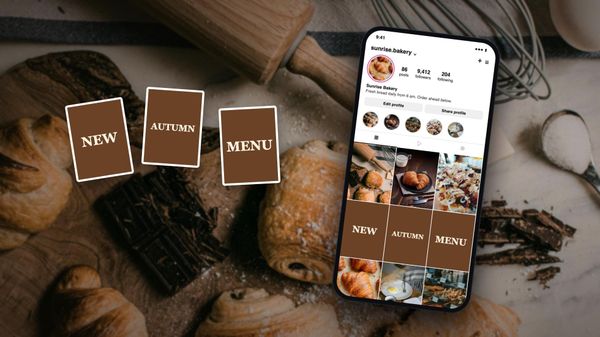
A 3 post banner is one wide image split into three posts that sit side by side in one row of your profile. It is the smallest kind of Instagram grid post, and it works best for a launch, a sale, an opening date or a new season, because a visitor sees the whole message in the very first row.
Instagram banner size in 2026
Since early 2025 every spot on the profile grid is a 3:4 rectangle of 1080 x 1440 px, so a banner that fits perfectly is 3240 x 1440 px. The Classic Grid and Panorama layouts above make square tiles. On the profile, Instagram trims a little from the left and right of each square, so keep text, logos and faces away from the outer edges and the two cut lines. The Instagram 3:4 crop preview shows exactly what will be cut.
How to post a 3 post banner in the right order
Post the right tile first, then the middle one, then the left one, with nothing in between. Instagram places every new post in the top left corner, so this is the only order that rebuilds the row.
Tip: pin the three posts. Instagram lets you pin up to three posts to the top of your profile, so a pinned banner keeps the first row even after you post again. Check the order after pinning; if it comes out reversed, unpin and pin them again the other way around.
3 banner ideas that work
- Opening or new location: the date in the middle tile, a photo of the place on each side.
- Seasonal sale: one product photo across all three tiles, the offer in the middle.
- Welcome row for a new profile: your logo in the middle, two signature photos left and right.
Frequently asked questions
Can I schedule a 3 post banner?
Yes. Download the three tiles and schedule them one after another in Circleboom's Instagram post scheduler, right tile first and left tile last, a minute apart.
Will the banner still line up after I post something new?
No, a new post pushes every tile one spot to the right. Post in sets of three, pin the banner, or move posts with Instagram's Reorder grid option, which arrived in June 2026.
Want the picture to cover your whole profile instead of one row? Circleboom's Instagram grid maker splits one image into a 3x3 or 3x4 grid and schedules every tile in order. See how to make a 3x3 grid post, or keep several photos in one post with the Instagram photo collage maker.