
To reply to tweets with AI, use a reply tool that sees the original post, drafts in your voice and lets you edit before posting. Switch to a quote when you want your own followers to see the post with your take attached.
What this answer covers.When AI Reply is the right call: joining the author's conversation inside the thread.When AI Quote works better: putting the post and your view on your own timeline.Why pasting a tweet into a chatbot adds steps without adding context.
Circleboom drafts replies and quote posts for trending X posts in your own style, through X's official Enterprise APIs. Start to reply to tweets with AI.
Why a generic AI reply on X gets skipped
A generic AI reply gets skipped because it restates or praises the post instead of adding to it. Readers scan a thread for something new, and agreement is not new.
The tool you use shapes that outcome more than people expect. A generator that only sees pasted text cannot know:
- Which thread is active
- What the author has already said in it
- Who is reading
It produces a safe paragraph, and safe paragraphs are what readers scroll past.
X also treats low-effort replies as a quality problem. Its account behavior rules and best practices note that replies unrelated to the original post, or of low quality, can be marked as spam.
The fix has two halves: choose the right format for what you want to say, and use a tool that drafts against the real post.
Circleboom handles the second half with AI-written replies to tweets drafted from the post itself.
What Circleboom's reply workflow gives you on X
Circleboom connects post discovery, drafting and publishing for X replies in one screen. Its Inspiration feed shows trending posts from other accounts in your chosen topics, each with its reply, retweet, like and bookmark counts, and every card carries an AI Reply and an AI Quote button.
The draft opens with the original post as context and is written in My Style by default. You refine it with a plain instruction in the "Describe and improve tweet" field, then post it, queue it or schedule it.
Circleboom lets you reply to tweets on X with AI drafts that keep the original post attached, so the answer stays on topic.
The feed exists in two places. The full Inspiration page sits under Schedule in the sidebar, with topic chips, keyword search and an AI Preferences shortcut for changing your interests.
A smaller strip of three cards also appears under the Post Editor in X Post Planner, with a View All button, and the same AI Reply and AI Quote buttons work there.
The feed follows your topics, so it will sometimes show posts on political, sensitive or contested subjects. Read the original in full before you answer one of those, because a fluent draft does not know the history of the argument.
Why the X reply workflow stays in one window
A separate drafting tool cannot copy this part: the source post, its context, your style, the edit and the publish button never leave the same window.
You review every draft, and nothing replies on its own.
I would not connect a main account to a reply tool I could not vouch for. Circleboom appears on X's list of Enterprise customers. It reads posts and publishes through X's approved access, with no scraping involved.
You can begin replying to X posts with AI on that basis.
How to reply to tweets with AI in four steps
Replying to a tweet with AI in Circleboom takes four steps: sign in, open X Post Planner, generate a reply on a post from the Inspiration feed, then edit and publish it. The original post stays attached to the draft the whole time, so the reply answers what the author actually said. Nothing goes live until you choose a publishing action.
- Log in to Circleboom and pick the X profile the reply should be posted from.
- Go to the X Post Planner menu.

- Open Inspiration, hover over a post and click AI Reply. Use a topic chip or the keyword search first if the feed is broad, and glance at the reply count so you skip threads that are already crowded.
- Edit the draft and publish it. Add your example or question in "Describe and improve tweet," then choose Post Now, Queue Up Next or Schedule.
Four steps are enough because the hard choices sit at either end: which post deserves your reply, and what you add to the draft before it carries your name.
In one line: pick the post, generate the reply, add your point, publish.
Should you reply to a tweet or quote it?
Reply when you want to join the author's conversation; quote when you want your own followers to see the post with your interpretation on top. A reply sits inside the original thread, while a quote is a new post on your timeline with the original embedded below your comment.
Circleboom puts both buttons on the same card, so the choice comes after you have read the post. The table turns that choice into a rule of thumb.
| Your goal | Use | What the reader sees |
|---|---|---|
| Add to a specific discussion | AI Reply | Your answer under the original post, in the thread |
| Explain what a post means for your audience | AI Quote | Your commentary on your timeline, original attached |
| React to an industry announcement | AI Reply to contribute; AI Quote to interpret | Either a thread answer or a timeline post with the source |
| Answer professionally without sounding generic | AI Reply | A draft built on the original post, refined by you |
| Add analysis to an interesting claim | AI Quote | The claim plus your example or explanation |
The quote draft looks different in the editor, and that difference is the decision made visible.
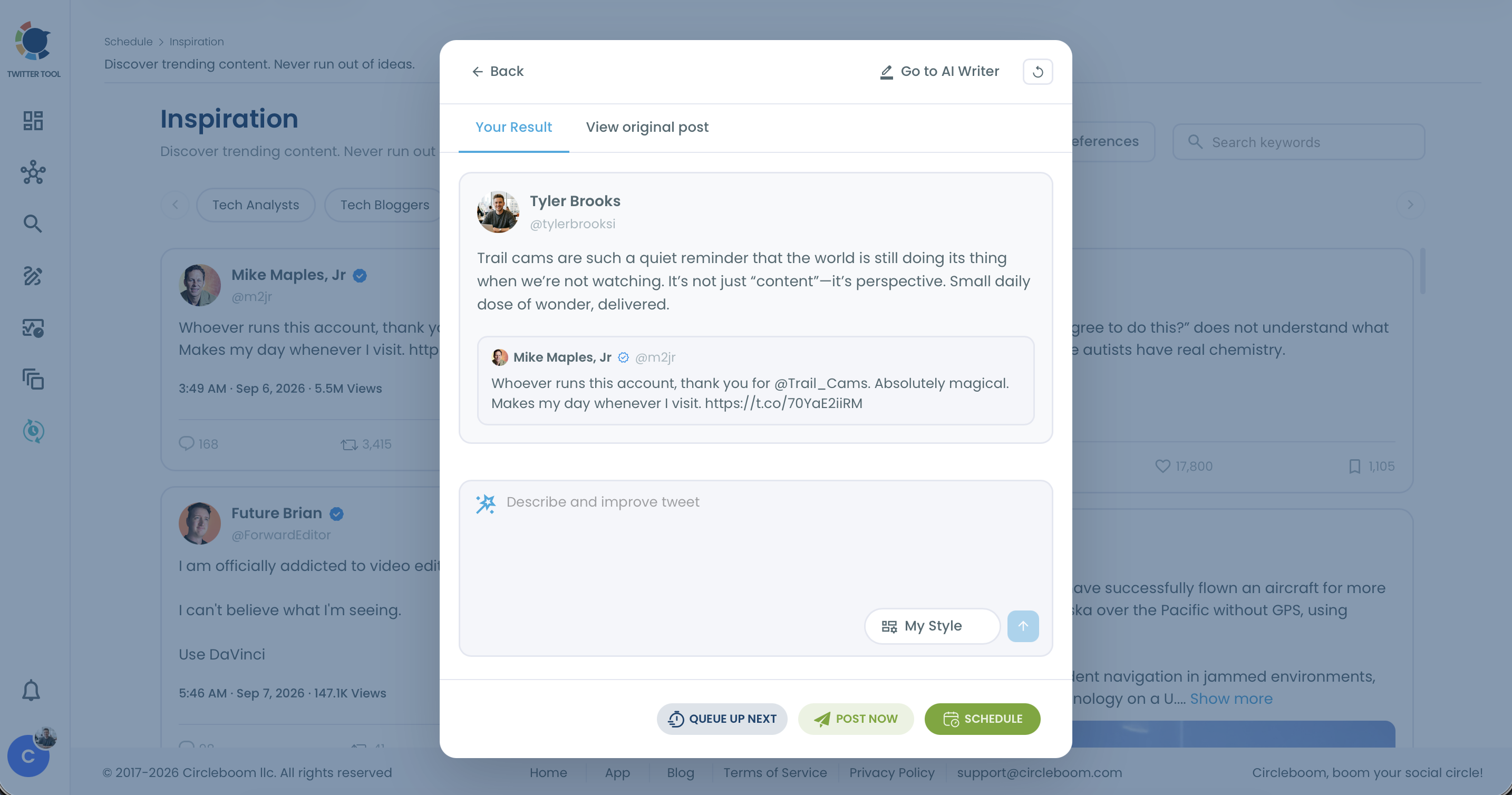
The same post, replied to and quoted
Take an industry announcement in your niche, as an illustrative case. A reply under it might ask the company one specific question about how the change affects small teams, and the author or their readers may answer you in the thread.
A quote of the same post might open with "What this means for small agencies:" followed by one practical implication. Your followers see the news and your take in one post, and the replies and likes it earns land on your own tweet.
Neither is better in general. The reply builds a relationship with the author's audience; the quote builds your own timeline.
Timing follows the same split. For news, review the draft and post it right away while people are still reading. For commentary that will still hold tomorrow, a queued or scheduled quote works just as well.
There is a hybrid too. Some people quote a post inside a reply to pull a second tweet into the conversation, and how to quote tweet in a reply covers that move.
When the quote route fits, Circleboom's AI Quote Generator drafts the commentary with the same refinement field and publishing buttons as a reply.
Who sees your AI reply on X
A reply is shown in the thread under the original post, so its first audience is the author and the people reading that conversation.
A quote lands on your own timeline, where your followers see the news and your take together, and the engagement it earns belongs to your post.
Whether your own followers also see a reply depends on how X displays it to them. The post on do my followers see when I reply to a tweet answers that in full.
Plan as if the thread is your stage.
Where a reply sits in a busy thread
Position in a busy thread is the other variable. X lists reply prioritization among the features of X Premium, which shapes how visible a reply is when hundreds of others sit under the same post.
No tool can promise where your reply lands, and Circleboom does not try.
What you control is timing and substance.
A reply posted the next day reaches the few readers still scrolling, while the same reply posted early meets the thread at its busiest. Being early also gives a useful reply more of the thread's readers to win over, and some of them will click through to your profile.
A podcast on what earns impressions and replies on X, useful context for deciding where your replies go.
Later, sort your published replies by profile clicks in Circleboom's tweet engagement analytics to see which threads sent readers to you.
Is pasting a tweet into ChatGPT good enough for X replies?
Pasting a tweet into a general chatbot works for a one-off draft, but it leaves the rest of the job to you. You still have to:
- Find the post
- Copy it
- Carry any thread context across by hand
- Edit the answer
- Paste it back into X
The bigger loss is the information around the post. A chatbot does not see the post's reply, like and bookmark counts, so it cannot tell you whether a thread is still active or already crowded. It also has no idea which of your topics the post belongs to.
A reply tool built into the posting workflow removes those hand-offs. In Circleboom the draft starts from the original post, uses your chosen style, takes your refinement and publishes from the same window.
When a reply needs a longer back-and-forth than one instruction allows, the "Go to AI Writer" button carries the post's context into Circleboom's AI Writer, so you get a chatbot-style conversation without losing the source.
If you are weighing general assistants anyway, the roundup of ChatGPT alternatives, free and paid compares the options outside a posting workflow.
Why an auto-reply bot is a different tool
An auto-reply bot answers without your review, which is exactly what reviewed AI replies avoid. X does not permit automated replies sent on keyword searches alone, and a bot that posts AI replies needs X's prior written approval before it runs.
Circleboom has no setting that replies to every mention or comments on posts in bulk. Each draft waits for you, and you remain responsible for checking it against X's content policies before it goes out.
For posts that are not replies at all, such as your own opinion on a topic you saw trending, the AI Tweet Generator writes standalone tweets instead.
Which AI reply route fits your goal on X
Match the tool to the job before you write a word:
- If you want to join a conversation the author will read, use AI Reply and add one example or question of your own.
- If you want your followers to see the post with your view attached, use AI Quote.
- If the post is breaking news, publish the reply right after review; if it will still matter tomorrow, queue or schedule it.
- If you only want a one-off draft and will post by hand, a general chatbot is enough, though you carry the context yourself.
- If you are not sure your replies are working, sort them by profile clicks after a few days and keep the format that ranks highest.
Every branch ends in the same habit: you read the post, you add something of your own, and you decide when it goes out.
The AI only removes the blank-page part of the job.
→ Reply to tweets with AI, drafted against the real tweet
What people ask about replying with AI on X
How do I make an AI reply sound like me and not a bot?
Keep My Style selected and add one thing only you know before posting, such as an example from your work or a reason you disagree. I also ask the draft to drop any generic praise, because that opener is the first thing that gives an AI reply away. Your input supplies the voice; the style setting only shapes the rhythm.
How many AI replies a day should I post to grow on X?
There is no official number, so set the pace by how many replies you can give a real edit, because quality runs out before time does. A few thoughtful replies under fresh posts every day beat a burst of many. A steady habit also fits the wider advice on how to engage with followers on Twitter.