

To search Twitter likes, load your latest 3,200 liked posts into Circleboom and type a word, #hashtag or @username into one keyword filter that reads post text, hashtags and mentions together.
Circleboom's Delete My Last Likes loads your recent likes, and its Keyword / Username or Hashtag field filters them in one pass. Circleboom searches the posts you liked on X by keyword, hashtag or username through official X Enterprise APIs, with a Date range to narrow common terms.
→ Search Twitter likes by keyword
Below: what matches, what does not, and where the 3,200-like window ends.
Why X search cannot find a post you liked
X search finds public posts; it does not search the list of posts you liked. Your like history is the only index that records which posts you, specifically, tapped the heart on.
That sounds obvious until you try it. X's advanced search filters by words, by people and by dates, so it feels like the right tool for a half-remembered post.
Every result, though, comes from the public pool of posts. A thousand posts may contain your phrase, and the search has no idea which one you liked.
Public-data tools share the same limit. Circleboom's own Twitter historical data search reaches public past tweets by keyword and date range. That is ideal for research on a topic and the wrong scope for a personal question.
What your likes list knows that search does not
A like is a link between two things: your account and one post. Search indexes the post. It does not index the link, because that link belongs to you and, since likes went private, is visible only to you.
So a phrase match can tell you that a post exists, but never that you liked it. The more popular the topic, the worse this gets: the post you liked competes with every other post using the same words, and nothing lifts yours to the top.
Likes still count inside X. They act as signals that shape your For You feed and recommendations. X uses them for ranking, but its search box still returns public posts, not your likes list.
The likes list is the only record that joins "this post" to "I liked it," so the search has to run on that list.
When X search is still the right tool
X search does have a role in this job. If you remember the exact phrase and the author's handle, the people and words filters in advanced search can surface that public post directly, whether or not you liked it.
The like only becomes necessary when your memory is thin and the post sits among thousands like it. That is the case where you need to search Twitter likes rather than the whole platform.
X has been moving the list itself. TechCrunch reports that X launched a History tab that gathers bookmarks, likes, videos and articles, starting on iOS. Likes have also stopped being a public profile tab that others can browse, so the list is private to you.
That privacy is the reason the problem lands on you alone. Nobody can index your likes from the outside, which is why the practical answer is to search your liked posts on Twitter from inside your own account.
What the likes keyword filter matches on Twitter
To search Twitter likes, Circleboom loads up to your 3,200 most recent liked posts from X through the API and filters them by one field: Keyword / Username or Hashtag. No archive upload is needed for that window.
The field matches three parts of a liked post:
- Words in the post text.
- @mentions of an account inside the post.
- #hashtags in the post.
It does not match:
- Likes older than your latest 3,200, which sit outside the API window.
- Words that appear only inside an image or video.
- Other people's likes, because only the connected account's likes load.
The page header states how many likes loaded before you filter anything. That number is the size of the haystack: if it reads well below what you expect, the like you want may be older than the window, and you know it before running a single search.
Reading a matched row before you open it
When you search Twitter likes, each row shows the author of the liked post, the post text and its numbers: Impressions, Likes, Retweets, Quotes, Bookmarks, Replies and Created At. Those columns are how you tell two similar matches apart without opening either one.
The Created At date is the strongest tiebreaker, since it shows when the post went live. A post with large engagement numbers is also easier to recall: if you remember a thread that "everyone was sharing," the row with the biggest numbers is usually it.
Two more controls sharpen a result. The Date range, set as an earliest and a latest day, cuts a common word down to the weeks you remember. Each row also has a link icon that opens the post on X, which is how you confirm a match before doing anything else.
I care about where the data comes from before I connect a working account. Circleboom appears in X's Enterprise customer directory, so likes load through X's sanctioned access instead of a scraper copying your screen.
All likes load pre-selected, and that default matters for a search. Only a confirmed unlike touches the account, so read and open freely. To try it on your own account, find liked posts by word, hashtag or username.
How to search Twitter likes by word, hashtag or username
Searching your likes runs in two phases: connect and load your latest 3,200 likes, then filter that list by one term and open the match on X. The keyword field does the narrowing, the Date range trims a common term, and the row link confirms the result.
Connect and load your latest likes
- Log in to Circleboom Twitter and authorize the X account whose like history you need.

- Navigate to the Essential Toolbox menu and open Delete My Last Likes under Delete Tools.

Filter by one term and open the match
- Select Filter Options above the likes list, type one word, #hashtag or @username, and add a Date range if the term is common.
Use one term per pass. A single clean term is easier to read back than a guess at a whole phrase, and a miss tells you which clue to swap.
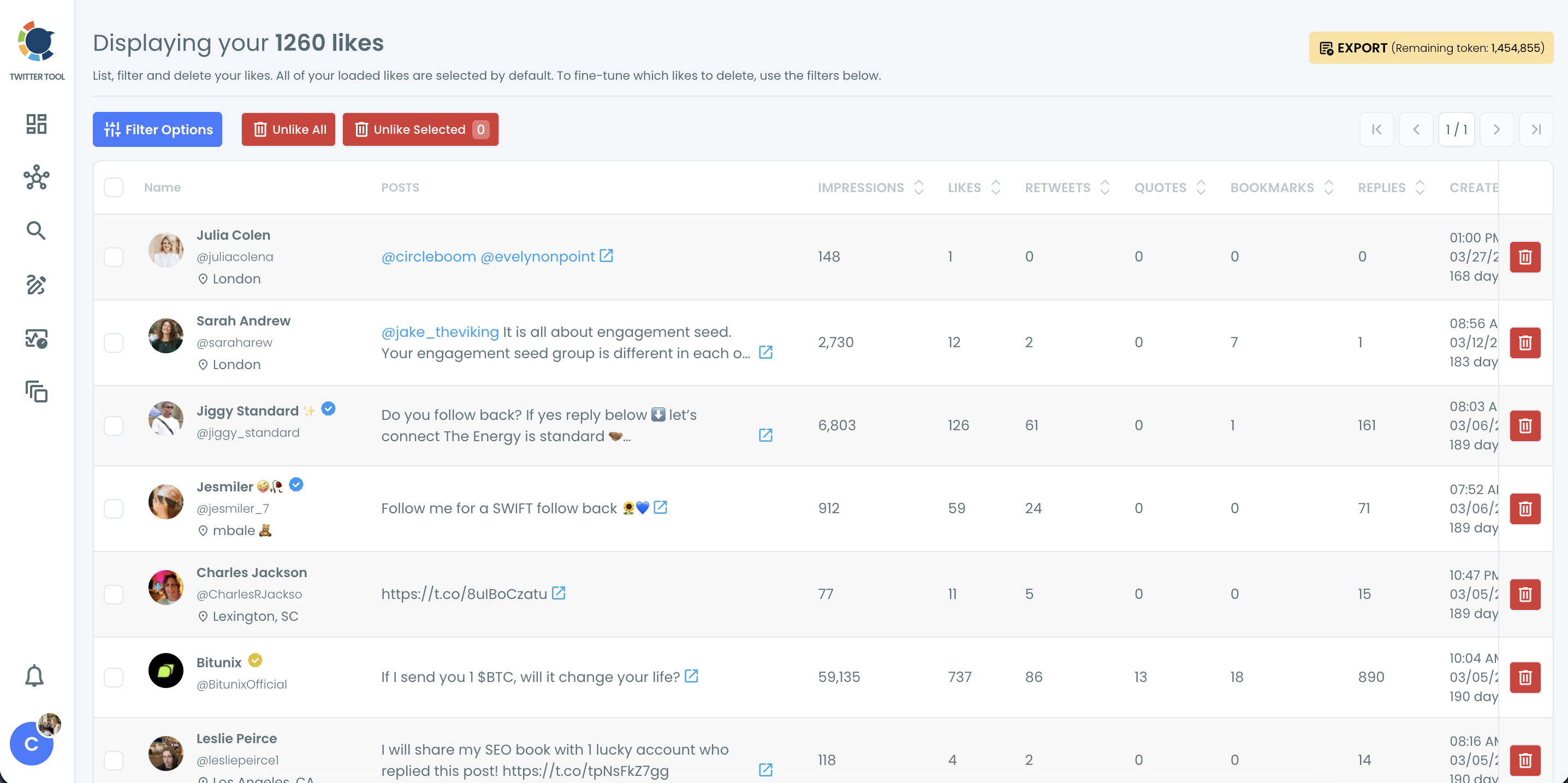
- Apply the filters and click the link icon on the matching row to open the liked post on X.
I read the Created At column before opening anything. When two rows look alike, the date usually settles it, and it saves opening the wrong post.
This sequence holds because the narrowing happens before any action is possible. The term removes most rows, the dates remove the rest, and opening the post on X verifies the match while every unlike button stays untouched.
In short: load, type one term, trim by date, open on X.
A composite example shows the shape of a real search. A community manager wants the customer post that praised their product last spring, the one they liked and meant to quote. They do not recall a single word of it.
They do recall that it tagged the brand's handle, so the @handle goes into the field, the spring months go into the Date range, and the shortlist is small enough to read row by row. The row link then opens the post on X, ready to quote with permission.
How far back can you search your Twitter likes?
Through the API, you can search your latest 3,200 liked posts. Older likes never load into the recent list, so a correct keyword can still return nothing when the post is years old. The limit comes from the X API, not from the filter, so no setting in the drawer extends it.
The full history is in your X archive. Circleboom's Delete All Likes accepts the like.js file from that archive and runs the same Keyword / Username or Hashtag filter across every like on the account.
X can take 24 to 48 hours to prepare the archive after you request it, so request it before you need it.
Telling an old like from a wrong clue
An empty result has two possible causes, and they need different fixes.
Clear the Date range first, since a wrong guess there hides posts that are inside the window. Then swap the pattern: try the author's @username or a hashtag instead of a word.
If the list stays empty after both changes, the like is most likely older than your latest 3,200, and the archive is the next place to search your Twitter likes.
Getting like.js out of your X archive
The archive arrives as a folder, and the file you need sits in its data folder. Three details save a failed upload:
- Upload the like.js file itself, not the full archive ZIP.
- Use the archive of the same account that is linked to your Circleboom subscription.
- Upload it at the Upload step of the three-step Start, Upload and Filter flow.
The same like.js file can be uploaded again later to run a different filter. Likes already removed in an earlier session are left out automatically, so one archive lets you search Twitter likes several times with different filters.
That archive route ends in an Approve & Delete count. For a search, stop at the filtered results and read them; confirm only if you mean to unlike.
The like.js file also stays on your computer as your own complete record of what you liked.
Older posts in general follow the same logic as old likes: the archive is the deepest record. If your hunt widens from likes to everything you posted, the approach to search Twitter history covers your own past posts.
Can you unlike every post that matches the keyword?
Yes. Once the keyword filter has narrowed the list, every matching like is selected and can be removed in one confirmed action. Likes on posts mentioning a specific topic, hashtag or account go together, instead of being unliked one at a time on X.
Three facts to weigh before confirming:
- Unliking is permanent; Circleboom has no undo once a like is processed.
- The original post is unaffected, apart from its like count dropping by one.
- Large runs are paced by API rate limits, so keep the browser open until they finish.
When unliking every match makes sense
The usual reason to do it is feed hygiene. Likes shape the For You feed, so a cluster of likes on one off-topic subject keeps pulling similar posts into your timeline. Removing the likes that match that subject's keyword or hashtag sends X a cleaner signal about what the account cares about.
Before you confirm, decide whether any of those likes are references you still need. Many people use likes as informal bookmarks, so export the filtered list as a CSV first, which spends export tokens, if you want a record of what you are about to remove.
The clip below shows that flow on a recent-likes list, from selection to the confirmation pop-up.
If the topic you want gone runs back further than your latest 3,200 likes, the same keyword filter in Delete All Likes reaches the archive copy of your full history. That keeps the cleanup consistent with the search you already ran.
Slicing likes by date, account or media before a cleanup is a filtering job of its own. Here the point is narrower: the search you ran to find a post doubles as the selection for removing every post like it.
The same keyword filter on your own tweets
Your posts and your likes are two separate records, but the filter logic is shared. A word, a hashtag or a handle that finds a liked post will also find your own posts that used it, which is useful when an old topic shows up in both places.
Watch the keyword filter drive a cleanup on tweets: one term typed, every matching post queued for removal.
The same keyword logic applies to your own timeline, and the page for tweet deletion by keyword handles posts you wrote. If the cleanup grows to cover both, the plan to delete all your tweets and likes puts the two jobs in order.
The only index of what you liked on X
X search knows what the world posted; your likes list is the only place that knows what you kept, so that list is where the search belongs.
What people ask about searching their likes
Does X advanced search include the posts I liked?
No. X advanced search filters public posts by words, people and dates, and it does not search the private list of posts you liked. For public posts, these ways to search old tweets on Twitter still apply.
Can I search my likes by hashtag or @username instead of a word?
Yes. Circleboom's Keyword / Username or Hashtag field accepts a #hashtag or an @username as well as a word, and matches tags and mentions inside the liked posts. To find a word one account used in its own public posts, see how to search specific words a Twitter account said.
Does the search include replies and quote posts I liked?
Yes. Likes on any type of post load into the list, and the Post Type filter in the same Filter Options drawer narrows it to the type of liked post you remember.

