

If your Twitter (X) timeline starts to feel like a wall of spam, repetitive replies, or completely irrelevant posts, it’s usually not random. In most cases, the reason is simple: a wrong follower or following list.
When bot accounts quietly slip into your network, they don’t just sit there. They interact, reply, retweet, and amplify low-quality content.
Over time, this directly affects what you see on your timeline and how your own tweets perform.
The confusing part is that many people assume all automated accounts are bots. That assumption is understandable—but it’s also wrong. Bots and automated accounts are not the same thing, and treating them as identical leads to bad decisions, like removing useful accounts or ignoring real threats.
Let’s break down the difference clearly.
Why People Confuse Bots with Automated Accounts
At a glance, bots and automated accounts can look similar. Both may post without human interaction at that exact moment. Both may share content at consistent intervals. Both may not reply like a typical person.
Because of this surface-level similarity, many users label any account that behaves “non-human” as a bot. But automation by itself is not harmful. In fact, automation is a normal and allowed part of Twitter (X) when used correctly.
The real difference lies in intent, transparency, and impact.
What Is a Bot Account on Twitter (X)?
Bot accounts are created primarily for manipulation, spam, or misleading activity. Their purpose is rarely to provide value to real users.

Common characteristics of bot accounts include:
🔸 Posting spam links or promotional content
🔸 Mass replying to trending tweets with generic messages
🔸 Artificially boosting likes, replies, or follows
🔸 Aggressively following and unfollowing users
🔸 Copying content from other accounts
Modern bots are especially difficult to spot. They often use AI-generated profile pictures, realistic bios, and even some interaction patterns that mimic human behavior. This is why manual detection has become unreliable.
Bots are designed to blend in, not stand out.
What Is an Automated Account on Twitter (X)?
Automated accounts, on the other hand, are not inherently bad. These are legitimate accounts that use automation tools or Twitter’s API to post content automatically for a clear and useful purpose.

Examples of automated accounts include: News update accounts, weather alerts, stock or crypto price trackers, job posting feeds, brand accounts using scheduled posts
 Arif Akdogan
These accounts usually:
🔹 Have a clear theme or purpose
🔹 Post predictable, relevant content
🔹 Follow Twitter’s automation and API rules
🔹 Provide value rather than noise
Many automated accounts openly disclose that they are automated—and Twitter (X) allows this kind of usage when it follows platform policies.
The Key Differences Between Bots and Automated Accounts
The easiest way to understand the difference is by looking at intent and impact.
Bots exist to manipulate the system. Automated accounts exist to serve a function.
Bots hide what they are. Automated accounts are usually transparent.
Bots degrade timeline quality by pushing spam and fake engagement. Automated accounts are neutral or helpful, depending on your interests.
Most importantly, bots often violate platform rules, while automated accounts are typically compliant.
Why Bot Accounts Are Harmful
Bot accounts don’t just clutter your timeline—they actively damage account quality.
When bots are part of your follower or following list:
- Engagement rates become misleading
- Tweets reach fewer real people
- Replies and mentions lose relevance
- Algorithms receive distorted signals
- Trust in your account decreases over time
Ignoring bots doesn’t make them harmless. Their presence slowly compounds, especially after viral tweets, follow-for-follow campaigns, or rapid growth periods.
Why Bots Are So Hard to Recognize Manually
Years ago, bots were easy to spot. No profile picture, random username, zero tweets. That’s no longer the case.
Today’s bots:
- Use realistic profile images
- Have filled-out bios
- May post occasionally to appear active
- Interact just enough to seem real
 Arif Akdogan
When you have hundreds or thousands of followers, manually reviewing profiles becomes impractical. That’s why relying on intuition or visual checks is no longer effective.
The Practical Solution: Detect and Remove Bots with Circleboom Twitter
To handle bot accounts properly, I use Circleboom Twitter.

Circleboom Twitter is an official X Enterprise Developer, which means it operates within Twitter’s official API framework and respects platform limits and rules. That’s critical when analyzing and removing accounts at scale.
Circleboom Twitter:
🟢 Analyzes all your followers and followings
🟢 Detects bot, fake, inactive, and suspicious accounts
🟢 Groups them based on behavior and signals
🟢 Allows bulk removal instead of manual cleanup
🟢 Automates the entire process safely
This removes guesswork and turns cleanup into a structured process.
Step-by-Step: How to Remove Bot Accounts Using Circleboom Twitter
Here’s how the process works:
Step #1: Go to the Circleboom Twitter website and log in with your credentials.
If you’re a new user, sign up—it’s quick and easy!

Step #2: On the left-side menu, click on the Followers / Following Management section. A dropdown menu will appear. Select Fake/Bot Followers to see the full list of your followers.
If you want to remove specific accounts, such as inactive users, you can directly select these categories from the dropdown menu instead of viewing all followers.

Step #3: You will see a complete list of your fake/bot followers.

Use the Filter Options on the left side to refine your list. You can filter followers based on engagement levels, inactivity, verification status, follower/following count, and more.

Step #4: Browse through your followers and check the boxes next to the users you want to remove.
You can also select multiple users at once. Once you have selected the users, click on the Remove Followers button at the top.
Alternatively, you can remove individual followers by clicking the red remove icon next to their name on the right side of the list.

A confirmation message will appear asking if you are sure you want to remove the selected followers. Click ''Remove Followers''.
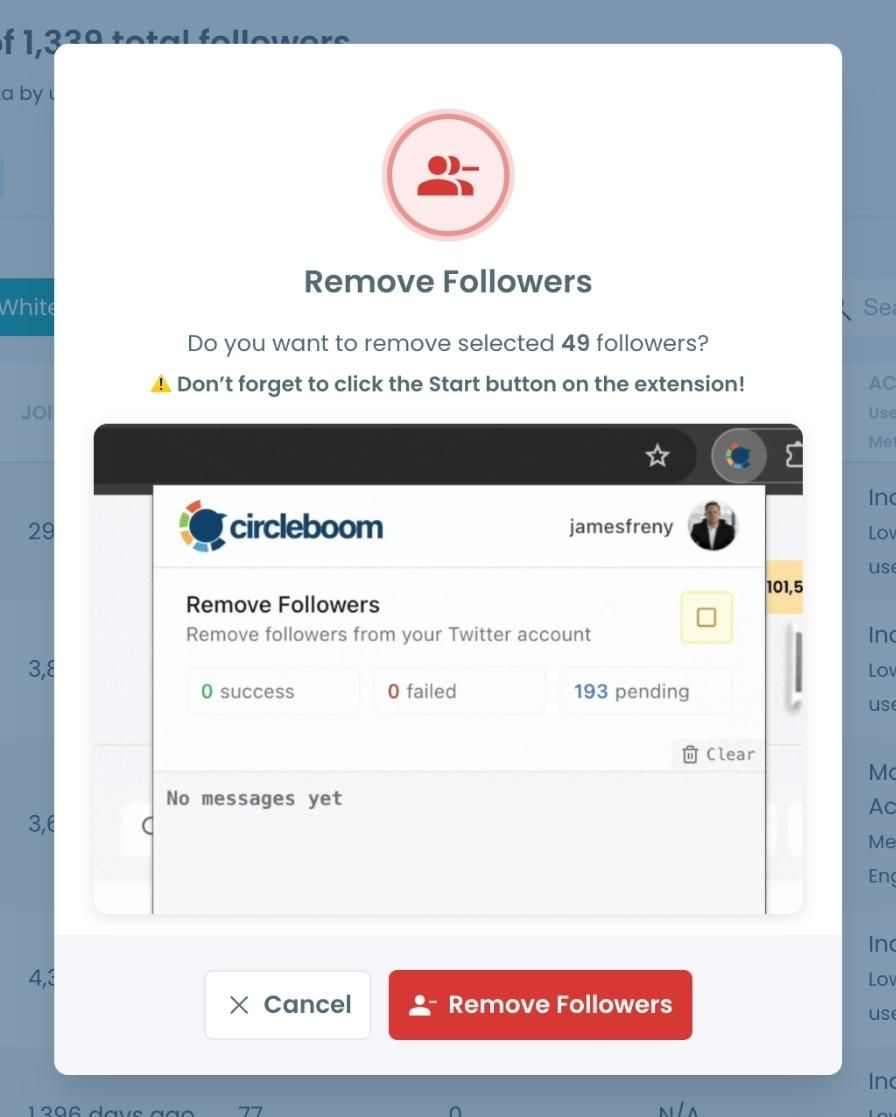
Step #5: Since the removal action is processed via the Circleboom Remove Twitter/X Followers extension, you need to install it to complete the process.
Click on Download the Extension and install it from the Chrome Web Store.
Once installed, you can easily remove followers.

Step #6: After installing the extension, Circleboom will automatically add all your removal requests to the extension queue.
Click on the Start button to begin the removal process.
The extension will process your requests and remove the selected followers.

That's it! Your selected followers are now removed automatically.
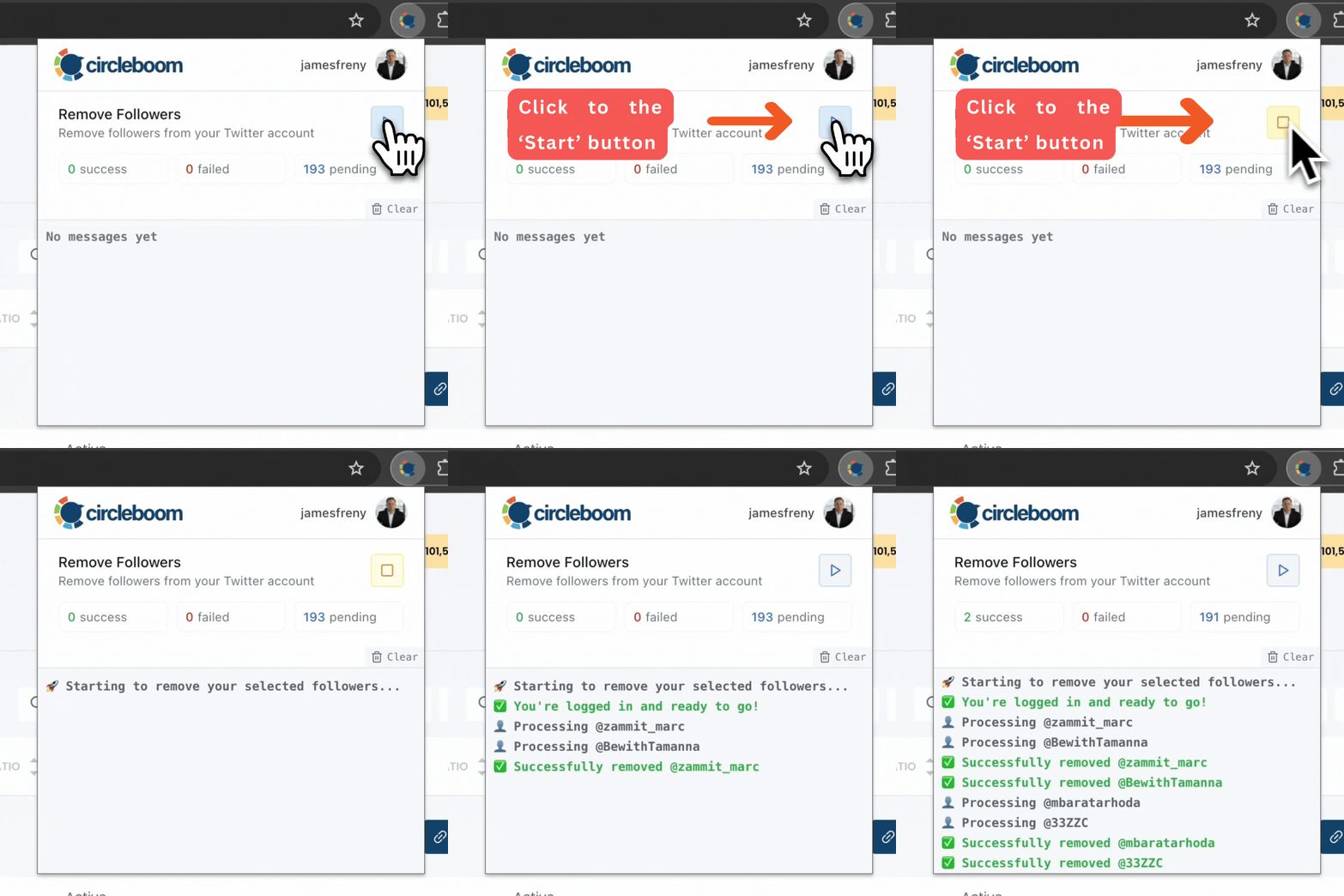
⚠️ Important Warning: Once the removal process begins, do not close your Chrome browser or the Circleboom tab. The tool will automatically remove followers in the background, but if you close the tab or exit Chrome, the process will stop.
If you need a more detailed guide check this video ⬇️
Once you have these accounts before you, you can also choose to add them to your Twitter lists or export them into CSV, both without having to leave the platform.
To prevent unwanted removal, Circleboom also includes a whitelist feature. You can read more about “How to Whitelist My Twitter Followers.”
Final Thoughts: Automation Isn’t the Problem—Bots Are
Automation and bots are often confused, but they are fundamentally different. Automated accounts can be useful, compliant, and valuable. Bots, on the other hand, exist to exploit systems and degrade quality.
If your timeline feels noisy or spam-heavy, the solution isn’t to remove automation; it’s to remove bots.
By understanding the difference and using tools like Circleboom Twitter to clean your follower list, you protect your engagement quality, improve your timeline, and build a healthier presence on Twitter (X) without unnecessary guesswork.
%3F)
