

There was a point when managing social media for my team felt more like juggling than marketing.
We had a designer sending images in one chat, a copywriter dropping captions in another, someone asking “Did anyone schedule this yet?” and another teammate posting something at the exact same time without knowing.
Half the workday disappeared just trying to stay aligned.
We were using group chats, Google Sheets, random notes, last-minute approvals, and a whole lot of luck.
Eventually, I realized something:
Our content wasn’t bad.
Our system was.
That’s when I started searching for a social media management tool that actually supports teamwork—not just scheduling.
And after trying multiple platforms, dealing with limitations, and seeing what truly matters in a collaborative workflow, one tool eventually stood out as the clear winner.
Here’s what happened.
Why Collaboration Tools Matter More Than Ever
Social media today is no longer a one-person task.
You need designers, writers, strategists, community managers — and all of them need to work together without stepping on each other's toes.
When multiple people create content separately, three things happen:
➡️ You lose track of who’s responsible for what.
➡️ The brand voice becomes inconsistent.
➡️ Posting times overlap or get forgotten entirely.
And once your accounts grow, even a single mistake becomes visible.
What I learned fast was this:
Good teams don’t fail because they’re unskilled — they fail because the workflow is messy.
That’s why choosing a management tool with strong collaboration features isn’t optional… it’s the backbone of modern social media work.
My Experience With Other Tools: Good, But Not Built for Teams
When I started searching for a solution, I tried the popular platforms everyone recommends. Some were good for scheduling. Some had pretty calendars. Some had basic analytics.
But the moment you involve a team, their limits start showing.
Here were the problems I kept running into:
❌ No role-based access (everyone could do everything).
❌ No approval workflows — posts went live without revision.
❌ Weak or cluttered calendar views.
❌ Hard to assign responsibilities.
❌ Still had to use Slack or WhatsApp for feedback.
❌ Password sharing (big security problem).
❌ No account-level permission control.
It felt like the tools were built for solo creators, not actual teams.
And we needed something different — something specifically designed for collaboration.
What I Needed in a Real Team Collaboration Tool
Based on all the chaos we had gone through, I created a mental checklist of what the “perfect tool” should have:
- Role-based permissions
- Approval workflows
- A shared publishing calendar
- Multi-account support
- No password sharing
- AI help for consistent brand voice
- Best time to post analytics
- Transparency: everyone sees what’s happening
- Control: only the right people can publish
If a tool didn’t have these, it couldn’t support a real team.
So the search continued… until I came across something that actually checked every box.
The Tool That Finally Got Collaboration Right: Circleboom Publish
When I first tried Circleboom Publish, I realized immediately that it was built for teams, not individuals.

What does AI-Powered mean?
AI-Powered means a product uses machine-learned models (not fixed rules) to analyze data and generate predictions or content automatically.
Everything about the platform is structured around collaboration:
- Clear roles
- Clean approval flows
- Secure account access
- Multiple social platforms
- A unified, shared dashboard
Most tools try to add “team features” as an afterthought.
Circleboom designed the system around teamwork.
That’s why it ended up becoming the tool our team relied on—and the one I now recommend without hesitation.
The Collaboration Features That Made Circleboom Publish Stand Out
1. Role-Based Team Management
This was the first thing that solved our confusion.
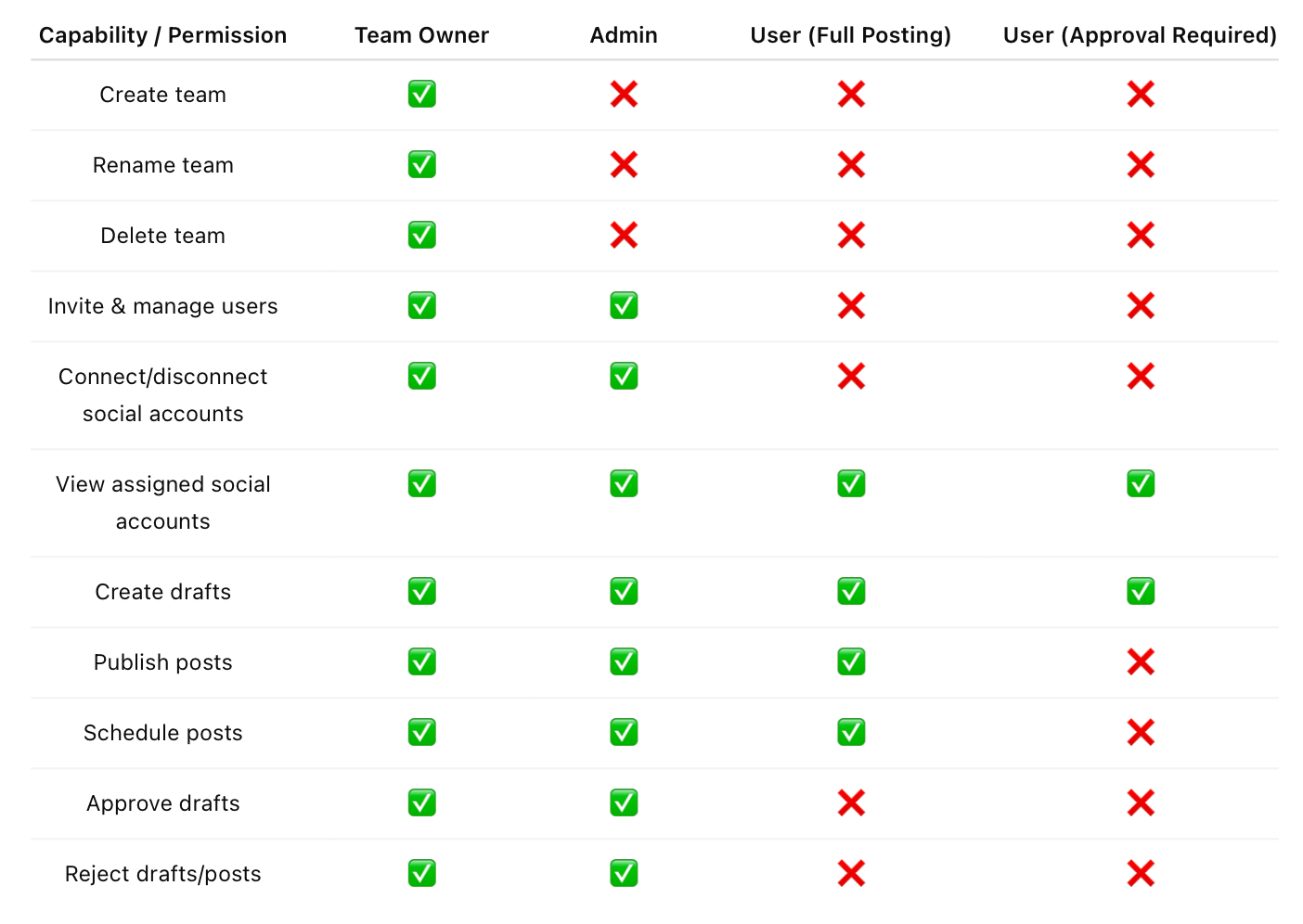
You can assign roles like:
- Admin
- Editor
- Author
And the best part?
You can grant access per social media account.
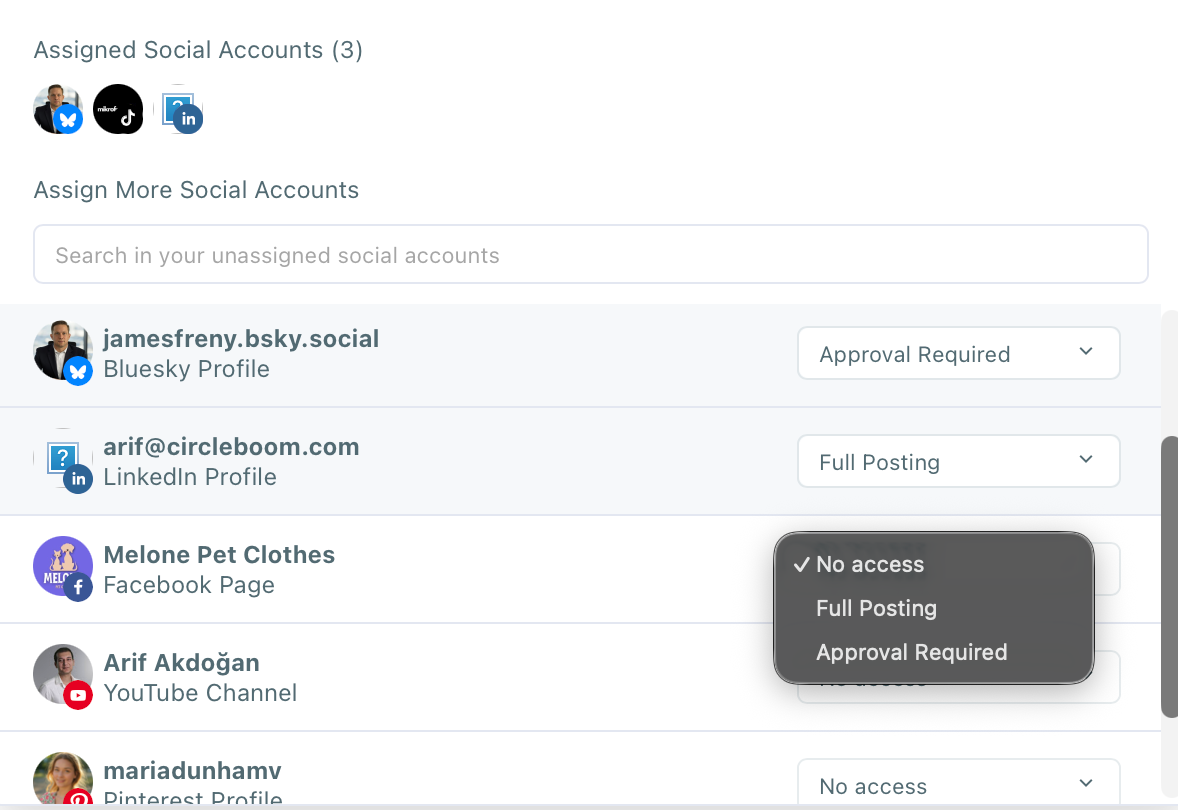
Not everyone needs to touch everything.
Designers can upload content, writers can write captions, and managers can approve — all without messing up the system or risking account access. By implementing these principles of identity and access management, the tool creates a layer of security that traditional password sharing lacks.
No more password sharing.
No more “Who published this?”
No more accidents.
Here is the detailed Role Comparison Table:
2. Approval Workflows That Prevent Mistakes
Before Circleboom, a caption could slip through without the manager seeing it.
Sometimes the tone was off.
Sometimes a detail was wrong.
With Circleboom:
- Editors prepare drafts
- Managers approve or decline
- Revisions stay inside the platform
- Nothing goes live without approval
This alone eliminated half of our typical mistakes.

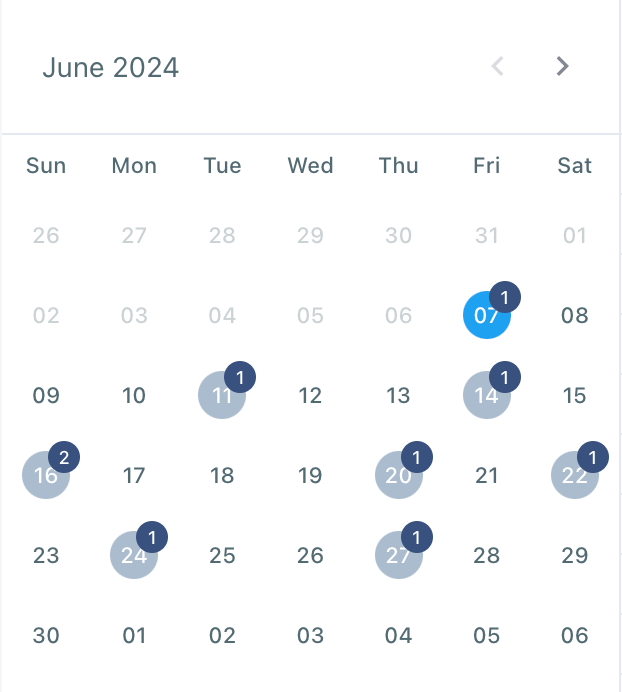
3. A True Shared Social Media Calendar
This was transformative.
Everyone could now see:
- What’s scheduled
- What’s missing
- Which campaigns are coming
- Which days are empty
- Who created each post
Dragging and dropping posts became the simplest part of our week.
4. AI Post Generator for Unified Voice
Different people write differently — and that’s okay.
But the brand voice should stay consistent.
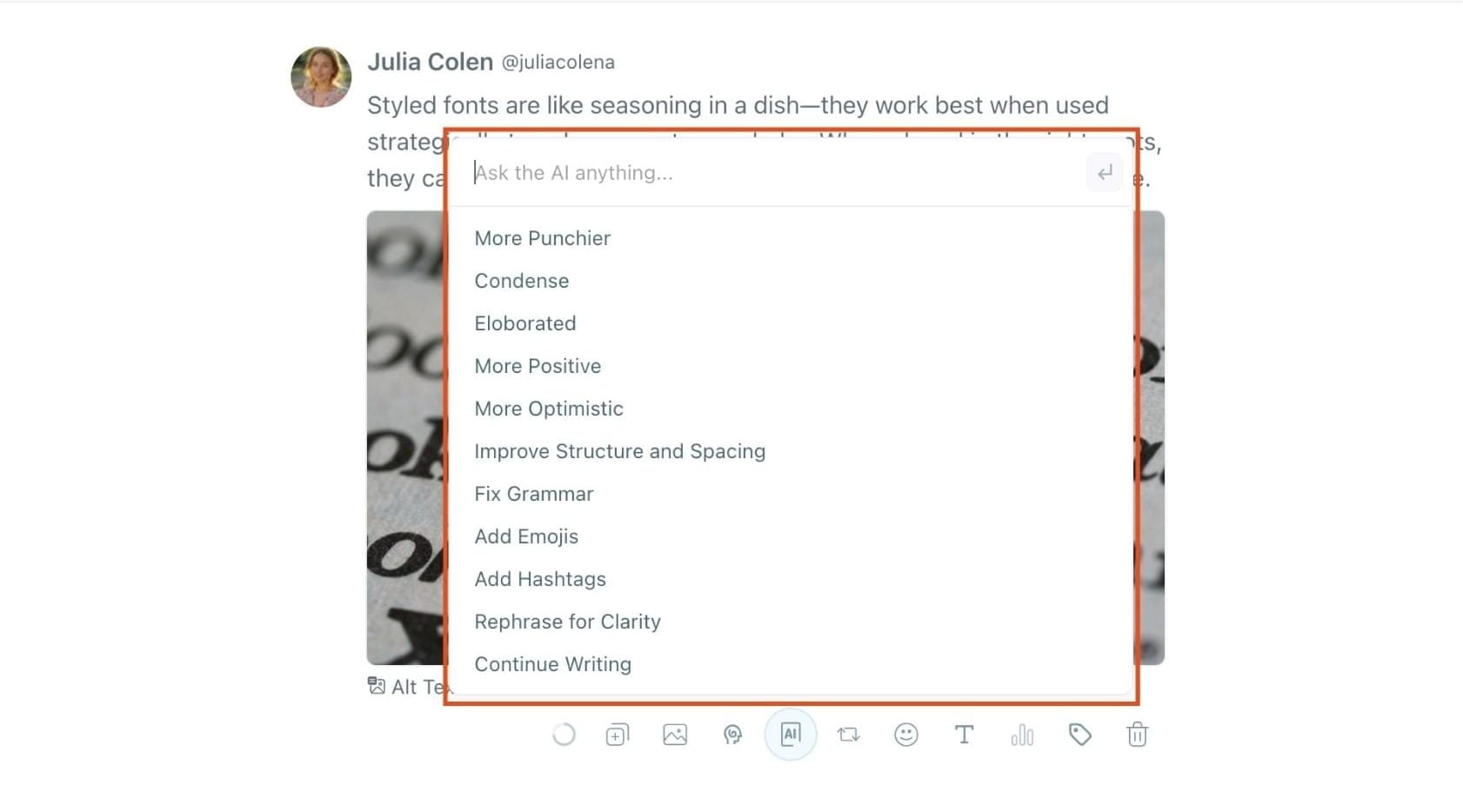
Circleboom’s AI generator helps:
- Rewrite content
- Match tone
- Repurpose blogs into posts
- Fix weak captions
- Maintain consistency across the whole team
This reduced revision cycles and kept everything aligned.
5. Best Time to Post Insights
This solved another big issue: overlapping posts.
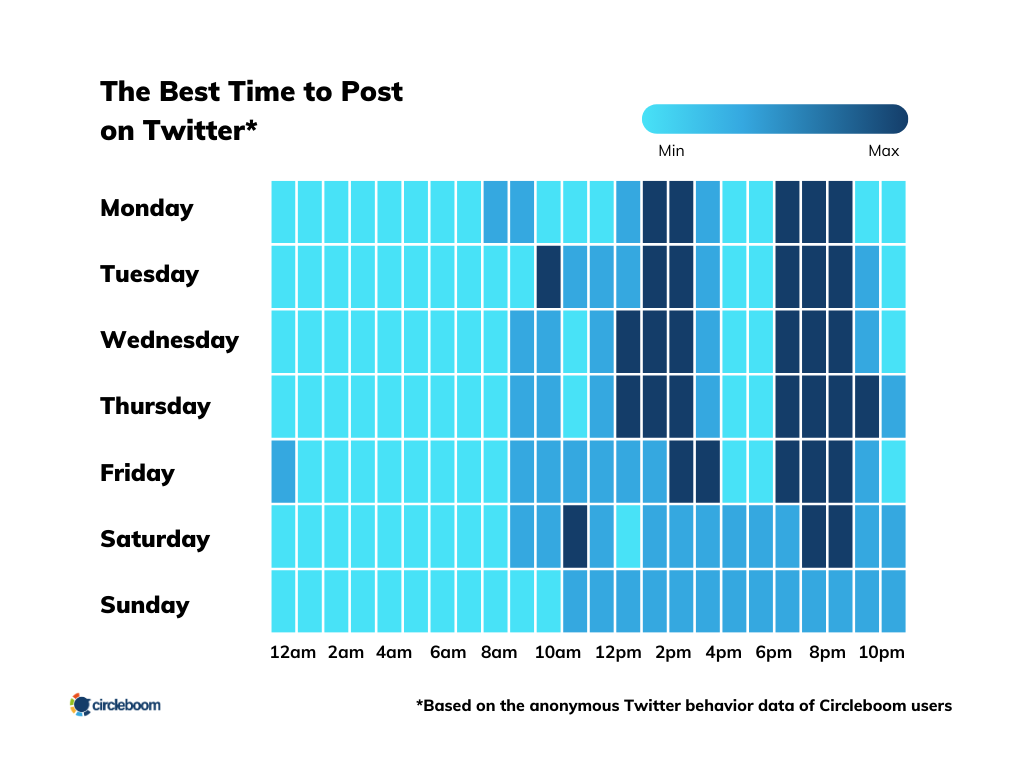
Before, two teammates would accidentally schedule posts at similar times.
Now, Circleboom shows when our audience is most active.
- Higher reach
- Better engagement
- Better separation between posts
- Smarter scheduling for campaigns
Everyone schedules strategically now — not randomly.
 Kevin Frank
6. Multi-Account Dashboard
We manage: Twitter/X, Instagram, Facebook, Pinterest, LinkedIn, Bluesky, Threads, Google My Business, TikTok, YouTube.
All in one place.
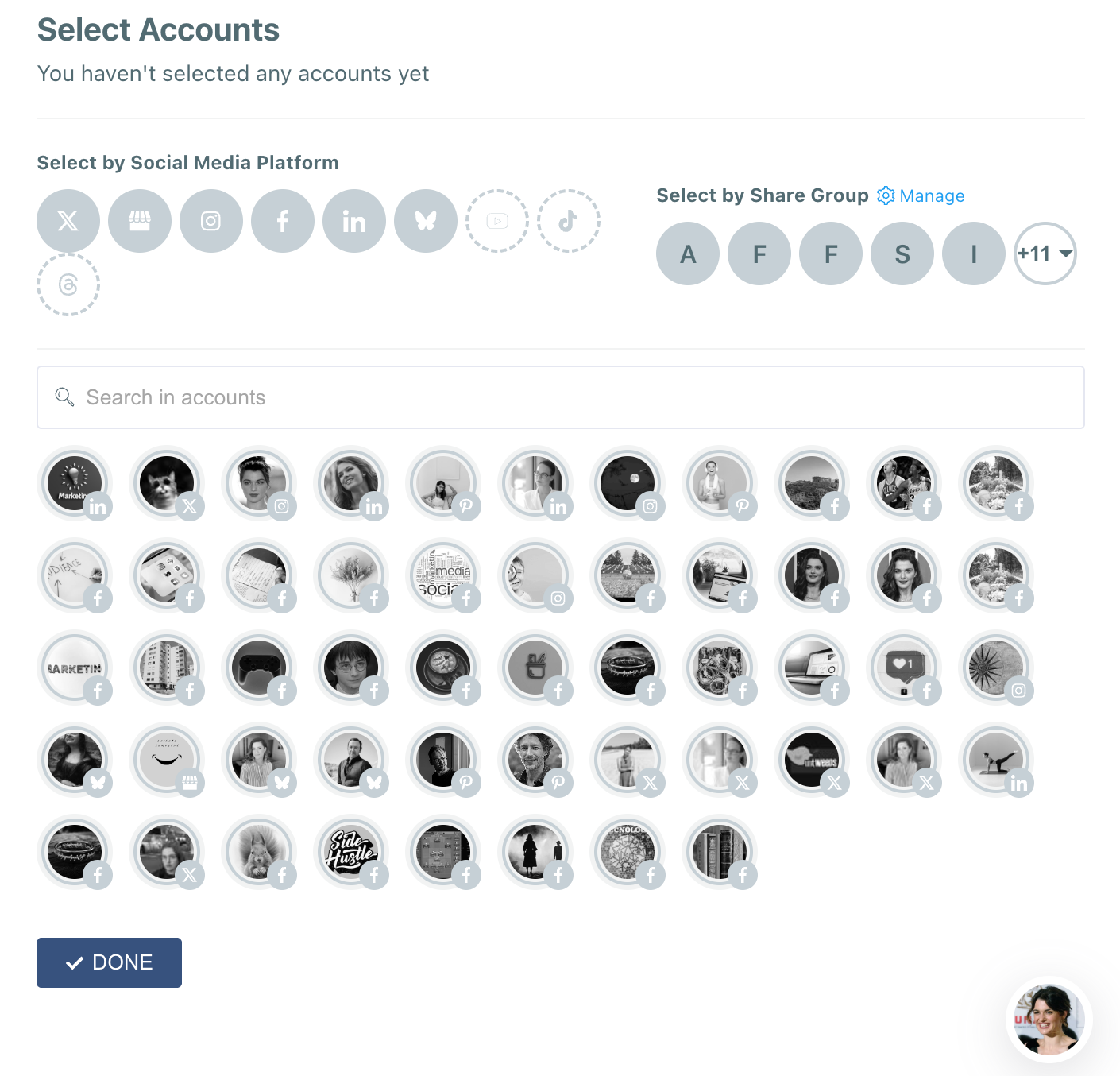
Each teammate sees only what they’re supposed to.
Nothing gets cluttered.
Nothing gets confusing.
Why Circleboom Publish Became My Final Choice
After months of testing different tools, Circleboom Publish was the first platform that truly felt built for teams.
Here’s why it won:
✅ It eliminates chaos.
✅ It organizes the entire workflow.
✅ It improves communication automatically.
✅ It reduces mistakes.
✅ It makes scheduling incredibly simple.
✅ It helps the team produce more content without burnout.
✅ It scales as you grow.
And most importantly:
It gives you full control over roles, access, and approvals.
Once we moved our team into Circleboom Publish, our entire social media process became cleaner, calmer, and more strategic.
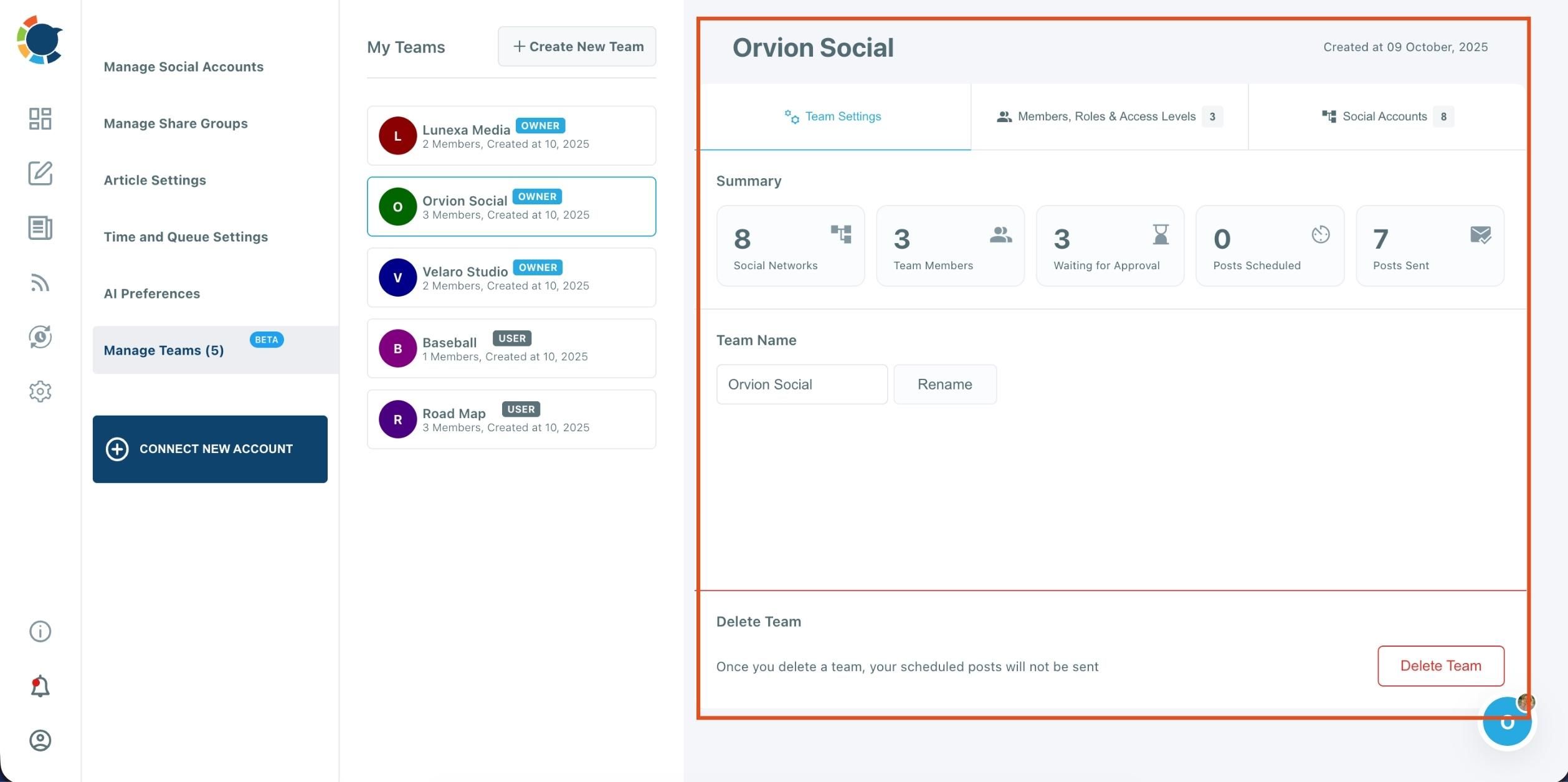
HOW TO CREATE A TEAM ON CIRCLEBOOM
Creating a team on Circleboom allows you to collaborate with your colleagues, manage approvals, and organize your social media accounts under different workspaces — perfect for agencies, businesses, or multi-brand management.
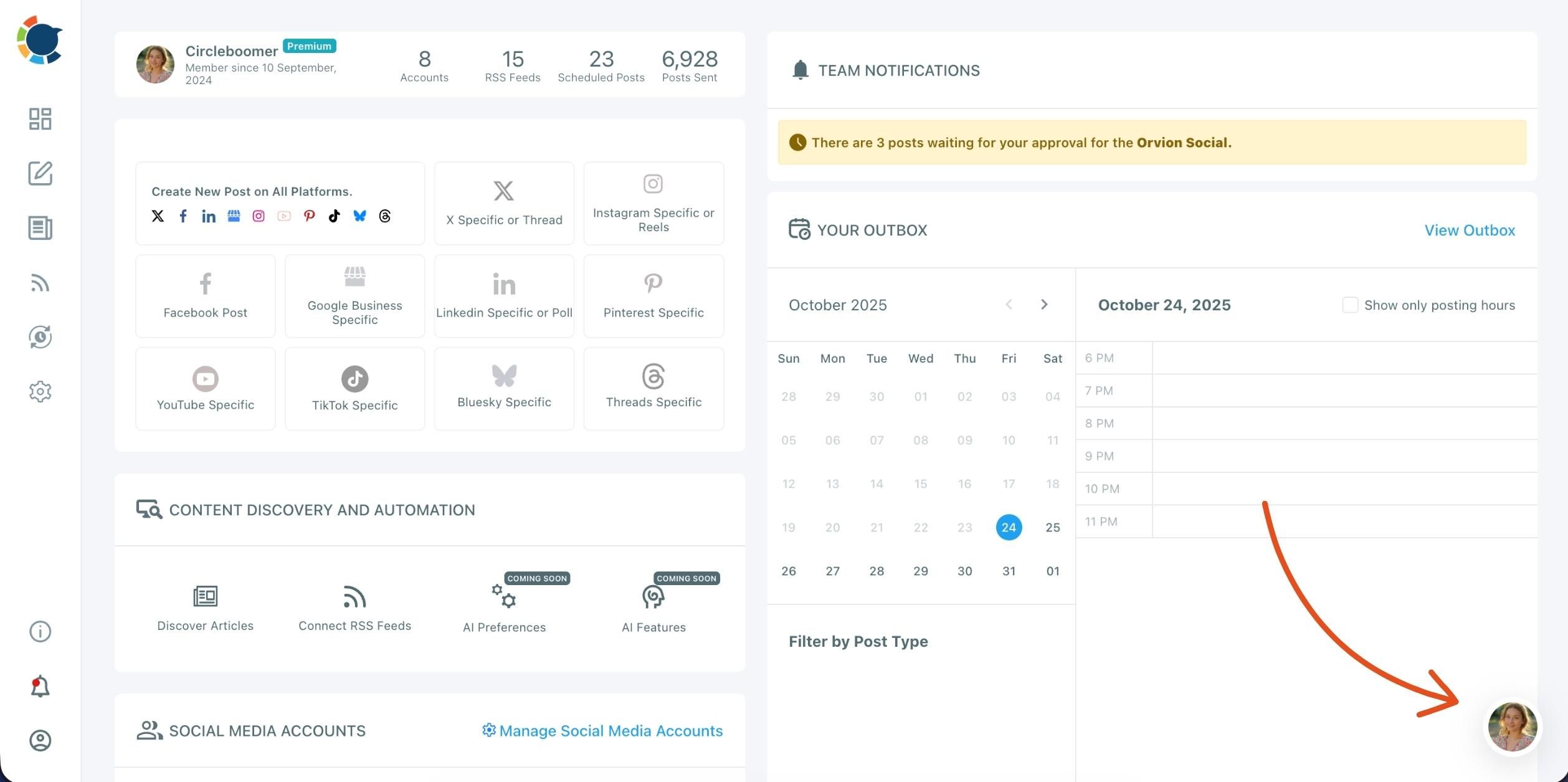
Step 1: Open the Profile Menu
In the right corner of your dashboard, click on your profile icon. This is the place where you can switch between teams (workspaces), view your current organization, and manage your team settings.
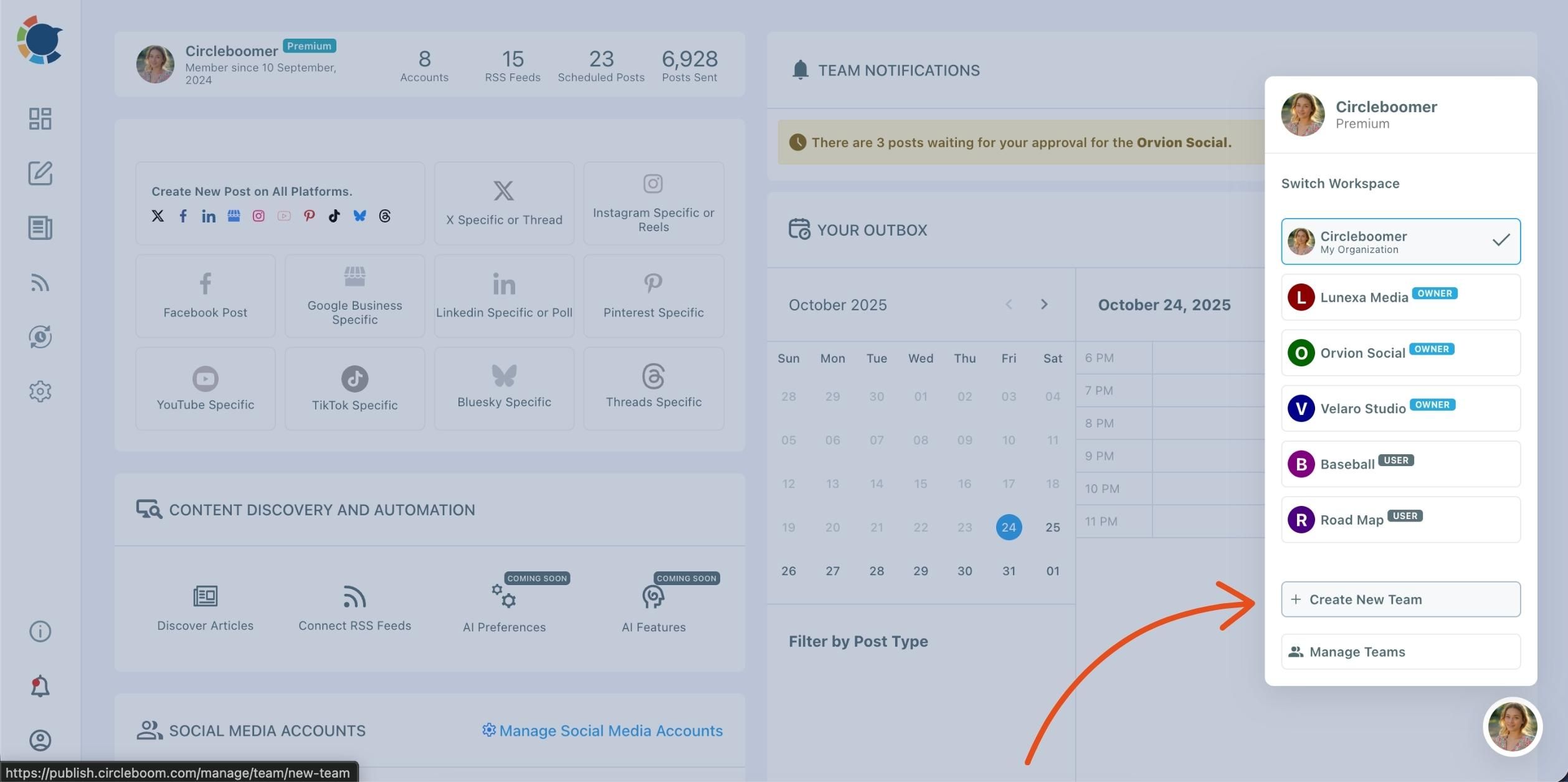
Step 2: Select “Create New Team”
In the dropdown, you’ll see all your existing teams, labeled as Owner or User. Click ➕ Create New Team at the bottom of the list.
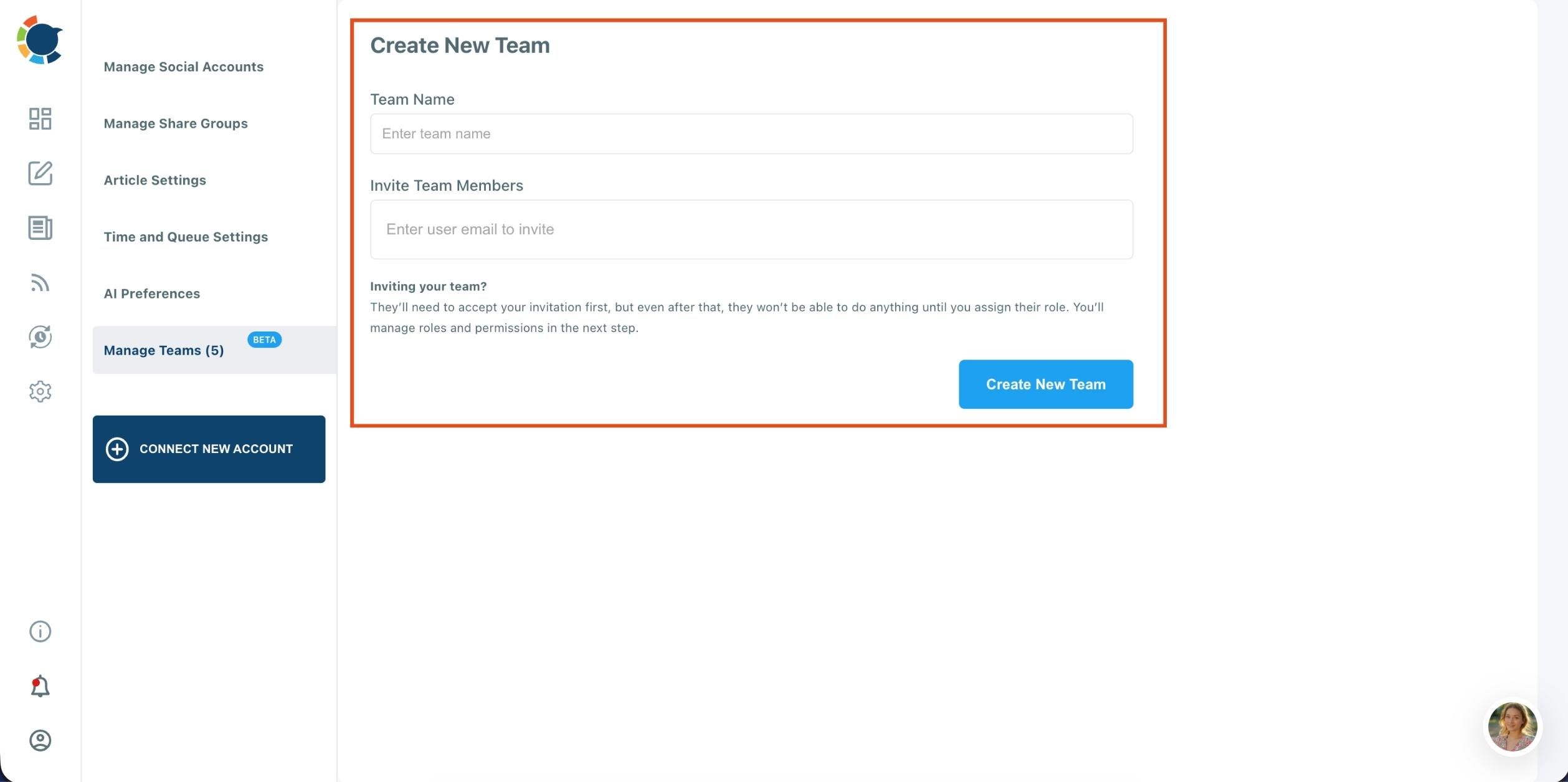
Step 3: Enter Team Details
You’ll be redirected to the Create New Team page.
- Type your Team Name in the first field.
- Then, enter the email addresses of the members you’d like to invite in the “Invite Team Members” field.
Once they receive and accept your invitation, you can assign roles and permissions for each member from the “Manage Teams” section.
Step 4: After creating your team, you can:
- Add or remove members
- Assign roles and access levels (Owner, Admin, User)
- Connect social media accounts for shared management
- Review scheduled or pending posts for approval
You can also switch between all your teams anytime from the profile dropdown menu.
Conclusion: The Best Collaboration Features Belong to the Tool Built for Teams
If your team works on social media together — whether you’re a business, agency, organization, or growing brand — you need more than a basic scheduler.
You need structure.
You need clarity.
You need a tool that fits the way teams actually work.
After all my trial and error, Circleboom Publish is the tool that delivered the collaboration features we genuinely needed.
If your workflow feels messy, if your team keeps stepping on each other’s toes, or if you simply want a more professional process, Circleboom Publish is the strongest option to bring order, security, and efficiency into your social media routine.

