The best business Instagram post ideas sell by showing the product doing its job, and they leave the price and the order line for the first comment. Below are 30 of them, grouped by what each post does for the shop.
What this list gives you.
• Thirty business Instagram post ideas, grouped by the job each one does.
• Where the selling line goes in each idea: the caption or the first comment.
• A weekly rhythm for posting them without running out of steam.
Circleboom Publish writes Instagram captions with AI, holds prices and order details in a scheduled first comment and posts each idea at your followers' active times. Schedule your business Instagram post ideas at your best times.
Why most business Instagram posts feel salesy
Most business Instagram posts feel salesy because the caption tries to do every job at once. It introduces the product, states the price, asks for the order, lists sizes and ends with a block of hashtags, so the reader meets a sales pitch before they meet a reason to care.
Instagram is not a quiet channel to get wrong.
Pew Research Center's social media fact sheet reports that 51% of U.S. adults use Instagram.
That audience scrolls fast. A post that opens with "Only $29, DM now!" reads as an ad, and people skip ads. A post that opens with the product solving a problem reads as something worth stopping for, and the sale follows from that.
This shift is what people call social commerce: buying inside the feed, often through a DM, instead of on a separate store. It rewards shops that post often and post well, which is a content planning problem more than a copywriting one.
So the fix has two parts. You need enough business Instagram post ideas to fill the week, and you need a place where the selling details go without crowding the caption.
A good start is to plan a month of business Instagram posts in one sitting, then write each caption around one idea.
Do you need an Instagram business account for these ideas?
Yes, set up a professional account before you post any of these ideas. Instagram's own guide to professional accounts walks through the switch, and you can change the account type or switch back later.
The switch happens in the Instagram app, under Settings and Account, and an existing account can be converted rather than started from zero. It adds a contact button so customers can reach you from the profile, plus Insights for reach, impressions and engagement.
The post on why you should have an Instagram business account covers the rest of the setup, including the bio and the profile link. With that in place, every idea below has a profile to land on.
30 business Instagram post ideas that sell without feeling salesy
These business Instagram post ideas fall into six groups of five. I would not post all of one group in a row. Mix them across the week so the feed alternates between showing, teaching and selling.
Product posts that show the item working
Product posts are the backbone of a shop with no website, because the post is the product page. The guide to sell on Instagram without a website explains how orders through DMs fit around these posts.
- The product in use: a photo of the mug holding coffee, not the mug on a white background.
- One product, one post: the item, one benefit in the caption and "DM to order" in the first comment.
- The collection drop: a 10-image carousel of the new range, with sizes and prices in the first comment.
- One item styled five ways: a carousel that answers "what would I wear this with?"
- Before and after: the room, the hair or the garden that the product changed.
Carousels carry most of this group. If you have no designer, Circleboom's tools to schedule Instagram carousel posts include an AI Carousel Generator that turns a short text into editable slides.
Behind-the-scenes posts that build trust
Behind-the-scenes posts sell by making the business feel real. People buy more readily from a shop when they can see the hands that pack the order.
- Packing the order: a short clip or photo of today's parcels going out.
- How it is made: one step of the process, from raw material to finished piece.
- Meet the team: one person, their job and one honest line about it.
- The workspace: the studio, kitchen or shelf where the stock lives.
- The mistake you fixed: a batch that went wrong and what you changed.
Customer posts that let buyers do the selling
Customer posts move the sales line out of your mouth and into a buyer's. Always ask permission and credit the customer when you share their photo or words.
- The customer photo: a repost of a buyer using the product, with credit.
- The review as a graphic: one line from a review, set as a quote image.
- The question a customer asked: answered in the caption, for everyone.
- The unboxing: a buyer's first look, shared with permission.
- How customers use it: three real uses you did not plan for.
Teaching posts that make the product the answer
Teaching posts earn saves, and a saved post comes back to the reader later. The guide to best practices for creating carousels on Instagram covers how to pace slides for this kind of post.
- The three-step how-to: a carousel that solves a small problem your product touches.
- Myth versus fact: one common belief in your niche, corrected.
- The care guide: how to wash, store or refill what you sell.
- The checklist: what to look for when buying this kind of product.
- The starter pick: "if you only buy one thing from us, start here."
Event and offer posts with a real deadline
Offer posts work when the deadline is real and the entry is simple. Sales and giveaways are among the most popular posts on Instagram, so run them, just not every day.
- The sale announcement: posted a couple of days ahead so people can plan.
- The countdown Story: a short daily reminder in the days before the sale.
- The giveaway: keep entry simple: like to enter, tag the brand and add #giveaway.
- The limited drop: a small batch with a clear end date.
- The seasonal special: a holiday bundle or a back-to-school set.
Community posts that show the brand's personality
Community posts give followers something to reply to, and replies are what keep a shop visible. The post on engaging quote posts for Instagram shows how to make a quote image that people share.
- The quote graphic: a line that fits your customers' day, made with the free quote maker in Instagram's shape.
- The milestone thank-you: your 100th order or your first year.
- The local partner shout-out: the café next door or the printer you use.
- The Story poll: "which color next?" (polls are added in the Instagram app).
- The open question: ask what they would like you to make next.
Only one group in six asks for the sale directly, and that is why the other five make it work.
Where each idea's selling line goes: caption or first comment
The caption should carry the reason to care, and the first comment should carry the transaction. That split is the difference between a post that sells and a post that reads like an ad.
Instagram gives you room for both. A caption holds up to 2,200 characters, with up to 30 hashtags and 20 @ tags, and that ceiling fills up fast once prices, sizes and tags pile on.
A first comment written by you is a second space, and it also claims the top comment slot before anyone else's reply lands there.
| Idea group | Caption carries | First comment carries |
|---|---|---|
| Product posts | The benefit and the hook | Price, sizes, "DM to order" |
| Behind the scenes | The story | A link-in-bio note |
| Customer posts | The customer's words, credited | Where to buy the item |
| Teaching posts | The tip itself | The product that helps |
| Offers and events | The deadline and the rule | Codes, dates and details |
| Community posts | The question | Hashtags |
One exception matters. If a post is a paid partnership or an ad, keep that disclosure in the caption itself, where people see it, and never hide it in a comment.
The guide to schedule first comments on Instagram posts shows the field in detail. In Circleboom Publish it sits under the caption as "Enter first comment" on an Instagram Post and "Add first comment" on a Reel, and it goes out with the post at the scheduled time.
A post that sells without feeling salesy puts the reason in the caption and the price one tap lower.
How to write the caption for each idea with Circleboom Publish
Circleboom Publish turns each idea into a finished Instagram post from one composer: the photo, an AI-drafted caption, hashtags and the first comment, all scheduled together. Here is how I would run it for this list. Circleboom is an official X (Twitter) Enterprise API partner, which is why brands trust it with their accounts on every network.
The composer opens on the Instagram Post tab, which takes up to 10 images or videos as a native carousel. Reels, Story Post, Grid Post and Panoramic Post sit in the tabs beside it, so the 30 ideas can mix formats without changing tools.
For the caption, the gold AI button above the text field writes a hook-first draft from a short instruction. Try something like "caption for a photo of our candles being packed, warm and short." The AI Instagram caption generator page shows the same writer on its own.
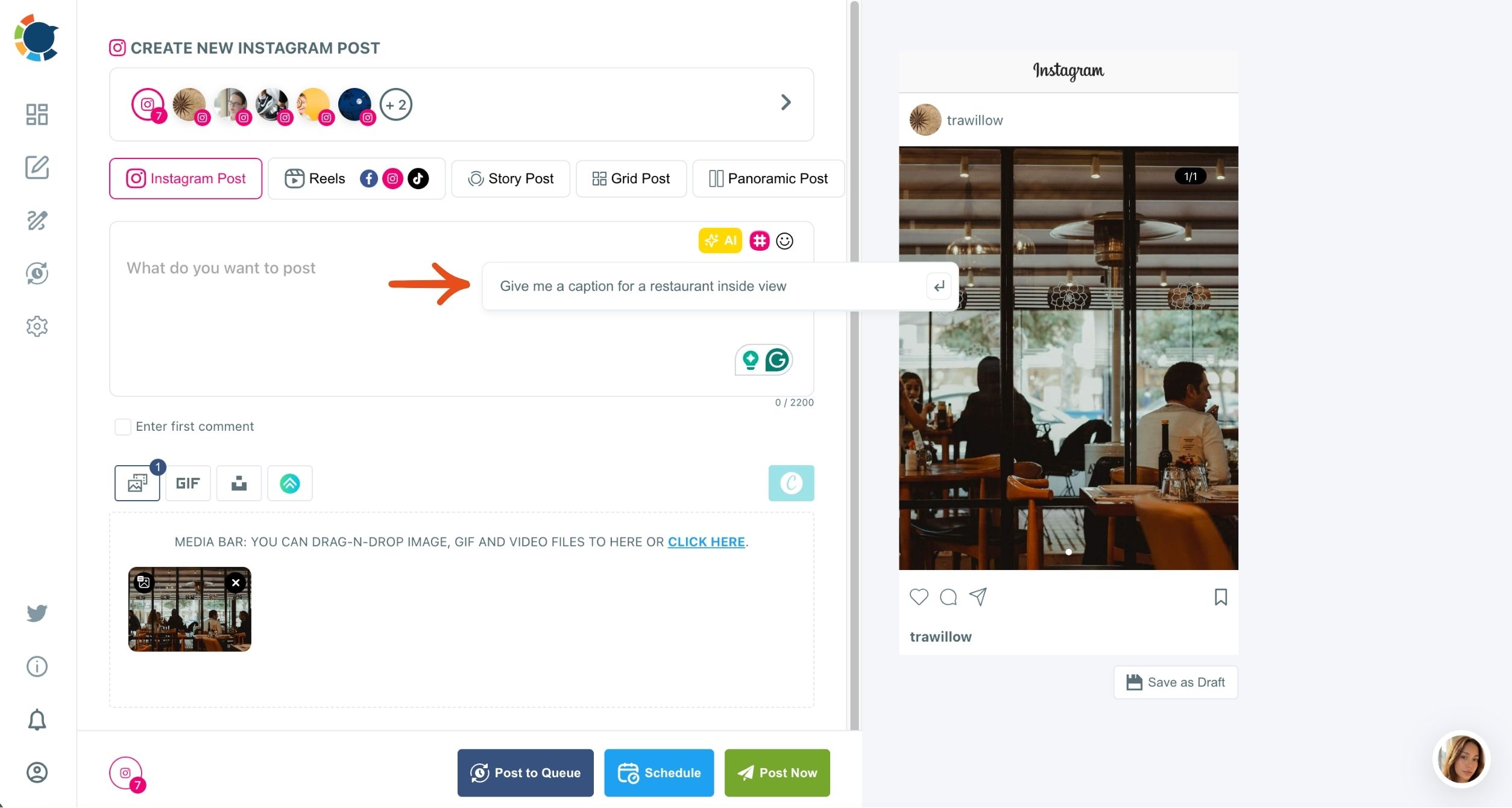
Shortcuts like More Punchier, Condense and Fix Grammar adjust the result, and you should always check any factual claim before posting.
Add hashtags and pick the posting time
The Hashtag Generator then bulk-adds a relevant set of tags for the post. Review them against the 30-tag cap and mix popular tags, niche tags and one branded tag, rather than reusing the same block on every post.
With the caption and first comment ready, you can schedule Instagram posts for your business with the caption and first comment ready in the same window. The Schedule modal offers a "Pick your best post time" panel with six suggested slots worked out from your own followers' activity.

Watch one of these business post ideas come together: AI writes the caption and Canva supplies the visual.
How often should a business post these ideas on Instagram?
A healthy rhythm is feed posts 3 to 5 times a week, Stories 2 to 4 times a day and Reels 3 to 5 times a week. Consistency matters more than volume, and a flood of posts can wear followers out.
At that pace, the 30 business Instagram post ideas above cover roughly six to ten weeks of feed posts, before you repeat a single format. That is an illustration of the math, not a rule, but it shows how far one list goes.
There is also a ceiling. Instagram caps posting at roughly 25 posts per account in 24 hours, which no small shop should come near, but it is worth knowing before a big sale day.
The practical answer is to batch. Write a week of posts in one sitting, set a Queue with the number of weekly slots you want and let Add Best Times to Post fill those slots with your own followers' active times.
I find a weekly sitting easier to keep than a daily habit, because it only needs one free hour.
Summary: turning post ideas into a selling week
Good business Instagram post ideas show the product working, teach something or let a customer speak, and only one in six asks for the sale outright. Put the hook in the caption, the price and order line in the first comment, and post on a steady weekly rhythm.
Circleboom Publish keeps that routine in one place: the AI writes the caption, the Hashtag Generator adds tags, and the first comment and best-time slot go out with the post.
→ Put these Instagram post ideas for your business on the calendar
Questions about selling on Instagram
How many hashtags can a business Instagram post use?
Instagram allows up to 30 hashtags in a caption, within its 2,200-character limit. A focused mix of popular, niche and branded tags usually reads better than all 30, and Circleboom Publish's Hashtag Generator adds a relevant set you can trim.
When should I post business content on Instagram?
Post when your own followers are online, not at a generic peak hour. The best time to post on Instagram for your account is worked out from your account's own followers' activity.
Circleboom Publish offers those windows as suggested slots when you schedule.
Can the same post go to my other shop accounts?
Yes, the Instagram composer lets you select several accounts at once. Give each account its own caption with the AI writer, though, because identical posts across accounts count as duplicate content and can limit reach.