I have run social accounts through Buffer, and the problems that pushed me to look elsewhere are not the ones most Buffer reviews lead with. Buffer is a clean tool for a few channels, and it gets expensive and fragile as the account list grows.
This review prices it at your channel count, keeps the pros fair, and tells you which setups it fits.
Buffer: a tidy per-channel scheduler for 12 networks, from $5 per channel a month. Best for: solo creators and small brands on three to five channels. Circleboom Publish: sends one post to any number of accounts on Instagram, X, LinkedIn, Facebook and six more networks in one action, and does not charge per platform.
→ Try the Buffer alternative that posts to every account at once
How I built this Buffer review
How I built this review: I scored Buffer against six criteria, using Buffer's own pricing and feature pages (checked in October 2026), platform-owner documentation, and my own experience running social accounts on it. The criteria are pricing at your channel and user count, platforms covered, posting one post to many accounts, team approvals, built-in creation and automation, and analytics with link tracking.
Two things to know before you read on. First, I work on Circleboom Publish, which competes with Buffer, so every Buffer fact below comes from Buffer's published pages rather than my opinion of them.
Second, the cons section is my own experience, labelled as such, with no invented test numbers.
Most Buffer reviews quote a starting price and stop there. The section on cost below does the arithmetic for 3, 5 and 10 channels instead, because that is the number you will actually pay.
Buffer vs Circleboom Publish at a glance
The table compares Buffer with Circleboom Publish on the six criteria, with Instagram formats added as a seventh row, so you can see where each one wins before reading the detail.
| Criterion | Buffer | Circleboom Publish | Edge |
|---|---|---|---|
| Pricing model | Per channel, per month | Per plan, not per platform | Depends on account count |
| Platforms | 12, incl. Mastodon, Substack | 10, incl. YouTube Shorts | Buffer |
| One post, many accounts | Yes, channel groups on paid plans | Yes, any number in one send | Tie |
| Team approvals | Team plan, unlimited users | Admin and User roles | Tie |
| Instagram formats | Carousels, Reels, Stories | Plus Grid, Panoramic, music | Circleboom Publish |
| Creation tools | AI Assistant, hashtag manager | AI writer, Canva, AI carousels | Circleboom Publish |
| Link tracking | Custom UTM on paid plans | UTM Link Builder | Tie |
Buffer wins on network count, and the team criteria come out even. The gap opens on Instagram formats, creation tools and, above all, on what happens to the bill when you add accounts.
What Buffer costs at 3, 5 and 10 channels
Buffer bills per channel, so the price you pay is the plan rate multiplied by your number of connected profiles and Pages. Here is the arithmetic on Buffer's published rates: Essentials at $5 per channel a month for one user, and Team at $10 per channel a month with unlimited users and approvals.
| Channels | Free | Essentials | Team |
|---|---|---|---|
| 3 | $0, 10 posts per channel | $15 a month | $30 a month |
| 5 | Not available | $25 a month | $50 a month |
| 10 | Not available | $50 a month | $100 a month |
At 10 channels with a team, Buffer costs $100 a month before any add-on.
For the same setup, Circleboom Publish costs $34 a month for 10 accounts with one team member included, and each additional team member is about $4. Even after adding a second team member, the bill is $38, about 60% less than Buffer's $100.
The Free plan covers up to 3 channels, 1 user and 10 scheduled posts per channel, with 30 days of Insights history. Above 10 channels, Buffer says the per-channel rate drops, but the page does not show the figure, so I have not guessed it.
The multiplied total, not the per-channel rate, is the number Buffer reviews usually leave out.
In my experience this is the con that hits hardest: the tool feels cheap at three channels and expensive at ten. If you are weighing it against a tool built for many accounts, use your real channel count. Then compare Buffer with a multi-account scheduler on the same numbers.
How many channels do you actually need to pay for?
Count every profile, Page and location separately, because each one is a channel on Buffer's bill. A café with an Instagram account, a Facebook Page and a Google Business Profile is three channels; open a second location and it becomes six.
The channels most readers pay for are the big ones. Pew Research Center's fact sheet on Americans' use of social media puts YouTube at 84% of U.S. adults, Facebook at 70%, Instagram at 51% and LinkedIn at 33%.
On Circleboom Publish, plans are sized by connected accounts instead: 2 on Entry, up to 5 on Pro, up to 10 on Premium and up to 30 on Business, with larger plans for up to 100. Adding another platform inside your plan does not raise the bill.
Buffer pros: what Buffer does well
Buffer is a capable scheduler, and a fair Buffer review has to say so. These are the strengths that show up on its own pages:
- The widest network list here: 12 channels, including Mastodon and Substack, which Circleboom Publish does not support.
- A real free plan: 3 channels and 10 scheduled posts per channel, enough to test the workflow.
- A clear calendar: week and month views of the whole schedule, included on every plan.
- Threads on several networks: threaded posts to X, Bluesky, Threads and Mastodon, one on Free and unlimited on paid plans.
- Team features without seat fees: the Team plan includes unlimited users, approvals and custom access.
It also schedules Instagram carousels of up to 10 images, Reels and Stories, and paid plans add first comments and custom UTM parameters. For a solo creator on three or four channels, that is a lot of tool for the money.
Buffer cons from running real accounts
These are the problems I ran into myself. They rarely make it into Buffer reviews, so I have grouped them by where they hurt. Where a point is a missing feature, I checked Buffer's own pages first; where it is my experience, I say so.
Pricing that climbs with every account
Buffer felt too expensive for what I needed once the account list grew. The per-channel model is the reason: every new Page, profile or branch adds $5 or $10 a month, so growth is taxed account by account. The cost table above shows the climb from $15 to $100, while Circleboom Publish stays at $34 for 10 accounts.
Connections that expire and posts that fail
In my experience, channel connections expired too often, and accounts had to be reconnected before scheduled posts could go out. Every expired connection means scheduled posts that wait until someone notices and reconnects.
I also saw a high rate of failed posts. I am not putting a percentage on it, because I did not measure it formally, but on a scheduling tool any regular failure undoes the reason you scheduled in the first place.
Instagram formats Buffer leaves out
Buffer's own Instagram page says it switches to notification-based posting when a post includes music, which means finishing the post yourself in the Instagram app. Circleboom Publish has a built-in music library for Reels and Stories, so the scored video publishes on schedule.
I could not find a tool in Buffer that splits one image into a 3x3 or 3x4 grid of tiles, or into a swipeable panorama. Circleboom Publish has both as tabs in its Instagram composer: Grid Post schedules each tile as its own post, and Panoramic Post turns one wide image into a single carousel that unfolds as you swipe.
Buffer does schedule carousels. The difference is creation: Circleboom's AI Carousel Generator writes a full multi-slide carousel from one instruction, with editable templates, fonts and colors.
AI and ease of use
I found Buffer complicated to use, and its AI features weak. Its AI Assistant is on every plan, but in my experience it did not do enough of the editing work I needed from it.
Circleboom's AI writer sits inside the composer at no extra cost. It drafts from a prompt and edits existing text with one-click shortcuts such as More Punchier, Condense, Fix Grammar and Add Hashtags.
It does not enforce platform limits on its own, so you tell it, for example, to keep a post under 280 characters for X.
X planning and auto-retweet
For X, Buffer is a scheduler and not much more. I could not find an auto-retweet option, or a way to turn a tweet into a designed Instagram post.
Both live on Circleboom Twitter, our X-only product. Its X Post Planner reposts a tweet on a delay you set and converts a tweet into an Instagram-ready visual.
Most of these cons grow with scale: more accounts mean more cost, more reconnections and more failed posts to chase.
How does Buffer handle teams and approvals?
Buffer handles teams well on its Team plan: unlimited users, approval workflows and custom access for $10 per channel a month. The catch is that the team price is still a channel price, so a team running ten channels pays $100 a month whatever its size. Circleboom Publish covers 10 accounts and one team member for $34, with each extra member at about $4.
Circleboom Publish takes a different route. Its team management gives each client or brand its own workspace with Admin and User roles.
A User's posts wait for an Admin's approval before they go live, and teammates are added as user add-ons rather than through a plan upgrade.
There are two roles only, Admin and User, with no custom roles. If your agency needs fine-grained permissions per person, Buffer's custom access is the stronger fit.
Who Buffer fits and who it does not
Buffer fits a solo creator or a small brand on three to five channels who wants a clean calendar and needs Mastodon or Substack. On those terms, the per-channel price stays low and the free plan is a fair trial.
It fits less well once you run many accounts, several brands or several locations, because each one adds to the bill and to the list of connections to keep alive. If that is you, the roundup of Buffer alternatives covers the tools built for that load.
If you are also weighing the other big name, the Buffer vs Hootsuite comparison sets them side by side on price and features.
Local businesses have one more question to answer. Google Business Profile posting differs between tools, and Circleboom vs Buffer for Google Business Profile scheduling covers that case in detail.
If you only post to Facebook and Instagram, you may not need a paid tool at all. Meta's help page on how to save, schedule and reschedule posts in Meta Business Suite covers its free scheduler.
The Circleboom Publish alternative for many accounts
Circleboom Publish is built for the point where Buffer gets expensive: many accounts across many platforms. One post goes to any mix and any number of connected accounts in one send, proven at 30 Facebook Pages at once, and Share Groups save a recurring bundle, such as one client's accounts, for one-click selection.
Circleboom is an official X Enterprise developer, so the X side of every send runs on access X itself approves, next to Instagram, LinkedIn, Facebook and the other networks. You can manage multiple social media accounts in one send without counting channels on the bill.

One post to every account, with the time math
The worked math shows the time side. Four posts to seven accounts on four platforms is 28 separate publishes when done natively, and four sends from one composer, about ten minutes in total.
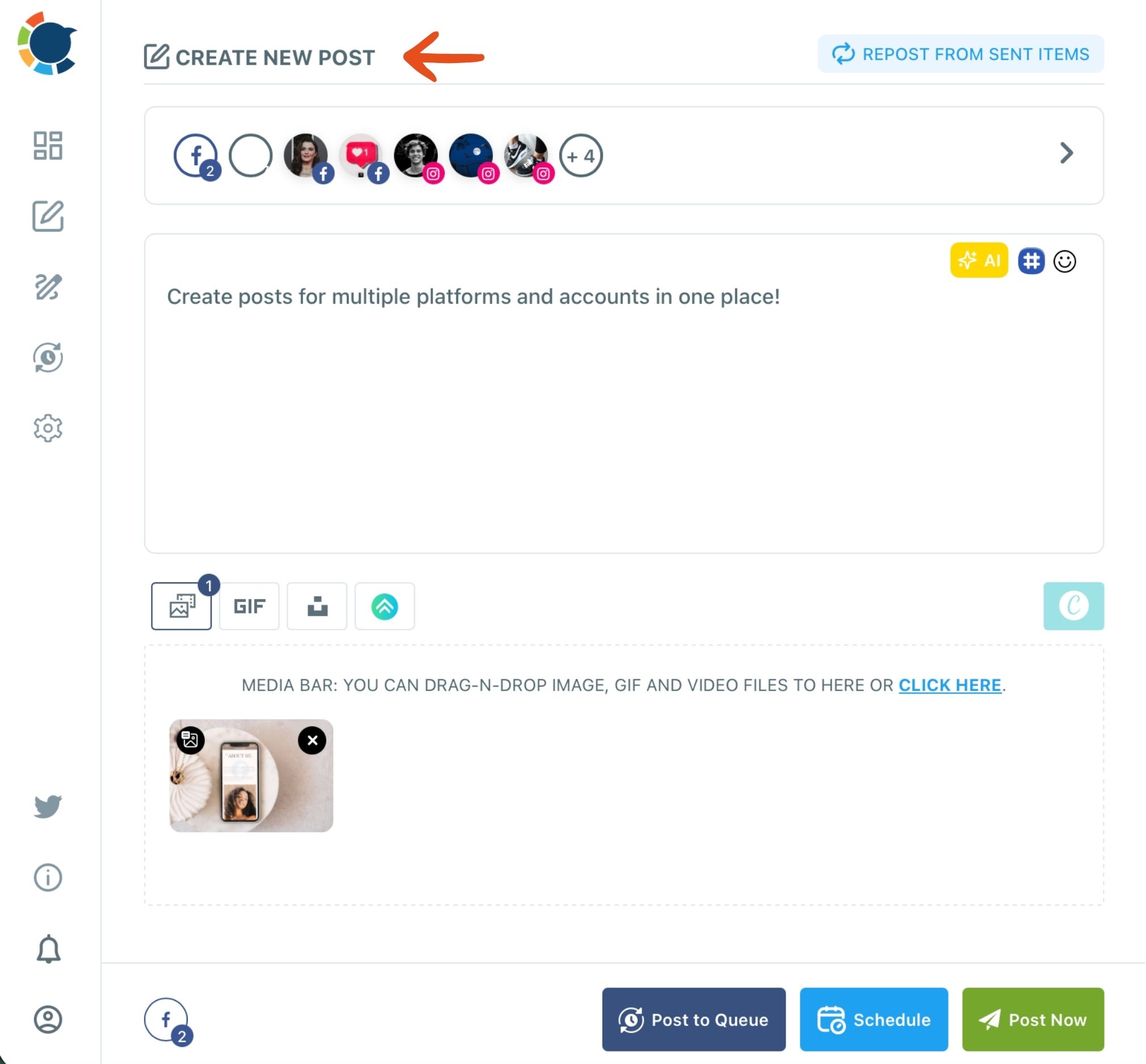
The composer previews the post per network before it goes out, and Post to Queue drops it into each account's next open recurring slot. One post to several platforms has to fit the strictest limit, so check the preview when X or Bluesky is in the send.
One send, two networks: the same post going to a Facebook Page and a LinkedIn account at once, the multi-account criterion this review turns on.
Automation, video and link tracking in Circleboom Publish
Automation and video go further than a queue. You can post RSS to social media so every new blog article goes out by itself on X, Facebook, LinkedIn, Google Business Profile, Bluesky and Threads.
For short video, you can also cross-post videos to Instagram, Facebook, TikTok and YouTube from one upload.
For links, the UTM Link Builder tags a pasted link with source, medium and campaign. These are the same parameters Google describes in its help page on URL builders, so clicks show up in Google Analytics by post and platform.
For a full head-to-head on both tools, the Buffer vs Circleboom comparison goes feature by feature.
Which tool to choose after reading Buffer reviews
Use your own setup to decide, not the starting price that most Buffer reviews quote:
- If you post to Facebook and Instagram only, start with Meta Business Suite's free scheduler.
- If you run three to five channels alone and need Mastodon or Substack, Buffer's Essentials plan fits.
- If you run ten or more accounts, several brands or several locations, price Buffer at your channel count first, then compare a plan that does not charge per platform.
- If Instagram music, grid posts or panoramas matter to your brand, pick the tool that publishes them on schedule.
- If small businesses are your clients, the guide to the best social media scheduler for small businesses narrows the field.
When your account list is the deciding factor, run the comparison on your own accounts:
→ Test a Buffer alternative on your own accounts
Questions readers ask about Buffer
How do I move my accounts from Buffer to Circleboom Publish?
You reconnect each account directly in Circleboom Publish, under Settings and then Manage Social Accounts, with the Connect New Account button. The help page on connecting your social accounts lists the steps per platform.
Can Buffer schedule X threads?
Yes. Buffer publishes threaded posts to X, Bluesky, Threads and Mastodon, limited to one thread on the Free plan and unlimited on paid plans. The walkthrough on Buffer Twitter threads shows how it compares.
What is the most common mistake when reading Buffer reviews?
In my experience, it is judging Buffer by its entry price. A $5 channel looks cheap until you multiply it by every Page, profile and location you run, and add the Team plan for a second person.