
Yes: one wedding shoot can fill two Pinterest accounts with video pins for weeks, as long as each account gets its own clips, titles and boards. The work sits in the split and the schedule; the filming is already done.
Uploading by hand: two logins, every clip uploaded twice, boards picked one account at a time, pins going live whenever editing ends. Circleboom Publish: plans Pinterest video pins for several accounts in one composer, with boards per account and a date and time for every pin.
→ Plan Pinterest video pins for multiple accounts in one calendar
The split, the limits and the schedule follow below.
Can one wedding shoot really fill two Pinterest accounts?
One wedding shoot can fill two Pinterest accounts when the clips are divided by audience, not copied. A photographer's studio account and a wedding-ideas account want different moments from the same day. That is the core rule for Pinterest video pins on multiple accounts.
Here is a typical split, as an illustration. A full wedding day gives a videographer far more footage than one account needs, and short clips are what Pinterest favors:
| Clip | Studio account | Ideas account |
|---|---|---|
| First look | Yes | No |
| Ceremony arch | No | Yes |
| Table setting | No | Yes |
| Couple portrait walk | Yes | No |
| Venue at dusk | Yes | Yes, new edit |
Ten usable clips split five and five gives each account five video pins, and a moment that suits both, like the venue at dusk, gets a second edit.
Scheduled one a week, that is more than a month of fresh video per account from a single day of work.
One shoot, two separate sets of pins.
Who gets which wedding clip
Decide the split by asking who searches for each moment. Couples choosing a photographer look for proof of style: the first look, the portrait walk, the way light falls at golden hour. Couples planning their own day look for ideas they can copy: the arch, the tables, the flowers, the venue.
So the studio account carries the moments that sell the photographer, and the ideas account carries the details that help a couple plan. When a clip could serve both, cut it twice: a slow, emotional edit for the studio and a detail-first edit for the ideas account.
That split is the whole logic behind Pinterest video pins on multiple accounts.
Copying one clip to both accounts saves a few minutes and runs into the duplicate problem covered below; dividing them gives each account a reason to exist.
What Pinterest accepts for a video pin
A pin carries one video. In Circleboom Publish the limits are: up to 2 GB, between 4 and 900 seconds long, in MP4, MOV or M4V. A pin also takes a 100-character title (the first 40 characters show in feeds) and a 500-character description.
Pinterest's own guidance on Pin performance and distribution recommends a 2:3 aspect ratio for videos anywhere from 15 to 60 seconds long, and advises choosing a strong thumbnail.
That makes the sweet spot for wedding clips clear: short, vertical, and opening on a frame that reads instantly.
Circleboom's Pinterest documentation also lists an image as required on every pin. Keep a strong still from the same moment ready with each clip, so the pin always has its visual.
If you are new to the format, the walkthrough on how to upload videos on Pinterest covers the native upload.
The faster route for two accounts is to plan Pinterest video pins for multiple accounts from one composer, which the rest of this guide follows.
Why the same wedding clip should not go to both accounts
The same clip with the same text on both accounts reads to Pinterest as a duplicate, and duplicates hold accounts back. Pinterest asks users not to repeatedly save the same Pins or upload content that already exists on Pinterest, and warns that doing so can get an account flagged as spam.
There is also a search reason. Pinterest matches pins to what people type, using the words in titles and descriptions. A studio pin titled "first look video, summer barn wedding" and an ideas pin titled "rustic ceremony arch with eucalyptus" answer two different searches. Two identical pins compete for one.
The explainer on how the Pinterest algorithm works goes deeper on how titles, descriptions and fresh pins feed that matching.
For the venue clip that both accounts use, change the edit, the title and the description. Then it is a new pin to Pinterest, not a repeat.
Before the first Pinterest upload: account type and sharp files
Two things should be in place before any video pin is scheduled:
- A Pinterest business account for each account you plan to use commercially, set up in Pinterest itself. The guide on how to create a Pinterest business account walks through converting a personal profile.
- Clean source files, exported vertical and sharp, with a matching still for each clip.
Soft stills cost saves. The tips on how to make Pinterest photos high resolution apply to the frame you choose for each pin.
Does a still need text on it, such as the venue name? The Pinterest pin design tools and Canva inside the composer handle it without leaving Circleboom.
How Circleboom Publish plans video pins across two accounts
Circleboom Publish plans Pinterest pins, video included, for several accounts from one composer. You select the accounts, choose at least one board for each, and every account shows a numbered badge with how many boards it will pin to.
Circleboom's name is on X's Enterprise customer list, and it connects your Pinterest accounts through the same kind of approved access.
The tool's job here is to schedule video pins for every Pinterest account you run without logging in twice. Connecting both accounts and choosing their boards works the way the manage multiple Pinterest accounts page describes.
Writing is where the two-account plan usually stalls, because each clip needs its own title and description.
The Pinterest composer has two separate AI buttons, one on the title field and one on the description. A one-line instruction ("ceremony arch clip, eucalyptus, barn venue, for couples planning a rustic wedding") returns a full description you can edit.
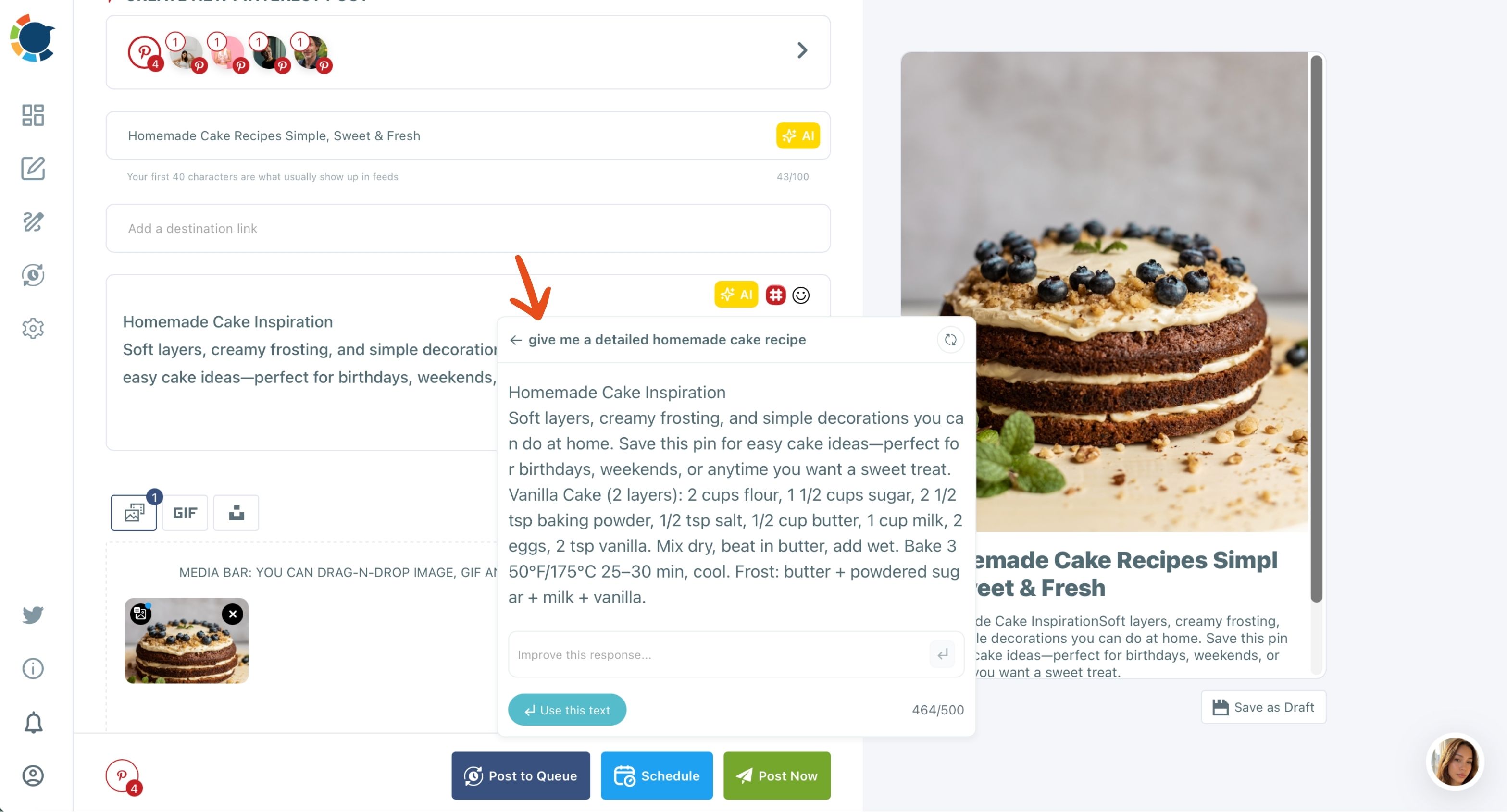
Hashtags for each wedding video pin
The description AI writes; it does not tag. Hashtags come from the Pinterest hashtag generator in the same toolbar.
Review the set before you schedule, because a mismatched tag can hurt a pin's search placement as easily as help it. The reasoning behind which tags help a pin is in the guide to Pinterest hashtags.
You can also watch the description writer at work in this short clip.
How to schedule Pinterest video pins on multiple accounts
To schedule Pinterest video pins on multiple accounts, connect both accounts once, then build each pin with its own clip, boards and text, and give it a date and time. Circleboom Publish keeps the accounts, boards and calendar in one place, so the whole shoot can be planned in one session. The process below runs in two phases.
Connect both accounts and set the boards
- Log in to Circleboom and connect both Pinterest accounts in Settings under Manage Social Accounts.
- Open the Pinterest composer and select the account this clip belongs to.
- Tick the boards for that account and press DONE.
Build and schedule each video pin
- Upload the clip and its still, then write the title and description with the two AI buttons and add the destination link.
- Click Schedule and pick the date and time, or one of the suggested best post times.
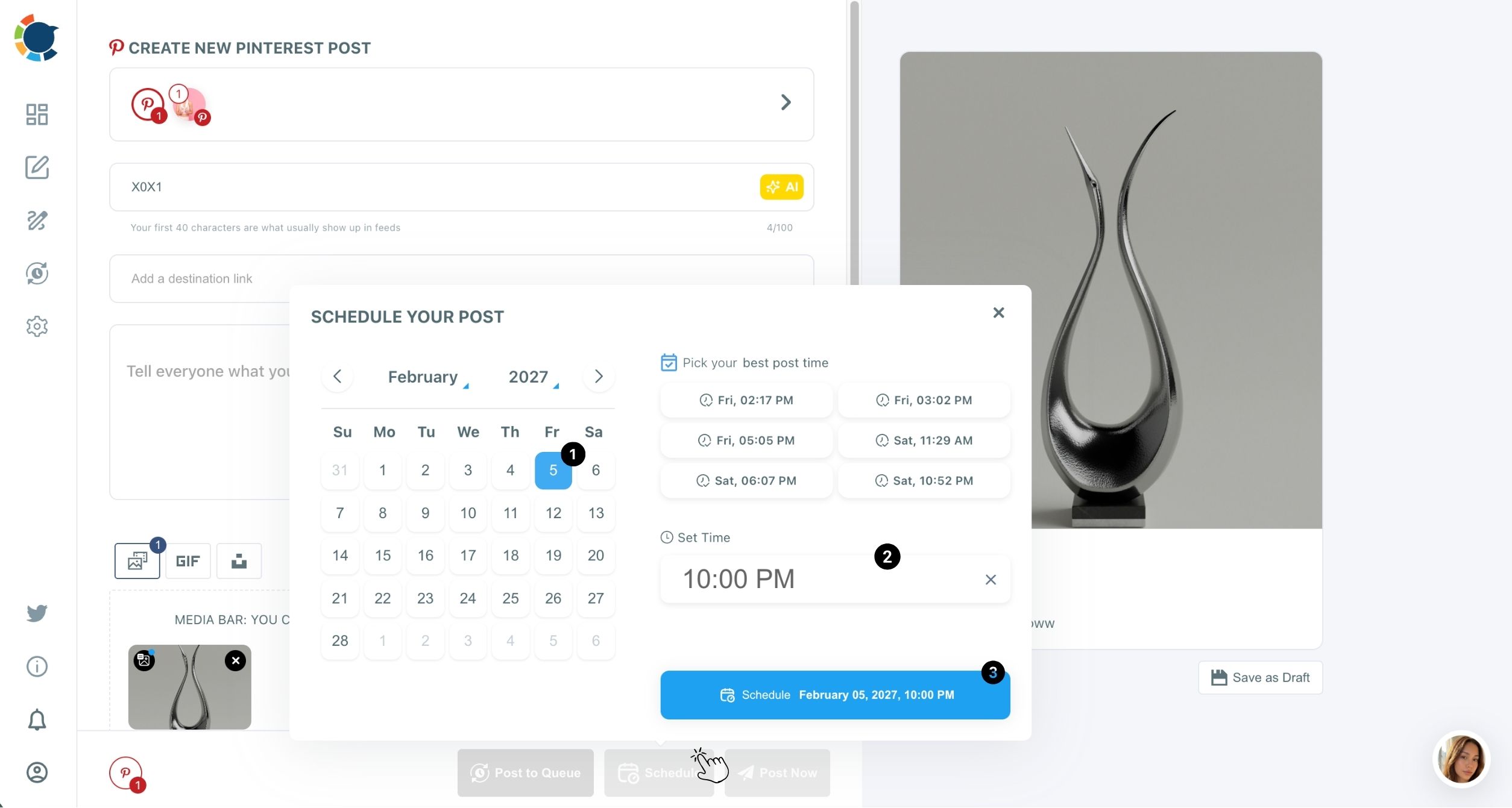
- Repeat for the next clip, switching accounts and boards as the split table says.
Boards are fixed before writing, so every title is written for a known audience, and timing comes last, once the pin is complete. That sequence keeps two accounts from blurring into one.
In one line: connect once, one clip per pin, boards per account, a date for every pin.
Video pins, start to finish: uploading a clip to a Pinterest pin and scheduling it for a later date with Circleboom Publish (2:13).
When should wedding video pins go live on Pinterest?
Wedding video pins should go live before couples start searching, not when the shoot is edited. Pinterest users plan ahead, and Circleboom's own guidance gives the example of a wedding planner scheduling spring wedding inspiration pins in January.
For Pinterest video pins on multiple accounts, that means different timing per audience:
- The ideas account gets ceremony and decor clips ahead of the season couples plan for.
- The studio account gets first-look and portrait clips spread steadily, so new visitors always find recent work.
- Each account uses its own suggested best times, since the slots are built from that account's audience.
The first hours still matter. The saves and closeups a pin earns early feed Pinterest's recommendation signals, even though the pin keeps being found for months afterwards.
A clip edited in August can be the pin a couple finds in January. Scheduling is what connects the two.
Which wedding Pinterest video pins send couples to the studio?
The destination link answers this, not the view count. Every video pin should point somewhere useful: the studio's booking page for studio pins, a gallery or blog post for ideas pins.
Tag each link with UTM parameters before scheduling. Circleboom's UTM Link Builder adds the tags, and Google Analytics then shows which pins sent visitors and inquiries.
Because a pin keeps circulating for months, a clip pinned before wedding season can still bring in inquiries long after the shoot. Without tracking, you would never know which one did it.
Inside Circleboom, Pinterest Content Performance Analytics shows each pin's saves and outbound clicks. Saves tell you which moments couples want to keep; outbound clicks tell you which ones made them act.
Over a few shoots, that decides which kinds of clips each account gets more of.
Saves show interest. Outbound clicks show intent. Plan the next shoot's split around the clicks.
Pinterest video pins for multiple accounts: native scheduling or one calendar?
Pinterest video pins for multiple accounts are easier to run from one calendar than from each account's own tools. Where Pinterest offers its own scheduling, it picks a time and posts to one account on one platform.
For a photographer with two accounts, the gap shows up in three places:
- Accounts: native scheduling means planning each account separately; Circleboom sends a pin to the accounts and boards you choose in one action.
- Timing: Circleboom suggests times from each account's own audience and can fill a Queue with them automatically.
- Production: the AI title and description buttons, the Hashtag Generator, Canva and Alt Text sit in the same composer as the schedule.
The Outbox then shows both accounts in one List or Calendar View, filterable by account, so an empty week on either side is visible before it happens.
Can the same wedding clips go to Instagram too?
Yes, through Circleboom's universal composer, Create New Post on All Platforms, which sends one post to Pinterest and other platforms together.
When one post goes to several platforms, the strictest limit applies: a pin takes one video and a 500-character description, so write to fit Pinterest first.
Keep the roles clear, though. Circleboom's separate video cross-posting engine for one short video covers Instagram, Facebook, YouTube and TikTok, and Pinterest is not one of its destinations. For Pinterest, the clip goes through the Pinterest composer or the universal composer.
The payoff is lasting. An Instagram Reel usually fades from feeds within days, while a pin built from the same clip can keep sending couples to the studio for months.
What an unplanned shoot costs on Pinterest
Without a plan, one wedding becomes a burst of pins on one account and silence on the other, and the clips that would have fed the second account sit on a hard drive.
With a plan, the same day of filming becomes a steady run of video pins on both accounts, each written for its own searchers and timed for when they plan.
→ Schedule your wedding video pins across both Pinterest accounts
Video pin questions for wedding photographers on Pinterest
Can I save a half-finished video pin and finish it later?
Yes. Save as Draft in Circleboom Publish keeps a pin's current state, complete or not, so you can upload the clip now and write the title and description after the client signs off.
Can a client approve wedding pins before they publish?
Yes. With Circleboom's Team Management, a client or assistant can be given access to only the relevant Pinterest account, and pins can go through Admin approval before they go live.